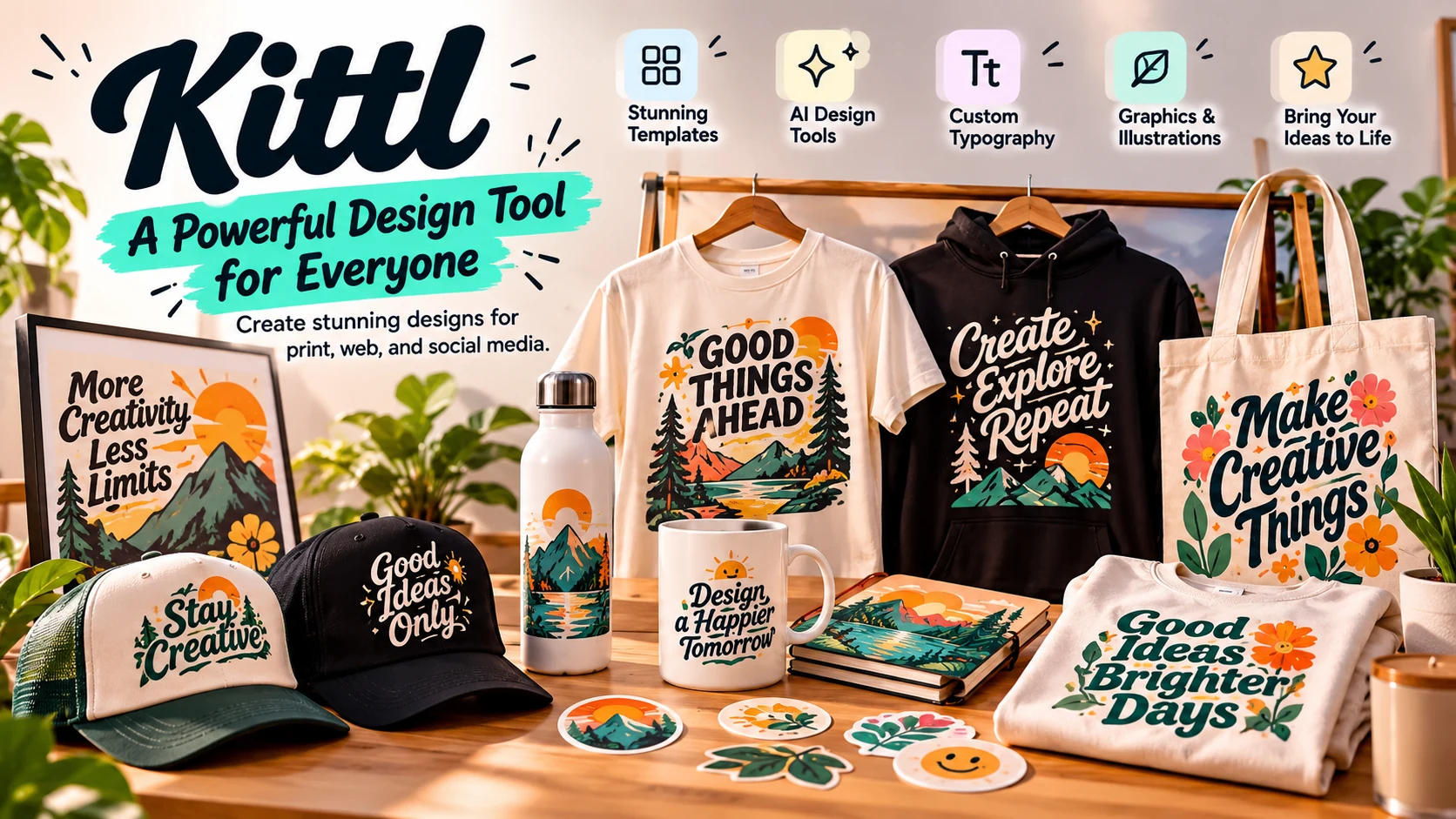
The Typography Engine. Create merch, posters, thumbnails, and social graphics that look professionally designed, without learning complex design software. Kittl is a typography-first AI design tool built for merch creators, YouTubers, and content creators, giving you pre-built composition systems and AI graphics that generate as editable vectors.
Kittl AI is a typography-first AI design tool built for merch creators, YouTubers, and content creators. Unlike blank-canvas tools, the platform gives you pre-built composition systems, typography hierarchies, and AI graphics that generate as editable vectors. It is purpose-built for promotion, not general design. Print-ready SVG exports, merch-focused workflows, and typography that works from the first click.
The real test of Kittl isn't the AI image on its own, it's how fast an idea becomes a finished design. So instead of stopping at the generated artwork, we ran the whole workflow inside the editor: generate a vintage outdoor badge, remove its background, place it on a hoodie template, and assemble a front-and-back apparel presentation, start to finish, without leaving Kittl.
"Create a premium vintage outdoor t-shirt design. Main illustration: a majestic brown bear walking through a pine forest with snow-capped mountains and a rising sun in the background. Typography: large vintage lettering ADVENTURE AWAITS; smaller text 'Explore More • Wander Often • Est. 2027'. Style: retro National Park poster aesthetic inspired by classic American outdoor apparel, circular badge composition with bold typography integrated into the illustration, distressed screen-print texture, vector-style artwork, thick outlines, and a limited palette of forest green, burnt orange, cream, mustard yellow, and dark brown. Output: professional t-shirt graphic centered on a transparent background, print-ready, high contrast, suitable for premium apparel and screen printing. No mockup, no t-shirt, no person, no background scene."

What the editor generated from the prompt, a clean "Adventure Awaits" badge, ready for background removal and placement onto apparel.
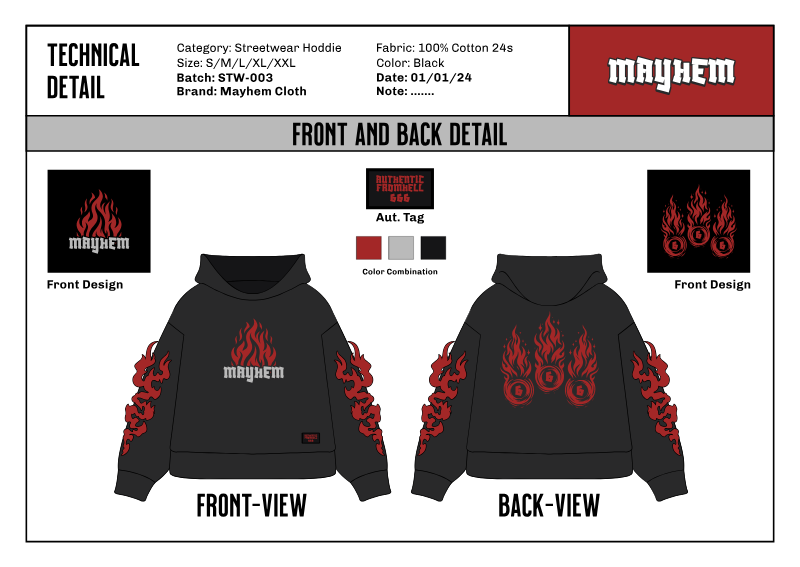
The front-and-back hoodie template we started from inside Kittl.
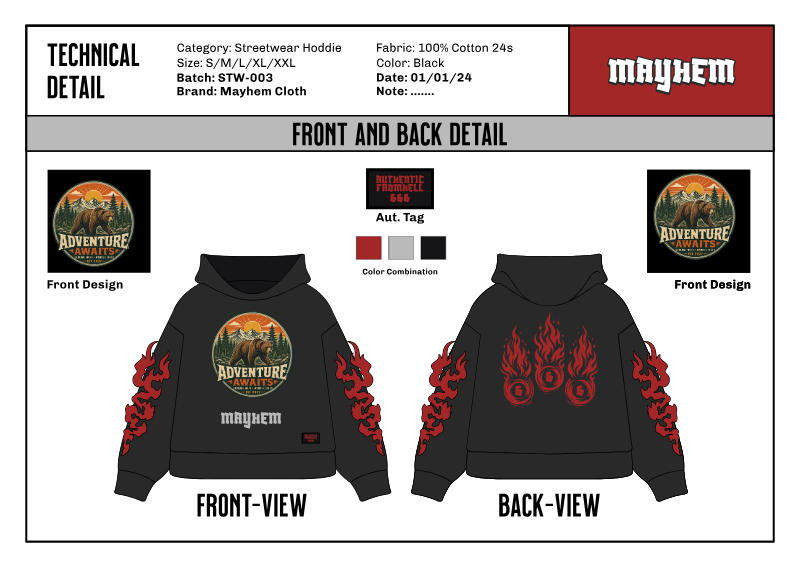
The AI-generated vintage badge, background removed, placed and assembled into a finished front/back apparel presentation.
Assessment. One of the tool's biggest strengths isn't simply AI image generation, it's how quickly you can transform an idea into a finished design. In this test, the badge was generated, cleaned up, placed onto a hoodie, and assembled into a front/back apparel presentation within minutes, all without leaving the editor. That integrated workflow is where Kittl provides value beyond the underlying image model.
Most design tools start with a blank canvas and infinite creative decisions. Canva gives you a general-purpose content creation environment. Adobe Express gives you brand templates. Figma gives you a professional design system, but one built for products, not promotion. The platform is asking a different question entirely. Not "what do you want to create?" but "how should this look, professionally?"
Many design tools hand you a blank canvas and expect you to figure out composition, hierarchy, spacing, and visual balance on your own. Kittl gives you structured visual aesthetics from the first click. Typography-first layouts. Merch-ready compositions. Vector-based AI graphics. Design systems that produce professional-looking results right from your first template choice.
This is what Kittl is actually for: a composition system for promotion, not a blank-canvas creative suite, not a UI design tool, not a general content platform. You are not being asked to design from zero. You are being asked to arrange, customize, and refine within a framework that already understands what professional visual hierarchy looks like.
"Kittl doesn't help you draw, it helps you compose."
When you open the editor for the first time, the experience is structured around templates, not blank canvases. You start with a phrase, a style direction, or a use case, merch, poster, thumbnail, social graphic. Kittl generates a typographic layout with visual hierarchy already in place. Decorative styling. Spacing systems. Compositional balance. The structure is already there. Your job is to customize, not to construct.
Kittl assumes your goal is professional output, not creative exploration.
Almost every review of the app compares it to Canva on feature breadth or evaluates it as a basic template generator for beginners. That framing misses what Kittl is actually doing: it's a typography and composition system first, an image generator second.
Solves the typography problem. Most beginner graphics fail silently because the typography looks wrong. The tool pre-solves this by giving you layouts where the typography already works.
Generates editable vector graphics, not locked images. This is the one place we'll explain "vector" in full, since it comes up a lot: unlike Midjourney or DALL-E, where the AI's output is a final, locked image, Kittl's AI graphics come out as vector nodes you can still move, resize, and recolor afterward. For merch and print-on-demand, where a design has to scale to different product sizes, that's a real practical advantage, not just a technical detail.
Looks composed by default. Because the typography and layout systems are pre-built, even a first attempt tends to look intentional rather than assembled from scratch. That's a genuine time-saver, though whether it helps sales is something we can't verify and won't claim.
Pre-built text hierarchy, spacing systems, and visual balance that make layouts look professionally composed from the first click. No design theory required.
Built specifically for apparel graphics, poster layouts, and POD workflows. Vector exports print cleanly for Printful, Printify, and Redbubble.
Editable, scalable AI-generated graphic elements that maintain quality at any print size. Unlike locked raster outputs from image generators, these are assets you can continue to refine.
Attention-grabbing layouts optimized for YouTube thumbnails, social media graphics, and content creator assets. Hierarchy is built in, not improvised.
Vintage, retro, and bold typographic trends, executed through pre-built style systems. A common fit for Etsy and merch listings.
High-resolution SVG, PDF, and PNG exports that move from design to print without quality degradation. The full workflow from concept to file is handled in one tool.
Preview a design on physical products, t-shirts, mugs, posters, tote bags, without leaving the platform. Seeing the artwork in context before export makes it far easier to judge scale, placement, and contrast for merch.
Kittl Video (launched 2026) animates what you've already designed, typography, vectors, and layouts, from a prompt. Supply a first and end frame and the AI fills the motion between them. Useful for logo animations and turning a static product mockup into a short animated showcase for social, Etsy, or Shopify.
Kittl's curated templates are the practical starting point for most projects. Rather than a broad, generic library, the templates are built typography-first, professionally composed layouts for apparel, posters, thumbnails, logos, and social graphics where the visual hierarchy, spacing, and font pairing are already resolved. You choose a direction and customize inside a system that already looks designed, drawing on a large library of fonts, illustrations, textures, and graphic assets.
T-shirt, hoodie, and print-on-demand layouts sized and composed for apparel. Vintage, retro, and bold-typographic styles that are common on Etsy and POD platforms are available as ready-to-customize templates.
Print-ready poster and flyer templates with high-resolution export. Typography hierarchy is pre-built so headlines, subheads, and details stay balanced at large print sizes.
YouTube thumbnail and social-graphic templates with attention-first composition, readable text at small sizes and layouts optimized for the feed and the video grid.
Logo, badge, and branding templates for small businesses, creators, and emerging brands building a consistent brand identity, vector-based so they scale cleanly across print and digital.
Vintage revival, retro type, and distressed-texture systems, packaged as templates so non-designers can execute trend-driven looks without building them from scratch.
A portion of the template and asset library is free; premium templates, fonts, and assets unlock on paid plans. Customizing typography, layout, and textures is what separates your design from the default look everyone else starts from.
Kittl's AI features run on a token system. Every AI action, image generation, vector generation, video (Motion on Canvas), upscaling, or background removal, consumes tokens, and the cost depends on the specific tool and model (Kittl shows the cost before you generate). The free plan includes a one-time allowance of 200 tokens. Pro includes 2,000 tokens a month; Expert and Max add a daily token top-up on top of their monthly allowance. Tokens reset each billing cycle and do not roll over, and add-on token packs are available on Expert and Max if you run out. Knowing this upfront helps you budget AI generations against your design volume.
Generate custom raster images from a text prompt directly inside the editor, backgrounds, illustrations, and concept art that match your design without leaving the platform.
Produce editable vector graphics from a prompt, or convert an existing raster image into clean vector nodes. Essential for merch and print where designs must scale without quality loss.
Remove a background in one click, then use Edit Cutout to brush back any part the remover took away by mistake, finer control over the cutout without redoing it from scratch.
Upscale images to higher resolution so AI-generated or low-res source art holds up at print sizes, useful for POD and large-format work.
Brush over a region, describe the change, and Kittl adds, erases, replaces, or updates just that part of the image, without regenerating the whole thing. Ideal for seasonal adaptations, fixing small flaws, or swapping a background for a mockup.
Describe what you want in plain words and Kittl's Agentic AI chooses the right model and generates variations, with a unified input for generating and remixing images into multiple design styles from a single starting point.
| Plan | AI tokens | Rollover | Add-on packs |
|---|---|---|---|
| Free | 200 one-time | No | — |
| Pro | 2,000 / month | No, resets each cycle | — |
| Expert | 6,000 / month + 200 / day | No, resets each cycle | Available |
| Max | 12,000 / month + 600 / day | No, resets each cycle | Available |
| Business | Custom | By agreement | Available |
The app runs a free plan plus three paid tiers, Pro, Expert, and Max, and a quote-based team plan. The paid plans are billed monthly or annually, and annual billing is meaningfully cheaper. The jump most creators care about is from Free to Pro: that's where high-resolution and vector exports, a commercial license, and a real monthly token allowance unlock. Expert and Max add a daily token top-up on top of the monthly allowance, and Max is the only tier without a reproduction cap on the commercial license.
| Plan | Price | AI tokens | Commercial license | Best for |
|---|---|---|---|---|
| Free | $0 | 200 one-time | None | Trying the workflow; personal, low-res use |
| Pro | $12/mo billed annually | 2,000 / mo | Up to 500,000 reproductions | Merch creators and POD sellers who need commercial rights |
| Expert | $26/mo billed annually | 6,000 / mo + 200 / day | Up to 500,000 reproductions | High-volume creators and freelancers delivering client work |
| Max | $48/mo billed annually | 12,000 / mo + 600 / day | No reproduction cap | Very high-volume sellers who need the cap removed |
| Business | Custom quote | Custom | Enhanced license | Teams and agencies needing collaboration and enhanced licensing |
Licensing is the detail that decides whether Kittl works for a selling business, and it's tied to your plan and to what you're licensing. Templates, fonts, and other Kittl-supplied content carry different terms than the images Kittl's AI generates for you. The paid plans include commercial rights for both, with a reproduction cap that applies on Pro and Expert but not on Max.
| Plan | License | What you can do |
|---|---|---|
| Free | Personal use only | No commercial rights, designs can't be sold or used for client work. |
| Pro & Expert | Commercial license | Sell designs on merch, print-on-demand, packaging, marketing, and digital media, up to 500,000 printed reproductions per design. |
| Max | Commercial license, no cap | Same commercial use as Pro and Expert, with no reproduction cap. |
| Business | Enhanced license | Custom terms for teams and agencies with higher-volume needs. |
The most common question about Kittl is how it stacks up against Canva. For general content and volume templates, Canva is the broader tool. For print-on-demand and merch specifically, the main differences are export formats, typography tools, templates, and licensing. Here's the head-to-head on the dimensions that matter for POD.
| For print-on-demand | The platform | Canva |
|---|---|---|
| Export format | Vector SVG, PDF, PNG exports, scale to any print size | Primarily PNG/JPG raster; SVG only on higher tiers |
| Typography | Pre-built hierarchy and pairings, merch type looks composed by default | Flexible text tools, but composition is on you |
| Templates | Typography-first, apparel/poster focused | Enormous general library; less POD-specific |
| Commercial license | Clear commercial rights up to 500,000 reproductions on paid plans | Tiered licensing; some assets carry extra restrictions for resale |
| Workflow speed for merch | Fast, pick a merch template, customize type, export print-ready | Fast for social; more manual setup for print-ready merch |
| Best for | Merch, POD, posters, thumbnails, typographic design | High-volume social content and general team design |
Choose Kittl when you're selling what you design, vector exports and a clear commercial license make it merch-ready. Choose Canva when you need volume and breadth of general templates across a team. For a POD business, compare export format and licensing against your own workflow before deciding.
For brand and marketing work, the choice is often Kittl against Adobe Express. Adobe Express leans on a broad template library and a mature brand-kit system inside Adobe's ecosystem. The editor leans on typography-first templates and editable vector exports. Here's how they compare for a small business managing its own brand.
| For small business branding | Kittl | Adobe Express |
|---|---|---|
| Brand assets | Brand-consistent templates, fonts, and reusable vector assets | Dedicated brand kit, logos, colours, and fonts stored centrally |
| Templates | Typography-first, merch and promotion focused | Very broad general library across social, print, and web |
| Collaboration | Real-time on the Business plan | Team features across Adobe's ecosystem |
| Export | Vector SVG, PDF, PNG exports, scale for print | PDF and PNG; strong for social and quick digital |
| Pricing | Free plan; Pro from $12/mo billed annually | Free plan; lower monthly entry on Premium, check live pricing |
| Best for | Merch, POD, and typography-led brand promotion | Broad marketing assets inside the Adobe ecosystem |
Pick Adobe Express if you want a central brand kit and the widest template range for general marketing. Pick Kittl if your brand leans on strong typography and you need editable vector output for merch and promotion.
Kittl holds a 4.7 / 5 rating on G2 from 42 verified reviews at the time of writing. The praise centres on ease of use and template quality; the recurring complaint is the AI token system and occasional instability. Here's the honest split.
4.7 / 5, ★★★★★ from 42 verified reviews.
This summary is based on 42 verified G2 reviews at the time of writing. Visit G2 for the most current user feedback and detailed breakdowns.
Two demos from Kittl's official channel show the workflow in practice, turning a single sketch into a set of sellable POD designs, and using the newer AI editing tools for precise image fixes.
Kittl's walkthrough of turning one sketch into ten print-on-demand product designs, the versatility-and-scaling workflow that fits current merch trends around bold, adaptable, hand-drawn styles.
A demo of Edit Area (AI inpainting), adding, erasing, or replacing parts of an image with a brush and prompt, and Edit Cutout, which restores anything the background remover took away by mistake.
Kittl is structured around templates and composition systems. If you need to build something from a completely original concept with no constraints, the tool will feel limiting. That constraint is also the product.
The template trap is real. If you use Kittl without customizing typography and layouts, your graphics start looking like the default Etsy aesthetic. Push further than the starting point.
Most users do not realize the platform's SVG export capability until they need to scale a design for large-format print. For print-on-demand businesses, that's a genuine practical advantage.
Kittl excels at composition. It is not built for painting, sketching, detailed character illustration, or cinematic visual storytelling. Use it for layout-heavy graphics.
No installation required. Works entirely in browser.
Composition-focused, not general illustration.
Structured starting points eliminate blank canvas friction.
Print-production ready. SVG for scalable merch assets.
Not locked raster output. AI is co-creation, not final decision.
Co-creation, not just generation. You refine after AI builds structure.
Printful, Printify, Redbubble exports supported.
Fast onboarding. Composition handled for you.
Tokens power image gen, vector gen, upscaling, and background removal. Reset each cycle, no rollover; add-on packs available on Expert and Max.
Multiple designers can work on the same project together, useful for agencies and content teams.
Included on Pro, Expert, and Max; Max removes the reproduction cap. Free plan is personal use only.
Region-based image editing and prompt-driven variations without regenerating the whole design.
Preview designs on apparel and products before export, no separate mockup tool needed.
Prompt-based animation of existing designs with first/end-frame control. Consumes AI tokens like other generative features.
A lot of the initial composition work has already been handled for you. First session ends with a finished, professional-looking graphic.
You discover that AI gives you a starting structure, not a final output, and vector nodes are yours to move. Customization separates templated from designed.
Experienced users develop a workflow: concept and layout in Kittl, illustration sourced elsewhere. Kittl is the typography and promotion engine at the center of a faster creative process.
You need graphics that look professionally designed and export print-ready for Printful, Printify, or Redbubble. Kittl gives you editable vector compositions that scale to any print size without quality loss.
You produce high volumes of visual content and need graphics that look designed without a designer on payroll. Kittl handles thumbnail composition, social card layouts, and quote graphics faster than any alternative.
You know what you want to communicate but not how to make it look professional. Kittl closes that gap. The composition systems give you access to professional visual hierarchy without design software expertise.
Being honest about fit is what makes a recommendation worth trusting. Here is when another tool will serve you better.

This review was researched and written by the TechScribe editorial team. It combines hands-on testing, the workflow test above ran a real prompt from AI generation through background removal, mockup placement, and a print-ready apparel concept, all inside Kittl, with the platform's own product documentation, live pricing, and verified user feedback from G2 (4.7 out of 5 across 42 reviews at the time of writing). Where Kittl has real limits, the token system, no mobile app, and shallow illustration depth, we say so plainly, and we update this page as Kittl's features and pricing change.
TechScribe publishes hands-on, no-hype reviews of AI and design tools. This page contains affiliate links: if you sign up through them we may earn a commission at no extra cost to you, which never affects our rating or what we recommend.
Kittl made a deliberate choice: prioritize composition over complexity.
That choice is visible in everything the product does. The template-first workflow removes the blank canvas problem before you encounter it. The typography systems give non-designers access to professional visual hierarchy. The editable vector output means the AI hands you a starting point, not a final answer.
It is not trying to compete with Illustrator on illustration depth. It is not trying to match Figma on collaborative design systems. It is designed to solve one particular problem: making polished promotional graphics without starting from scratch.
Kittl does not improve your ideas. It improves how your ideas look. Use it when you need graphics that look designed, not generated. Use it when your concept is strong but your layout is weak.
Explore the Typography Engine, see if composition-first design changes how you create merch, thumbnails, and social graphics.
 Try the app →
 OpenArt AI
 Photoroom
 LetsEnhance
 Magnific
 Krea AI
 Phot.AI
 CHATGPT
 Stable Diffusion
 Leonardo AI
 Fotor
Fotor Topaz Photo AI
 NightCafe