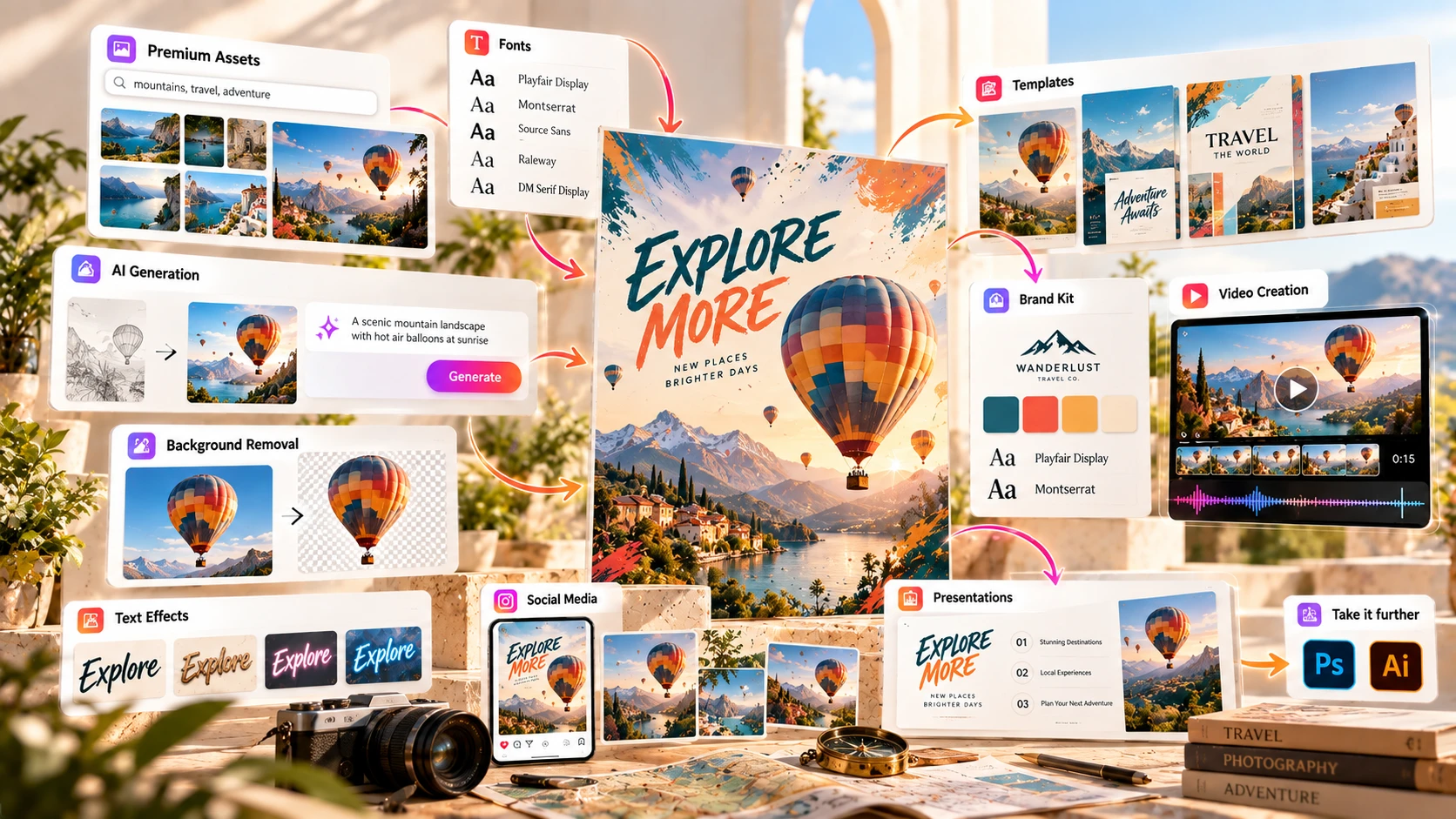
Quick, templated design with Adobe's tools and stock library behind it. Adobe Express combines a template library, Firefly-powered AI, and a direct path into Photoshop and Illustrator when you need more control.
Adobe Express is Adobe's easy-to-use design tool. You don't need training in Photoshop or Illustrator to use it — you pick a template, swap in your own content, and export. It's built for social posts, flyers, presentations, and short videos, not the deep pixel-level editing Adobe's professional apps handle. What sets it apart is what's behind it: Adobe Stock, Adobe Fonts, and a direct path into Photoshop or Illustrator when you need more.
Adobe Express is Adobe's easy-to-use design tool. You don't need training in Photoshop or Illustrator to use it — you pick a template, swap in your own content, and export. It's built for social posts, flyers, presentations, and short videos, not the deep pixel-level editing Adobe's professional apps handle.
What sets it apart from other easy design tools is what's behind it: Adobe Stock's asset library, Adobe Fonts, and the option to move a design into Photoshop or Illustrator when you need more control than Express can give you.
Adobe's generative AI tools sit inside Express under the Firefly name. Firefly also now gives you access to partner models from Google, OpenAI, and Black Forest Labs, selectable from a model dropdown, alongside Adobe's own. Generative Fill, Text to Image, and Text Effects are Firefly-powered; an AI Assistant (still in beta, confirmed in Adobe's documentation as of August 31, 2026) handles conversational, prompt-based editing. Premium includes 250 generative credits a month; Free gets a limited number of daily generations.
Social media posts, flyers, posters, presentations, short videos, logos, and basic marketing documents, all from templates you can resize and reuse.
Template-based, drag-and-drop, works across formats.
268,000+ on Free, 519,000+ premium templates on Premium.
Background removal, format conversion, and video trimming; Premium adds One-click Resize for multiple formats.
Stores fonts and colors, with locked elements to keep a team consistent.
Generative Fill, Text to Image, Text Effects, an AI Assistant in beta.
Schedule and publish social posts from inside the app.
Trimming, cropping, format conversion, caption generation.
500,000+ photos on Free, 350M+ photos on Premium, plus other stock assets.
Adobe Express's generative AI features include Firefly-powered tools, while Firefly also gives you access to partner models from Google, OpenAI, Black Forest Labs, and others. A few concrete examples:
Select part of an image and describe what should replace it.
Generate an image from a text description, inside the editor.
Turn plain text into a styled graphic treatment using a text prompt.
A conversational tool for editing a design with prompts instead of manual steps. Still in beta as of this review.
Premium includes 250 generative credits a month; Free gets a limited number of daily generations instead. The exact credit cost depends on the feature.
Adobe Express's real advantage over other easy design tools isn't a single AI feature — it's the direct line into the rest of Adobe's ecosystem.
Quick Actions cover one-click background removal and format conversion without opening a separate tool. Premium also includes One-click Resize, which Adobe says can automatically resize assets for multiple channels. Adobe doesn't clearly explain whether all those versions are generated simultaneously in one action, so we're not presenting it as equivalent to Canva's Magic Switch — just noting it's a real feature worth checking against your own workflow. Beyond that, Express designs can be sent into Photoshop or Illustrator for deeper editing, and Firefly's generative tools (including its partner models) are shared across Express and Adobe's other apps rather than being Express-only.
If you're not using any other Adobe app and don't expect to, this advantage matters less — in that case, Express competes mainly on templates, price, and ease of use.
268,000+ templates on the free plan, 519,000+ with Premium, across social posts, flyers, presentations, and video. Adobe Stock's library (500,000+ free photos, 350M+ on Premium) sits behind the templates for photos, video, music, and design elements.
Like any large template library, popular templates get reused across a lot of published content. Customization — your own photos, brand colors and fonts — is what keeps a design from looking like everyone else's.
Beginner-friendly; no design background needed to produce a usable design.
Drag-and-drop, template-first.
More limited than Photoshop or Illustrator; for deeper editing, a design can be sent into those apps directly from Express.
Social media: templates sized for every major platform, plus Content Scheduler to publish directly from the app instead of switching tools.
Presentations: template-first, similar to Express's other formats — pick a layout, swap in content. It covers the basics but isn't built for the deeper animation and transition control of PowerPoint or Keynote.
Video: trimming, cropping, format conversion, and caption generation are built in. It's aimed at short social and marketing video, not multi-track, frame-accurate editing — a dedicated video editor is still the better tool for that.
Free gets limited daily generations; Premium gets 250 generative credits a month. The amount used depends on the feature. Adobe's higher Firefly Pro tier ($19.99/mo) adds 4,000 credits a month, but that's aimed at premium AI video and audio features specifically, not everyday use.
Adobe says it can automatically resize assets for multiple channels. Adobe doesn't clearly explain whether all those versions come out of one single action, so don't assume it works exactly like Canva's Magic Switch — test it against your own use case first.
Treat it as an early feature, not a finished one.
Express is not a replacement for those tools — it's a faster way to get most everyday design work done, with a direct path into the professional apps when you need them.
The same as any large template library — customization is what makes a design stand out.
| Feature | Specs & Context |
|---|---|
| Platform | Browser-based, plus desktop and mobile apps, with sync across devices. |
| AI image generation | Firefly-powered (Generative Fill, Text to Image, Text Effects), plus partner models from Google, OpenAI, and Black Forest Labs. Premium includes 250 monthly generative credits; Free includes limited daily generations. |
| Quick Actions | One-click background removal, format conversion, and video trimming inside the editor. Premium adds One-click Resize for automatically resizing a design to a new channel. |
| AI Assistant | Conversational, prompt-based editing. In beta as of this review (confirmed in Adobe's documentation, updated August 31, 2026). |
| Generative credits | Premium: 250/month. Free: limited daily generations instead. Firefly Pro add-on: 4,000/month for premium AI video/audio features. |
| Adobe ecosystem | Designs can move into Photoshop or Illustrator for deeper editing; Adobe Fonts and Adobe Stock shared across Creative Cloud apps. |
| Export formats | PNG, JPG, PDF, MP4, GIF |
| Brand Kit | Fonts and colors stored centrally; locked elements available for team consistency. |
| Content Scheduler | Schedule and publish social posts directly from the app. |
Adobe's pricing varies by country, billing cycle, and account setup. The figures below are the US prices we saw on adobe.com on September 30, 2026. In India, Adobe lists Express Premium at roughly ₹398.84/month including GST on its India pricing page. Template and stock-asset counts also vary slightly across Adobe's own pages — the numbers below come from Adobe's detailed pricing comparison table and can change as Adobe updates its library. Check current pricing →
5GB storage, limited daily generative-AI generations.
100GB storage, 250 generative credits/month.
Same storage/templates/stock as Premium.
*First year; $7.99/mo after. 1TB storage per user.
Enterprise: custom pricing (sales contact), custom credit allowances, admin controls, and enterprise support.
| Feature | Free | Premium |
|---|---|---|
| Templates | 268,000+ | 519,000+ (incl. premium) |
| Adobe Stock photos | 500,000+ | 350M+ (plus other stock assets) |
| Adobe Fonts | 4,000+ | 30,000+ |
| Storage | 5GB | 100GB |
| Generative credits | Limited daily | 250/month |
| Background removal | ✓ (Quick Action) | ✓ |
| Content Scheduler | Limited | Full access |
Both are positioned as the "easy" tier of design tools — no professional training needed — which makes them a more direct comparison than Adobe Express against Photoshop or Illustrator, which serve a different skill level and use case entirely.
| Feature | Adobe Express | Canva |
|---|---|---|
| Free plan | Yes — 268,000+ templates, 5GB storage | Yes — 1.6M+ templates, 5GB storage |
| Premium price (US) | $9.99/mo | $144/year (Pro) |
| Premium templates | 519,000+ | 3.6M+ |
| Stock library (premium) | 350M+ Adobe Stock photos, plus other stock assets | 141M+ assets |
| Multi-format resizing | One-click Resize (Premium) — Adobe says it can resize for multiple channels | Magic Switch — converts a design into other formats and adapts the layout |
| Professional ecosystem | Direct path into Photoshop and Illustrator | Not on Pro; Affinity suite bundled on Business/Enterprise only |
| Fonts | 30,000+ Adobe Fonts (Premium) | Adobe Fonts not included |
Adobe Express is cheaper at the premium tier and has a bigger stock photo library through Adobe Stock. Canva has more templates. Both tools now offer some form of one-click resizing — Adobe says One-click Resize can resize for multiple channels, and Canva's Magic Switch converts a design into other formats and adapts the layout — but neither company clearly spells out whether every version comes out of a single action, so it's worth testing both directly if that distinction matters for your workflow. The bigger reason to choose Express is its connection to Photoshop and Illustrator — if you're already inside Creative Cloud, or expect to need those tools eventually, Express fits more naturally than Canva does. If templates are the main thing you care about, Canva gives you a larger library.
If you or your team already pay for Creative Cloud, Photoshop, or Illustrator, Express plugs into that ecosystem directly — shared fonts, shared stock library, and a path to open a design in a professional app.
Premium is cheaper than Canva Pro, and the free tier covers basic social posts and flyers.
Content Scheduler and platform-sized templates cover a lot of day-to-day publishing without a separate scheduling tool.
The direct path into Photoshop or Illustrator matters if you expect to need more control later.
Who probably shouldn't use Adobe Express: anyone doing advanced photo manipulation, vector illustration, or motion graphics should go straight to Photoshop, Illustrator, or a dedicated video editor rather than Express's Quick Actions. If a large template library matters more to you than the Adobe ecosystem, Canva's library is bigger.
Adobe Express doesn't have a large, dedicated Trustpilot review base — its Trustpilot page has a handful of reviews, too small a sample to draw conclusions from. G2 has a much larger sample: 4.5 out of 5 stars across 850 reviews.
4.5 ★★★★★
850 reviews, as of this review
G2 reviews reflect individual customer experiences and shouldn't be read as a standalone measure of product quality. Source: Adobe Express reviews on G2 — 4.5/5 across 850 reviews at the time of writing.
If you only make occasional social posts, flyers, or simple videos — it covers that without needing to upgrade.
If you need the larger Adobe Stock library, Adobe Fonts, One-click Resize, or more generative-AI credits than the free allowance gives you.
Express is easier to fit into your existing workflow than switching to a tool outside the Adobe ecosystem.
If you specifically need the higher AI video/audio credit allowance — most everyday users won't need it.
Yes. The free plan includes 268,000+ templates, 5GB of storage, 500,000+ Adobe Stock photos, and a limited daily generative-AI allowance. Premium adds the full template and stock library, more storage, and a larger monthly credit allowance.
If the larger template/stock library, Adobe Fonts, or the direct path into Photoshop and Illustrator would save you regular time, yes. If you only design occasionally, the free plan may be enough.
Firefly, Adobe's generative AI platform, which includes Adobe's own models as well as partner models from companies such as Google, OpenAI, and Black Forest Labs. Firefly powers Generative Fill, Text to Image, Text Effects, and the AI Assistant, which is still in beta.
Premium includes One-click Resize, which Adobe says can automatically resize assets for multiple channels. Adobe doesn't clearly explain whether all those versions are generated simultaneously in one action, so we're not presenting it as equivalent to Canva's Magic Switch — worth testing directly if that distinction matters for your workflow.
Premium is $9.99/month. A higher Firefly Pro tier is $19.99/month for a larger generative-credit allowance. Teams pricing starts at $4.99/month per license for the first year. Pricing varies by country — check adobe.com for current numbers.
Yes — that direct path into Adobe's professional apps is one of Express's main advantages over other easy design tools.
For short social and marketing video — trimming, cropping, format conversion, captions — yes. For multi-track editing or precise audio sync, a dedicated video editor is still the better tool.
Canva has a much larger template library. Adobe Express is cheaper at the premium tier, has a larger Adobe Stock library, and gives you a direct path into Photoshop and Illustrator, which Canva doesn't offer outside its Business/Enterprise Affinity bundle. Both now offer some form of one-click resizing to other formats.
People already using other Adobe apps, small businesses on a budget, social media managers who want built-in scheduling, and anyone who expects to eventually need Photoshop- or Illustrator-level editing.
We checked Adobe Express's product information, documentation, pricing, and user reviews when preparing this review, including where its review coverage is thin (its own Trustpilot page has too few reviews to be meaningful, so we used G2's larger sample instead) and where its feature set has real limits — the AI Assistant's beta status, how One-click Resize actually compares to Canva's Magic Switch (Adobe's own documentation doesn't spell this out), and a smaller template library than Canva's. We update this page as Adobe Express's features and pricing change.
This page contains affiliate links: if you sign up through them, we may earn a commission at no extra cost to you, which never affects what we recommend.
Adobe Express is most interesting for people who want simple design tools with Adobe's stock, fonts, and professional apps close by.
It doesn't match Canva's template library, and its AI Assistant is still in beta. For people already inside the Adobe ecosystem, or who want a cheaper premium tier with a path into professional tools, that trade-off can be worth it.
You can explore Adobe Express's current plans and see whether Premium fits your needs.
Affiliate link. We may earn a commission at no extra cost to you. Our review is always independent.
 OpenArt AI
 Photoroom
 LetsEnhance
 Magnific
 Ideogram
 Kittl
Kittl Krea AI
 Phot.AI
 CHATGPT
 Stable Diffusion
 Leonardo AI
 Canva AI
 Adobe Express
 Fotor
Fotor Topaz Photo AI
 NightCafe
 Midjourney AI