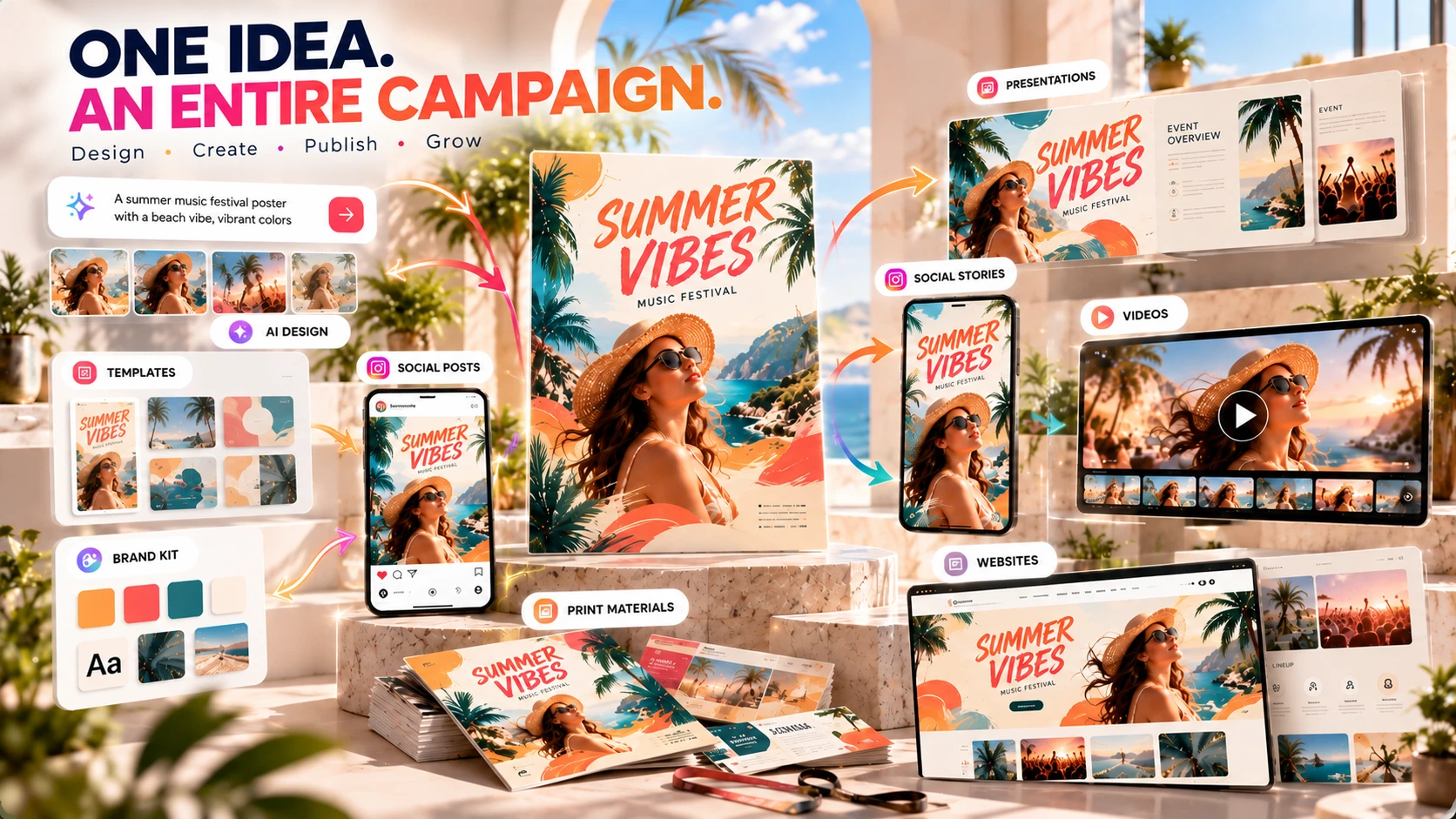
Design anything, publish anywhere — with AI built into every step. Canva combines a template library, a drag-and-drop editor, Magic Studio's AI tools, and (on Business and Enterprise) the Affinity professional suite in one subscription.
Canva is built for people who want to make good-looking designs without learning professional design software first. You choose the format and Canva sets up the right canvas and templates. The main editing tools are similar across formats — you can start with a template, upload your own content, or use Canva's AI tools to get a first draft, then adjust from there. In 2026, Canva's AI features run under one umbrella: Magic Studio.
Canva is built for people who want to make good-looking designs without learning professional design software first. You choose the format and Canva sets up the right canvas and templates. The main editing tools are similar across formats — you can start with a template, upload your own content, or use Canva's AI tools to get a first draft, then adjust from there.
In 2026, Canva's AI features run under one umbrella: Magic Studio. It covers image generation, background removal, format conversion, copywriting, video, and a conversational AI assistant. Not every tool draws from the same limit, though — more on that under "Good to Know."
Affinity — the professional suite (Photo, Designer, Publisher) that replaced separate purchases of Photoshop- and Illustrator-style tools — is bundled into Canva's Business and Enterprise plans, alongside Cavalry and Flourish, as part of what Canva calls ProSuite, with AI features layered on top ("Affinity with AI"). It isn't included on Pro.
Social media posts, presentations, videos, websites, documents, posters, marketing materials, and print-ready designs, all from the same editor.
Drag-and-drop canvas that works the same across every format.
1.6M+ on Free, 3.6M+ premium templates on Pro.
Brand Kit stores colors, fonts, and logos, applied automatically across new designs.
Image generation, background removal, format conversion, copywriting, and a conversational assistant.
Background removal, object removal, upscaling, style matching.
Text-to-video, storyboard-to-video, animation.
Slide decks with charts, layouts, and presenter tools.
Real-time multi-user editing, comments, version history, approval workflows on Team plans.
Canva's AI tools sit under the Magic Studio umbrella. A few concrete examples of what each does:
Describe what you want in a sentence, get a complete suggested layout built around your content. It gives you a starting point instead of leaving you with a blank page. You still need to decide what the design should say.
Text-to-image generation inside the editor. Useful for concepts and backgrounds; not the strongest photorealistic generator on the market (see "Good to Know" below).
Brush over part of an image and replace or remove it based on a text prompt.
Converts one finished design into another platform's format automatically (see next section).
One click, works well on clean subjects like product shots and portraits.
Which of these count against your monthly AI allowance depends on the tool and your plan — see "Good to Know" for the specifics.
Magic Switch is worth a closer look if you publish across several platforms.
Create a YouTube thumbnail, hit Magic Switch, and it becomes an Instagram Reel cover, a TikTok vertical, and a LinkedIn banner, all resized and re-laid-out in one click. No cropping, no rebuilding each version by hand.
It can be useful if you publish the same content in several formats. Magic Resize is the narrower version (dimensions only); Magic Switch is the broader one-click conversion across platforms and formats, translation included.
Canva has millions of templates across different formats and industries. Strong categories: social media posts, presentations, resumes, marketing flyers, and video intros.
Where it gets repetitive: the most-used templates appear across a huge volume of published content, so two businesses in the same niche often land on the same starting template. Customization (your own photography, brand colors, typography) is what separates a distinctive result from a generic one.
Beginner-friendly; you can start making usable designs without a design background.
Drag-and-drop, no design training required.
More limited than professional design software; precise typographic control (kerning, OpenType features) isn't available in the core Canva editor. Affinity Publisher goes further, but it's only on Business and Enterprise, not Pro.
Social media: one campaign, adapted across Instagram, Pinterest, TikTok, YouTube, and LinkedIn without rebuilding each version from scratch, using Magic Switch. Preset formats exist for every major platform, and custom dimensions cover anything not already templated.
Presentations: Canva's presentation workflow is template-first — pick a deck template, swap in your content, use Magic Charts to turn data into visuals. It covers the basics: layouts, typography, images, charts, and presenter tools, without the steeper learning curve of dedicated presentation software. It's not a replacement for PowerPoint's or Keynote's deeper animation and transition control, but for building a clean deck quickly, it's faster.
Video: Canva's video tools handle storyboard-to-video — combine photos, text, music, and motion into a finished clip without touching a timeline-based editor. It's built for short, templated video (social clips, intros, simple promos), not frame-accurate editing. Dedicated video editors are a better fit for multi-track editing, color grading, and precise audio sync.
Magic Media is useful but not cutting-edge. For photorealistic output from text prompts, Krea AI or Ideogram do better.
Canva's AI tools are split into Standard, Premium, and Ultra. What counts toward your monthly allowance depends on the tool and your plan. On paid plans other than Pro Lite, most Standard tools don't use up your allowance. Premium and Ultra tools do — this includes Magic Media image generation, Magic Design, Magic Layers, AI video, and the conversational assistant. On Free and Pro Lite, Standard and Premium uses share one small pool. Once you use up your allowance, Canva's AI Pass add-on lets you keep going.
It comes with Business and Enterprise (as part of Canva ProSuite), not Pro. Leonardo.Ai's image generation is a further paid add-on on top of Business or Enterprise.
Hair, fur, and complex edges usually need manual touch-up after the one-click pass.
Customization matters if you want to stand out.
| Feature | Specs & Context |
|---|---|
| Platform | Browser-based, cloud rendered. Desktop app available for offline access to previously downloaded projects. |
| AI image generation | Canva's own model (Magic Media). Useful for concepts and backgrounds; not competitive with dedicated generators like Krea AI or Ideogram for photorealistic output. |
| Magic Switch | Converts a design to any supported format in one click. Layout repositions automatically; minor manual adjustment usually still needed. |
| AI allowance | Standard/Premium/Ultra tiers; Standard tools are generally unlimited on paid plans, Premium and Ultra draw from a monthly allowance that varies by plan. AI Pass add-on available once it's used up. |
| Affinity suite | Bundled into Business and Enterprise as Canva ProSuite (Affinity, Cavalry, Flourish). Not included on Pro. |
| Export formats | PNG, JPG, PDF, SVG, MP4, GIF |
| Print resolution | Up to 300 DPI via PDF export |
| Brand Kit | Colors, fonts, and logos stored centrally, applied automatically across new designs. Multiple Brand Kits supported on paid plans. |
| Collaboration | Real-time multi-user editing; comments, version history, and approval workflows on Team plans |
Canva's pricing varies by country, billing cycle, and account setup. The figures below are the US prices we saw on canva.com on September 30, 2026. Prices and plan details can change after that date. Check current pricing →
5GB storage, ~20 Standard/Premium AI uses combined per month.
For one person. Monthly billing costs more; exact rate shown at checkout.
Monthly billing costs more; exact rate shown at checkout.
Sales contact.
| Feature | Free | Pro |
|---|---|---|
| Templates | 1.6M+ | 3.6M+ (incl. premium) |
| Stock assets | 4.7M+ | 141M+ premium |
| Brand Kits | 1 (3 colors) | 5 |
| Background Remover | — | ✓ |
| Magic Switch | — | ✓ |
| AI allowance | ~20 uses/mo | 200 Premium or 20 Ultra/mo |
| Storage | 5GB | 100GB |
| Social scheduling | — | ✓ |
| Affinity suite | — | — (Business/Enterprise only) |
Both are positioned as the "easy" tier of design tools — no professional training needed — which makes them a more direct comparison than Canva against Photoshop or Figma, which serve different skill levels and use cases (see the table further down).
| Feature | Canva | Adobe Express |
|---|---|---|
| Free plan | Yes — 1.6M+ templates, 5GB storage | Yes — 100,000+ templates, 5GB storage |
| Premium price (US) | $144/year (Pro) | $9.99/mo |
| Premium templates | 3.6M+ | 519,000+ |
| Stock library (premium) | 141M+ assets | 200M+ Adobe Stock assets |
| Multi-format conversion | Magic Switch — one click, any platform | Resize tool |
| Professional suite included | Not on Pro; Affinity bundled on Business/Enterprise | None — Adobe's professional apps (Photoshop, Illustrator) are separate subscriptions |
| Fonts | Adobe Fonts not included | 30,000+ Adobe Fonts (Premium) |
Adobe Express is cheaper at the premium tier and draws on a larger stock library through Adobe Stock. Canva's main advantage here is Magic Switch, which converts a design into other formats and adjusts the layout automatically in one step. If you're already inside the Adobe ecosystem (Creative Cloud, Photoshop, Illustrator), Adobe Express fits more naturally. If you want fast, templated design without an existing Adobe subscription, Canva is the more self-contained option — and its Business/Enterprise tiers add a path into Affinity for people who eventually want more editing depth.
| Tool | Best suited for |
|---|---|
| Canva | Fast visual content and templates |
| Adobe Express | Quick content within the Adobe ecosystem |
| Photoshop | Advanced pixel-level image editing |
| Illustrator | Vector illustration |
| Figma | UI/product design and collaborative design work |
Publishing across Instagram, TikTok, YouTube, and LinkedIn, where every piece needs several formats — Magic Switch can save time when the same content needs to be adapted for several platforms.
Need a logo, social posts, flyers, and a pitch deck without an agency budget. Brand Kit plus the template library covers most of it.
No design background needed for clean slide decks, infographics, and thumbnails fast. The free plan covers most educational use cases.
Need brand-consistent output across many people, using Brand Kit and approval workflows on Business.
Who probably shouldn't use Canva: anyone needing extremely advanced photo manipulation, professional vector illustration workflows, or complex motion graphics is better served by specialized software (Photoshop for pixel-level retouching, Illustrator or Figma for precision design work, a dedicated NLE like Premiere or DaVinci Resolve for real video editing). Canva's Affinity bundle (Business/Enterprise only) narrows this gap for some workflows but doesn't close it entirely.
At the time we checked, Canva had a 4.0/5 TrustScore on Trustpilot, based on more than 7,000 reviews. Ratings are polarized: roughly half are five-star, and a smaller but notable share are one-star.
4.0 ★★★★☆
7,000+ reviews, as of this review
Trustpilot reviews reflect individual customer experiences and shouldn't be read as a standalone measure of product quality. Source: Canva reviews on Trustpilot — 4.0/5 based on more than 7,000 reviews at the time of writing.
Canva is particularly compelling if your priority is producing polished visual content quickly without spending months learning professional design software, and especially if you publish the same content across multiple platforms.
If your output is occasional and you don't need premium templates, Magic Switch, or Background Remover — the free tier genuinely covers basic social posts, simple documents, and educational materials.
Once Magic Switch, Background Remover, or the larger template/asset library would save you real time on a regular basis, or once the free AI allowance stops being enough for how often you actually use these tools.
Once you need team collaboration, approval workflows, or the Affinity/ProSuite tools — Pro doesn't include those.
Yes. The free plan includes 1.6M+ templates, 5GB of storage, 1 Brand Kit, and roughly 20 AI uses a month. Pro and Business add premium templates, more storage, Magic Switch, Background Remover, and larger AI allowances.
If Magic Switch, Background Remover, or the premium template/asset library would save you regular time, yes. If you only design occasionally, the free plan may be enough.
Magic Studio is Canva's umbrella name for its AI features: Magic Design, Magic Media (image generation), Magic Switch, Magic Edit, Magic Eraser, Background Remover, and a conversational AI assistant, among others.
It converts one finished design into another platform's format in one click, automatically adjusting the layout. It's one of Canva's most useful features for anyone publishing across multiple platforms.
Pro is $144/year for one person; Business is $250/year per person; Enterprise is custom. Monthly billing costs more than the annual rate. Pricing varies by country — check canva.com for current numbers.
Not Adobe's own tools, but Canva's Business and Enterprise plans include the Affinity suite (Photo, Designer, Publisher) as part of Canva ProSuite — professional alternatives built for similar work to Photoshop and Illustrator — with AI features added. Pro does not include Affinity.
For short, templated video — social clips, intros, simple promos — yes. For multi-track editing, color grading, or precise audio sync, a dedicated video editor is still the better tool.
Adobe Express is cheaper at the premium tier ($9.99/mo vs Canva Pro's $144/yr) and has a larger stock asset library. Canva's advantage is Magic Switch, its one-click multi-platform conversion, versus Adobe Express's manual resize tool.
Social media creators publishing across multiple platforms, small businesses that need a range of marketing materials without hiring a designer, educators and students, and marketing teams that need brand-consistent output at scale.
We checked Canva's product information, documentation, pricing, and user reviews when preparing this review, including areas where Canva has clear limitations — AI usage limits, image generation quality, typography control, and which plans actually include Affinity/ProSuite. We update this page as Canva's features and pricing change.
TechScribe publishes hands-on, no-hype reviews of AI image, video, and design tools. This page contains affiliate links: if you sign up through them, we may earn a commission at no extra cost to you — which never affects what we recommend.
Canva's main strength is simplicity. It combines templates, editing tools, AI features, and different design formats in one place, with a path into more professional tools (Affinity, on Business and Enterprise) for creators who eventually outgrow the basics.
Magic Switch is the standout feature for anyone publishing across multiple platforms. It won't replace a dedicated image generator for photorealistic output, and it won't replace Photoshop-level precision for pixel work. For people who need to turn one idea into several finished formats, that can be a useful advantage.
You can explore Canva's current plans and see whether Pro fits your needs.
Affiliate link. We may earn a commission at no extra cost to you. Our review is always independent.
 OpenArt AI
 Photoroom
 LetsEnhance
 Magnific
 Ideogram
 Kittl
Kittl Krea AI
 Phot.AI
 CHATGPT
 Stable Diffusion
 Leonardo AI
 Canva AI
 Adobe Express
 Fotor
Fotor Topaz Photo AI
 NightCafe
 Midjourney AI