AI Image & Design ToolsStable DiffusionStable DiffusionLeonardo AILeonardo AIKittlKittlCanva AICanva AIAdobe ExpressAdobe ExpressPhotoroomPhotoroomKrea AIKrea AIFotorFotorTopaz Photo AITopaz Photo AIIdeogram 2.0Ideogram 2.0Phot.AIPhot.AIOpenArt AIOpenArt AILetsEnhanceLetsEnhanceMidjourney AIMidjourney AICHATGPTCHATGPTMagnificMagnific Image & Design AI
Leonardo AI logo
Honest Deep Dive · The Production Layer

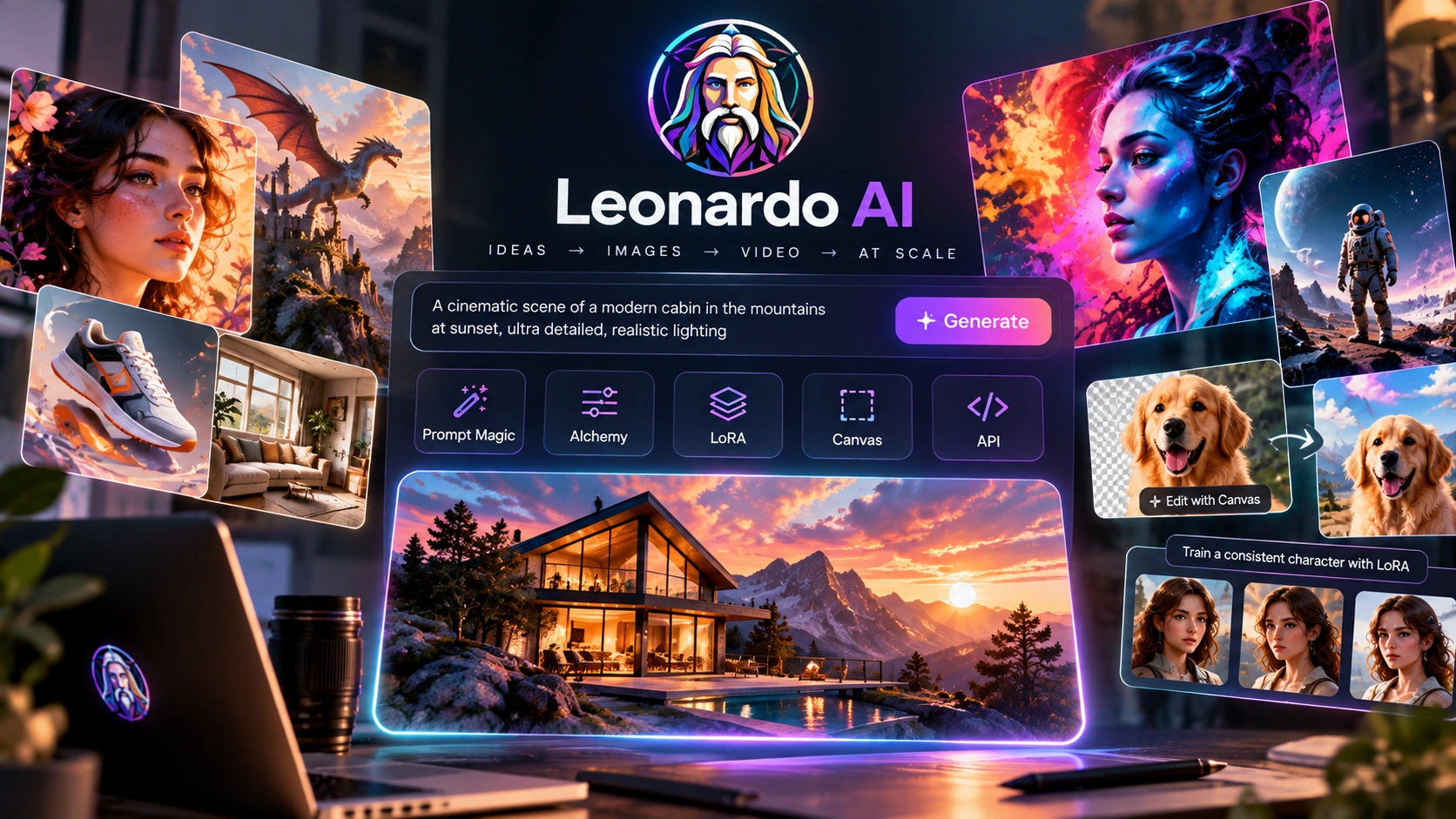
Leonardo AI

A controllable production engine — Prompt Magic, Alchemy refinement, LoRA injection, mask-constrained Canvas editing, and a Creative API for building a thousand images that all belong to the same visual world.

What is Leonardo AI?

Leonardo AI is a creative infrastructure platform built around predictable, repeatable production rather than the spectacular one-off "hero shot." Prompt Magic acts as an internal prompt-enhancer that helps the model interpret vague inputs with higher fidelity. Alchemy adds an enhanced rendering pass for cleaner textures and higher local detail. LoRA injection lets you fold a proprietary art style or character identity into generations without full model retraining. The Canvas implements mask-constrained diffusion for surgical, region-specific edits. A Creative API exposes all of this for automated, batch-processing pipelines. Not a single-image generator. A complete visual production platform.

The thousandth image, not the hero shot —
consistency as the product.

Five years ago, the value of an AI image tool was measured by the "hero shot" — one spectacular image that proved the model could do something remarkable. That bar has largely been cleared by every serious platform. The bottleneck for creative teams has moved somewhere else entirely.

The challenge today is not creating one extraordinary image. It is creating a thousand ordinary images that all belong to the same visual world — same character, same palette, same lighting logic, same brand feel — without each one drifting into its own little universe. Leonardo AI is built around this exact problem. Leonardo AI optimises for controllable production workflows, prioritising predictable output and project-wide consistency over raw artistic spontaneity.

The comparison that clarifies the positioning: Midjourney optimises for aesthetic surprise and artistic mood — often, by design, a "black box." Leonardo AI optimises for control. For a production pipeline, predictability is the metric that actually matters. A single beautiful image you cannot reproduce is not a production asset. A controllable image you can reproduce, vary, and batch is the foundation of a visual supply chain — and that's exactly what Leonardo AI is designed to deliver.

Underneath that positioning sit a handful of modular control mechanisms that define what Leonardo AI actually is — Prompt Magic to interpret vague prompts with more fidelity, Alchemy as a refinement pass for detail and texture, LoRA injection to fold in a custom style or character without retraining a foundation model, and a Canvas built on mask-constrained diffusion for region-specific edits. A Creative API ties Leonardo AI together for teams who need this at automated, batch scale.

"Leonardo isn't trying to win the contest for the most spectacular one-off image. It is solving the far harder problem of creating a thousand images that all belong to the same visual world."

From a lucky generation to
a repeatable setup.

The first session with Leonardo AI does not feel dramatically different from any other text-to-image tool at first glance. You type a prompt, pick a model — Phoenix is the default starting point for most users — and a strong image appears. It's only when you start exploring the panel beside the canvas that the actual shape of Leonardo AI becomes visible.

Prompt Magic is sitting there as a toggle, quietly expanding and emphasising descriptive concepts in your prompt before generation begins, helping the model interpret vague inputs with more fidelity. Alchemy sits next to it as another toggle — flip it on and the same prompt comes back with noticeably cleaner textures and more local detail, the result of an additional refinement pass rather than a different base model.

What the first session reveals
  • Phoenix and other foundation models available — different base distributions for different semantic needs
  • Prompt Magic toggle — expands and emphasises descriptive concepts before generation, useful for vague prompts
  • Alchemy toggle — a refinement pass that sharpens high-frequency detail while anchoring global composition
  • Guidance Scale and Scheduler controls sit right there, not hidden — this is a tool that expects you to tune things
  • The Canvas tab — mask a region and regenerate only that area, without re-synthesising the whole image
  • A library of community fine-tuned checkpoints alongside the foundation models

The realization that arrives by the end of the first session is less "wow, look at this image" and more "I could set this up once and run it a hundred times." The second realization comes when you open the Canvas and mask a small region of an otherwise-finished image — Leonardo AI regenerates only that masked area, leaving the rest of the composition, lighting, and structure untouched. That is a meaningfully different mental model from "regenerate the whole image and hope it's close enough."

Leonardo AI's first session doesn't sell you on one image. It sells you on the idea that the next thousand images could look like this one, on purpose.

Leonardo AI in Action
See Prompt Magic, Alchemy, Canvas, and LoRA in 2026

Watch these official demos to see Leonardo AI's latest capabilities — Prompt Magic, Alchemy refinement, LoRA injection, mask-constrained Canvas editing, and batch production workflows.

Leonardo 101: Navigating the Homepage

Tutorial covering the Leonardo AI homepage navigation and interface overview. Learn how to get started with the platform.

Leonardo 101: Image Generation Basics

Image generation tutorial covering prompt basics, generation settings, and how to get the best results from Leonardo AI.

Leonardo 101: Universal Upscaler

Learn how to enhance your images and make them print-ready with Leonardo AI's Universal Upscaler. Discover AI-first tools for stunning visuals.

Gen AI Workflows for Fashion and Product Design

Learn how to enhance fashion designs and product visuals, generate on-trend and on-brand designs, and keep brand aesthetics consistent with Leonardo AI.

Video Generation — From Static to Motion
Leonardo's video models and capabilities

Leonardo AI has expanded beyond image generation into video, offering several models and capabilities for creators who need motion in their visual production pipeline.

🎬
Veo 3

Advanced video generation with physics-aware motion and cinematic quality.

🎥
Kling Video 3.0

High-fidelity video generation with camera control and animation effects.

Seedance 2.0

Efficient video generation for social media and short-form content.

📱
Social Media Content

Reels, Shorts, and TikTok-ready clips generated directly from the same pipeline.

🎞️
Cinematic Sequences

Storyboards and cinematic sequences built from static concepts.

📢
Product Demonstrations

Commercials and product demos without a physical shoot.

Motion Graphics

Animated logos and motion graphics for brand assets.

🖼️
Concept Visualisation

Pre-visualisation for concepts before committing to full production.

Not the base model.
LoRA injection plus mask-constrained Canvas.

Most reviews of Leonardo AI focus on how good Phoenix or Alchemy-refined outputs look compared to other foundation models. That framing misses where the actual leverage of Leonardo AI sits.

The real story is LoRA (Low-Rank Adaptation) injection combined with the Canvas's mask-constrained diffusion. These two mechanisms solve two different halves of the production-consistency problem, and together they're what separate "a tool that makes nice images" from "infrastructure you can build a pipeline on."

LoRA Injection — the identity layer: Retraining a foundation model from scratch is computationally and financially expensive — out of reach for almost everyone. LoRA sidesteps this by modifying only a small fraction of the model's weight matrices to inject a specific concept: a proprietary art style, a recurring character's face and proportions, a brand's visual signature. Once that LoRA exists, every generation that uses it inherits that identity. You're not re-describing your character or style in every prompt and hoping for the best — you're loading it.

The Canvas — the precision layer: The Canvas is not a paint tool bolted onto a generator. It is a technical implementation of mask-constrained diffusion. Apply a mask to a region of an image and the diffusion process is confined to that area — the model computes new pixels only within the mask, rather than re-synthesising the entire image and risking global lighting or structural drift. For complex assets where one element needs to change but everything around it must stay exactly as it was, this is the difference between a five-minute fix and starting over.

What this combination actually gives you
  • LoRA — inject a character's identity or a brand's art style without full model retraining
  • Canvas masking — regenerate only a specific region without disturbing global composition or lighting
  • Lower iteration cost — fixes are localised instead of full re-rolls
  • Alchemy — a refinement pass that sharpens detail and texture on top of either pathway
  • Creative API — expose the same pipeline programmatically for batch jobs

Core Truth: Leonardo AI optimises for controlled, consistent, production-usable output across many images — not for the single most jaw-dropping generation from a cold prompt. If you want one remarkable image with no consistency requirements, tools with a higher single-shot aesthetic ceiling exist. If you need a thousand images that visibly belong to the same world, with surgical control over what changes and what doesn't, Leonardo AI is where that capability lives — and the gap versus prompt-only tools is significant.

The 6 pillars of
controllable visual production with Leonardo AI

Prompt Magic — higher fidelity from vague inputs

Leonardo hasn't publicly disclosed the exact implementation, but Prompt Magic behaves as an internal prompt-enhancer — expanding or emphasising descriptive concepts within the latent space before generation begins. The practical effect: rougher, shorter prompts produce results closer to what you actually meant.

🧪
Alchemy — a refinement pass, not a different model

Alchemy uses an enhanced rendering pipeline that produces higher local detail and cleaner textures than standard generation. Rather than a standalone model, it acts as a refinement layer — additional passes that sharpen high-frequency detail while anchoring the global composition that was already established.

🧬
LoRA Injection — style and character without retraining

Inject a proprietary art style or a character's identity by modifying only a small fraction of the foundation model's weight matrices. Domain-specific customisation without the computational and financial overhead of full fine-tuning — and it persists across every generation that calls on it.

🖌️
Canvas — mask-constrained diffusion for surgical edits

Apply a mask to a region and the diffusion process is confined to that area. Instead of re-synthesising the whole image — and risking global lighting or structural changes — the model only computes new pixels within the masked region. Lower iteration cost, surgical precision for complex assets.

🪪
Character Engine — identity anchored across generations

Appears to use reference image embeddings to anchor a character's identity across generations. Combined with LoRA training, this is the foundation for series, storytelling projects, and branded characters that need to look like themselves across dozens or hundreds of images.

🔌
Creative API — programmatic inference for batch pipelines

Programmatic inference endpoints expose the same foundation models, Alchemy refinement, and LoRA injection for automated, batch-processing pipelines. For teams generating at volume, this is what turns a UI tool into infrastructure that fits into an existing production workflow.

The trade-offs and failure modes —
named honestly.

📈
More Controls, Higher Learning Curve

The depth of configuration on offer in Leonardo AI — Guidance Scale, Schedulers, Alchemy, Prompt Magic, LoRA selection — requires users to have at least a working grasp of diffusion concepts. New users who skip past these controls without understanding them often get inconsistent results and don't know why.

🗂️
More Models, Decision Fatigue

A vast library of community checkpoints sits alongside the foundation models. That's a genuine asset, but it's also a double-edged sword — the time spent testing models to find the right one for a given job is a real, if "hidden," production cost that teams should budget for.

🐢
Better Consistency, Slower Workflows

The tools required to lock in consistency — Character Reference, LoRA training, careful Canvas masking — add steps that simply don't exist in "instant" prompt-and-go generators. That's the trade you're making deliberately, and it's worth being honest about the time cost upfront.

🔤
Text Inside Images Remains Hard

Diffusion models learn visual patterns, not the symbolic rules of typography. Generating coherent, spelled-out words remains a meaningfully harder problem than rendering recognisable objects — and Leonardo AI is not an exception to this. If text-in-image is a hard requirement, plan for it separately.

👥
Crowds Fail Exponentially, Not Linearly

Each additional character in a scene introduces a new set of anatomical and spatial constraints. The probability of perspective errors, limb misplacement, and clipping increases exponentially — not linearly — as a scene becomes more populated. Dense crowd scenes are a known weak point.

🔍
Complex Physics Are Approximated, Not Calculated

Leonardo AI lacks a true 3D physics engine. Transparent surfaces — glass, water — and complex reflections are often rendered as diffuse textures, because the model doesn't calculate light paths; it approximates them based on 2D visual data. Don't expect ray-traced accuracy.

Do NOT use Leonardo AI as your primary tool if you
  • Want the simplest prompt-and-generate experience with the fewest decisions — use Krea AI
  • Need crisp, readable text inside every image — use Ideogram 2.0
  • Need professional e-commerce product photos at batch scale — use Photoroom
  • Are chasing maximum single-shot artistic surprise over predictability — use Midjourney
  • Will not invest time learning diffusion concepts like Guidance Scale, Schedulers, and LoRA workflows — the core advantage is inaccessible without it

What you're
actually getting

Foundation Models
Phoenix and community checkpoints

Base probabilistic distributions for semantic understanding, plus a large library of community fine-tuned models for specific aesthetics.

Prompt Enhancement
Prompt Magic — internal prompt-enhancer

Likely expands or emphasises descriptive concepts within the latent space before generation, helping the model interpret vague inputs with higher fidelity.

Refinement Layer
Alchemy — enhanced rendering pipeline

Higher local detail and cleaner textures via additional passes that sharpen high-frequency detail while anchoring global composition.

Style & Character
LoRA injection — weight-update layers

Injects specific concepts — art style or character identity — by modifying a small fraction of model weights. No full fine-tuning required.

Editing
Canvas — mask-constrained diffusion

Confines diffusion to a masked region. Only new pixels within the mask are computed, preserving global lighting and structure elsewhere.

Character Consistency
Character Engine — reference embeddings

Appears to use reference image embeddings to anchor a character's identity across multiple generations.

Infrastructure
Cloud-based GPU compute fabric

Inference infrastructure schedules generation requests across GPU clusters — no local hardware required.

Automation
Creative API — programmatic endpoints

Programmatic inference endpoints for automated, batch-processing pipelines across foundation models, Alchemy, and LoRAs.

What to expect
stage by stage

1
Stage One — Prompting
Translating natural language into visual intent.

You generate from prompts in Leonardo AI, toggle Prompt Magic on and off to see how it reshapes vague descriptions, and start to notice which foundation models suit which subjects. This stage is accessible immediately and looks similar to any other text-to-image tool — the differences haven't surfaced yet.

2
Stage Two — Parameter Tuning
Guidance Scale, Negative Prompts, and Alchemy enter the picture.

You start understanding how Guidance Scale and Negative Prompts manage latent noise, and what Alchemy actually changes versus a standard pass. Outputs become noticeably more deliberate — less "what did I get this time" and more "I expected something close to this."

3
Stage Three — Pipeline Integration
LoRAs, Canvas masking, and reference embeddings become a workflow.

You move from single generations to building reliable, repeatable asset pipelines — training or selecting a LoRA for style and character, using Canvas masking for targeted fixes, and anchoring identity with reference embeddings. This is where Leonardo AI stops being "a generator" and starts being "the system we build assets in."

🎯
Pro tip: Before relying on a LoRA for a project, test it across a range of prompts and subjects — not just the one image that looked great during training review. A LoRA that nails one pose or composition can behave inconsistently on others. Treat LoRA validation as part of the setup, not an afterthought.

Three teams who will
get real value from this

🏢
The Creative Team Building a Visual World
Project-wide consistency — not one-off generation

You're producing assets for a campaign, a game, a brand, or a content series where every image needs to feel like it belongs to the same world — same character, same palette, same lighting logic. LoRA injection and the Character Engine give you that anchor, and Canvas masking lets you fix the one element that's wrong without re-rolling the whole image.

🛠️
The Technical User Who Wants Control
Guidance Scale, Schedulers, Alchemy — not a black box

You already have at least a working grasp of diffusion concepts, or you're willing to build one. You want Guidance Scale, Negative Prompts, Alchemy, and Prompt Magic exposed and tunable, not hidden behind a single "generate" button. Leonardo AI rewards exactly this kind of user with predictable, steerable output.

⚙️
The Team Building an Automated Pipeline
Batch scale — not manual, one-at-a-time generation

You need generation, refinement, and LoRA-based style or character injection available programmatically — not as a manual UI workflow. The Creative API exposes Leonardo's foundation models, Alchemy refinement, and LoRA pipeline for automated, batch-processing jobs that fit into an existing production system.

📊
The Leonardo AI Threshold: Use Leonardo AI when the deliverable is a set, not a single image — when project-wide consistency, repeatability, and surgical edits matter more than the aesthetic ceiling of any one generation. If you need one remarkable image with no consistency requirements, simpler tools with a higher single-shot aesthetic ceiling will get you there faster.

If your needs point
in a different direction

Being honest about fit is what makes a recommendation worth trusting. Here is when a different tool will serve you better than Leonardo AI.

What's New in Leonardo AI (2026)
Latest features and updates

Leonardo AI has released significant updates in 2026, introducing new models and capabilities that push the boundaries of visual production.

🎬
Gen-4.5

Advanced image-to-video with object manipulation, atmospheric control, and camera coverage for cinematic video generation.

🎥
GWM-1

Style edits and camera coverage for maintaining consistent visual styles across multiple shots.

✂️
Aleph 2.0

Keyframe editing and real-time video agents for advanced editing workflows and frame-level control.

🎭
Characters

Consistent character and voice generation across scenes with character sheets and prompting techniques.

Gen-4.5 Image to Video
Advanced object manipulation and atmospheric control

Gen-4.5 is Leonardo AI's latest image-to-video model, delivering advanced object manipulation and atmospheric control for cinematic video generation. Gen-4.5 sets a new standard for image-to-video generation, enabling creators to transform static images into dynamic, cinematic sequences with precise control over every element of the scene.

🎯
Object Manipulation

Precisely control individual objects within a scene.

🌤️
Atmospheric Control

Adjust lighting, weather, and environmental conditions.

🎥
Camera Coverage

Direct camera angles and movement patterns.

🎨
Style Edits & Prompt Adherence

Maintain consistent visual styles across shots, with high fidelity to textual descriptions across a full sequence.

Aleph 2.0 in Edit Studio
Keyframe editing and real-time video agents

Aleph 2.0 brings professional-grade editing capabilities to Leonardo AI, enabling keyframe editing and real-time video agents for advanced video production workflows. It is designed for creators who need granular control over their AI-generated videos, making it a powerful tool for professional video production.

🎞️
Keyframe Editing

Frame-level control over generated video.

🤖
Real-Time Video Agents

Automated editing and generation tasks.

🎨
Style Edits

Consistent visual styling across shots.

🎯
Object Manipulation & Atmospheric Control

Control individual elements within scenes and adjust environmental conditions on the fly.

Characters
Consistent character and voice generation across scenes

Leonardo AI's Characters feature enables consistent character and voice generation across multiple scenes, using references, character sheets, and prompting techniques. Character consistency has been a major challenge in AI video generation — Leonardo's Characters feature directly addresses this, enabling creators to build narratives with coherent characters across multiple scenes.

🪪
Character Sheets

Upload reference images to define character identity.

🎙️
Voice References

Provide voice samples for consistent audio.

✍️
Prompting Techniques

Use specific prompting to maintain consistency.

🔗
Scene Chaining & Performance Continuity

Generate multiple scenes with the same characters, with facial expressions and body language that stay consistent.

GWM-1
Style edits and camera coverage

GWM-1 focuses on style edits and camera coverage for maintaining consistent visual styles across multiple shots in cinematic video generation.

🎨
Style Edits

Maintain consistent visual styles across shots.

🎥
Camera Coverage

Direct camera angles and movement patterns.

🧩
Visual Coherence

Ensure consistent aesthetics across sequences.

🌤️
Atmospheric Control

Adjust environmental conditions across a shot list.

Leonardo AI Creative API
Pricing, rate limits, endpoints, and batch pipeline examples

Leonardo AI's Creative API provides programmatic inference endpoints for automated, batch-processing pipelines. For teams generating at volume, the Creative API is what turns a UI tool into infrastructure that fits into an existing production workflow.

⏱️
Rate Limits

Requests per minute/hour/day for free vs. paid tiers.

🔗
Supported Endpoints

Text-to-image, image-to-image, LoRA injection, Alchemy refinement.

🔑
Authentication

API key setup and best practices.

📦
Batch Processing — Real-World Example

Generate at scale for production pipelines — for example, generating 1000 branded product images with LoRA.

How to Train a LoRA on Leonardo AI
A step-by-step guide with failure modes

1
Step 1
Dataset Curation

Prepare 15-20 images with varied angles and consistent lighting. The quality of your training dataset directly impacts the quality of your LoRA.

2
Step 2
Upload and Configure

Upload your images to Leonardo AI and configure the LoRA training job with appropriate settings for your use case.

3
Step 3
Key Parameters

Understand rank, steps, learning rate, and their trade-offs. These parameters determine how your LoRA learns and generalizes.

4
Step 4
Validation

Test the LoRA across 10 diverse prompts to catch overfitting and ensure consistent performance across different scenarios.

5
Step 5
Common Failure Modes

Watch for concept bleed, pose bias, and other common issues. Learn how to fix them through parameter adjustment and dataset refinement.

Leonardo AI vs. Krea AI
Real-time generation vs. controlled production

Leonardo AI and Krea AI serve different purposes in the AI image generation ecosystem. Here's how they compare across key dimensions.

DimensionLeonardo AIKrea AI
Generation Speed
Slower, multi-pass refinement
✓ Real-time generation
Consistency
✓ LoRA + Character Engine
Prompt-only approach
Learning Curve
Steeper, more controls
✓ Simpler, easier to start
Single-Shot Quality
✓ High aesthetic ceiling
Pipeline Integration
✓ Creative API available
Limited API capabilities
💡
Verdict: Choose Leonardo AI for controlled production workflows and consistency. Choose Krea AI for real-time generation and simplicity.

Leonardo AI Canvas
How mask-constrained diffusion works (with examples)

The Canvas is a technical implementation of mask-constrained diffusion. Diffusion is confined to a masked region, not the whole image — preserving global lighting, composition, and character identity, and reducing iteration cost compared to full re-generation.

👕
Before/After Examples

Changing a character's shirt color without re-rolling the entire scene, and removing an object from a complex background without introducing artifacts.

⚖️
Canvas vs. Full Re-Generation

Significant improvements in time, quality, and consistency compared to re-rolling the whole image.

Leonardo AI vs. Midjourney
The 100-generation consistency benchmark

This benchmark compares Leonardo AI and Midjourney across 100 generations, measuring consistency, identity retention, and structural variance. Same prompt, same seed, 100 generations per platform — Leonardo AI with LoRA + Character Engine, Midjourney with character reference. Raw data table and downloadable CSV available for reference.

🪪
Metric 1 — Identity Retention

Embedding cosine similarity across all 100 outputs.

🎨
Metrics 2 & 3 — Palette Drift & Structural Variance

Palette drift measured via histogram intersection between first and Nth generation; structural variance measured via SSIM between generations.

Leonardo AI vs Flux 2 Pro and Seedream 4.5
Model comparison

How does Leonardo AI compare to Flux 2 Pro and Seedream 4.5? Here's a head-to-head comparison.

🖼️
Flux 2 Pro & Seedream 4.5

Flux 2 Pro is known for high-quality image generation with strong prompt adherence; Seedream 4.5 excels in creative and artistic image generation.

⚙️
Leonardo AI

Best for controlled production workflows with LoRA and Canvas.

G2 Community Reviews
From 33 verified users

Leonardo AI holds a 4.5/5 rating on G2 based on 33 verified user reviews. Here's what users consistently praise — and where they see room for improvement.

G2 Community Rating
4.5
★★★★★
From 33 verified users
What Users Love
  • High-Quality Generation: Users value the high-quality image and video generation from Leonardo AI, enhancing creative output effortlessly. (6 mentions)
  • Prompt Management: Users value the excellent prompt management in Leonardo AI, enabling precise image generation and workflow efficiency. (4 mentions)
  • Ease of Use: Users love the ease of use of Leonardo AI, highlighted by intuitive prompt generation and user-friendly setup. (3 mentions)
  • Helpful Tool: Users find Leonardo AI to be a helpful tool that enhances creativity and simplifies the design process. (3 mentions)
  • Variety of Options: Users love the variety of options Leonardo AI provides for generating and editing images and videos. (3 mentions)
Top Concerns
  • High Pricing: Users feel the pricing for Leonardo AI is quite high, making it less accessible for beginners and users in poorer regions. (4 mentions)
  • Limited Daily Credits: Users are frustrated by Leonardo AI's limited daily credits, restricting frequent image and video generation. (4 mentions)
  • Poor Results: Users experience poor results with Leonardo AI, often requiring manual adjustments and improvements in quality and accuracy. (3 mentions)
  • Prompt Issues: Users face prompt issues with Leonardo AI, requiring multiple tweaks for desired results and costly credit usage. (3 mentions)
  • Image Understanding: Users feel that Leonardo AI's image understanding ability needs improvement, requiring multiple prompts and iterations. (2 mentions)
Want the Latest Reviews?

This summary is based on 33 verified G2 reviews. Visit G2 to see the most current user feedback, detailed breakdowns, and individual review comments.

View all reviews on G2 →

Industry Adoption & Partnerships
Canva, Coca-Cola, Ducati

Leonardo AI's technology has been adopted by major industry partners across creative, brand, and technology sectors.

🎨
Canva

Acquisition partnership integrating Leonardo AI's visual generation capabilities into Canva's design platform.

🥤
Coca-Cola & Ducati

Brand partnership with Coca-Cola for visual production and creative asset generation at scale, and a partnership with Ducati for automotive design and visual asset production.

Community Scale
  • 60 Million+ Creators: Trusted by over 60 million creators worldwide using Leonardo AI
  • 2 Billion Generations: Over 2 billion AI generations created on Leonardo AI

Safety & Data Security
Published Safety policy and Data Security page

Leonardo AI is committed to safety and data security, with published policies and practices for responsible AI use.

🛡️
Safety Policy

A published Safety policy outlining responsible AI practices. See leonardo.ai/safety

🔒
Data Security

A published Data Security page detailing how user data is protected. See leonardo.ai/data-security

Mobile App — Create on the Go
Generate and edit visuals from anywhere

Leonardo AI offers mobile apps for both iOS and Android, bringing the power of AI visual production to your pocket. Whether you're on set, in a meeting, or away from your desk, Leonardo's mobile app lets you generate, edit, and manage your visual assets on the go.

📱
Image Generation

Generate images directly from your phone, with the same foundation models available on desktop.

🖌️
Canvas Editing

Access mask-constrained editing on mobile — make surgical fixes to a generation without sitting at a desktop.

📐
Blueprint Templates

Use pre-designed templates for rapid creation, tuned for common use cases straight out of the gate.

🔍
Universal Upscaler

Enhance image resolution on the go, taking a rough generation to print-ready quality from your phone.

🗂️
Project Management

Access and manage all your projects, keeping mobile and desktop work in the same pipeline.

App Store Ratings

iOS App Store: 4.8 stars. Google Play: 4.7 stars. Both from thousands of reviews.

Blueprint Templates — Pre-Designed Workflows
Rapid project starts with ready-to-use templates

Leonardo AI's Blueprint Templates are pre-designed workflows that help you get started quickly. Instead of building your generation setup from scratch, you can choose a template tailored to your specific use case.

✍️
Pre-Configured Prompts

Prompts optimized for specific outcomes, so you're not starting from a blank box.

⚙️
Recommended Model Settings

Model and parameter choices matched to different use cases, picked for you.

Best Practices Baked In

The workflow itself encodes what typically works, not just a starting prompt.

Time-Saving Shortcuts

Common visual tasks get a head start instead of a from-scratch setup every time.

📦
Product Photography

Generate professional product images with consistent branding.

🎭
Character Design

Create consistent characters for games, animations, and storytelling.

📣
Marketing Visuals

Generate on-brand marketing assets quickly, without a fresh setup each time.

🎨
Concept Art & Social Media

Rapidly ideate and iterate on visual concepts, and create engaging social content with settings already optimized for the format.

Universal Upscaler — Resolution Enhancement
Make your images print-ready

The Universal Upscaler is Leonardo AI's dedicated tool for enhancing image resolution and quality. Whether you need print-ready assets, high-resolution social media content, or professional-grade visuals, the Universal Upscaler delivers.

🧠
AI-Powered Enhancement

Uses advanced AI models to add detail and clarity beyond simple pixel scaling.

📈
Resolution Boost

Up to 4K resolution enhancement from a standard generation.

🎯
Quality Preservation

Maintains visual coherence while increasing resolution — no melted detail.

🔁
Batch Processing

Upscale multiple images at once instead of one at a time.

🖨️
Print-Ready Assets

Enhance images for brochures, posters, and marketing materials.

📦
Product Photography

Improve product image quality for e-commerce listings.

📲
Social Media

Create high-resolution content suited to every platform.

🏷️
Brand Assets & Archival Restoration

Maintain consistent quality across all visual assets in a brand's library, and enhance or restore older, lower-resolution images.

📊
Standard vs. Upscaled Output: significant improvements in detail, clarity, and print-readiness once the Universal Upscaler is applied.

Leonardo AI for Teams — Collaborative Production Workflows
Built for team-based visual production

Leonardo AI is designed not just for individual creators, but for teams building visual content at scale. From marketing departments to creative agencies, Leonardo AI provides the tools teams need to collaborate effectively.

🤝
Collaborative Projects

Share and work on projects together instead of passing files back and forth.

🎨
Brand Consistency

Maintain consistent visual identity across everyone on the team.

🗂️
Asset Management & Version Control

Centralized access to all generated assets in one shared place, with tracked changes and iterations across a project's lifecycle.

⚙️
Workflow Automation

Streamline production processes with batch generation instead of manual repeats.

🔌
Creative API Integration

Automate batch pipelines for large-scale production needs.

🧬
LoRA Sharing

Share custom LoRAs across the team so identity and style stay consistent.

📘
Style Guides

Maintain a consistent visual direction that the whole team can follow.

🔁
Batch Processing

Generate at scale for production pipelines, not one image at a time.

📣
Marketing Teams

Generate campaign assets at scale with consistent branding.

🏢
Creative Agencies

Produce client work with efficient, repeatable workflows.

🎮
Game Development Studios

Create character and environment assets collaboratively.

🏷️
Brand Departments

Maintain visual identity across every output the brand produces.

Everything you need to know
before your first Leonardo AI session

What is Leonardo AI best used for?

Leonardo AI is best used for controllable, repeatable visual production — when you need a large volume of images that all belong to the same visual world. Prompt Magic and Alchemy improve generation quality and detail. LoRA injection locks in a custom style or character identity across hundreds of generations. Mask-constrained Canvas editing allows surgical edits without disturbing the rest of the composition. The Creative API enables automated batch pipelines. It is the platform for teams whose thousandth image needs to look like it belongs with the first.

Is Leonardo AI better than Midjourney?

They serve different priorities. Midjourney optimises for aesthetic surprise and artistic mood — often by design a 'black box.' Leonardo AI optimises for controllable production workflows, prioritising predictable output and project-wide consistency over raw artistic spontaneity. For teams building a repeatable asset pipeline, Leonardo's controls are more practical. For a single striking image with strong artistic personality, Midjourney's aesthetic ceiling is higher.

What is Alchemy in Leonardo AI?

Alchemy is an enhanced rendering pipeline that produces higher local detail and cleaner textures than standard generation. Rather than being a standalone model, it acts as a refinement layer — performing additional passes to sharpen high-frequency details while anchoring global composition. Leonardo has not publicly disclosed its exact implementation, but in practice it behaves as a quality pass applied on top of a base generation.

What is LoRA training in Leonardo AI?

LoRA (Low-Rank Adaptation) lets Leonardo inject a specific concept — a proprietary art style or a character's identity — by modifying only a small fraction of a foundation model's weight matrices. This avoids the computational and financial overhead of full fine-tuning while giving you domain-specific customisation that persists across every generation using that LoRA.

What is the Canvas in Leonardo AI?

The Canvas is a technical implementation of mask-constrained diffusion. By applying a mask to a specific region of an image, Leonardo confines the diffusion process to that area. Instead of re-synthesising the entire image — which risks global lighting and structural changes — the model only computes new pixels within the masked region, reducing iteration cost and giving surgical precision for complex assets.

What is Leonardo AI's Creative API?

Leonardo AI's Creative API provides programmatic inference endpoints for automated, batch-processing pipelines. It exposes the same foundation models, Alchemy refinement, and LoRA injection capabilities available in the UI, allowing teams to integrate Leonardo AI into their existing production workflows for generating at volume.

Does Leonardo AI have a mobile app?

Yes. Leonardo AI offers mobile apps for both iOS and Android. The apps provide access to image generation, Canvas editing, Blueprint Templates, and the Universal Upscaler. Both apps have ratings above 4.7 stars.

What are Blueprint Templates in Leonardo AI?

Blueprint Templates are pre-designed workflows that help you get started quickly with your visual projects. They include pre-configured prompts, recommended model settings, and best practices tailored to specific use cases like product photography, character design, marketing visuals, and social media content.

What is the Universal Upscaler in Leonardo AI?

The Universal Upscaler is Leonardo AI's dedicated tool for enhancing image resolution and quality. It uses AI-powered enhancement to add detail and clarity, with the ability to boost resolution up to 4K. It's designed for print-ready assets, product photography, and maintaining quality across all visual assets.

Can teams use Leonardo AI collaboratively?

Yes. Leonardo AI offers team features including collaborative projects, brand consistency tools, asset management, workflow automation, and version control. Teams can share LoRAs, maintain style guides, and use the Creative API for automated batch pipelines at scale.

Who should NOT use Leonardo AI?

Avoid Leonardo AI as your primary tool if you want the simplest prompt-and-generate experience with the least configuration (use Krea AI), need crisp readable text inside every image (use Ideogram 2.0), need professional e-commerce product photos at batch scale (use Photoroom), are chasing maximum single-shot artistic surprise over predictability (use Midjourney), or are not willing to learn diffusion concepts like Guidance Scale, Schedulers, and LoRA workflows.

The Future of Visual Production —
where consistency becomes infrastructure

Leonardo AI is not the endpoint. It is the operational bridge.

The infrastructure established here points directly toward the next generation of unified visual production. Instead of managing descriptive text prompts, creators will interact with true multimodal systems — modifying styles, adjusting lighting, and transforming visual elements in real-time.

Text prompting is a temporary stepping stone. Conversational, multimodal visual production is the actual endgame.

What this means for operators now: the skills built inside Leonardo AI — directorial prompt language, LoRA workflows, identity anchoring — are transferable. They are not tool-specific habits. They are the foundational competencies of AI visual production, regardless of which interface surfaces next.

The skills you build inside Leonardo AI are not tool-specific. They are the foundational competencies of AI visual production — and they transfer to whatever comes next.

The verdict

Leonardo AI made a deliberate choice — control over surprise, repeatability over occasional brilliance, the set over the single image.

Everything about Leonardo AI reflects that: Prompt Magic that helps vague prompts land closer to intent before generation even starts. Alchemy as a refinement pass that sharpens detail without disturbing composition. LoRA injection that folds a style or character into the model's weights so it persists across every generation that calls on it. A Canvas built on mask-constrained diffusion so one element can change without the rest of the image drifting. A Creative API that takes all of this out of the UI and into automated pipelines.

Leonardo AI is not trying to be the simplest AI image generator. It is not competing on single-shot artistic surprise. It is not the right tool for someone who wants to type a prompt once and walk away with a finished image and no further thought.

It is trying to answer one question better than most tools in this category — how do you produce a thousand images that all belong to the same visual world?

The answer: stop treating each generation as a fresh roll of the dice. Inject your style or character once via LoRA. Use Alchemy and Prompt Magic to raise the baseline quality of every generation. Use the Canvas to fix the one thing that's wrong instead of re-rolling everything. Invest the time to learn the controls — Guidance Scale, Schedulers, LoRA selection — because the return, measured in consistency across a production run, is significant.

Leonardo AI is the Production Layer. Whether it succeeds for your team depends less on the quality of a single generation and more on how much friction it removes from your thousandth.

Build a Consistent Visual Pipeline with Leonardo AI

Open Leonardo AI, generate a first image with a foundation model of your choice, then toggle Alchemy and compare the result. Try masking a region in the Canvas and regenerating only that area. Within two sessions you'll understand whether Leonardo AI is the production workflow your creative pipeline has been missing.

Affiliate link — we may earn a commission at no extra cost to you. Our review is always independent.
Leonardo AI logo Try Leonardo AI →
Back to Top