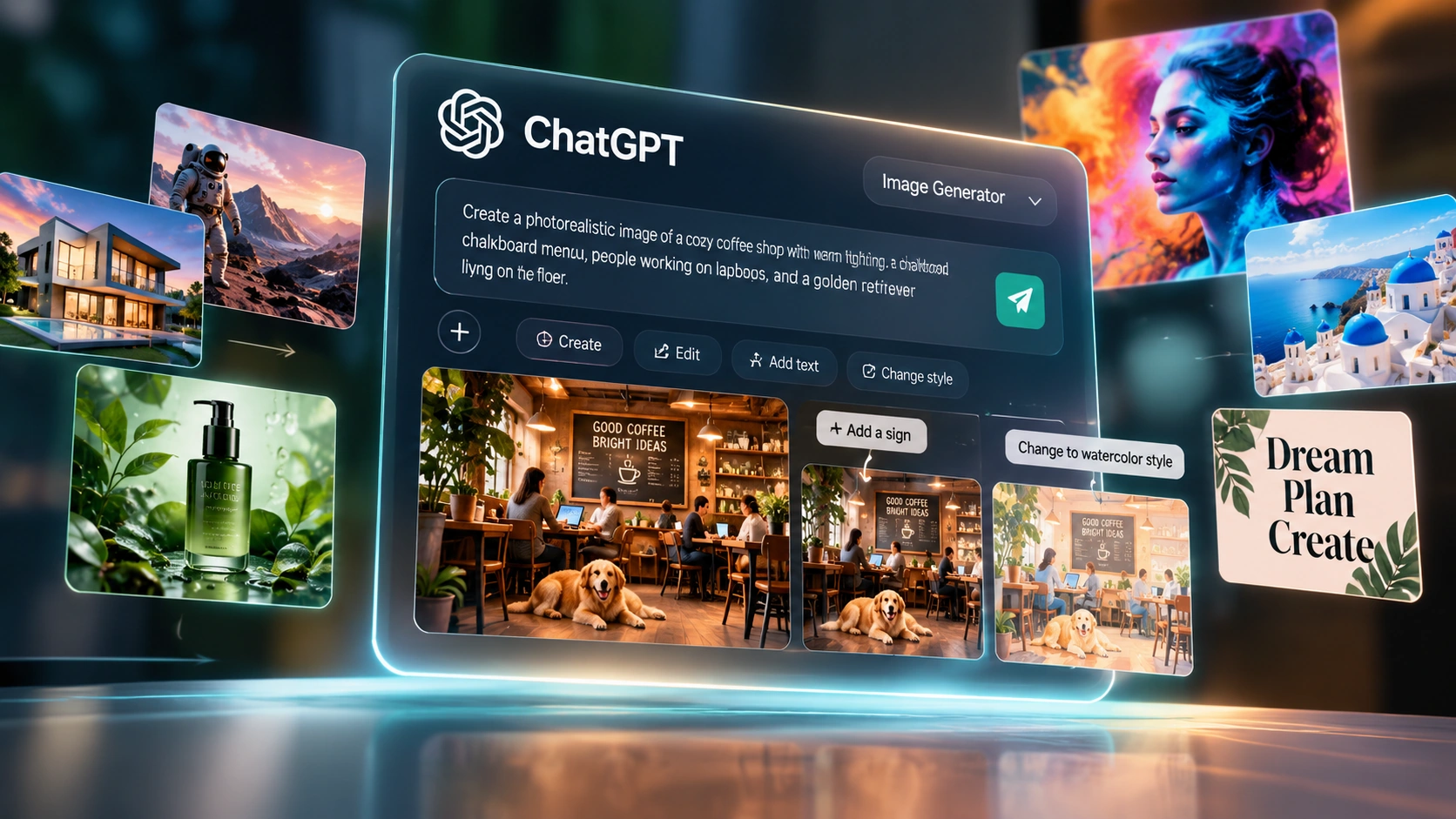
In our tests, it was particularly good at following detailed instructions and making changes to an existing image.
GPT Image 2 is OpenAI's image model built into ChatGPT, aimed at following detailed instructions rather than loosely interpreting them. In our tests it was strong at rendering readable text for posters, packaging and social graphics — an area many image models have historically struggled with — and its multi-turn editing lets you refine the same image across several prompts while it keeps the rest of the composition intact. It's available natively in ChatGPT and, separately, as a partner model inside Adobe Firefly. That combination makes it a practical option for marketers, designers, founders, agencies and educators who need usable visuals without a design background.
Most AI image generators interpret your prompt and produce something artistic — often surprising, occasionally off-target. GPT Image 2 aims for the opposite: matching what you actually asked for, closely, including text, layout and specific objects.
When you describe a layout to a human designer, they execute it. When you describe the same layout to most AI image tools, they interpret it loosely and often miss the intent. In our tests, GPT Image 2 held onto detailed, multi-part instructions — exact text, object placement, repeated characters across panels — more consistently than that. The evaluations below show exactly what that looked like, including where it fell short.
Compared with Midjourney and DALL-E 3, the practical difference is this: Midjourney tends to produce something aesthetically striking that may drift from your brief, while GPT Image 2 stays closer to the brief at the cost of some visual flair. Which one you want depends on whether you need something usable as specified or something to spark ideas.
Below are four prompts we tested ourselves with GPT Image 2, along with what we found on semantic alignment, visual quality, and integrity.
How we scored these: we checked each image against what the prompt actually asked for — were the specified objects, text, layout and details present and correct — and separately judged visual quality and whether the result held together (anatomy, consistency, no stray artifacts). These are our own test scores from this one run, not an industry-standard or third-party benchmark.
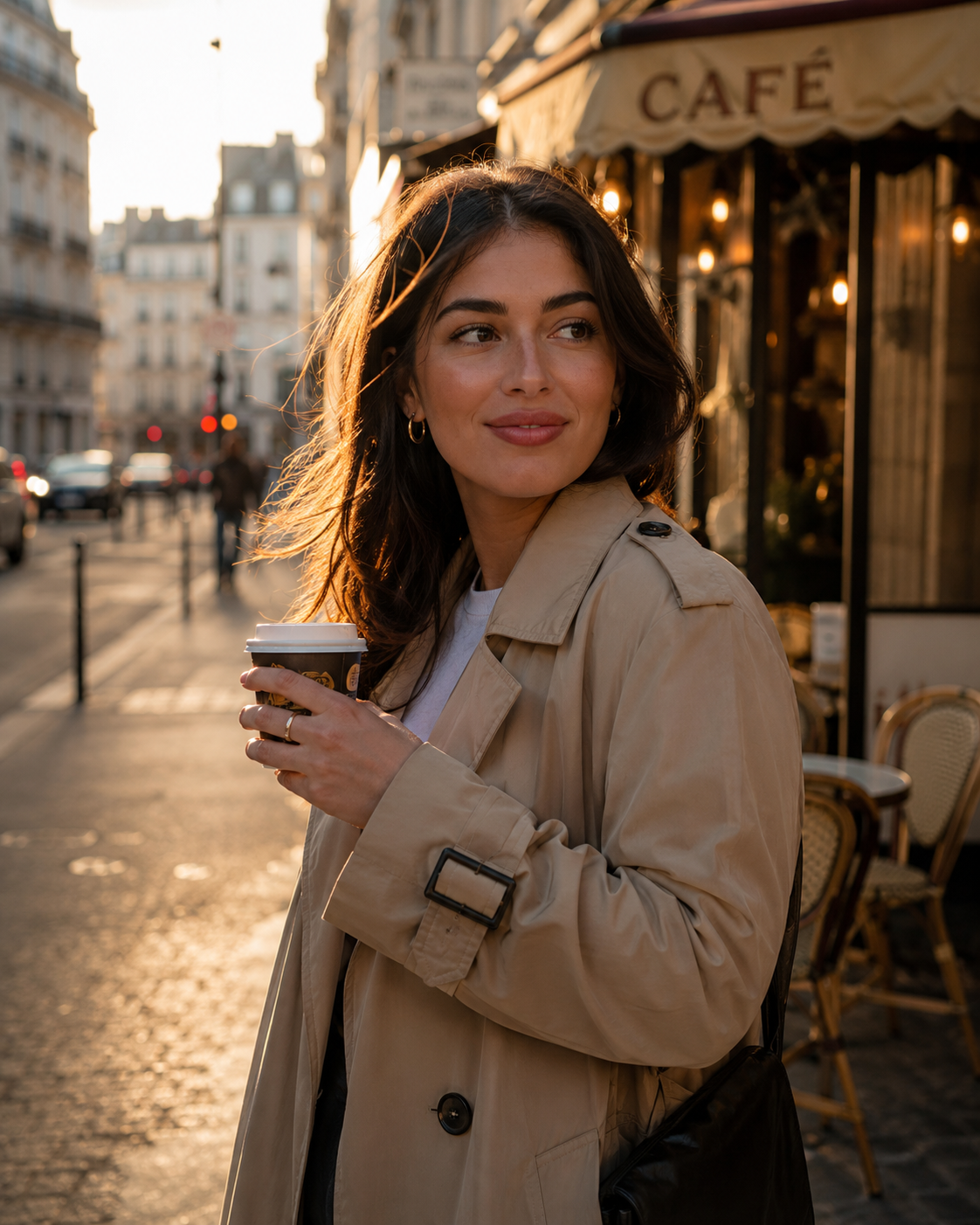
Prompt: A candid street portrait of a 27-year-old woman standing outside a small Paris café during golden hour, wearing a beige trench coat and holding a takeaway coffee. Captured on a full-frame mirrorless camera with an 85mm f/1.4 lens. Natural skin texture with visible pores, subtle flyaway hairs, realistic eye reflections, anatomically correct hands, soft cinematic depth of field, warm sunlight, shallow bokeh, ultra-photorealistic, RAW photography quality.
Semantic Alignment: 94% — ✓ woman, ✓ Paris café, ✓ beige trench coat, ✓ takeaway coffee. Minor deviation: slightly camera-aware vs. fully candid.
Visual Quality: Stylistic 88% · Perceptual 89% — Cinematic shallow DOF, soft bokeh, golden hour lighting, warm palette. Sharp, detailed face with natural skin texture.
Integrity: Pass — Anatomy correct, hands naturally hold cup, facial proportions realistic. No cartoon/3D/anime traits.
Verdict: Acceptable output; minor note on candidness for future iterations.
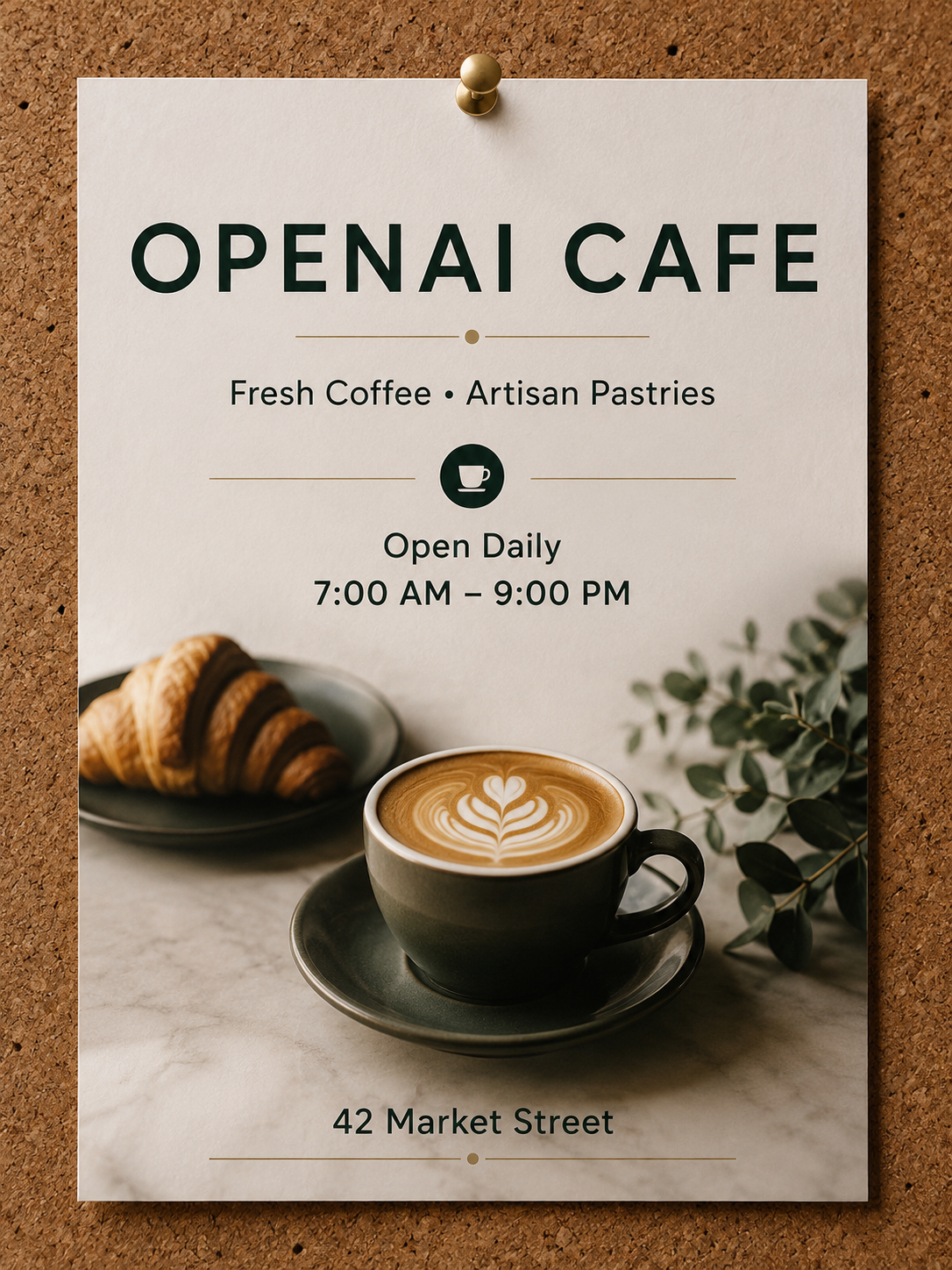
Prompt: Design a premium modern coffee shop poster pinned to a corkboard. The poster must contain exactly the following text: OPENAI CAFE Fresh Coffee • Artisan Pastries Open Daily 7:00 AM – 9:00 PM 42 Market Street Use elegant sans-serif typography, balanced spacing, realistic paper texture, and ensure every word is spelled exactly as written. No additional text should appear.
Semantic Alignment: 98% — ✓ All text elements present with correct spelling. ✓ Elegant sans-serif typography, balanced spacing, realistic paper texture. ✓ Brass push pin at top center on corkboard. ✓ No additional text.
Visual Quality: Stylistic 95% · Perceptual 97% — Premium minimalist design, coffee cup icon, actual coffee/croissant imagery. Warm cream/forest green palette. Sharp focus.
Integrity: Pass — Layout geometrically sound, proportional spacing, visual hierarchy. No additional text beyond required elements.
Verdict: Strong result; no obvious text or layout errors in this test.
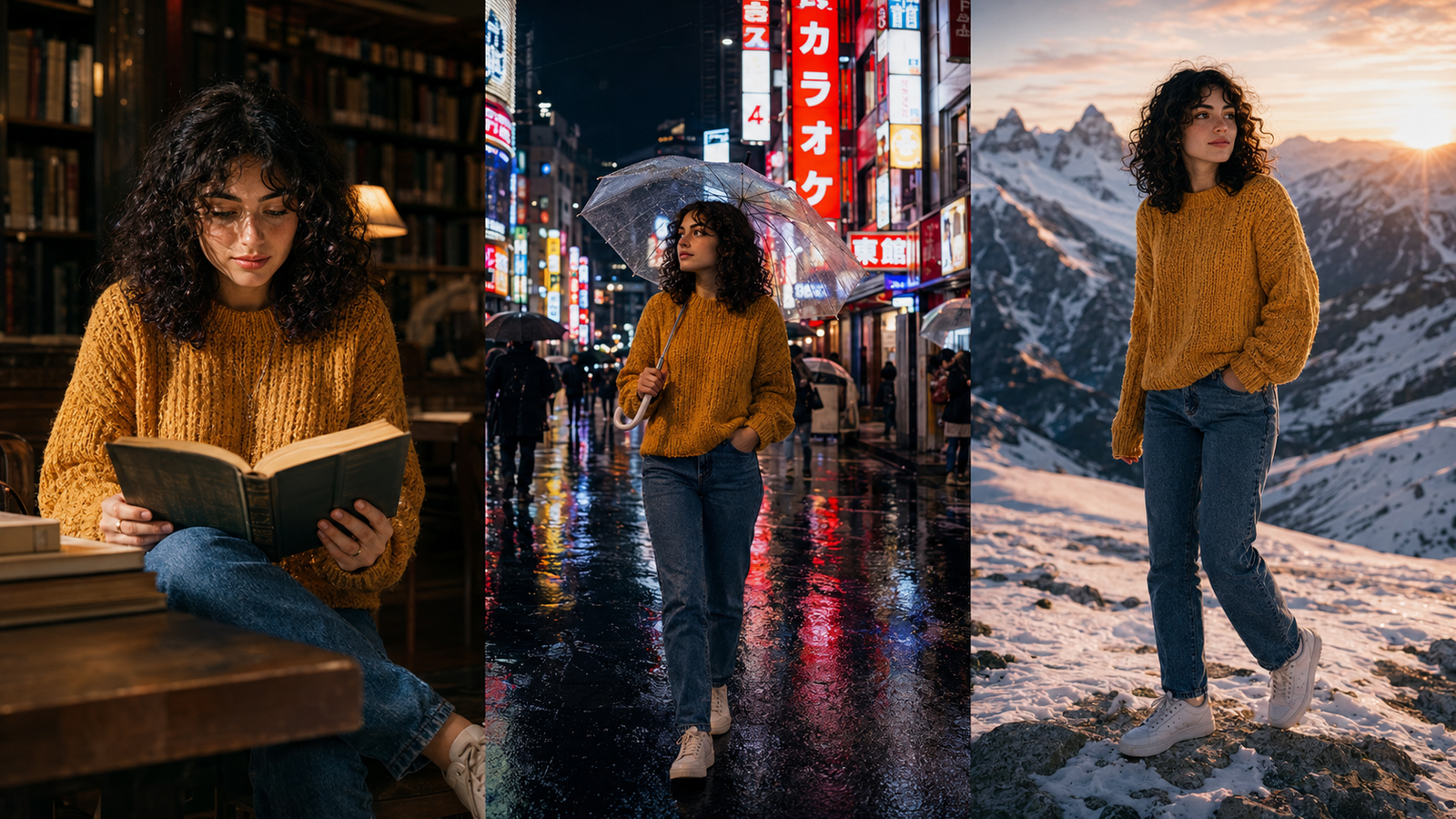
Prompt: Create a cinematic triptych (three-panel composition) featuring the same woman in every panel. She has shoulder-length curly black hair, green eyes, freckles across her nose, and wears a mustard-yellow knitted sweater, blue jeans, and white sneakers. Panel 1: Sitting in a quiet library reading a hardcover book. Panel 2: Walking through a rainy Tokyo street at night holding a transparent umbrella. Panel 3: Standing on a snowy mountain at sunrise. Her face, hairstyle, clothing, proportions, and identity must remain identical across all three panels. Only the environment, pose, and lighting should change. Photorealistic cinematic photography.
Semantic Alignment: 97% — ✓ Woman, library, book, Tokyo street, umbrella, mountain, snow. ✓ Shoulder-length curly black hair, green eyes, freckles across nose — consistent across all panels. ✓ Mustard-yellow sweater, blue jeans, white sneakers present in all panels.
Visual Quality: Stylistic 94% · Perceptual 92% — Cinematic triptych format, photorealistic color grading. Panel lighting varies: warm tungsten, cool neon, golden sunrise.
Integrity: Pass — Anatomy correct across all panels. Same face, hairstyle, clothing, identity. No cartoon/illustration/anime elements.
Verdict: Strong consistency across all three panels; minor structural note on umbrella handle.
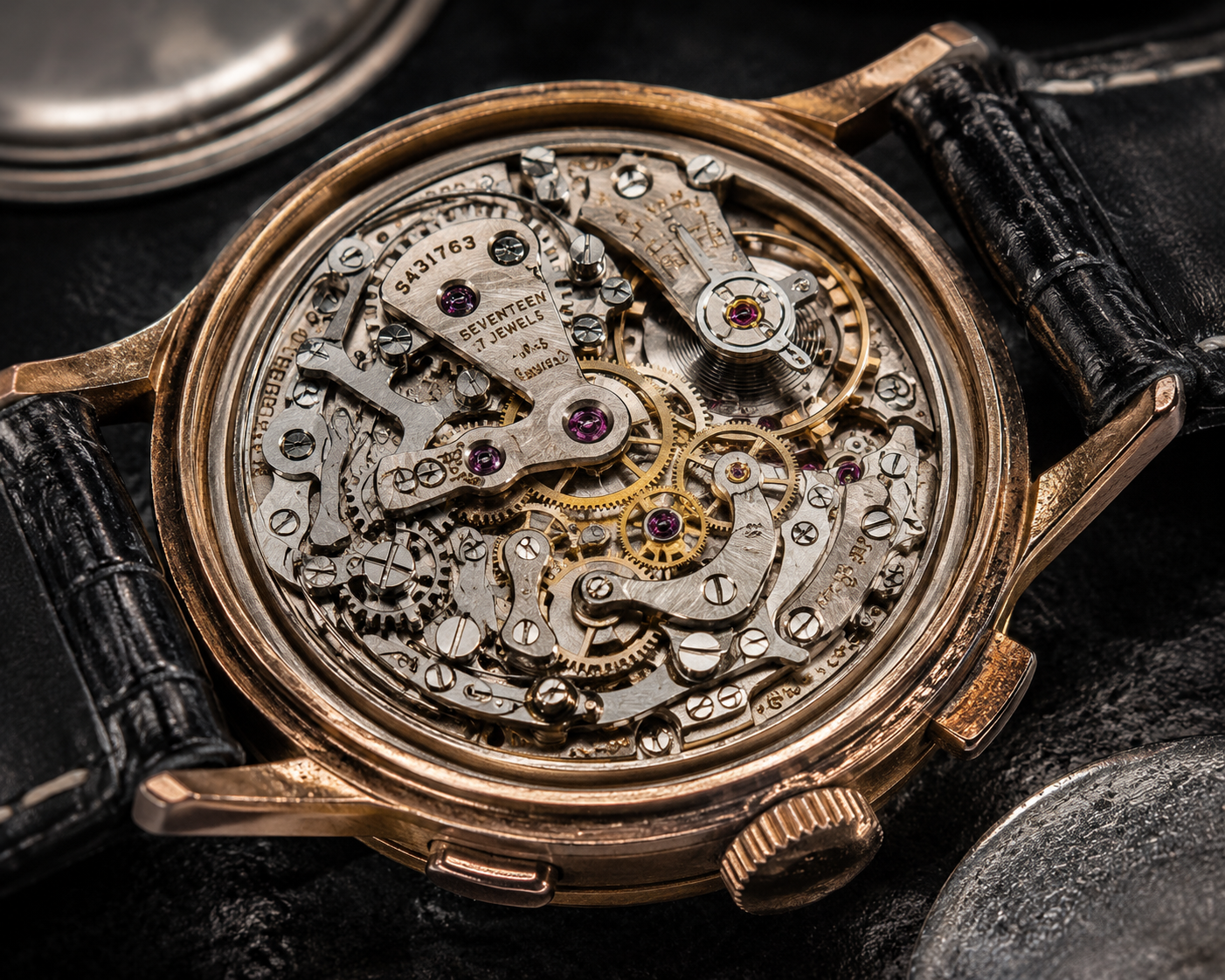
Prompt: A professional macro photograph of an antique mechanical wristwatch with its back removed, revealing hundreds of precisely machined gears, ruby bearings, springs, engraved serial numbers, polished screws, and brushed steel components. Tiny dust particles, microscopic scratches, and realistic oil sheen are visible under dramatic studio lighting. Every metallic reflection, glass surface, and engraved detail should appear physically accurate. Captured with a professional macro lens at 3:1 magnification. Hyper-realistic luxury product photography in 8K.
Semantic Alignment: 88% — ✓ Gears, ruby bearings, springs, engraved serial numbers ('SEVENTEEN JEWELS', 'S31763'), polished screws, brushed steel components, oil sheen. ✗ Tiny dust particles — NOT visibly apparent.
Visual Quality: Stylistic 92% · Perceptual 91% — Exceptional sharpness, individual gear teeth rendered crisply. Dramatic studio lighting with warm/cool metallic reflections.
Integrity: Pass — Coherent mechanical anatomy, proportionally correct components. Caseback removal properly executed. No geometric inconsistencies.
Verdict: Excellent execution; missing dust particles noted as minor gap from prompt.
| # | Prompt Subject | Score | Alignment | Stylistic | Perceptual | Integrity |
|---|---|---|---|---|---|---|
| 01 | Paris Café Portrait | 92/100 | 94% | 88% | 89% | ✅ Pass |
| 02 | Coffee Shop Poster | 99/100 | 98% | 95% | 97% | ✅ Pass |
| 03 | Cinematic Triptych | 95/100 | 97% | 94% | 92% | ✅ Pass |
| 04 | Antique Watch Macro | 96/100 | 88% | 92% | 91% | ✅ Pass |
We started with a simple prompt: "Create a social post for a coffee shop with a warm brown background, a steaming cup in the centre, and the text 'Start your day right' in bold serif." The first image followed the basic layout and included the requested text, readable and correctly placed.
We then asked it to make one change: "Make the background lighter and change the text to 'Fresh coffee, fresh start'." The second version kept the cup, the font and the overall composition, and only the background and text changed — we didn't need to re-describe the whole scene to get there.
Watch these official demos to see ChatGPT Image Generator (GPT Image 2) in action — from the platform overview to advanced thinking and intelligence features.
A new era of image generation. Watch the official overview of ChatGPT Images 2.0 capabilities, including instruction fidelity, text rendering, and contextual editing.
OpenAI researcher Ayaan Haque shows how capable ChatGPT Images 2.0 has become when Thinking is enabled. With the ability to research topics on the web, it can handle open-ended prompts and produce highly complex outputs.
A common complaint with AI image generators: you describe a specific layout and the model ignores half of it. Instruction fidelity is just a term for how well a model avoids that — sticking to the layout, text placement, colour and composition you actually described rather than a loose interpretation.
In the hands-on tests below, GPT Image 2 held onto multi-element briefs — exact wording, specific object placement, repeated characters across panels — more consistently than we've seen from earlier OpenAI image models.
Most AI image generators are "one and done" — you generate an image, and if it's not quite right, you generate another one from scratch. GPT Image 2 works differently: it keeps context across edits, so a follow-up prompt can change one thing without redoing the rest.
In practice that means you can add an object, remove a person from the background, blend two product shots, change the colour of a garment, or adjust the lighting — and the rest of the image (faces, scene, composition) tends to stay intact. You describe the change instead of re-describing the whole scene.
The practical upside is fewer full regenerations. If your first result is 80% right, you can usually fix the remaining 20% directly instead of starting over.
Text rendering has been a long-running weakness of AI image generators — logos, flyers, posters and social captions frequently came out garbled or misspelled. In our poster test (evaluation 02 above), GPT Image 2 reproduced a specific block of text — business name, hours, address — correctly, spelled and placed as requested, with no extra text added.
That held up across the other formats we tried: quote cards, packaging mockups, and social graphics with captions. Ideogram is the other tool we found comparably reliable on text; see the comparison table below.
For anyone who needs text inside an image rather than just a picture, that reliability matters more than most other features on this page.
The previous section covered why iteration matters. Here's what that actually looks like in practice — the specific kinds of edits that carry over cleanly without you having to redo the whole image:
Add a dog in sunglasses to a surfboard photo, or drop in any new object or subject into an existing scene.
Remove a person from the background of a product shot while keeping the rest of the composition intact.
Blend two product shots together into a single cohesive image.
Change the colour of a garment while preserving fabric texture, or adjust lighting direction without recomposing the scene.
In our tests, the model usually kept the main subject and composition intact while we changed individual elements.
Generate visual libraries and brand guidelines with Firefly Boards. Create consistent campaign aesthetics across multiple assets.
Place products in realistic environments. Generate packaging mockups. Create lifestyle shots without a photoshoot.
Generate Instagram posts, TikTok thumbnails, LinkedIn banners, and Facebook ads — all with readable text and correct formatting.
Create instructional graphics, data visualisations, and educational diagrams — clearly labelled and formatted for comprehension.
Generate consistent product images with branded backgrounds, accurate colours, and professional presentation across your entire catalogue.
Create illustrative diagrams, explanatory graphics, and visual learning materials — clearly labelled and formatted for teaching.
GPT Image 2 is integrated into Adobe Firefly, so you can use it alongside Firefly's editing and other image-generation tools in the same creative environment.
This integration also includes Firefly Boards, a mood boarding and brand guideline system that allows teams to create visual libraries, maintain brand consistency, and collaborate on campaign direction.
For marketing teams and agencies, this integration is a significant workflow advantage — reducing the need to switch between tools and ensuring that generated assets align with brand guidelines from the start.
Held up well across our layout-heavy test prompts (see the evaluations above) — multi-element briefs, exact placement, and repeated wording came through with fewer dropped instructions than older models.
Our tests produced readable text on posters, quote cards and other graphics. Results can still vary depending on the prompt and layout.
Keeps context across follow-up edits, so you can change part of an image without recreating the whole prompt.
Optimised for rapid iteration, typically within minutes. Faster than traditional design workflows, slower than real-time generators.
Natively available within ChatGPT ecosystem. Integrated into Adobe Firefly. Web-based with no installation required.
With Thinking enabled, GPT Image 2 can research topics on the web and handle open-ended prompts, producing highly complex outputs.
Open ChatGPT and navigate to the image generation interface. ChatGPT Plus and Pro subscribers have full access; free tier users have limited daily usage.
Describe what you want clearly — be specific about layout, colours, text, and composition. Example: "A social post for a coffee shop with a warm brown background, a steaming cup in the centre, and the text 'Start your day right' in bold serif."
Review the generated image. If it is not exactly what you wanted, describe the change: "Make the background lighter and change the text to 'Fresh coffee, fresh start'." The image updates, preserving the composition.
Download the final image in your preferred format. Use it in your marketing campaign, social post, presentation, or product listing.
Solution: Rephrase your prompt. Specify the font style ("bold serif", "clean sans-serif"). Use quotation marks around the exact text you want to appear. Example: "Include the text 'Start your day right' in bold serif."
Solution: Be more specific about spatial relationships. Use keywords like "in the centre," "at the bottom," "on the left side." Specify relative positions of elements.
Solution: Check your internet connection. Reduce the complexity of your prompt if you are generating particularly complex scenes. For GPT Image 2, generation times are typically fast but can vary with server load.
Solution: Use clear, unambiguous language. Avoid terms like "make it better" or "improve it." Be specific: "Change the background colour to navy blue" or "Remove the person on the right."
In our comparison, Midjourney produced more visually stylized results, while GPT Image 2 stayed closer to the literal brief and rendered text more reliably. The full breakdown is in the comparison table below.
The two models are built differently — DALL-E 3 uses a diffusion architecture, while GPT Image 2 generates images natively as part of GPT's multimodal system. In practice, GPT Image 2 supports multi-turn image editing and performed better on text rendering and detailed instructions in our testing.
GPT Image 2 supports multi-turn editing of the same image; DALL-E 3 doesn't — each generation starts fresh.
Strong in our tests on GPT Image 2; DALL-E 3 is the weaker of the two on legible in-image text.
GPT Image 2 is available as a partner model inside Adobe Firefly; DALL-E 3 is not.
These optimize for different things. Midjourney tends to produce visually striking images that can drift from the literal brief; GPT Image 2 stays closer to what you specified, which we found made it more predictable for layout- and text-heavy work, at some cost to visual polish.
Strong in our tests on GPT Image 2 for multi-element briefs; Midjourney tends toward looser interpretation.
Strong in our tests on GPT Image 2; Midjourney is generally the weaker of the two on in-image text.
GPT Image 2 supports multi-turn editing; Midjourney's editing workflow works differently and doesn't carry context the same way.
Midjourney is generally regarded as the stronger choice here; GPT Image 2 prioritizes matching the brief over visual flair.
These are the two tools we found most reliable for text inside images. Ideogram has built its reputation specifically around text accuracy; GPT Image 2 matches it on that front in our tests and adds multi-turn editing and Adobe Firefly availability on top.
Both were strong in our tests on readable, correctly-placed text.
GPT Image 2 supports multi-turn editing of the same image; Ideogram's workflow is generation-focused rather than iterative.
GPT Image 2 is available in ChatGPT and as a partner model in Adobe Firefly; Ideogram is a standalone tool.
The ratings below are our own testing impressions, not a certified benchmark — where we say "strong in our tests," that's based on the evaluations earlier on this page, not a claim of precise measurement.
| Feature | GPT Image 2 | DALL-E 3 | Midjourney | Ideogram |
|---|---|---|---|---|
| Following Instructions | Strong in our tests | More interpretation-heavy | More interpretation-heavy | Moderate |
| Text Rendering | Strong in our tests | Weaker on legible text | Weaker on legible text | Strong |
| Multi-Turn Editing | ✅ | ❌ | Different workflow | ❌ |
| Aesthetic Quality | Good, prioritizes accuracy over flair | Good | Widely regarded as strongest here | Good |
| Adobe Firefly Availability | ✅ Partner model | ❌ | ❌ | ❌ |
| Platform | ChatGPT + Firefly | Standalone | Web + Discord | Web |
| Best For | Text-heavy and layout-precise work, iterative edits | General generation | Aesthetic exploration | Text-heavy single-shot generation |
Need to produce visuals quickly and consistently. It can help small teams create drafts, social graphics and campaign assets without starting every project from scratch or routing everything through a designer.
Need usable-looking assets but don't have the budget for a design team. It can produce workable visuals from a text description, which lowers the bar for anyone with an idea but no design skills.
Need to produce client work efficiently while maintaining high quality. The Adobe Firefly integration and multi-model workflows make ChatGPT Image Generator a practical tool for agency production pipelines.
Need to create clear, labelled diagrams and educational graphics. ChatGPT Image Generator's instruction fidelity makes it reliable for producing accurate, informative visuals.
Being honest about fit is what makes this review worth trusting. Here is when a different tool will serve you better.
ChatGPT Image Generator (GPT Image 2) is OpenAI's image generation tool built into ChatGPT. It's built to follow detailed instructions closely, render legible text inside images — a longtime weak spot for AI image tools — and let you keep editing the same image over multiple turns instead of starting over each time.
ChatGPT Image Generator is available through ChatGPT. Access depends on your ChatGPT subscription tier — free tier users have limited access, while Plus and Pro subscribers have higher usage limits. Check the ChatGPT pricing page for current details.
The two models are built differently. In our testing, GPT Image 2 performed better on detailed instructions and text rendering, and it supports multi-turn image editing.
In our tests, GPT Image 2 produced readable, correctly spelled text in posters, quote cards, packaging mockups and social graphics. Results can still vary by prompt and layout. Ideogram is the other tool that matched it on text accuracy in our comparison; see the comparison section for specifics.
It's a term for how closely the model sticks to what you actually described — layout, text, colour, composition — rather than producing a loose artistic interpretation. In our tests, GPT Image 2 held onto detailed, multi-part instructions more consistently than earlier OpenAI image models.
Contextual editing means GPT Image 2 retains conversational context across multiple edits. You can add or remove elements, change colours, or adjust lighting without starting the image from scratch. In our tests, it usually kept the main subject and composition intact while we changed individual elements.
Yes. It can help produce usable marketing assets — ads, product photos, social graphics, diagrams and similar — and is particularly useful for marketers, founders, agencies and educators who don't have a design background or a designer on hand.
GPT Image 2 is available inside Adobe Firefly as a partner model. This lets you use it alongside Firefly's editing and other image-generation tools in the same creative environment.
While ChatGPT Image Generator (GPT Image 2) is strong on instruction fidelity and text rendering, it has limitations — complex scene composition can still be challenging, extremely detailed prompts may produce inconsistent results, and the tool is not designed for photorealistic portraiture at the level of Midjourney's aesthetic quality.
OpenAI offers API access to image generation capabilities. Check the OpenAI API documentation for current endpoints, pricing, and usage limits for programmatic generation.
ChatGPT Image Generator (GPT Image 2) has a clear focus: following detailed instructions and letting you refine an image through multiple prompts. In our tests, that showed up most clearly with complex layouts, text inside images, and edits that carried over from one prompt to the next.
It isn't always the most visually stylized option. Midjourney produced more stylized results in our comparison, while GPT Image 2 stayed closer to the literal brief.
For marketers, founders, agencies, and educators, the main advantage is the workflow: describe what you want, check the result, and keep refining it without rebuilding the entire prompt. Whether that matters more than visual style depends on the type of work you're doing.
Describe what you want — a social post, a product mockup, an ad — and see how closely GPT Image 2 matches your brief. One prompt is usually enough to tell you whether it fits your workflow.
 Try ChatGPT Image Generator →
 OpenArt AI
 Photoroom
 LetsEnhance
 Magnific
 Kittl
Kittl Krea AI
 Phot.AI
 Stable Diffusion
 Adobe Express
 Fotor
Fotor Topaz Photo AI
 NightCafe