AI Art & Video Generator — Many Models in One Place
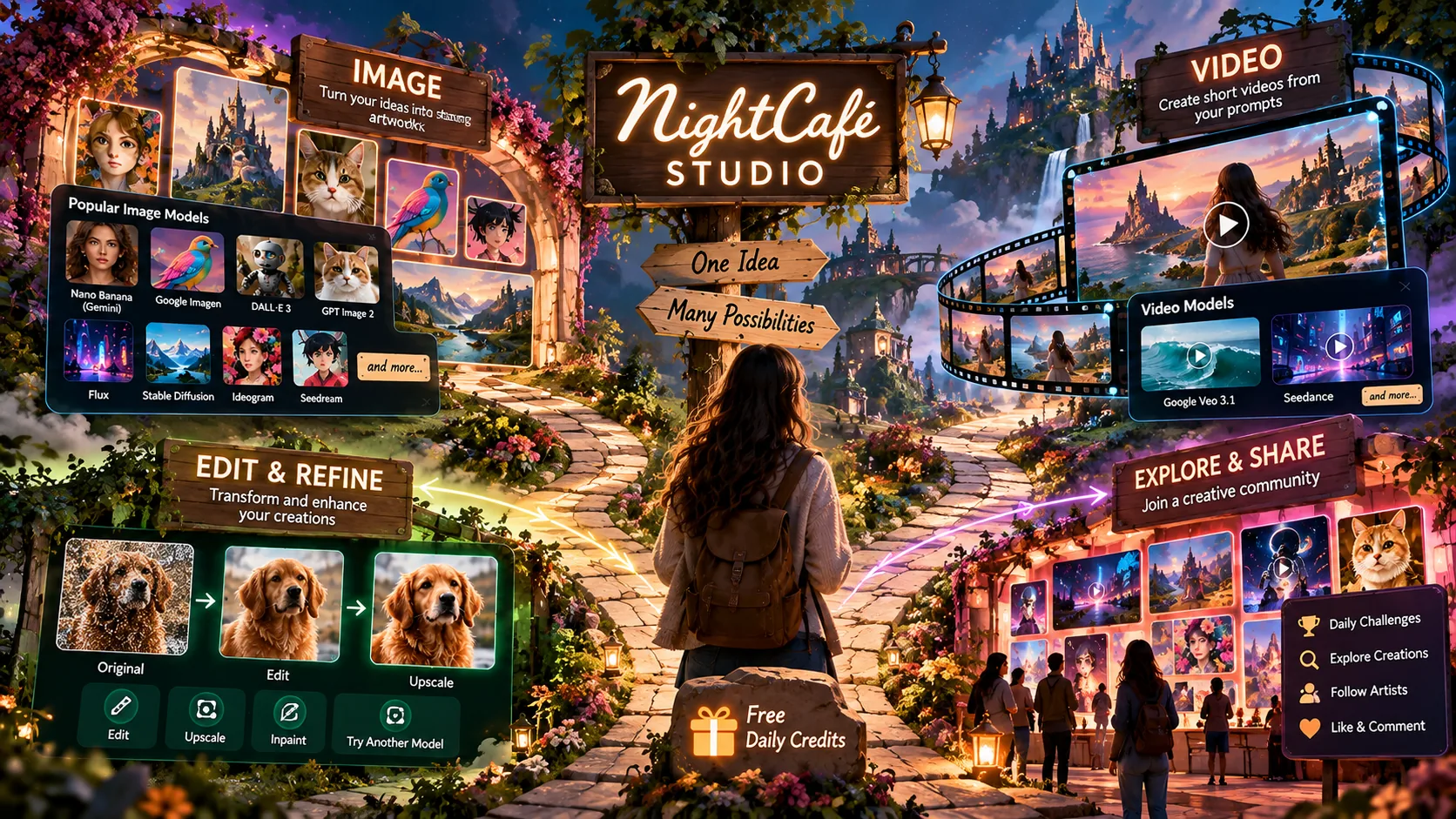
NightCafe is an AI art and video platform. You can use it to create images and short videos from text prompts. The main difference from most AI art tools is that NightCafe gives you access to many different AI models from one interface, instead of locking you into just one. On the image side that includes Google's Nano Banana (Gemini) and Imagen, OpenAI's DALL·E 3 and GPT Image 2, Flux, Stable Diffusion, Ideogram, and Seedream. On video, it includes Google Veo 3.1 and Seedance. Founded in 2019, NightCafe was one of the first text-to-image AI generators. Today it pairs free daily credits with a daily AI art challenge and an active community. It's free to start, and no credit card is required.
Many AI art tools focus on a particular model or workflow: product mockups, marketing images, design drafts. NightCafe takes a different approach. It puts dozens of image and video models side by side — Flux, Stable Diffusion, DALL·E 3, Google Imagen, Nano Banana, Ideogram, HiDream, Seedream, and more — inside a community where millions of creators share prompts, comment on each other's work, and enter daily challenges.
NightCafe describes itself as built "for AI artists, enthusiasts and content creators." NightCafe puts more emphasis on the community side of AI art than most competitors: you can create, share work, follow artists, and take part in daily challenges from the same account. Free credits refresh every day, there's a new challenge every day, and the feed is always changing. It's been covered by MSN, Mashable, Forbes, the BBC, TechCrunch, Vice, AOL, and Yahoo News, and the company reports more than 30 million creators — a figure we haven't independently verified.
Getting your first image out of NightCafe takes about a minute, and you don't need to sign up just to look around. Open the Studio, type a prompt, pick a model, and click Create. From there you can tweak the prompt, switch models to change the look, or push the result further with edits and upscaling.
Every account gets free credits each day just for logging in, plus more for entering and voting in the daily challenge — so a first session can span several models without spending anything.
If you've never used an AI art generator, here's the whole path — signup to first shared creation — in five steps. None of it needs design skills or a paid plan.
Create a free account — no credit card. You get free credits every day just for logging in, plus more for entering the daily challenge.
Open the Studio, pick a model — Flux and Stable Diffusion are free and forgiving to start — and describe what you want in plain language. Clear, specific prompts work best.
Click Create, then refine: adjust the prompt, swap models to change the style, or upscale for higher resolution.
Submit a creation to that day's themed challenge and vote on others. It earns more free credits and is a fast way to improve your prompting.
Browse the Explore feed, like and comment, and follow creators whose work you like so it shows up in your feed.
One of NightCafe's main advantages is breadth: instead of committing to one model's look, you get a library of models under one login and one credit system. Want photorealism? Try Seedream or GPT Image. Want fast, stylized output? Flux or SDXL. For Google's models, you can use Nano Banana. Want it to move? Switch to a video model like Seedance or Google Veo 3.1, without opening a second subscription.
In practice, that means you can run the same prompt through several models and compare, instead of maintaining several separate accounts. NightCafe adds new models on an ongoing basis as they're released.
Flux, Stable Diffusion, DALL·E 3, Imagen, Nano Banana, Ideogram, Seedream and more — plus video models — without juggling multiple subscriptions.
Free credits every day, unlimited base Stable Diffusion, and more credits earned through the community.
A new theme every day with thousands of entries and votes.
Millions of creators sharing prompts, commenting, following, and chatting; community is one of the things users mention most often in reviews.
Create from laptop, tablet, or phone, with creations synced across devices.
Turn prompts or images into short videos, some with synchronized audio.
NightCafe is organized around what you want to make, not around a single model:
Write a prompt, choose a model, and generate an image — from a simple sketch to a photorealistic scene.
Create short videos from a text prompt or a still image, using models like Seedance, Google Veo 3.1, Kling, and Runway.
Create a character once, then reuse it across multiple creations so the same face and design carry through a series.
Use plain-language prompts to change an existing image instead of starting over.
Push a finished image to higher resolution when you need it larger or print-ready.
Generate realistic or stylized faces from a text prompt.
Transform your own photos into AI-generated paintings across a range of styles.
Save prompts, models, and settings as templates, and use hundreds of purpose-built AI tools.
One of the hardest things in AI art is getting the same character to show up across different images — same face, same design, different scenes. NightCafe's Consistent Characters feature is built for that, so you can build a series instead of generating one-off images.
It pairs naturally with the video tools: build a character, then animate it. There's an official walkthrough of this exact feature in the Videos section below.
NightCafe also works as an AI video generator. It offers separate Text-to-Video and Image-to-Video tools: text-to-video generates a clip from a prompt, while image-to-video animates a still you've already made. It runs several current video models side by side, the same way it does for images.
Video generation is credit-based and mostly a PRO capability. Because these are third-party models, the exact line-up shifts over time (see the model-volatility note in Good to Know).
NightCafe's image line-up includes Flux (including Flux 2, Flux Dev, and Flux 2 Klein), Stable Diffusion and SDXL, DALL·E 3, Google Imagen, Gemini's Nano Banana line (Nano Banana, Nano Banana 2, Nano Banana Pro), Ideogram 3.0, HiDream, Qwen Image, Z-Image Turbo, Seedream 4 and 4.5, and GPT Image 2 with prompt-to-edit and multi-image fusion.
Models split into free and PRO tiers. Non-paying users get a range of models, including unlimited base Stable Diffusion. PRO unlocks 50+ additional models plus the video models, depending on the current plan and model availability. The video models (Seedance, Veo 3.1, Kling, Runway) live in the same library and are covered in the Video Generation section above. New models are added on an ongoing basis.
Four videos from NightCafe's own YouTube channel, each with a short summary so you can scan what it covers before pressing play — from making AI videos to model quality settings, templates, and consistent characters.
A beginner-friendly workshop replay on making AI video feel simple and controllable — how video models work, image vs. video prompts, when to refine vs. restart, and why editing is the missing piece.
Compares the LOW, MEDIUM, and HIGH quality settings of GPT Image 2 on the same prompts, to help you pick the right one for AI art, thumbnails, social, and cinematic renders.
Introduces NightCafe's Templates feature, which saves prompts, models, settings, and style keywords so you can recreate your best AI art in a click.
Tests the Consistent Characters feature — creating the same AI character across images using reference images and prompts, and which models work best.
There's an official AI art challenge every day: a fresh theme, thousands of entrants, and community voting. A "Football Fever" daily challenge drew over 4,000 entries and more than 200,000 votes in a single day, which the company points to as evidence of scale.
You can browse a public feed of AI-generated art, like and comment on other creations, and follow artists so their work lands in your feed. Community is one of the things users bring up most often in reviews (see "What Real Users Say" below).
The daily streaks reflect regular use: more than 8,800 people have created art every day for 100+ consecutive days, and the longest streaks run past three years.
Beyond the open-ended Studio, NightCafe offers hundreds of purpose-built AI tools for specific jobs. Each lets you pick from 30+ models, describe what you want, and iterate, with free daily credits and no design experience needed.
This section needed real correction. The previous version of this page cited Trustpilot at "around 4/5 across roughly 559 reviews." We checked Trustpilot directly for this update and found NightCafe's actual profile shows 3.5/5 based on only 7 reviews, on an unclaimed company profile. The ~559 figure does not match what's currently live — whether it changed or was never accurate, the number now needs to reflect what's actually there.
On G2, NightCafe is rated 4.2/5 across 3 reviews — G2 itself notes there aren't enough reviews to provide reliable buying insight. Both samples are small; treat these as a rough signal, not a settled verdict.
Sources: NightCafe on G2 — 4.2/5 across 3 reviews; NightCafe on Trustpilot — 3.5/5 across 7 reviews (unclaimed profile).
| Alternative | NightCafe's edge | When the other wins |
|---|---|---|
| Midjourney | Many models, free daily credits, community | A single, focused image-generation experience with one house style |
| DALL·E 3 (via ChatGPT) | DALL·E 3 plus dozens of other models, with sharing | You already live inside ChatGPT |
| Leonardo AI | Hobbyist fun, community, daily practice | Game/design asset production, pro controls |
| Stable Diffusion (local) | Same models in-browser, zero setup | Free, unlimited, fully offline control |
The choice depends on what you want from the platform. NightCafe focuses on model variety, community features, and a low-cost way to experiment. Because it hosts several of these models itself (DALL·E 3, Stable Diffusion, and more), you often don't have to choose between the two.
NightCafe and OpenArt AI are both browser-based multi-model aggregators — many models in one place, no installs, consistent characters — rather than a single model or a single-style tool. The difference is emphasis: OpenArt leans toward a power-user sandbox with custom style training, while NightCafe leans toward free daily credits, community, and a daily habit.
| Criteria | NightCafe | OpenArt AI |
|---|---|---|
| What it is | Multi-model studio + community | Multi-model creative sandbox |
| Models | Dozens of top image & video models | 100+ models |
| Custom style training | Not the focus | Train your own LoRA/style models |
| Free access | Free credits every day | Credits-based; free tier available |
| Community | Daily challenges, chat rooms, feed, voting | Lighter social layer |
| Video | Text-to-video & image-to-video built in | More image-focused |
| Best for | Community and a daily habit | Power users training a custom style |
Choose OpenArt if you want the widest raw model count and the ability to train a model on your own style. Choose NightCafe if you want free daily credits, image and video in one studio, and an active community around it.
Hugging Face is the other place people go to try many models for free, so it's worth a direct comparison. It's the largest open-source AI hub: thousands of image and video models, plus community "Spaces" (hosted demos) where you can run Flux, SDXL, and more, often at no cost. But it's built for developers. Each Space is a separate, inconsistently-built interface; popular ones queue or go offline; and to run many models reliably you often end up duplicating a Space and supplying your own compute or a paid tier. There's no unified credit system and no social layer.
| Criteria | NightCafe | Hugging Face |
|---|---|---|
| What it is | Curated studio of selected models | Open hub of thousands of models & Spaces |
| Interface | One consistent studio, one login | Each Space is a separate, varied UI |
| Reliability | Managed generation, one credit system | Spaces queue, sleep, or need duplicating |
| Setup / skill | Minimal — type and create | DIY; often needs your own compute |
| Community | Feed, daily challenges, following | Developer-oriented, no art challenges |
| Best for | Hobbyists & content creators | Developers benchmarking or building |
Hugging Face offers more raw breadth and openness, and it's free if you're technically comfortable with the DIY setup. NightCafe offers a more unified, no-setup experience with a community built around it.
NightCafe's economy runs on credits. Free users get daily credits, a range of models, and unlimited base Stable Diffusion.
Included with a PRO subscription each month; usable on any model at full speed. They roll over and never expire, and you keep unused ones even if you cancel (for non-PRO models).
Earned free through daily activity — logging in, the daily challenge, badges, and a streak reward. They work like Fast Credits but generate at lower priority when servers are busy.
This table was out of date and has been rebuilt from NightCafe's live pricing page. The previous version listed three PRO tiers (~$12.49 / ~$24.99 / ~$39.99) and didn't reflect the current pricing structure or promotion.
Prices and included models can change. The figures below were checked on September 30, 2026. NightCafe is currently running a "50% off, 6 months free" annual promotion, valid through October 11, 2026 — the table shows both the normal monthly rate and the current promotional rate.
| Plan | Normal Price | Current Promo (annual) | Fast Credits/mo | Unlimited Models Include |
|---|---|---|---|---|
| Free | $0 | $0 | — (Relax Credits only) | Base Stable Diffusion (unlimited) |
| AI Hobbyist | $12.50/mo | $6.24/mo | 200 | Flux 2 Klein, Z-Image Turbo, +2 more |
| AI Enthusiast | $25/mo | $12.49/mo | 500 | HiDream, fine-tuned Flux models, +5 more |
| AI Creator | $40/mo | $19.99/mo | 850 | GPT Image 2 Low, Muse, +9 more |
| AI Artist | $62.50/mo | $31.24/mo | 1,400 | Seedream 4, Nano Banana, +13 more |
Monthly and quarterly billing (no annual commitment) are also available — quarterly saves 15% off the normal monthly rate. All paid plans include full model access, video generation, 600+ Relax Credits/month, custom and private templates, animated creations, and credits that don't expire. Check NightCafe's live pricing page for current rates once the promotion ends. Payments are handled by Paddle (a PCI-compliant Merchant of Record) and PayPal; NightCafe never sees your full card details.
NightCafe recommends the PRO subscription over credit packs for most users, since a subscription can be paused or cancelled at any time.
What credits actually buy. A credit is the unit spent per generation. A base image on a lightweight model can be free (or a single credit); higher-quality models, larger sizes, video, and extra settings (start images, ControlNet-style controls) cost more. Failed generations are automatically refunded.
Getting credits without paying. Beyond the credits you get for logging in, you earn more by entering and voting in the daily challenge, by earning badges, and through a 5-day streak reward. Everyone is eligible for the daily reward regardless of balance or plan.
You can use your NightCafe creations commercially, even on the free plan. As long as you own or have permission to use any original assets you fed in — like reference images — NightCafe assigns any copyright in the output to you, the creator.
The caveat is worth repeating: copyright law for AI-generated art is still evolving, and some jurisdictions may not grant copyright to AI images at all. It's worth checking the rules in your own country before you build a business on a specific image.
You get a set number of free credits per day; heavy use of premium models runs through them quickly. It's the most common complaint in reviews.
Some images — especially those downloaded from Explore — can appear low-resolution unless you upscale them, per reviewers.
Fast vs Relax credits, Unlimited Models, and per-model costs take a little while to understand at first.
Free and relax generations run at lower priority; PRO exists partly to skip the wait when servers are busy.
There's no team, brand-asset management, or approval pipeline.
A few reviewers raise moderation and safety concerns about public interaction, though others specifically praise the moderation as stricter than competitors.
Because NightCafe aggregates third-party models, individual models can be removed or updated by their creators (e.g. Stability AI or Google). An older saved prompt might render differently over time.
NightCafe runs in any modern browser and installs as an app to the home screen of an iPhone, Android phone, or tablet, with your account and creations synced across devices. It aggregates third-party models — from OpenAI, Google, Black Forest Labs (Flux), Stability AI, Ideogram, ByteDance (Seedance), and others — behind one interface and one credit system, so you don't install or manage models yourself.
Payments and taxes are handled by Paddle as Merchant of Record, with PayPal also supported. The company is NightCafe Studio Pty Ltd, operating since 2019.
Getting started is simple: type a prompt, pick a model, click Create. The depth comes later and is optional — learning which models suit which styles, how prompting differs between them, and how the credit system rewards daily activity.
The daily challenge can also work as a simple way to practice: a fresh prompt every day plus thousands of public examples to learn from. Prompt-craft is the real skill, and NightCafe's community and shared prompts make that easy to pick up — you can open almost any creation and see exactly how it was made.
Anyone who wants a low-pressure creative outlet and regular practice.
Creators who want many models in one place and an audience to share work with.
People who need quick images and short videos across varied styles for social, thumbnails, and posts.
Anyone with no design background who wants to start free and learn by doing.
Being honest about fit is what makes a recommendation worth trusting. Here's when another tool will serve you better.
We checked NightCafe's own product, pricing, and documentation pages directly, along with verified user feedback on G2 (4.2/5 across 3 reviews) and Trustpilot (3.5/5 across 7 reviews — corrected from a previous, inaccurate figure of ~559 reviews). Both review samples are small; we say so plainly rather than presenting them as more conclusive than they are. Pricing reflects a limited-time promotion running at the time of this update — check NightCafe's live pricing page for current figures once that offer ends. We update this page as NightCafe's models, pricing, and ownership change.
TechScribe publishes hands-on, no-hype reviews of AI image, video, and design tools. This page may contain affiliate links: if you sign up through them, we may earn a commission at no extra cost to you — which never affects our rating or what we recommend.
NightCafe puts many image and video models in one place, alongside free daily credits and a community built around daily challenges.
It isn't built for enterprise asset pipelines, and it's not the choice if you want a single model with total control — that's better served by a pro tool or a local Stable Diffusion setup.
For hobbyists, beginners, and content creators, NightCafe is worth considering if you want several AI models, image and video generation, and an active community in one place. If you need detailed production controls, team features, or full local control, another tool on this page may make more sense.
Generate images and video from a prompt using many AI models, claim free credits every day, and join the daily challenge — no credit card required to start.
 OpenArt AI
 Photoroom
 LetsEnhance
 Magnific
 Ideogram
 Kittl
Kittl Phot.AI
 CHATGPT
 Canva AI
 Adobe Express
 Fotor
Fotor Topaz Photo AI
 NightCafe