AI Image & Design ToolsStable DiffusionStable DiffusionLeonardo AILeonardo AIKittlKittlCanva AICanva AIAdobe ExpressAdobe ExpressPhotoroomPhotoroomKrea AIKrea AIFotorFotorTopaz Photo AITopaz Photo AIIdeogram 2.0Ideogram 2.0Phot.AIPhot.AIOpenArt AIOpenArt AILetsEnhanceLetsEnhanceMidjourney AIMidjourney AICHATGPTCHATGPTMagnificMagnific Image & Design AI
Midjourney logo — visual taste engine
Honest Deep Dive

Midjourney AI

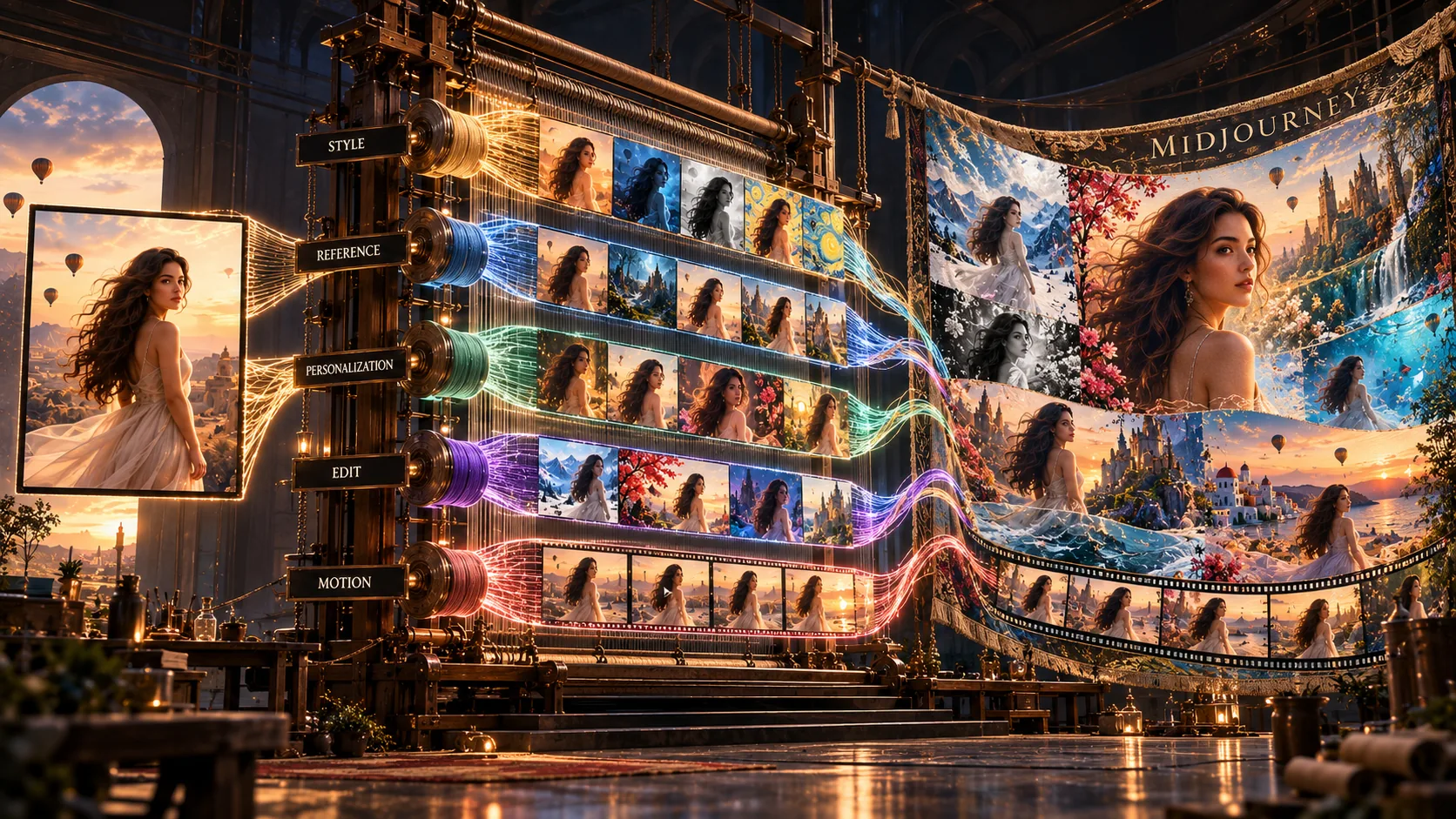
Midjourney has evolved beyond being only an image generator into a visual creativity platform — a visual taste engine that transforms creative direction into consistent imagery.

Personalization
Style References
Photorealism
Character Consistency
What is Midjourney?

This Midjourney AI review covers one of the most important creative tools available today — a visual creativity platform. Most AI image tools focus entirely on producing images from text prompts. Midjourney has evolved beyond being only an image generator into a visual creativity platform that helps users discover, refine, and reproduce visual aesthetics through Personalization Profiles that build your unique aesthetic model over time, Style References (--sref) for transferring visual language across subjects, Omni References for character and product consistency, a web-based canvas editor with inpainting and Retexture, and an open community gallery that is one of the largest publicly searchable AI image galleries. Available through a dedicated web interface and Discord integration.

The visual taste engine,
a visual creativity platform.

This Midjourney AI review begins with the distinction that most reviews miss entirely. Midjourney has evolved beyond being only an image generator into a visual creativity platform. Most mainstream reviews misunderstand it because they treat it as an isolated asset factory — focusing heavily on prompt engineering to force the model into a specific output. Designers look at it differently.

For professionals, the value lies in aesthetic alignment rather than raw creation. Beginners push a button to see what the machine gives them. Creative professionals use Midjourney to map out an interior design language, a branding system, or a cinematic moodboard.

As Midjourney shifts away from its Discord roots toward a robust web-based interface, prompting is becoming less important than style systems. The image is the output. Taste alignment is the product.

Midjourney does not create images better than everyone else. It helps users discover what they actually want to create.

Prompt. Generate.
The workflow begins after generation.

The first Midjourney AI review realization most users have: the workflow truly begins after generation, not before it. You type a basic concept. Four images appear — a 2x2 grid of distinct visual interpretations presenting diverse lighting, compositions, and stylizations based on your brief.

Selecting a favourite allows you to upscale it, then generate subtle or strong variations — branching into a more focused aesthetic path. By adjusting the prompt or style inputs mid-stream, you tweak parameters while keeping the core composition intact.

The first realization: You are not typing words into a box. You are navigating a multi-directional visual search space. Each generation is a direction, not a destination.

The first image is rarely the destination. It is the beginning of the search.

Midjourney in Action
See latest features, workflows, and editing tools

Watch these tutorials to see Midjourney in action — from prompt engineering to the editor, personalization, and Omni Reference.

Midjourney — Latest Features, Hidden Tricks & Workflow

Learn about the latest Midjourney capabilities, hidden tricks, prompt engineering, the editor, personalization, and Omni Reference.

Midjourney — Advanced Prompt Engineering & Editing

Explore advanced prompt engineering techniques, editing workflows, style references, moodboards, character references, and image consistency.

Taste compression —
expertise without the expertise tax.

Every creative discipline has an expertise tax. Photography requires understanding lighting. Branding requires understanding visual systems. Illustration requires understanding composition. The Midjourney AI review verdict on this is clear: Midjourney compresses much of that expertise into a generation engine.

A founder with no background in cinematic lighting can still produce cinematic imagery. A marketer who cannot art direct an expensive photoshoot can still produce campaign-quality visuals. A creator who cannot draw can still explore hundreds of visual directions in minutes.

The breakthrough is not image generation itself. The breakthrough is dramatically reducing the expertise required to achieve professional visual quality.

The creative skill shifts from making images to recognizing good ones.

Where Midjourney produces
genuinely convincing photorealistic output.

One of the most consistent findings in any serious Midjourney AI review is this: the platform's photorealism capability is exceptional. Midjourney often produces images with accurate lighting, believable skin texture, precise material rendering, and environmental depth that closely match real-world photography.

For product visualisation, the results are particularly impressive. Complex materials — glass, metal, fabric, leather, water — render with physical accuracy that rivals expensive studio photography. Lighting frequently produces realistic interactions between light and materials. Shadows fall correctly. Reflections carry environmental information.

The photorealism is not accidental. It is the result of Midjourney's model training on a curated aesthetic dataset that prioritises visual quality — and its personalization system that allows the model to bias toward the specific photographic aesthetics each user prefers.

Midjourney's photorealism does not just look good. It often produces realistic interactions between light and materials.

Where Midjourney stops
feeling generic.

Standard AI image generators start every prompt from a blank slate, producing a generalized average of their training data. This Midjourney AI review highlights one of the platform's most significant differentiators — its advanced Personalization Profiles system breaks that pattern entirely.

By ranking images, participating in community evaluation pools, and toggling the --p personalization argument, you build a distinct visual taste model. If you prefer high-contrast film photography over hyper-clean digital renders, the system biases its future generations toward that aesthetic. This helps reduce the generic AI aesthetic.

Most AI tools forget everything after every prompt. Midjourney gets better the longer you use it — accumulating aesthetic intelligence that makes every subsequent generation more aligned with your specific visual preferences.

Most AI tools forget everything after every prompt. Midjourney gets better the longer you use it.

How Personalization Works
Rank. Learn. Refine. Repeat.

1
Step 1
Rank Images

Rate and rank images in the community gallery or your own generations. Each ranking teaches the model about your aesthetic preferences.

2
Step 2
Personalization Profile Learns

Midjourney builds a unique aesthetic model based on your rankings and preference patterns. This profile grows more accurate with each interaction.

3
Step 3
Enable --p

Add --p to any prompt to activate your personalization profile. Future generations will be biased toward your specific visual preferences.

4
Step 4
Continue Ranking

The more you rank and generate, the more aligned the model becomes with your taste. Over time, the AI look fades and your personal creative DNA emerges.

Words describe style.
Images define it.

Text is a deeply inefficient way to communicate complex creative direction. When someone says "luxury," "modern," or "bold," everyone in the room hears something completely different. This Midjourney review identifies Style References as the feature that solves this fundamental problem.

Through Style References (--sref), the system extracts stylistic characteristics such as color palette, lighting, texture and overall visual aesthetic from a reference image and applies them to a completely new subject. Moodboards function as an integrated personalization system — letting teams align visually before production even begins.

For creative agencies, this visual alignment saves far more billable time than the image generation itself.

Commercial asset creation —
the same subject across every frame.

Most AI image generators are optimized for beautiful one-off images. Businesses rarely need one-off images — they need the same product showcased across 50 distinct ads, the same brand mascot moving across 20 global campaigns, or the same custom vehicle navigating multiple environment changes.

Midjourney's Omni Reference systems (--cref and subject reference workflows) help preserve the identity of a subject across multiple generations. A beautiful image is nice. A reusable visual asset is valuable.

A beautiful image is nice. A reusable visual asset is valuable.

Midjourney is no longer
prompt in, image out.

The web-based canvas completely updates how users interact with generations — turning Midjourney into a lightweight suite of creative software. Vary Region (Inpainting) modifies localized sections of an image. Pan and Zoom Out expand canvas boundaries dynamically.

Retexture is one of the most overlooked capabilities in modern design workflows. It attempts to preserve the overall composition while completely transforming its underlying visual style. A raw product shot can become cyberpunk. A rough concept sketch can become photorealistic. A basic wireframe can become luxury advertising.

What it actually
looks like under the hood

🧠
Personalization Profiles

Advanced user-specific aesthetic modeling over time. Builds your unique visual taste model through image ranking and preference learning. Activated via --p argument.

🖼️
Moodboards

Integrated as an independent personalization and style alignment system. Lets teams agree on visual direction before production begins.

🎨
Style References (--sref)

Dedicated system for transferring visual aesthetics. Extracts stylistic characteristics such as color palette, lighting, texture and overall visual aesthetic from reference images.

🧬
Omni References

Helps preserve the identity of a subject across multiple generations via --cref and subject reference workflows.

✏️
Canvas Editor

Vary Region inpainting, Pan and Zoom Out canvas expansion, and Retexture for complete style transformation without altering composition.

📸
Photorealism

Among the strongest currently available — lighting, material rendering, and environmental depth consistently producing photography-quality output.

👥
Community Discovery

Millions of indexed, searchable public generations with full prompt and parameter transparency. One of the largest publicly searchable AI image galleries.

🌐
Platform

Dedicated web interface for primary workflow. Discord integration for community and legacy workflows. No specialist hardware required.

Midjourney Pros and Cons
From the G2 community

Based on recent G2 reviews, common themes among users include praise for ease of use, realistic imagery, exceptional visual quality, and time-saving capabilities. Here are the key patterns:

G2 Community Rating
4.4
From recent G2 reviews
Common Praises
  • Incredibly easy to use — effectively saving time and enhancing design processes
  • Realistic imagery — enhancing creativity and efficiency in design processes
  • Exceptional visual quality — enhancing creativity and saving valuable design time
  • Time-saving capabilities — significantly reducing design hours and streamlining creative processes
  • Exceptional creativity — enabling stunning artistic images that elevate creative projects and product visuals
Common Concerns
  • AI limitations in output quality, particularly with realism and precise replication of details
  • Prompt issues — difficulty in achieving specific details and requiring multiple attempts
  • Image errors — some outputs lack realism and precise instruction adherence
  • Learning difficulty — complicated to achieve desired visuals for some users
  • Poor design quality — struggles with project organization and output consistency
Want the Latest Reviews?

This summary is based on recent G2 reviews. Visit G2 to see the most current user feedback, detailed breakdowns, and individual review comments.

View all reviews on G2 →

Midjourney History & Versions
Evolution of the platform

Midjourney has evolved through multiple model versions, each bringing significant improvements to image quality, prompt adherence, and creative control. The latest production model available at the time of writing represents the current state of the platform.

VersionKey Improvements
V1Initial release
V2Improved resolution, better prompt adherence
V3More realistic outputs, better lighting
V4Major quality leap, style control introduced
V5Photorealism breakthrough, better hands
V6Advanced style control, personalization introduced
V7Web interface, Omni Reference, Style References
Latest Production ModelCurrent — best quality, full feature set available at time of writing

How to Use Midjourney on the Web: A Beginner's Guide
Step-by-step tutorial

1
Step 1
Create an Account

Visit midjourney.com and sign up. Choose a subscription plan that fits your needs.

2
Step 2
Navigate the Web Interface

Explore the dashboard — includes features such as Create, Explore, Archive, and Collections for managing your work.

3
Step 3
Write Your First Prompt

Type a simple description of what you want to create. Start with the subject, then add style, lighting, and composition details.

4
Step 4
Upscale & Refine

Select your favourite variation and upscale it. Use the canvas editor to make adjustments or generate variations.

Advanced Midjourney Prompt Engineering
Master parameters for better output

Midjourney's parameter system gives you precise control over your output. Understanding these parameters is key to achieving consistent, high-quality results.

ParameterWhat It DoesUse Case
--arAspect ratio16:9 for landscape, 9:16 for portrait
--vModel versionLatest production model for best results
--qQualityHigher quality for detailed work, lower for speed
--sStylizationHigher = more artistic, lower = more literal
--iwImage weightControls how much reference image influences output
--noNegative promptExclude unwanted elements
--chaosVariation randomnessHigher = more diverse outputs
--seedSeed parameterLock in a specific generation for reproducibility

Midjourney Parameters Guide
Quick reference for common parameters

📐
--ar

Aspect ratio. Examples: --ar 16:9, --ar 9:16, --ar 1:1

🎯
--v

Model version. Use latest production model for best quality.

--q

Quality (0.5-2). Higher = better quality, slower generation.

🎨
--s

Stylization (0-1000). Higher = more artistic, lower = more literal.

🖼️
--iw

Image weight (0.5-2). Controls reference image influence.

🚫
--no

Negative prompt. Exclude unwanted elements from generation.

🎲
--chaos

Chaos (0-100). Higher = more variation between outputs.

🔒
--seed

Seed number. Lock in a specific generation for reproducibility.

Raw Mode & Weird Mode
Advanced controls for experienced users

Raw Mode (--style raw): Reduces Midjourney's default stylization, giving you more literal prompt adherence. Use when you need the model to follow your prompt exactly without adding its own artistic interpretation.

Weird Mode (--weird): Introduces unconventional or unexpected elements into the output. Useful for creative exploration and discovering novel visual directions.

Describe — Reverse Prompt Engineering
Upload an image, get a prompt

The Describe feature is one of Midjourney's most powerful learning tools. Upload any image — your own work, a reference, or something you admire — and Midjourney generates multiple text prompts that could have produced it. This helps you understand how to prompt for specific styles, learn the language of professional prompt engineering, and reverse-engineer visual aesthetics for your own projects.

Vary Subtle & Vary Strong
Controlled variation for refined output

Vary Subtle: Makes minimal changes to the selected image while preserving its core composition, lighting, and subject. Use for small refinements and fine-tuning.

Vary Strong: Introduces more significant variations, changing composition, pose, or style while maintaining the core subject. Use for exploring alternative directions from a strong foundation.

Image Prompts — Using References
Multiple references for better results

Midjourney supports image prompts alongside text prompts. You can use:

  • Single image reference: Provide a single image to guide the composition, style, or subject.
  • Multiple image references: Multiple image references can be combined to define lighting, composition, and overall visual direction.

This is particularly powerful when combined with Style References (--sref) and Omni Reference (--cref) for comprehensive visual control.

Seed — Reproducibility & Consistency
Lock in a specific generation

The --seed parameter allows you to reproduce a specific generation. By noting the seed value of a successful generation, you can recreate it with modifications to other parameters. This is essential for:

  • A/B testing different variations on the same foundation
  • Creating consistent outputs across multiple projects
  • Refining a generation without starting from scratch

Midjourney AI Interface Walkthrough
Dashboard, Explore, Create, Archive, and Draft Mode

The Midjourney web interface includes features such as:

📊
Dashboard

Your home screen — recent generations, quick access to projects, and activity overview.

🔍
Explore

Search millions of public generations. See exact prompts, style references, and parameters used.

✏️
Create

The main generation workspace — prompt input, parameter controls, and output grid.

📁
Archive

Organize and store your generations. Access previous work and revisit older prompts.

Draft Mode

Draft Mode prioritises speed over image quality, making it suitable for rapid ideation before generating higher-quality versions.

📂
Collections

Group your generations into collections for project-based organisation and easy reference.

Omni Reference — Identity Consistency Across Generations
Characters, products, and branding

Omni Reference (--cref) is Midjourney's system for helping maintain visual consistency across multiple generations. It helps preserve the identity of a subject — making it suitable for commercial campaigns, brand mascots, and product visualisation across different environments.

Best Practices
  • Use high-quality reference images with clear subject visibility
  • Maintain consistent reference images across all generations
  • Combine with Style References (--sref) for complete visual control
  • Test on a small batch before committing to large-scale production

Moodboards — Visual Direction Before Generation
Build design systems, brands, and creative workflows

Moodboards are an integrated personalization and style alignment system. They allow teams to build a visual direction by curating reference images that define the aesthetic of a project — colour palettes, lighting styles, composition approaches, and overall mood before any image generation begins.

Workflows for Professionals
Designer, agency, YouTube, game art, and book cover workflows

🎨
Designer Workflow

Concept → Variations → Upscale → Editor → Export

🏢
Agency Workflow

Moodboard → Style References → Batch Generation → Client Review → Refinement

📹
YouTube Thumbnail Workflow

Concept → Draft Mode → Upscale → Editor → Export

🎮
Game Art Workflow

Character Reference → Environment Moodboard → Consistent Asset Generation

📚
Book Cover Workflow

Genre Moodboard → Cover Concept → Typography → Refinement → Export

Midjourney Performance Benchmarks
Generation speed, accuracy, consistency, and quality

MetricRatingNotes
Generation Speed
⭐⭐⭐⭐
Fast with Draft Mode; standard mode takes 10-30 seconds
Prompt Accuracy
⭐⭐⭐⭐
Strong but requires precise language for complex scenes
Consistency
⭐⭐⭐⭐⭐
Strong with Omni Reference and Style References
Image Quality
⭐⭐⭐⭐⭐
Exceptional photorealism and artistic quality
Editor Performance
⭐⭐⭐⭐
Good but requires internet connection; some latency
Personalization
⭐⭐⭐⭐⭐
Among the strongest available with --p parameter

Commercial Usage & Licensing
Commercial rights, ownership, and client work

Midjourney allows commercial use of generated images with paid subscriptions, subject to Midjourney Terms of Service. Paid plans typically include commercial rights — free trial users typically cannot sell generated images. Always review the latest terms of service for complete details.

Privacy Settings
Public generations, private generations, enterprise considerations

Midjourney offers different privacy settings depending on your subscription tier. Public generations are visible to the community and searchable. Private generations are typically only visible to you, though this depends on your specific subscription plan and privacy settings. Enterprise accounts may have additional privacy controls.

Export Quality
Sharpness, realism, print, social media, and advertising

Midjourney exports at high resolution suitable for print, social media, and advertising. Quality depends on the generation settings — higher quality settings produce better results but take longer to generate.

Midjourney Limitations
What the tool struggles with

Known Limitations
  • Prompt failures: Complex prompts may produce unintended results
  • Anatomy: Hands, feet, and human anatomy can still be inconsistent
  • Text rendering: Text inside images is often garbled
  • Consistency edge cases: Character consistency can drift with extreme angles
  • Editing limitations: The editor is not a full Photoshop replacement
  • Learning curve: Advanced features require significant learning investment

Midjourney vs. DALL-E 3
Which AI image generator wins in 2025?

Midjourney and DALL-E 3 represent two different approaches to AI image generation. Here's a side-by-side comparison. Note that ratings are based on our experience and community feedback — your priorities may differ.

FeatureMidjourneyDALL-E 3
Photorealism
⭐⭐⭐⭐⭐
⭐⭐⭐⭐
Prompt Adherence
⭐⭐⭐⭐
⭐⭐⭐⭐⭐
Style Control
⭐⭐⭐⭐⭐
⭐⭐⭐
Character Consistency
⭐⭐⭐⭐⭐
⭐⭐⭐
Editing Capabilities
⭐⭐⭐⭐
⭐⭐⭐
Best For
Artistic direction, style exploration
Text-heavy, literal prompts

Midjourney vs Competitors
Side-by-side feature comparison

FeatureMidjourneyChatGPT ImagesAdobe FireflyFluxIdeogram
Realism
⭐⭐⭐⭐⭐
⭐⭐⭐⭐
⭐⭐⭐⭐
⭐⭐⭐⭐⭐
⭐⭐⭐
Prompt Adherence
⭐⭐⭐⭐
⭐⭐⭐⭐⭐
⭐⭐⭐
⭐⭐⭐⭐
⭐⭐⭐⭐⭐
Editing
⭐⭐⭐⭐
⭐⭐⭐
⭐⭐⭐⭐⭐
⭐⭐⭐
⭐⭐⭐
Typography
⭐⭐
⭐⭐⭐
⭐⭐⭐
⭐⭐⭐
⭐⭐⭐⭐⭐
Consistency
⭐⭐⭐⭐⭐
⭐⭐⭐
⭐⭐⭐
⭐⭐⭐⭐
⭐⭐⭐
Ease of Use
⭐⭐⭐
⭐⭐⭐⭐⭐
⭐⭐⭐⭐⭐
⭐⭐⭐
⭐⭐⭐⭐

Five creators who will
get real value from this

🎨
Professional Designers
Aesthetic alignment at speed.

Map interior design languages, branding systems, and cinematic moodboards. The personalization system builds your visual taste model the more you use it — making every project faster and more aligned.

📣
Creative Agencies
Visual alignment before production begins.

Use Style References and Moodboards to align creative direction before committing production budgets. Pre-visualise campaigns with photorealistic output that passes for photography among non-specialists.

🛒
E-Commerce Brands
Consistent product assets at scale.

Showcase the same product across 50 distinct environments without additional photography. Omni Reference systems help maintain product consistency across every generation.

🎬
Filmmakers & Directors
Previsualize before production.

Generate cinematic moodboards, test lighting scenarios, and explore visual directions before committing crew and budget. Photorealism quality makes Midjourney genuinely useful for professional pre-production.

🚀
Founders & Marketers
Campaign-quality visuals without a photoshoot.

Produce campaign-quality imagery without art directing an expensive photoshoot. The taste compression superpower means significantly lowers the creative expertise required.

When Midjourney
is not the right choice

Being honest about fit is what makes this Midjourney AI review worth trusting. Here is when a different tool will serve you better.

Everything you need to know
before your first Midjourney session

What is Midjourney?

Midjourney is an AI image generation platform that has evolved beyond being only an image generator into a visual creativity platform — helping users discover, refine, and reproduce visual aesthetics through personalization profiles, style references, moodboards, and character consistency systems.

Is Midjourney good for photorealism?

Yes. Midjourney is among the strongest AI image generators for photorealistic output. Its models often produce images with accurate lighting, believable skin texture, precise material rendering, and environmental depth that closely match real-world photography.

What makes Midjourney different from other AI image generators?

Unlike most AI image tools that start from a blank slate for every prompt, Midjourney has evolved beyond being only an image generator into a visual creativity platform. Its Personalization Profiles system builds a personalized aesthetic model over time.

What are Midjourney Style References?

Style References (--sref) allow users to upload a reference image and have Midjourney extract stylistic characteristics such as color palette, lighting, texture and overall visual aesthetic — then apply that aesthetic to a completely new subject.

Can Midjourney maintain character consistency across multiple images?

Yes. Midjourney's Omni Reference systems (--cref and subject reference workflows) help preserve the identity of a subject across multiple generations.

Is Midjourney worth it for professional designers?

Many professional designers consider Midjourney one of the most valuable AI tools in their stack — primarily for its personalization system, style reference capabilities, and the quality of its photorealistic and aesthetic outputs.

What is Midjourney Personalization?

Midjourney Personalization builds a unique aesthetic model based on your image ranking history and preference learning. By activating the --p argument, future generations are biased toward your specific visual preferences — helping reduce the generic AI aesthetic.

Does Midjourney have an image editor?

Yes. Midjourney's web-based canvas includes Vary Region (inpainting) for modifying localized sections, Pan and Zoom Out for expanding canvas boundaries, and Retexture for attempting to preserve the overall composition while changing appearance.

What is Midjourney Retexture?

Retexture attempts to preserve the overall composition while completely transforming its visual style. A raw product shot can become cyberpunk. A rough concept sketch can become photorealistic. A basic wireframe can become luxury advertising.

How does Midjourney's community feature work?

Midjourney's open community gallery functions as a live inspiration and learning engine. Millions of public generations are indexed and searchable — and users can see the exact prompts, style references, and parameters used to create any image.

Can I use Midjourney images commercially?

Yes, subject to Midjourney Terms of Service. Midjourney allows commercial use of generated images with paid subscriptions. The specific terms depend on your subscription tier.

What is Omni Reference in Midjourney?

Omni Reference (--cref) is Midjourney's system for helping maintain visual consistency across multiple generations. It helps preserve the identity of a subject — making it suitable for commercial campaigns, brand mascots, and product visualisation across different environments.

What is Draft Mode in Midjourney?

Draft Mode prioritises speed over image quality, making it suitable for rapid ideation before generating higher-quality versions. The output is lower resolution, but it allows creators to explore dozens of directions quickly.

Is Midjourney available on the web?

Yes. Midjourney has a dedicated web interface available at midjourney.com. The web interface includes features such as dashboard, explore, create, archive, organize, collections, and the canvas editor. Discord integration is also available for community and legacy workflows.

What are Midjourney Moodboards?

Moodboards are integrated as an independent personalization and style alignment system in Midjourney. They allow teams to build a visual direction by curating reference images that define the aesthetic of a project — colour palettes, lighting styles, composition approaches, and overall mood before any image generation begins.

The verdict

Midjourney began as an image generator. It has evolved beyond being only an image generator into a visual creativity platform — a system for capturing, refining, and reproducing visual taste.

The prompts matter. The models matter. The photorealism is among the strongest currently available. But the real product lives underneath them — in the personalization profiles, moodboards, style references, editing tools, and creative exploration systems that help users move from random generation to consistent aesthetic control.

The strongest lock-in is not the model. It is the creative workflow built around it.

Midjourney's greatest achievement is not creating images. It is helping users discover what they want their images to look like — before they even know how to describe them.

Try Midjourney for yourself

The Midjourney AI review verdict is clear — but the first session tells you everything this review cannot — what it actually feels like when the platform starts understanding your visual taste.

Midjourney logo Try Midjourney →
Back to Top