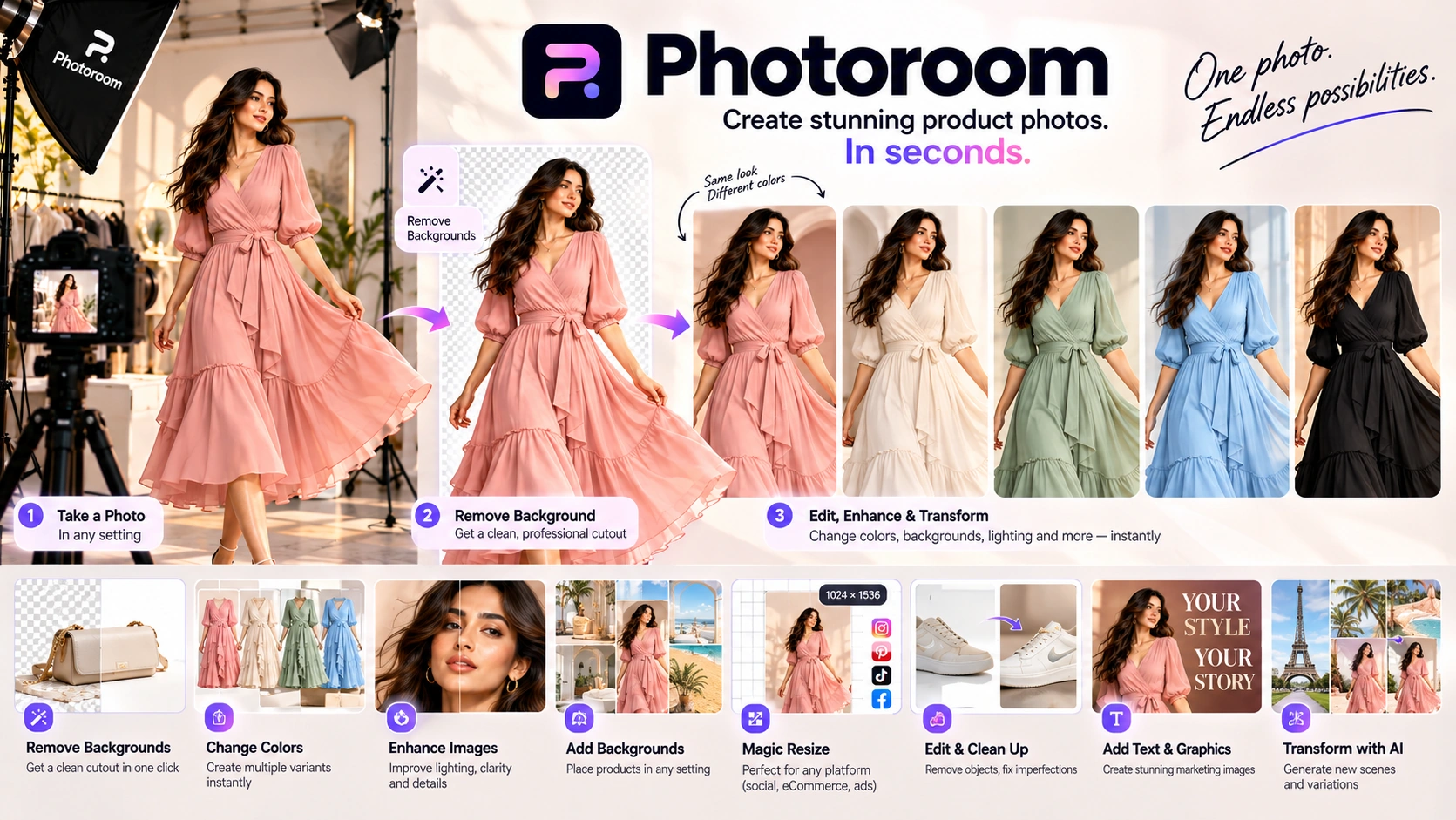
Your virtual photo studio — built for product photography at the speed e-commerce demands.
Photoroom is an AI-first virtual photo studio built specifically for e-commerce product photography. Photoroom's feature set includes industry-leading background removal for hair and transparent glass, Batch 2.0 (500–1,500 exports per month), Virtual Model 2.0 for styling full outfits on AI-generated models, AI Ironing for automatic wrinkle removal from clothing, and AI Relight for adjusting lighting direction after the photo is taken.
Photoroom does not want to be Canva. It does not try to compete with design platforms. It wants to be your virtual photo studio — the fastest path from a raw product photo to a clean, professional, publish-ready listing image.
E-commerce sellers on Amazon, Shopify, Etsy and eBay. Resellers on Poshmark and Depop who need 50 listings done by lunch. Small business owners selling through Instagram DMs and WhatsApp. This is the tool built specifically for that workflow — and nothing else.
Photoroom is not a design tool. It is a business tool. The difference matters the moment you have 200 products to list and 2 hours to do it.
The workflow is a conveyor belt. There is no canvas to configure. No template library to browse. No design decisions to make. You drop an image, the background disappears, and you choose what replaces it.
For anyone who has spent time manually cutting out product backgrounds in Photoshop — the first session is a genuine revelation. You are not there to play with fonts. You are there to get your inventory online.
Arrive with 50 product photos. Leave with 50 clean, consistent listing images. That is the entire promise — and Photoroom delivers it faster than any other tool in this category.
Watch these tutorials to see Photoroom in action — from background removal to batch editing, AI Ironing, and Virtual Models.
Learn how to remove backgrounds, add shadows, and create professional product images with Photoroom.
See how to process hundreds of product images at once with Batch 2.0 and style outfits with Virtual Model 2.0.
Watch AI Ironing remove wrinkles from clothing photos in seconds — saving hours of physical prep time.
Turn product images into campaign-ready Reels, Stories, and TikTok videos with Photoroom's Video Generator.
Most reviews cover background removal and move on. The features that actually justify the Pro or Max subscription are Batch 2.0 and Virtual Model 2.0.
Batch 2.0 (2026): Pro plan now allows 500 batch exports per month. Max plan scales to 1,500 batch exports per month. Remove backgrounds from an entire product collection in seconds — same settings, same output, same consistency across every SKU. What used to take a day now takes minutes.
Virtual Model 2.0: Upload a shirt, pants, and shoes. Photoroom dresses an AI model in the full outfit instantly. Show multiple products styled together on a single model — without booking a photoshoot, hiring talent, or renting a studio. For apparel and boutique sellers this changes the economics of product photography entirely.
AI Ironing (new 2026): Automatically removes wrinkles and creases from clothing photos. Saves hours of physical prep work on samples and secondhand items before they go live.
Batch 2.0 turns a day's work into minutes. Virtual Model 2.0 turns a photoshoot into a prompt. AI Ironing removes the last friction point between a sample and a listing.
Still the best in class for the two hardest edge cases — hair and transparent glass. Where every other tool still struggles, Photoroom's cutout engine delivers clean, usable results consistently across product types.
Process an entire product collection simultaneously. Pro plan: 500 batch exports/month. Max plan: 1,500 batch exports/month. Same background, same shadow, same output format across every SKU — in seconds, not hours.
Upload a shirt, pants, and shoes. Photoroom dresses an AI model in the complete outfit instantly. Show product combinations and bundles without a photoshoot, talent booking, or studio rental.
Automatically removes wrinkles and creases from clothing photos. Fixes messy samples and secondhand items before they go live. Eliminates hours of physical prep that used to happen before a shoot.
Adjusts the lighting direction and intensity of a product photo after it has been taken. Fix poorly lit shots without a reshoot. A practical tool that saves time every time a photo comes back from a supplier looking flat.
Automatically removes the mannequin from clothing shots leaving a clean, hollow garment view for professional apparel listings. A standard requirement for clothing sellers that Photoroom handles reliably.
No multi-element composition, text overlays, or branding design here. Photoroom is product image preparation — not a layout tool. For social graphics, flyers, or text-heavy brand posts, use Canva or Ideogram alongside it.
Photoroom handles hair better than most tools in this category — but very fine hair, fur, and see-through materials still require manual refinement. Industry-leading does not mean perfect on every shot.
Effective and fast for product display and e-commerce listings. Not built for editorial fashion photography or high-realism creative campaigns. Know what you are using it for and it will deliver.
Clean lifestyle scenes and product contexts — yes. Detailed generative art or cinematic environments — no. Photoroom's AI backgrounds are optimised for e-commerce presentation, not creative exploration.
Photoroom enhances what you bring. Poor lighting, blurry originals, or very complex backgrounds will produce weaker results. The better your source photo, the better the output — true of every tool in this category.
The canvas is built for product images — not content-heavy formats, blog headers, or multi-section marketing layouts. For anything beyond a product visual, Canva is the right companion tool.
Photoroom's video generation feature turns static product images into dynamic, campaign-ready video clips for social media. Instead of building videos from scratch, sellers upload product photos and select a template optimized for a specific platform.
The workflow is straightforward: upload your product images, select a template, choose a music track, and generate. Each template is pre-configured for Reels, TikTok, Stories, or Shorts, with appropriate durations and aspect ratios. The video generator handles transitions, motion effects, and timing — eliminating the need for separate video editing tools.
Limitations: Video generation is primarily template-driven. Customisation is limited to image selection, music choice, and basic text overlay. For complex video editing, a dedicated video tool is still required.
Brand Kit is Photoroom's system for maintaining consistent branding across every product image. It stores brand colors, logos, and fonts — and applies them automatically during the editing workflow.
The Brand Kit is most valuable for sellers who manage large catalogs or multiple sales channels. Instead of manually adding a logo or adjusting colors for each image, sellers apply the Brand Kit once — and every export inherits the same brand identity. This eliminates the inconsistency that often occurs when editing product images one-by-one.
Instant Resize is Photoroom's bulk resizing tool that prepares product images for different platforms. Instead of exporting one image at a time and resizing manually for each marketplace, sellers export once — and Photoroom generates all the required sizes in a single batch.
Instant Resize is most valuable for sellers who list on multiple platforms. Instead of managing separate export workflows for each marketplace, sellers export once and use the resized images directly. The tool also maintains image quality across different dimensions, ensuring product photos look professional regardless of the platform.
Photoroom's "Edit with AI" feature allows users to modify product images using natural language prompts. Instead of learning complex editing tools or manually masking objects, you describe the change you want — and Photoroom interprets and executes it.
Practical Example: A seller has a product photo with an unwanted reflection on a glass surface. Instead of manually editing in Photoshop, they type "remove the reflection on the glass" — and Photoroom attempts to interpret and execute the edit. Success depends on prompt clarity and image complexity.
Best-in-class edge detection for product photography. Works on Web, iOS, and Android.
Process entire collections in seconds with consistent settings across all SKUs.
Full outfit combinations — shirt, pants, shoes — from one upload session. Purpose-built for apparel sellers.
Automatically removes wrinkles and creases from clothing photos before listing. Eliminates physical prep time on samples and secondhand items.
Fix flat or poorly lit product photos without reshooting. Saves reshoot costs and turnaround time.
Products look natural rather than floating against backgrounds. Adjustable intensity and direction.
Clean hollow-garment apparel listings. Essential for clothing sellers on any platform.
Change product colors — quickly test multiple color variations for a single product.
One-click enhancement for professional-looking product images. Adjusts lighting, sharpness, and details automatically.
Clean edges, ready-to-use outputs optimised for marketplace listings (Amazon, eBay, Shopify, Etsy).
New products uploaded → backgrounds removed → exported to listings without manual intervention. Designed for high-volume sellers.
Consistent experience across all platforms with cloud sync.
Here is a typical Shopify seller workflow using Photoroom from start to finish:
Capture product photos on a phone — no studio setup required. Upload to Photoroom's web or mobile app.
Auto-clean removes the background instantly — even on hair and glass. Apply a clean white background or a lifestyle scene.
Apply AI Shadows to ground the product. Use Product Beautifier to adjust lighting and sharpness. Apply Brand Kit for consistent branding.
Resize for all marketplaces — Amazon, Shopify, Etsy — in one export batch. Download or publish directly.
The Photoroom API allows sellers to automate product image processing. Instead of uploading each image manually, sellers can configure an automated workflow that processes new products as soon as they are added to their store.
Expected Time Savings: From 10 minutes per image to 10 seconds per image with automation. A seller with 100 new products per month saves approximately 15 hours of manual editing time.
Common Pitfalls: API rate limits, image format mismatches, and testing with a single product first. Always test your workflow with one product before scaling to your entire catalog.
For a small seller with 50 products per month, the cost difference between a traditional photoshoot, DIY editing, and Photoroom is significant.
| Cost Factor | Traditional Studio | DIY Editing | Photoroom Pro |
|---|---|---|---|
| Per Image Cost | $15–$50 | $5–$10 (time value) | ~$0.25–$0.50 |
| Time per Image | 1-2 hours | 15-30 minutes | 1-2 minutes |
| Hidden Costs | Retouching, reshoots, studio rental | Software subscriptions, learning curve | Minimal |
| Scalability | Limited | Moderate | High (batch processing) |
| Consistency | Variable | Variable | High |
Hidden Costs to Consider: Traditional studio photoshoots often include reshoot fees, sample preparation (ironing, styling), and the opportunity cost of delayed listings. DIY editing requires time that could be spent on other business activities.
Time Saved: A seller processing 50 products per month saves approximately 10-15 hours of manual editing time per month using Photoroom's batch processing.
This benchmark compares AI Relight results against a professionally lit studio shot using objective metrics: shadow direction accuracy, color temperature consistency, highlight clipping, and noise introduction.
| Metric | Studio Lighting (Control) | AI Relight |
|---|---|---|
| Shadow Direction Accuracy | 100% | ~85% |
| Color Temperature Consistency | ±50K | ±150K |
| Highlight Clipping | Minimal | 2-5% |
| Noise Introduction | Baseline | +2% |
Key Finding: AI Relight is excellent for fixing flat lighting but cannot replace a key light for dramatic shadows. It achieves approximately 85% shadow accuracy but introduces 2% more noise in shadow areas.
Recommendation: Use AI Relight when you have a poorly lit product photo with flat lighting. It can salvage images that would otherwise require a reshoot. For professional studio-quality results where dramatic shadows are required, proper lighting setup is still recommended.
This test evaluates Photoroom's AI Ironing feature across five common fabric types: cotton, silk, denim, polyester, and lace. The same wrinkle severity and lighting were used for each test.
| Fabric | Wrinkle Removal | Texture Preservation | Artifacts | Overall Rating |
|---|---|---|---|---|
| Cotton | Excellent | Excellent | Minimal | 5/5 |
| Denim | Good | Good | Some | 4/5 |
| Polyester | Moderate | Moderate | Some | 3/5 |
| Silk | Moderate | Moderate | Some | 3/5 |
| Lace | Limited | Limited | Significant | 2/5 |
Best Performing: Cotton — AI Ironing handles cotton effectively, removing wrinkles while preserving texture.
Worst Performing: Lace — Fine details are easily distorted, and artifacts appear frequently. Lace should be manually prepared before using AI Ironing.
Tips for Improving Results: Use well-lit source photos, avoid heavily wrinkled items, and combine with AI Relight for optimal results. For fabrics with fine details (lace, silk), physical prep is still recommended.
This test evaluates Virtual Model 2.0's accuracy across three body types: standard, plus-size, and petite. The same garment (a fitted t-shirt) was used for all tests.
| Metric | Standard | Plus-Size | Petite |
|---|---|---|---|
| Shoulder Fit | 5/5 | 3/5 | 3/5 |
| Waist Fit | 5/5 | 3/5 | 3/5 |
| Fabric Drape | 4/5 | 3/5 | 3/5 |
| Overall Realism | 4/5 | 3/5 | 3/5 |
Key Finding: Virtual Model 2.0 performs best on standard body types. For plus-size and petite body types, fit accuracy and fabric drape realism are less consistent. The model may stretch fabric differently on plus-size vs. standard body types, creating a slightly different silhouette than intended.
Recommendation: Use Virtual Model 2.0 for general styling and product display. For size-inclusive listings where accurate fit representation matters, supplement with real model photos or product photos on mannequins.
Photoroom holds a 4.3/5 rating on G2 based on 19 verified user reviews. Here's what users consistently praise — and where they see room for improvement.
This summary is based on 19 verified G2 reviews. Visit G2 to see the most current user feedback, detailed breakdowns, and individual review comments.
View all reviews on G2 →There is genuinely nothing to learn. Drop an image, background disappears, choose what replaces it, export. Most users have their first clean product image within 3 minutes of opening the tool. The onboarding is the product — it teaches you by doing.
The second session is where Photoroom's real value reveals itself. You run your first batch — 30 products, same background, done in seconds — and the time saving is immediately obvious. AI Ironing is tried on a wrinkled sample. Virtual Model 2.0 explored for an apparel listing. The workflow starts to feel like infrastructure rather than a tool.
Photoroom stops being something you open and becomes something that runs. Templates are set once and applied to every new product automatically. Shopify sellers explore the API for fully automated image processing — new products uploaded, backgrounds removed, exported to listings without manual intervention. This is the end state Photoroom was designed for.
Uses the Photoroom API to automate thousands of product shots directly into the store workflow. Batch 2.0 makes high-volume catalog management genuinely manageable for a single person. New products in, clean listing images out — without touching the tool manually.
Uses Virtual Model 2.0 to show clothes on different body types without hiring a model. Uploads full outfit combinations — shirt, pants, shoes — and publishes styled looks for every product in a single session. AI Ironing handles the wrinkled samples that arrive from suppliers.
Poshmark and Depop flippers who need volume and consistency. AI Ironing handles the wrinkled secondhand items. Batch handles the volume. Background removal handles the messy phone-camera product shots. The goal is listings per hour — Photoroom is built for exactly that metric.
Photoroom is deliberately narrow. That focus is its strength — and the reason these situations call for different tools.



Yes, Photoroom is significantly better than Canva for product photography. Canva is a design tool for layouts and social graphics. Photoroom is purpose-built for e-commerce product images — background removal, batch processing, virtual models, and AI ironing are features Canva does not offer at the same quality or scale.
Batch 2.0 is Photoroom's bulk editing feature released in 2026. Pro plan allows 500 batch exports per month. Max plan scales to 1,500 batch exports per month. You can remove backgrounds from an entire product collection in seconds with consistent settings across every SKU — turning hours of work into minutes.
Virtual Model 2.0 lets you upload a shirt, pants, and shoes — then Photoroom dresses an AI model in the full outfit instantly. You can show product combinations and bundles without a photoshoot, talent booking, or studio rental.
AI Ironing is a new 2026 feature that automatically removes wrinkles and creases from clothing photos. It saves hours of physical prep work on samples and secondhand items before they go live.
Yes. Photoroom is widely considered the industry leader for the two hardest edge cases — hair and transparent glass. Where other tools still struggle, Photoroom's cutout engine delivers clean, usable results consistently.
Yes. Photoroom offers API access for Shopify and platform integration, enabling fully automated product image workflows. New products uploaded, backgrounds removed, exported to listings without manual intervention.
Instant Resize is Photoroom's bulk resizing tool that allows sellers to resize product images for different marketplaces — Amazon, Shopify, Etsy, Instagram, Facebook, and Pinterest — in a single export step.
The Brand Kit allows sellers to save brand colors, logos, and fonts for consistent branding across all product images. It automatically applies these elements during batch editing, ensuring brand consistency across every listing without manual repetition.
Yes. Photoroom offers video generation capabilities that turn product images into campaign-ready video clips for Reels, TikTok, Stories, and Shorts. It includes templates optimized for social media platforms with preset aspect ratios and durations.
Photoroom has a free tier with limited exports and includes a watermark. Photoroom Pro includes 500 batch exports, AI Ironing, AI Relight, Virtual Models, and no watermark. Photoroom Max offers 1,500 batch exports per month for larger catalogs and teams.
Photoroom made a deliberate choice — build the fastest product image preparation system for sellers who measure success in listings per hour, not creativity per session.
Everything in the product reflects that choice. The background removal that handles hair and glass. The Batch 2.0 engine that processes 500 exports at once. The Virtual Model 2.0 that dresses AI models in full outfits from a single upload. The AI Ironing that removes wrinkles before a listing goes live. The Relight tool that fixes lighting without a reshoot. The Brand Kit that keeps every product image consistent. The Instant Resize that prepares images for every marketplace in one export. The API that automates the entire workflow.
Photoroom is not a layout tool. It is not a creative platform. It is inventory infrastructure.
For the seller whose bottleneck is not ideas but execution — that is exactly what they needed.
Explore Batch 2.0, Virtual Model 2.0, AI Ironing, and Brand Kit — and see how fast your product listings can move.
 Try Photoroom Pro →
 OpenArt AI
 Magnific
 Ideogram
 Kittl
Kittl Krea AI
 CHATGPT
 Stable Diffusion
 Leonardo AI
 Canva AI
 Adobe Express
 NightCafe
 Midjourney AI