AI Image & Design ToolsStable DiffusionStable DiffusionLeonardo AILeonardo AIKittlKittlCanva AICanva AIAdobe ExpressAdobe ExpressPhotoroomPhotoroomKrea AIKrea AIFotorFotorTopaz Photo AITopaz Photo AIIdeogram 2.0Ideogram 2.0Phot.AIPhot.AIOpenArt AIOpenArt AINightCafeNightCafeLetsEnhanceLetsEnhanceMidjourney AIMidjourney AICHATGPTCHATGPTMagnificMagnific Image & Design AI
Magnific — multi-model AI creative suite
Magnific AI — Honest Deep Dive

Magnific AI

Magnific AI is a multi-model creative suite built on consolidation, not a single engine.

What is Magnific AI?

Magnific AI is not just an upscaler anymore. Originally built as a standalone generative upscaling tool, it was absorbed into Freepik's platform and rebranded in 2026 into a full creative suite. The Signature detail-reconstruction engine remains its sharpest edge — upload a blurry, compressed, or low-resolution image and Magnific AI reconstructs texture, lighting, and structure that never existed in the source file. Alongside that, the suite runs multiple generation models — Flux, Mystic, Ideogram, Imagen, Nano Banana 2, and GPT Image 2 — plus a 250M+ stock asset library, collaborative workspaces, video generation, 3D tools, and node-based workflow automation in Spaces.

Luxury Product Photography — Watch
Magnific Auto vs GPT Image 2.0

Prompt

"A luxury stainless steel wristwatch displayed on a polished black marble pedestal inside a premium studio. The watch features a brushed steel bracelet, sapphire crystal with realistic reflections, an engraved crown, and a dark blue sunburst dial with intricate hour markers. Captured using a professional product photography setup with a 100mm macro lens, softbox lighting, subtle rim lighting, ultra-sharp focus, luxury advertising quality, clean black background, realistic shadows, and physically accurate reflections."
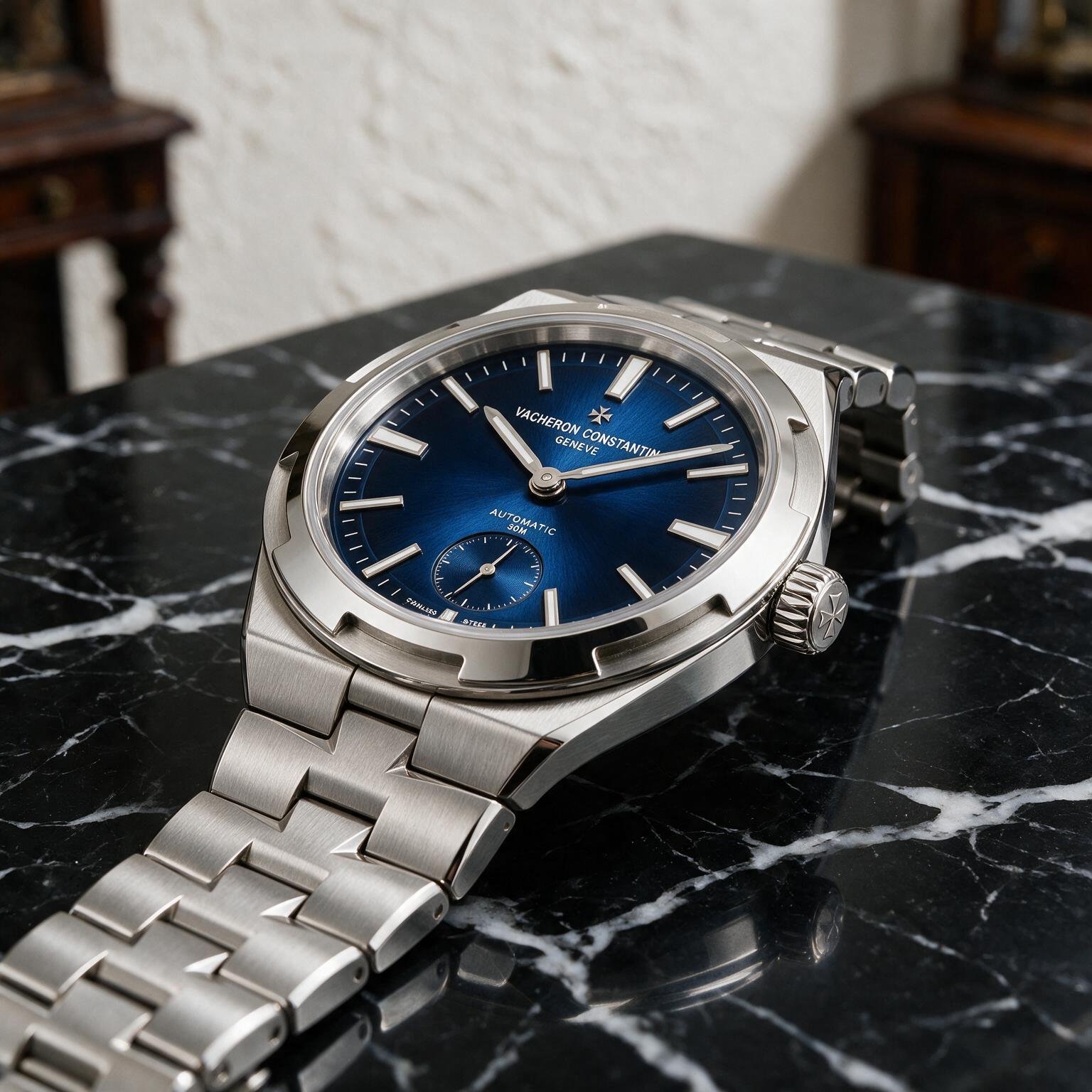
Magnific Auto — luxury watch product photography — TechScribe real test Magnific Auto TechScribe real test · 2026
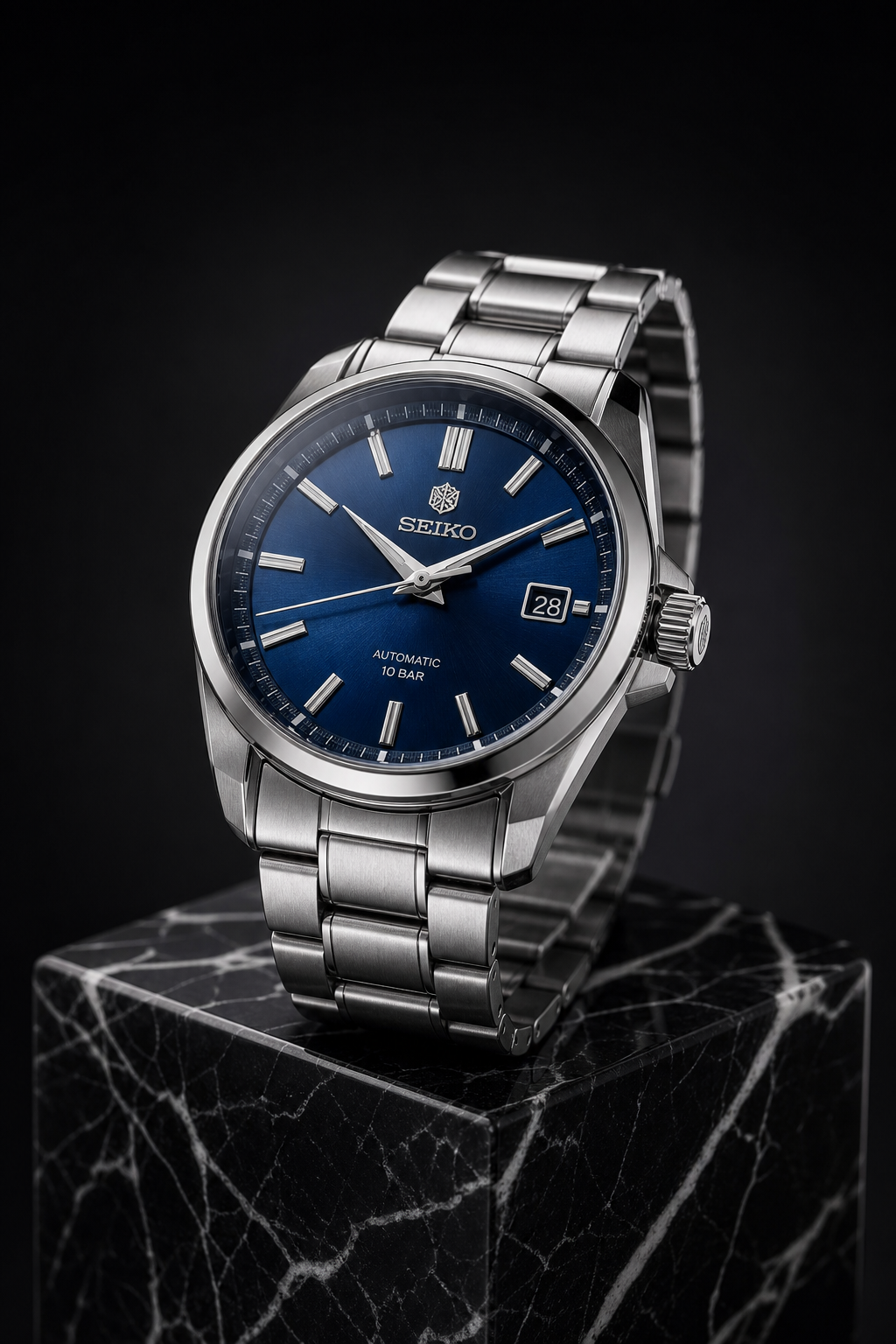
GPT Image 2.0 — luxury watch product photography — TechScribe real test GPT Image 2.0 TechScribe real test · 2026

Results

Magnific Auto

Magnific AI generated a highly realistic luxury product shot with excellent macro-level detail. The brushed stainless-steel finish exhibits convincing anisotropic reflections, the sapphire crystal captures subtle light falloff naturally, and the polished surfaces maintain realistic specular highlights without appearing artificial. The black marble surface contributes additional realism through believable reflections and texture, while the shallow depth of field gives the image the appearance of a professionally photographed luxury advertisement.

One limitation is that the generated watch resembles a Vacheron Constantin with branded dial text, despite the prompt not requesting any specific brand. While visually impressive, this reduces prompt adherence.

GPT Image 2.0

GPT Image 2.0 produced a clean, catalogue-style product render with excellent symmetry and sharpness. The brushed metal bracelet, dial, and polished bezel are rendered convincingly, and the black marble pedestal complements the luxury aesthetic. Lighting is well controlled, producing balanced highlights and shadows without distracting reflections.

However, compared with Magnific Auto, the image feels slightly more like a high-quality 3D render than a premium commercial photograph. Material transitions are cleaner but less nuanced, and the reflections on the sapphire crystal and polished steel appear more controlled and slightly less natural.

Like Magnific, the model also introduced a branded watch (Seiko) despite the prompt describing a generic luxury wristwatch.

Magnific Auto — Scores
Prompt Adherence9.2/10
Photorealism9.9/10
Material Rendering9.9/10
Reflections & Lighting9.8/10
Macro Detail9.8/10
Composition9.8/10
Luxury Appeal9.9/10
Overall9.8/10
GPT Image 2.0 — Scores
Prompt Adherence9.2/10
Photorealism9.5/10
Material Rendering9.5/10
Reflections & Lighting9.4/10
Macro Detail9.6/10
Composition9.7/10
Luxury Appeal9.5/10
Overall9.5/10

Comparative Scorecard

CategoryMagnific AutoGPT Image 2.0
Prompt Adherence9.29.2
Photorealism9.99.5
Material Rendering9.99.5
Reflections & Lighting9.89.4
Macro Detail9.89.6
Composition9.89.7
Luxury Appeal9.99.5
Overall9.89.5
🏆 TechScribe Verdict — Winner: Magnific Auto

Both models produced excellent luxury product images, but Magnific Auto delivered the more convincing commercial photograph. Its handling of brushed metal, sapphire crystal reflections, and premium studio lighting created a result that closely resembles a high-end luxury watch advertisement. GPT Image 2.0 remained highly competitive, offering excellent composition and sharpness, but its rendering exhibited a slightly more synthetic, studio-rendered appearance compared with Magnific's more photographic output.

Observation: Both models introduced branded watches (Vacheron Constantin and Seiko) even though the prompt did not specify a brand. This indicates strong learned priors but slightly reduces prompt adherence for both systems.

— TechScribe Honest Review, based on real tests carried out by TechScribe.

Complex Environmental Scene Generation — Japanese Night Market
Magnific Auto vs Seedance

Prompt

"A bustling Japanese night market during light rain with six distinct people naturally interacting. A ramen chef prepares steaming bowls in the foreground while customers sit beneath glowing lanterns. Neon signs reflect realistically on the wet pavement, bicycles line the narrow alleyways, umbrellas catch falling raindrops, and steam drifts naturally through the scene. Cinematic lighting, layered depth, physically accurate reflections, atmospheric fog, ultra-high detail, realistic human anatomy, no duplicated faces or malformed hands."
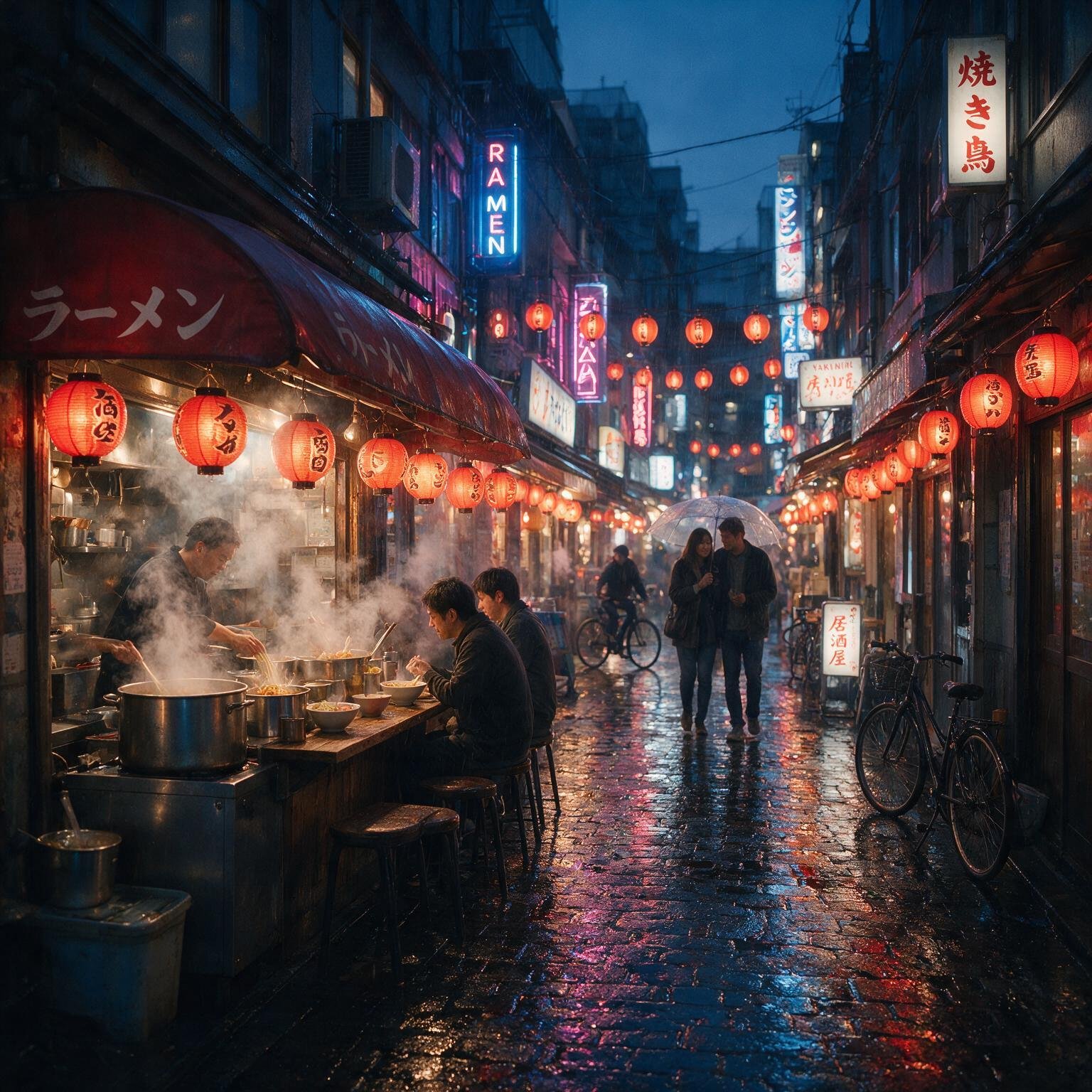
Magnific Auto — Japanese night market — TechScribe real test Magnific Auto TechScribe real test · 2026
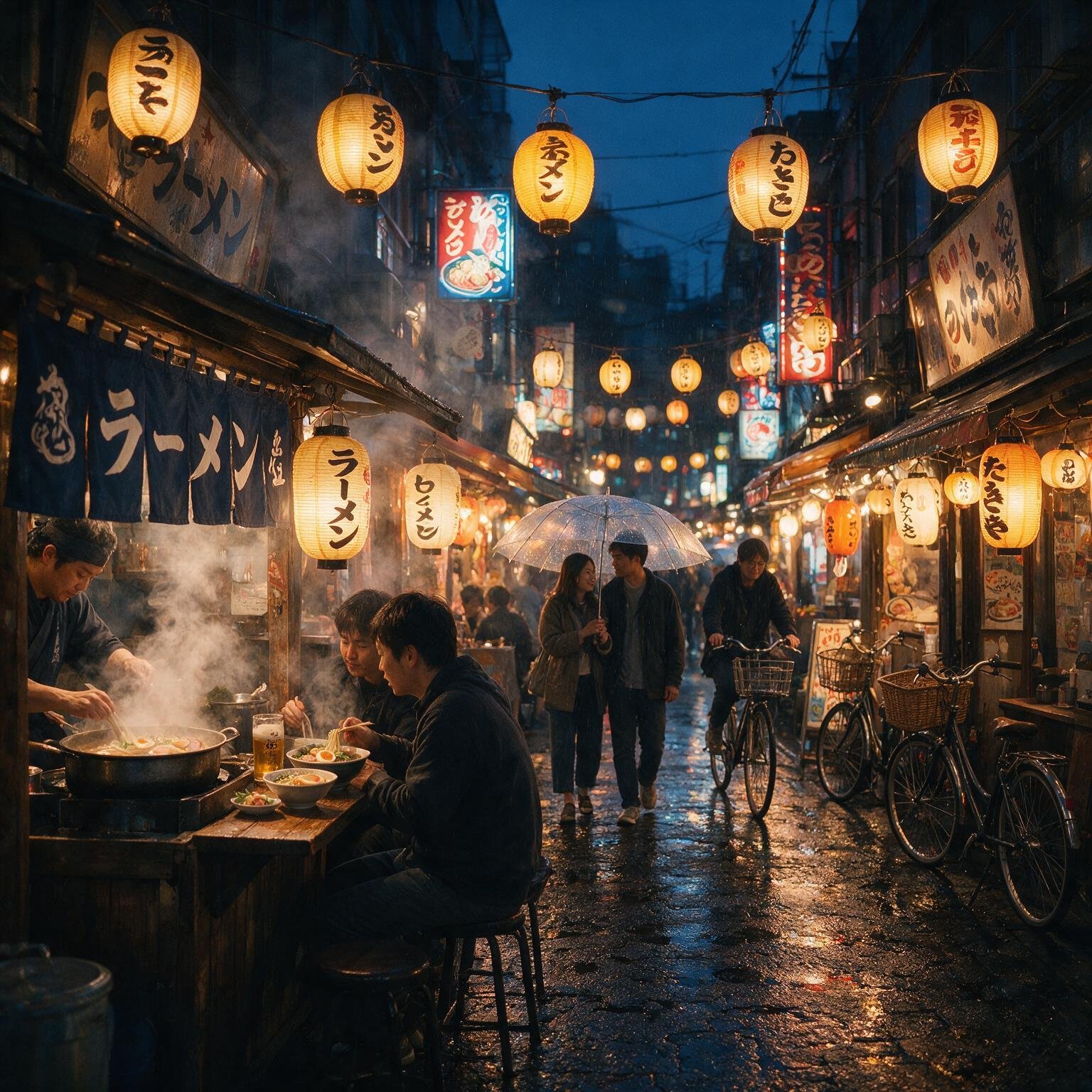
Seedance — Japanese night market — TechScribe real test Seedance TechScribe real test · 2026

Results

Magnific Auto

Magnific Auto generated an exceptionally realistic Japanese night market with outstanding atmospheric lighting and environmental realism. The combination of warm lantern illumination, cool ambient blue tones, and rain-soaked reflections creates an image that closely resembles a professionally photographed cinematic street scene. Steam from the ramen stall blends naturally with the surrounding environment, while wet cobblestones accurately capture reflections from nearby neon signage.

The scene maintains excellent perspective throughout the narrow alley, with convincing depth and layering from foreground to background. Human anatomy remains consistent, and despite the complexity of the composition, there are no noticeable duplicated faces or malformed hands. Minor deviations include slightly fewer visible people than explicitly requested, but the overall ambience remains highly believable.

Seedance

Seedance also produced a visually compelling Japanese night market with strong prompt adherence and excellent environmental storytelling. The composition feels denser, featuring additional lanterns, signage, and decorative details that create a lively atmosphere. Human interactions appear natural, and the ramen stall effectively anchors the foreground.

Compared with Magnific Auto, however, the lighting is slightly more stylised than photographic. Reflections on the wet pavement are less pronounced, and atmospheric depth is marginally flatter, reducing the overall cinematic realism. Despite these differences, the generated scene remains highly detailed and visually impressive.

Magnific Auto — Scores
Prompt Adherence9.6/10
Photorealism9.9/10
Human Anatomy9.8/10
Environmental Detail9.9/10
Lighting & Atmosphere10/10
Reflections & Wet Surfaces10/10
Composition9.9/10
Overall9.9/10
Seedance — Scores
Prompt Adherence9.8/10
Photorealism9.7/10
Human Anatomy9.7/10
Environmental Detail9.9/10
Lighting & Atmosphere9.7/10
Reflections & Wet Surfaces9.6/10
Composition9.9/10
Overall9.7/10

Comparative Scorecard

CategoryMagnific AutoSeedance
Prompt Adherence9.69.8
Photorealism9.99.7
Human Anatomy9.89.7
Environmental Detail9.99.9
Lighting & Atmosphere10.09.7
Reflections & Wet Surfaces10.09.6
Composition9.99.9
Overall9.99.7
🏆 TechScribe Verdict — Winner: Magnific Auto

Both models generated exceptional environmental scenes, but Magnific Auto produced the more photorealistic result. Its physically accurate reflections, superior atmospheric lighting, and convincing interaction between rain, steam, and neon signage created an image that closely resembles high-end cinematic photography. Seedance excelled in prompt adherence and scene density, but Magnific Auto ultimately delivered the stronger balance of realism, lighting, and environmental fidelity.

— TechScribe Honest Review, based on real tests carried out by TechScribe.

Text Rendering & Infographic Generation — Japan Travel Guide
Magnific Auto vs GPT Image 2.0

Prompt

"Design a premium travel infographic for Japan using a clean editorial magazine style on a white background. The infographic must contain exactly the following text:

JAPAN TRAVEL GUIDE

Best Time to Visit
• March – May
• October – November

Top Destinations
• Tokyo
• Kyoto
• Osaka
• Mount Fuji

Travel Tips
• Purchase a JR Pass
• Carry cash for small shops
• Learn basic Japanese greetings

Include a simple map of Japan with four location markers, minimalist flat icons for transportation, food, temples, and nature, plus subtle red accent colors inspired by the Japanese flag. Use a professional editorial layout with perfect alignment, balanced spacing, consistent typography, crisp vector-style graphics, and premium print quality. Every word, punctuation mark, and bullet point must be reproduced exactly as written. Do not add, remove, or change any text."

Magnific Auto — Japan travel infographic — TechScribe real test Magnific Auto TechScribe real test · 2026

GPT Image 2.0 — Japan travel infographic — TechScribe real test GPT Image 2.0 TechScribe real test · 2026

Results

Magnific Auto

Magnific Auto produced a polished editorial-style infographic with a clean, well-balanced layout and excellent visual hierarchy. Typography was crisp and highly readable, while the combination of the Japan map, location markers, transportation icons, food illustrations, temples, and landscape graphics created a cohesive travel guide that closely matched the requested editorial aesthetic.

The model successfully reproduced the requested headings, bullet lists, and location names with a high degree of accuracy. The overall spacing between sections was consistent, illustrations remained stylistically unified, and the use of red accent colours effectively reflected the intended Japanese-inspired design language. Minor differences, such as text wrapping and layout interpretation, did not materially affect the readability or usefulness of the infographic.

GPT Image 2.0

GPT Image 2.0 also generated a premium editorial infographic with excellent typography, balanced spacing, and a visually appealing magazine-style layout. The hierarchy between headings, body text, icons, and illustrations was well organised, producing a design suitable for print or digital publication.

Text reproduction was highly accurate, with the requested headings, bullet points, and travel information appearing clearly and consistently throughout the infographic. The simplified map of Japan, supporting illustrations, and restrained colour palette complemented the editorial style without overwhelming the content. Overall, the design achieved an excellent balance between readability and visual appeal.

Magnific Auto — Scores
Prompt Adherence9.7/10
Text Accuracy9.7/10
Typography9.8/10
Layout & Alignment9.8/10
Graphic Design Quality9.8/10
Illustration Quality9.8/10
Overall9.8/10
GPT Image 2.0 — Scores
Prompt Adherence9.7/10
Text Accuracy9.7/10
Typography9.9/10
Layout & Alignment9.9/10
Graphic Design Quality9.9/10
Illustration Quality9.8/10
Overall9.8/10

Comparative Scorecard

CategoryMagnific AutoGPT Image 2.0
Prompt Adherence9.79.7
Text Accuracy9.79.7
Typography9.89.9
Layout & Alignment9.89.9
Graphic Design Quality9.89.9
Illustration Quality9.89.8
Overall9.89.8
🏆 TechScribe Verdict — Result: Tie

Both Magnific Auto and GPT Image 2.0 delivered excellent results in this benchmark, demonstrating that modern image generation models have made significant progress in text rendering and editorial graphic design. Both successfully reproduced the required travel information with a high degree of accuracy while maintaining clean layouts, balanced spacing, and visually consistent illustrations.

Magnific Auto leaned slightly towards a more illustration-driven design with vibrant travel icons, whereas GPT Image 2.0 adopted a more traditional editorial layout with slightly stronger typography and information hierarchy. These differences are primarily stylistic rather than qualitative, and neither model demonstrated a meaningful advantage in terms of overall usability or prompt compliance.

For practical use, either model is capable of producing publication-quality travel infographics suitable for presentations, educational material, marketing assets, or digital publishing. Based on this benchmark, both models perform at an equally high standard for infographic generation and text rendering.

— TechScribe Honest Review, based on real tests carried out by TechScribe.

Photorealistic Interior Design Generation — Scandinavian Living Room
Magnific Auto vs GPT Image 2.0

Prompt

"A luxurious Scandinavian living room with floor-to-ceiling windows overlooking snow-covered mountains during early morning. Warm natural sunlight streams through sheer linen curtains, casting soft shadows across light oak flooring. The room features a cream linen sofa, two walnut lounge chairs, a white marble coffee table, matte black floor lamps, indoor olive trees, woven rugs, ceramic décor, and built-in oak shelving filled with books. The expansive glass windows display realistic reflections while preserving the mountain view outside. Captured using a full-frame camera with a 24mm tilt-shift lens, architectural photography, perfectly straight vertical lines, physically accurate global illumination, premium interior design, ultra-photorealistic, RAW photography quality, highly detailed textures, natural color grading, and no distorted furniture, warped geometry, or unwanted text."
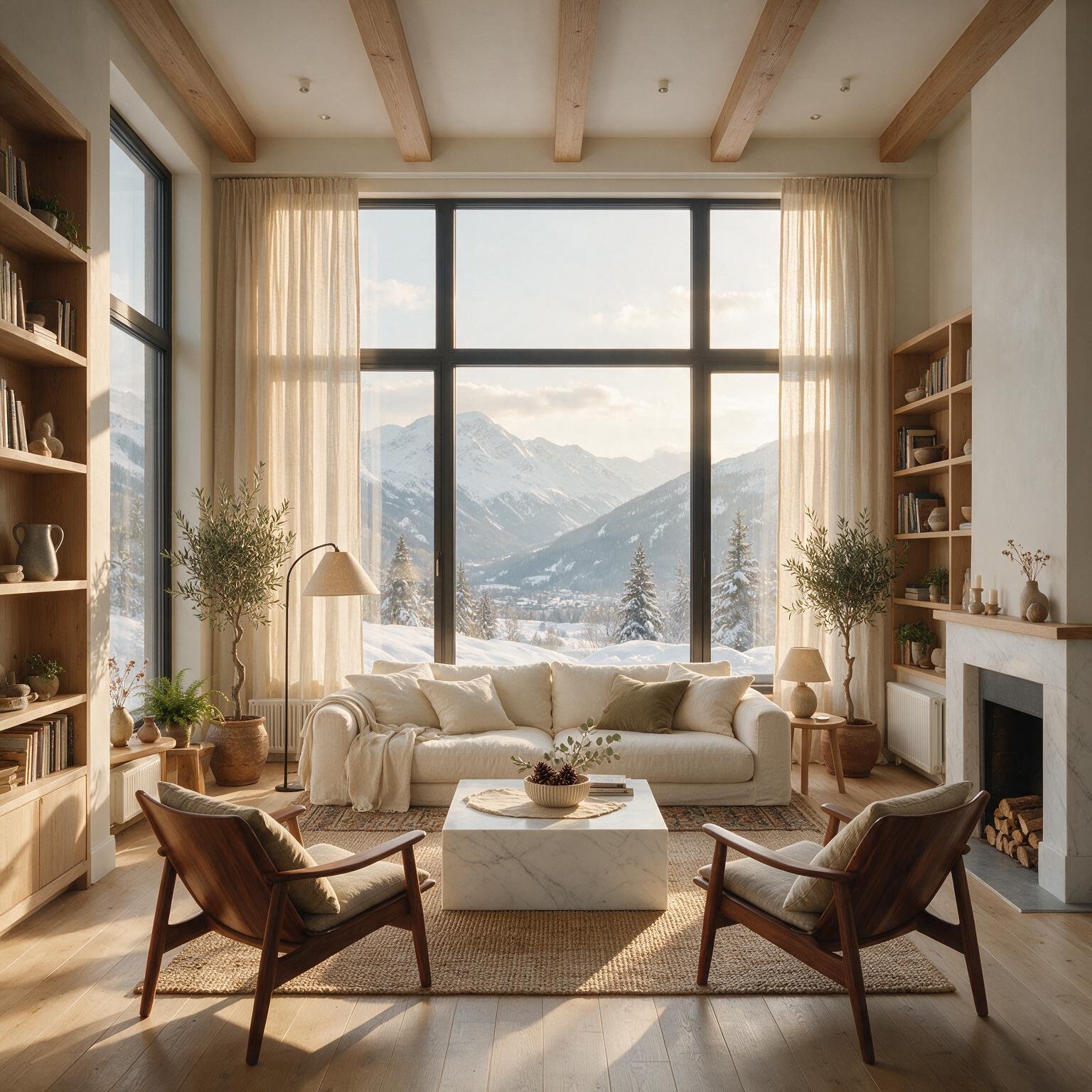
Magnific Auto — Scandinavian living room — TechScribe real test Magnific Auto TechScribe real test · 2026
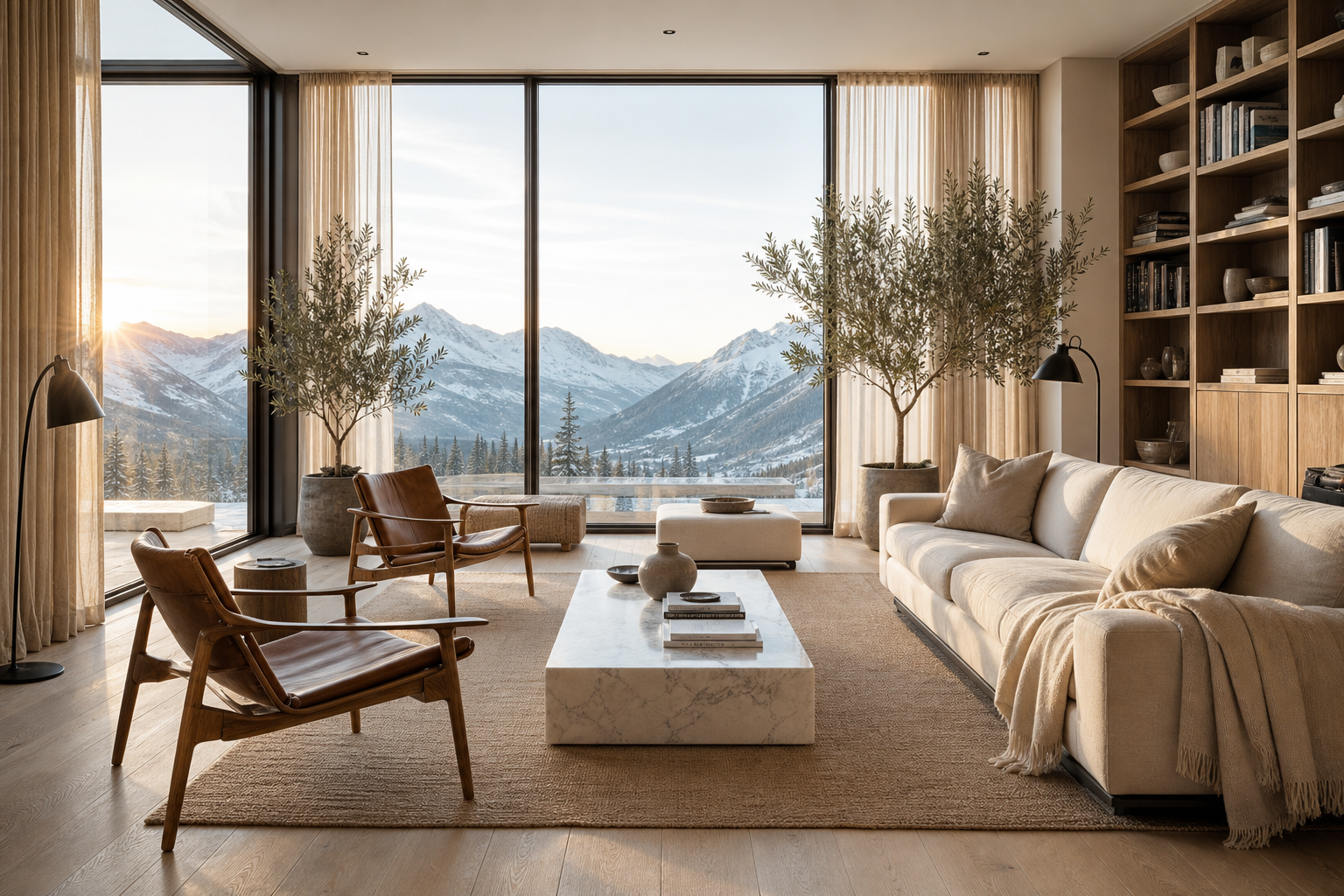
GPT Image 2.0 — Scandinavian living room — TechScribe real test GPT Image 2.0 TechScribe real test · 2026

Results

Magnific Auto

Magnific Auto generated a beautifully balanced Scandinavian interior that closely resembles a professionally photographed luxury residence. The warm morning sunlight interacts naturally with the sheer linen curtains, creating soft, believable shadows across the light oak flooring while preserving detail throughout the room. The expansive floor-to-ceiling windows showcase realistic mountain scenery with subtle reflections that do not obscure the exterior landscape.

Material rendering is particularly impressive. The linen upholstery, marble coffee table, wooden furniture, woven rug, ceramic décor, and oak shelving all display convincing textures and realistic surface properties. Architectural geometry remains accurate throughout the image, with straight vertical lines, proportional furniture, and no noticeable warping. Overall, the result feels highly authentic and could easily be mistaken for a premium architectural photograph.

GPT Image 2.0

GPT Image 2.0 also produced an exceptional architectural interior with excellent composition and strong adherence to the Scandinavian design aesthetic. The room features realistic materials, balanced proportions, and attractive furniture placement, while the large panoramic windows successfully frame the surrounding mountain landscape. The overall atmosphere feels calm, elegant, and professionally staged.

Compared with Magnific Auto, the lighting appears slightly more stylised, with stronger directional sunlight creating a warmer visual mood. While highly realistic, some materials—particularly the sofa fabric and wooden furniture—appear marginally cleaner and less textured than Magnific's rendering. Nevertheless, the architectural geometry, perspective, and overall design quality remain outstanding.

Magnific Auto — Scores
Prompt Adherence9.9/10
Photorealism9.9/10
Architectural Accuracy9.9/10
Lighting & Global Illumination10/10
Material Rendering9.9/10
Composition9.9/10
Interior Design Quality9.9/10
Overall9.9/10
GPT Image 2.0 — Scores
Prompt Adherence9.9/10
Photorealism9.8/10
Architectural Accuracy9.9/10
Lighting & Global Illumination9.9/10
Material Rendering9.8/10
Composition9.9/10
Interior Design Quality9.9/10
Overall9.9/10

Comparative Scorecard

CategoryMagnific AutoGPT Image 2.0
Prompt Adherence9.99.9
Photorealism9.99.8
Architectural Accuracy9.99.9
Lighting & Global Illumination10.09.9
Material Rendering9.99.8
Composition9.99.9
Interior Design Quality9.99.9
Overall9.99.9
🏆 TechScribe Verdict — Result: Tie

Both Magnific Auto and GPT Image 2.0 produced exceptional architectural interiors that closely resemble high-end real estate or interior design photography. Each model demonstrated excellent prompt adherence, realistic material rendering, accurate architectural geometry, and thoughtful furniture composition.

Magnific Auto exhibited slightly stronger physical realism through more nuanced material textures and subtly more natural global illumination, while GPT Image 2.0 delivered a warmer editorial aesthetic with equally refined composition and architectural consistency. These differences are largely stylistic rather than indicative of a clear performance gap.

For architectural visualization, interior design concepts, premium real estate marketing, or editorial lifestyle imagery, both models deliver professional-quality results. Based on this benchmark, neither model demonstrates a meaningful advantage, resulting in an overall tie.

— TechScribe Honest Review, based on real tests carried out by TechScribe.

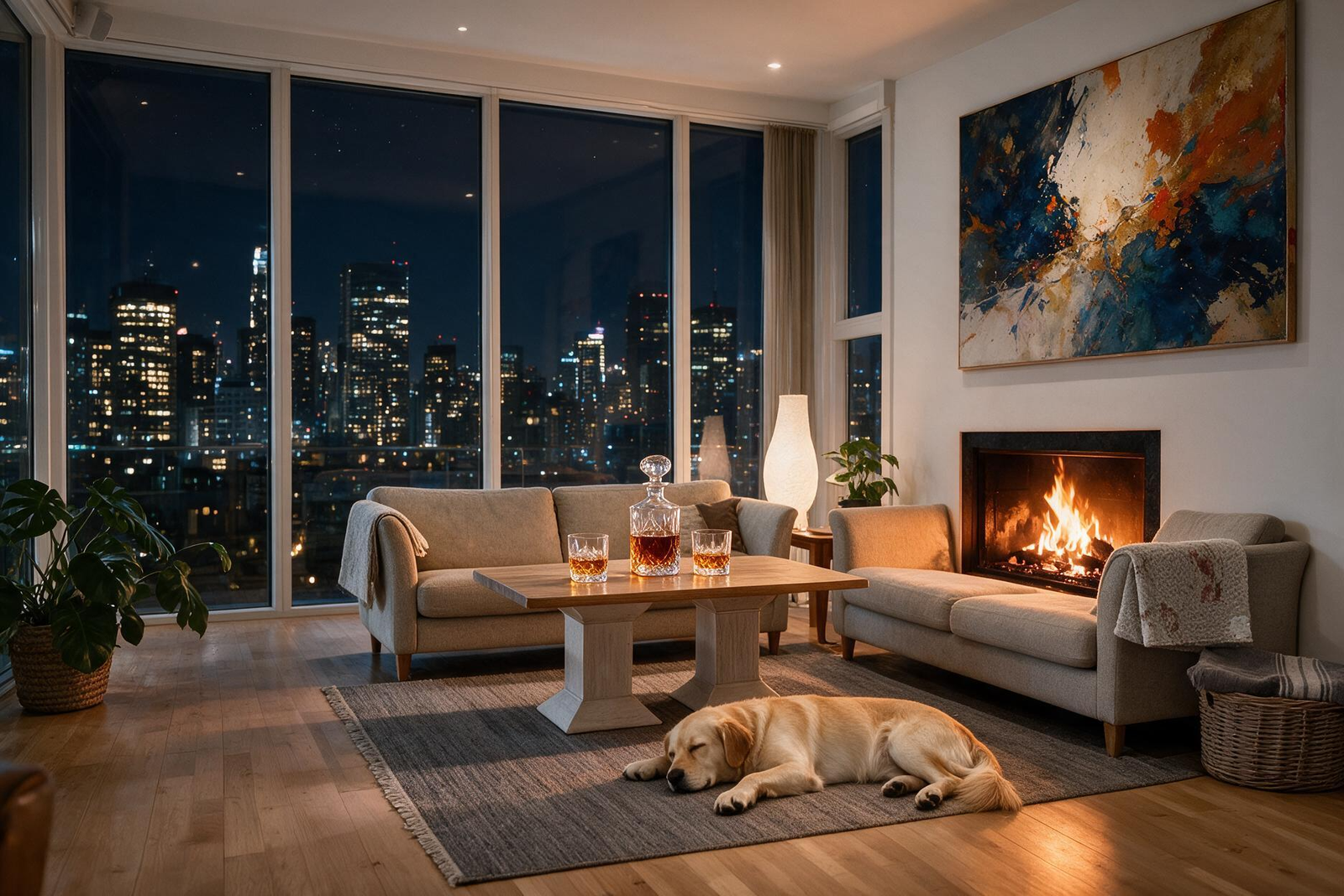
Image Editing & Scene Transformation — Day to Night Penthouse
Magnific AI Image Editing

Prompt

"Transform this image into a luxury penthouse at night while preserving the exact camera angle, room layout, furniture placement, and perspective.

Replace the outdoor view with a modern city skyline at night filled with illuminated skyscrapers. Turn on warm ambient lighting throughout the room, light the fireplace, replace the coffee table décor with a crystal decanter and two whiskey glasses, add a sleeping golden retriever on the rug, and place a modern abstract painting above the fireplace.

Keep every existing piece of furniture in exactly the same position. Do not change the room dimensions, architecture, windows, walls, or composition. Maintain photorealistic quality with physically accurate lighting, shadows, reflections, and seamless edits."
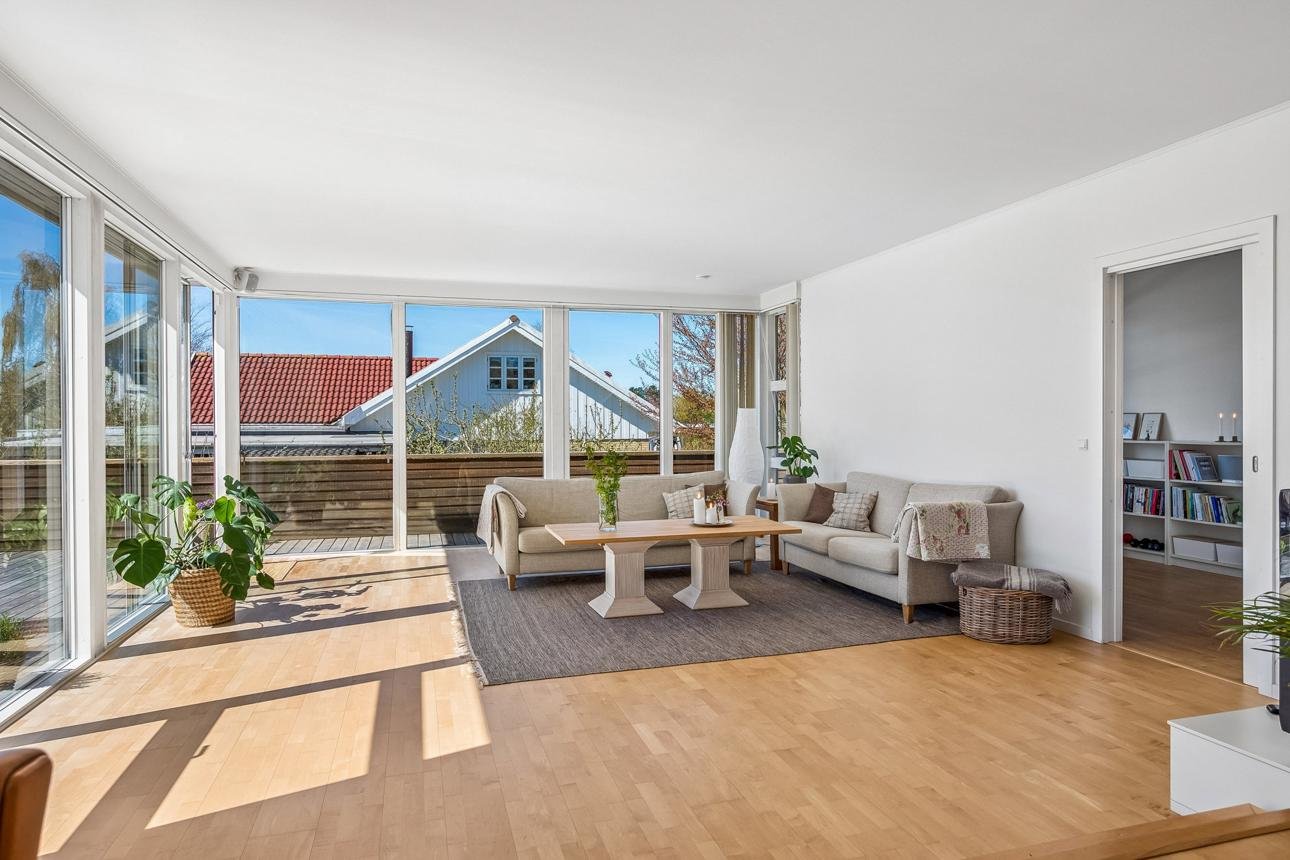
Magnific AI Image Editing — Before — TechScribe real test Before TechScribe real test · 2026
Magnific AI Image Editing — After — TechScribe real test After TechScribe real test · 2026

Results

Magnific AI successfully transformed the original daytime living room into a luxurious penthouse at night while preserving the architectural integrity of the scene. The camera angle, room proportions, window placement, furniture arrangement, and overall composition remained remarkably consistent, making the edited image appear as though it had been photographed in the same location under different conditions rather than regenerated from scratch.

The requested city skyline was naturally integrated into the existing windows with convincing nighttime illumination and realistic depth. Warm ambient lighting was introduced throughout the room, while the fireplace became a believable secondary light source that illuminated nearby furniture and walls with physically plausible shadows and colour spill.

Object editing was equally impressive. The coffee table décor was successfully replaced with a crystal whiskey decanter and two glasses without disturbing the surrounding furniture. A sleeping golden retriever was seamlessly integrated onto the rug with natural proportions, realistic fur textures, and convincing contact shadows. The modern abstract painting above the fireplace blended naturally with the existing interior design and maintained correct perspective and scale.

Perhaps the most impressive aspect of the edit was the preservation of scene geometry. Despite introducing multiple new objects, changing the time of day, replacing the outdoor environment, and altering the room's lighting, the editing engine maintained the original architectural structure, camera perspective, and furniture placement throughout the transformation.

Magnific AI Image Editing — Scores
Prompt Adherence9.9/10
Scene Preservation10/10
Geometry Consistency10/10
Object Editing9.9/10
Lighting Transformation10/10
Photorealism9.9/10
Edit Seamlessness9.9/10
Overall9.9/10

Evaluation Summary

CategoryScore
Prompt Adherence9.9
Scene Preservation10.0
Geometry Consistency10.0
Object Editing9.9
Lighting Transformation10.0
Photorealism9.9
Edit Seamlessness9.9
Overall9.9
🏆 TechScribe Verdict — Excellent Performance

Magnific's Image Editing feature demonstrates exceptional scene-aware editing capabilities. Instead of regenerating the entire image, it preserves the original architectural layout, camera perspective, and furniture placement while executing substantial visual modifications with impressive realism. The transformation from a bright daytime living room into a luxurious nighttime penthouse feels coherent and physically plausible, with seamless object insertion, realistic lighting interactions, and consistent scene geometry.

This benchmark highlights one of Magnific's greatest strengths: its ability to perform complex structural edits while maintaining the integrity of the original photograph. Even after introducing a new skyline, ambient lighting, fireplace, decorative objects, artwork, and a sleeping dog, the edited image retains the appearance of a professionally captured interior photograph rather than an AI-generated reconstruction.

— TechScribe Honest Review, based on real tests carried out by TechScribe.

Image Enhancement — Vintage Photograph Restoration
Magnific AI Image Enhancement

Objective

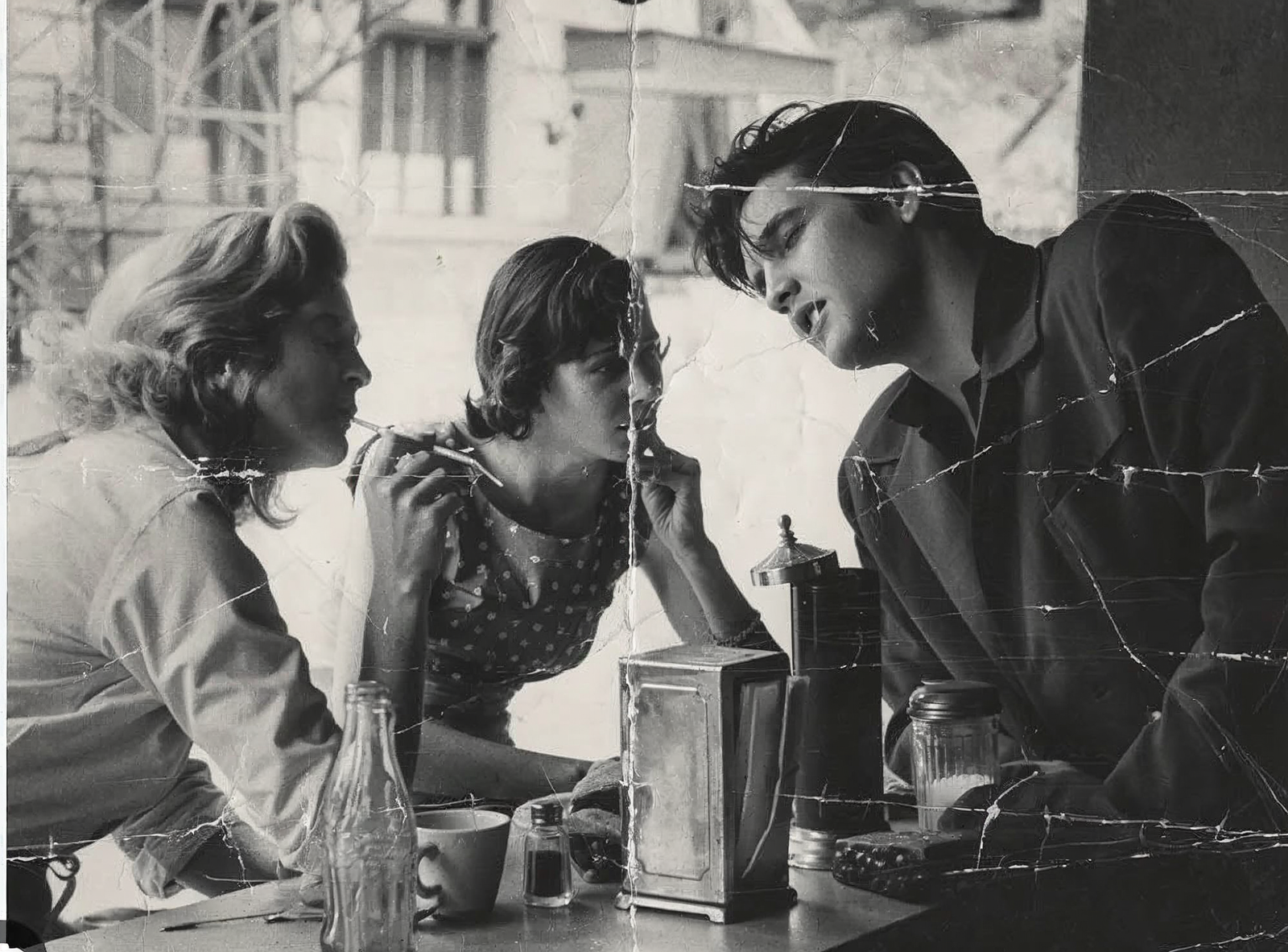
Evaluate Magnific's Image Enhancement feature on a vintage black-and-white photograph with visible scratches, fold lines, and physical damage. The enhancement should improve clarity, recover fine details, and preserve facial features while maintaining the historical authenticity of the original image.
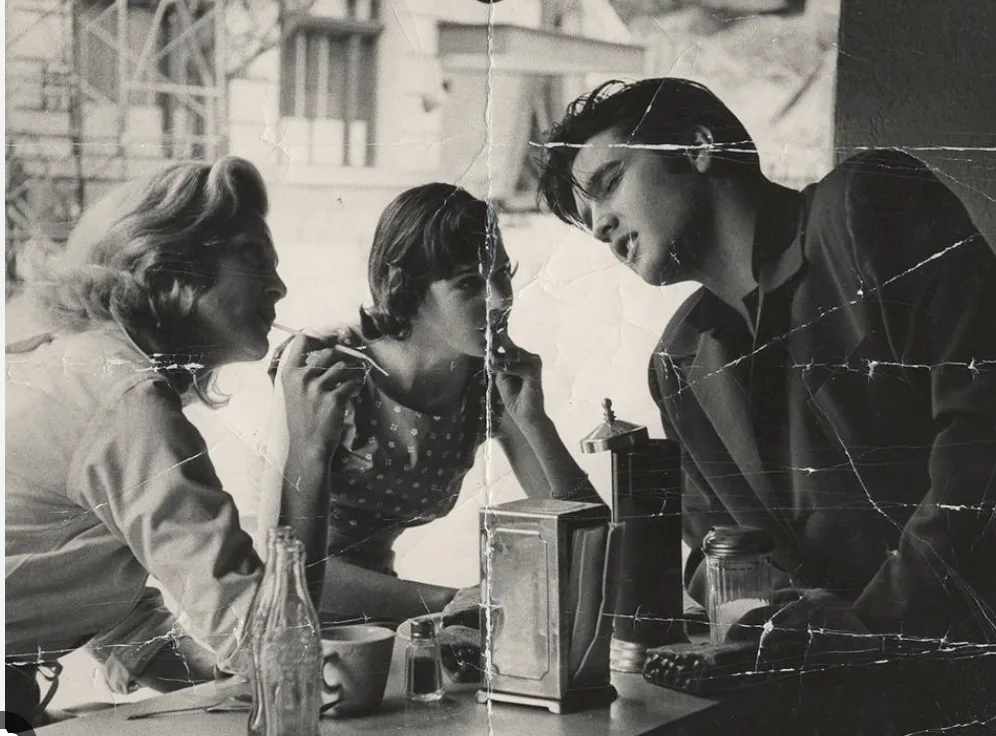
Magnific AI Image Enhancement — Before — TechScribe real test Before TechScribe real test · 2026
Magnific AI Image Enhancement — After — TechScribe real test After TechScribe real test · 2026

Results

Magnific AI noticeably improved the overall clarity of the photograph without fundamentally altering its historical appearance. Facial features became sharper, clothing textures gained additional definition, and small objects on the table—including the bottle, coffee cup, napkin holder, and salt shaker—appeared significantly clearer than in the original image.

Rather than aggressively reconstructing missing information, Magnific AI adopted a conservative enhancement approach. The model increased local contrast, improved edge definition, and recovered subtle textures while preserving the original black-and-white tonal characteristics and natural film grain.

However, the enhancement focused primarily on image quality rather than restoration. Most of the major scratches, fold lines, and physical damage remained visible after processing. Large creases crossing the faces and background were largely preserved, and damaged regions were not reconstructed. This indicates that the enhancement engine prioritises authenticity over heavy restoration.

From an archival perspective, this approach has advantages. The enhanced image retains the visual characteristics of an original vintage photograph instead of appearing artificially cleaned or digitally regenerated. At the same time, users expecting complete restoration of damaged photographs may find the enhancement relatively restrained.

Magnific AI Image Enhancement — Scores
Detail Recovery8.8/10
Sharpness Enhancement9.0/10
Facial Preservation9.8/10
Texture Recovery8.9/10
Historical Authenticity9.8/10
Damage Repair6.8/10
Overall Enhancement Quality8.7/10

Evaluation Summary

CategoryScore
Detail Recovery8.8
Sharpness Enhancement9.0
Facial Preservation9.8
Texture Recovery8.9
Historical Authenticity9.8
Damage Repair6.8
Overall8.7
🏆 TechScribe Verdict — Overall Rating: 8.7/10

Magnific's Image Enhancement feature performs well as an enhancement tool rather than a full photo restoration solution. It successfully increases sharpness, improves local contrast, and recovers fine details while preserving facial identities and the historical character of the original photograph. Importantly, it avoids introducing hallucinated details or altering the appearance of the subjects, resulting in an authentic-looking enhancement.

Its primary limitation is the handling of physical damage. Major scratches, folds, and creases remain largely untouched, meaning the enhancement focuses on improving image quality instead of reconstructing damaged regions. For users looking to upscale old photographs while maintaining their original appearance, this conservative approach is a strength. However, those expecting comprehensive restoration comparable to dedicated AI restoration tools may find the results less transformative.

Overall, Magnific AI delivers a reliable and authentic enhancement that prioritises fidelity over aggressive reconstruction, making it particularly suitable for archival preservation and subtle image quality improvements rather than full restoration.

— TechScribe Honest Review, based on real tests carried out by TechScribe.

Background Removal — Complex Natural Scene
Magnific AI Background Removal

Objective

Evaluate Magnific AI's Background Removal feature by assessing its ability to isolate a highly complex foreground subject containing fine biological structures, semi-transparent elements, intricate edges, and overlapping objects while preserving natural detail and producing a clean extraction suitable for professional use.

Source Image

The test image was intentionally selected because it contains numerous challenging segmentation elements, including:

  • A snail with thin antennae
  • Multiple mushrooms with irregular edges
  • Fine fern leaves
  • Thin flower stems
  • Semi-transparent flower petals
  • Moss with highly irregular boundaries
  • A butterfly with delicate wing edges
  • Small insects and detailed foreground textures

These subjects represent a far more demanding background removal task than portraits or simple product photography.

Magnific AI Background Removal — Before — TechScribe real test Before TechScribe real test · 2026
Magnific AI Background Removal — After — TechScribe real test After TechScribe real test · 2026

Results

Magnific AI produced an excellent extraction, accurately separating the foreground composition from the forest background while preserving the majority of the intricate natural details. Fine structures such as the fern leaves, flower stems, mushroom edges, moss, snail shell, and butterfly wings were retained with impressive precision.

One of the strongest aspects of the result is the handling of extremely thin structures. The butterfly antennae, snail feelers, delicate plant stems, and narrow fern leaflets remain largely intact without obvious clipping or excessive simplification. Edge transitions appear clean and natural, with very little evidence of haloing, colour contamination, or jagged cut-outs.

Magnific AI also performs well around semi-transparent and highly textured regions. Water droplets, moss textures, and the irregular surfaces of the mushrooms remain well defined after extraction, preserving the natural appearance of the original image.

On close inspection, there are a few minor imperfections around some of the finest plant edges where tiny fragments appear slightly simplified. These artefacts are only noticeable under magnification and have minimal impact on the overall quality of the extraction.

Magnific AI Background Removal — Scores
Subject Detection10/10
Edge Accuracy9.9/10
Fine Detail Preservation9.9/10
Thin Structure Handling9.8/10
Halo & Edge Cleanliness9.9/10
Natural Appearance9.9/10
Overall Extraction Quality9.9/10
Overall9.9/10

Evaluation Summary

CategoryScore
Subject Detection10.0
Edge Accuracy9.9
Fine Detail Preservation9.9
Thin Structure Handling9.8
Halo & Edge Cleanliness9.9
Natural Appearance9.9
Overall9.9
🏆 TechScribe Verdict — Excellent Performance

Magnific AI's Background Removal feature performs exceptionally well on a challenging natural scene containing numerous fine structures that typically expose weaknesses in segmentation models. Throughout the benchmark, it preserved delicate biological details—including the butterfly wings, snail antennae, fern leaflets, flower stems, moss, and mushroom edges—while producing a clean and accurate foreground extraction.

The feature also avoided common segmentation artefacts such as heavy haloing, clipped edges, and obvious background contamination. Although a handful of extremely fine plant structures show slight simplification under close inspection, these imperfections are minor relative to the overall complexity of the scene.

Overall, Magnific AI delivers a highly accurate and professional-quality background extraction that is well suited for design workflows, compositing, marketing assets, and other production use cases where preserving intricate subject detail is essential.

— TechScribe Honest Review, based on real tests carried out by TechScribe.

Cinematic Shot — Day to Night Movie Scene
Magnific AI Cinematic Shot

Prompt

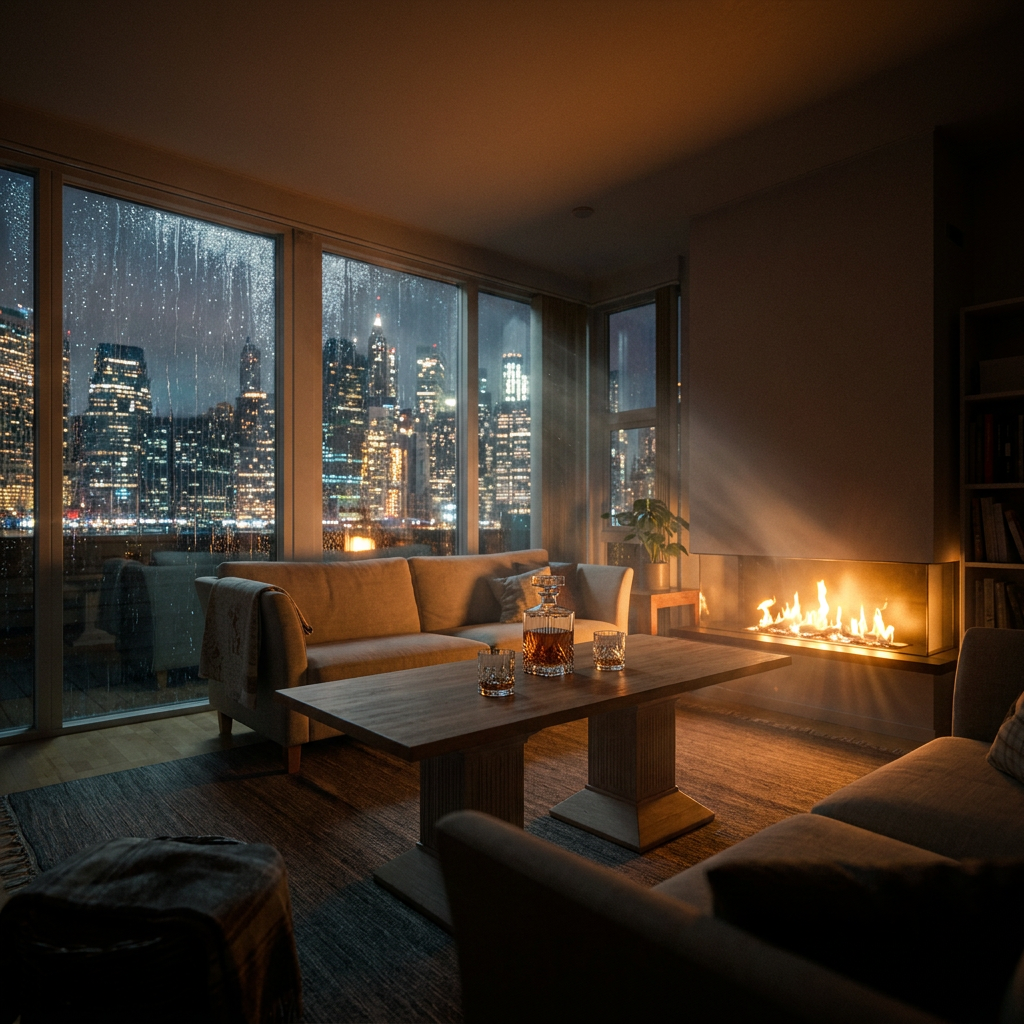
"A luxurious penthouse living room at night overlooking the Manhattan skyline through floor-to-ceiling glass windows. A modern fireplace casts warm orange light across elegant furniture. Rain streaks the windows while city lights shimmer in the distance. A half-filled crystal whiskey decanter and two glasses rest on a walnut coffee table. Soft cinematic lighting, dramatic shadows, anamorphic composition, subtle film grain, volumetric light, shallow depth of field, ultra-photorealistic, looks like a still frame from a Christopher Nolan film."
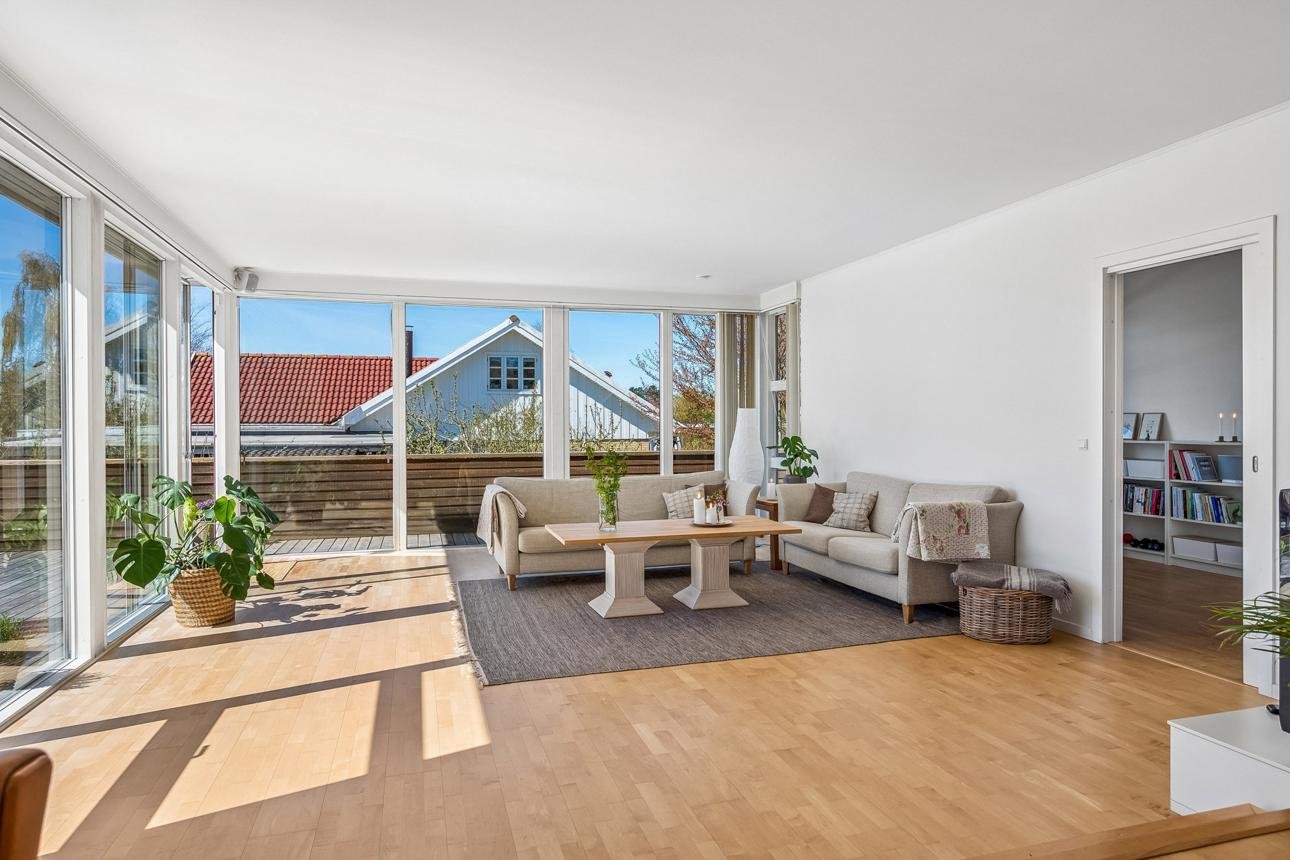
Magnific AI Cinematic Shot — Before — TechScribe real test Before TechScribe real test · 2026
Magnific AI Cinematic Shot — After — TechScribe real test After TechScribe real test · 2026

Prompt Compliance Analysis

Requested ElementResultEvaluation
Penthouse at nightSuccessfully transformed from daytime to nighttime✅ Excellent
Manhattan skylineConvincing illuminated skyline integrated into windows✅ Excellent
Floor-to-ceiling windowsOriginal window geometry preserved✅ Excellent
FireplaceAdded with realistic flames and warm illumination✅ Excellent
Warm orange lightingFireplace realistically lights surrounding furniture✅ Excellent
Rain on windowsRain streaks clearly visible across the glass✅ Excellent
Whiskey decanter and glassesAdded naturally on the coffee table✅ Excellent
Dramatic shadowsStrong cinematic contrast achieved✅ Excellent
Volumetric lightingVisible light rays from fireplace✅ Excellent
Cinematic atmosphereStrong movie-like visual style✅ Excellent
Preserve room layoutOverall room structure maintained✅ Excellent
Preserve camera angleOriginal viewpoint retained✅ Excellent

Results

Magnific AI successfully transformed the bright daytime living room into a convincing cinematic nighttime scene while preserving the overall composition of the original photograph. The architectural layout, window positions, furniture arrangement, and camera perspective remain highly consistent with the source image, allowing the transformation to feel like the same room photographed under entirely different conditions.

The environmental transformation is particularly effective. The suburban exterior has been replaced with a believable Manhattan skyline whose illuminated buildings integrate naturally behind the existing window frames. Rain streaks across the glass add visual depth without obscuring the skyline, while realistic window reflections contribute to the overall sense of realism.

Lighting is one of the strongest aspects of the transformation. The newly introduced fireplace creates a warm secondary light source that interacts convincingly with nearby furniture and walls. The room transitions naturally from daylight to a dark, cinematic ambience with deep shadows, subtle volumetric light rays, and a balanced colour palette that reinforces the intended mood.

The requested whiskey decanter and glasses are seamlessly incorporated onto the coffee table with appropriate reflections and proportions. Importantly, these additions do not disturb the original furniture layout or camera perspective.

Although the prompt references an anamorphic composition and shallow depth of field, these stylistic elements are only partially evident. The image remains relatively sharp throughout, and the composition closely follows the original framing rather than exhibiting obvious anamorphic characteristics. These are minor observations and do not significantly reduce the overall quality of the transformation.

Magnific AI Cinematic Shot — Scores
Prompt Adherence9.8/10
Scene Preservation9.9/10
Lighting Transformation10/10
Atmosphere Creation10/10
Object Integration9.9/10
Architectural Consistency9.9/10
Photorealism9.9/10
Cinematic Quality9.8/10
Overall9.9/10

Evaluation Summary

CategoryScore
Prompt Adherence9.8
Scene Preservation9.9
Lighting Transformation10.0
Atmosphere Creation10.0
Object Integration9.9
Architectural Consistency9.9
Photorealism9.9
Cinematic Quality9.8
Overall9.9
🏆 TechScribe Verdict — Excellent Performance

Magnific AI's Cinematic Shot feature demonstrates an impressive ability to transform the mood and atmosphere of an existing photograph while preserving its underlying structure. The transition from a bright suburban living room to a luxurious Manhattan penthouse at night is executed convincingly, with realistic lighting, seamless skyline replacement, natural object insertion, and strong cinematic colour grading.

The benchmark also highlights one of the feature's key strengths: scene preservation. Despite introducing substantial visual changes—including a new skyline, rain-covered windows, fireplace, ambient lighting, and decorative objects—the original camera angle, architectural layout, and furniture arrangement remain highly consistent. The result resembles a professionally graded film still rather than a newly generated image, making Cinematic Shot one of Magnific AI's strongest image transformation features.

— TechScribe Honest Review, based on real tests carried out by TechScribe.

Video Generation — Paris Café Portrait
Magnific Auto vs Seedance 2.0

Prompt

"A young woman stands inside a Paris café during golden hour, smiles naturally, takes a sip of coffee, gently brushes a strand of hair behind her ear, and looks out of the window. Cinematic camera movement, ultra-photorealistic, realistic facial expressions and hand movement, 5–6 seconds."

Magnific Auto

TechScribe real test · 2026

Seedance 2.0

TechScribe real test · 2026

Prompt Compliance Analysis

Requested ElementMagnific AutoSeedance 2.0
Paris café
Golden hour lighting
Natural smile
Drinks coffee
Brushes hair behind ear
Looks out the window
Cinematic camera movement
5–6 second duration
Photorealistic appearance

Both models successfully completed every requested action.

Results

Magnific AI Auto

Magnific AI Auto generated a polished cinematic sequence with excellent facial realism and natural character animation. The subject's facial expressions remain subtle and believable throughout the clip, avoiding exaggerated smiling or artificial movements. The transition between sipping the coffee, brushing her hair, and looking out of the window flows smoothly, creating the impression of a continuous live-action performance.

The camera movement is restrained and cinematic, complementing the subject rather than distracting from her performance. Lighting is warm and natural, with pleasing golden-hour illumination across the face and realistic skin rendering. Hand movement during the hair adjustment appears fluid, and facial proportions remain consistent throughout the sequence.

The overall result resembles a professionally shot commercial or lifestyle advertisement, with strong temporal consistency and no noticeable artefacts during the benchmark.

Seedance 2.0

Seedance 2.0 also produced a highly realistic sequence with excellent prompt adherence and convincing human animation. The subject performs the requested actions naturally, and the golden-hour lighting creates a pleasant cinematic atmosphere. Facial proportions remain stable, and the coffee interaction appears believable throughout the clip.

Compared with Magnific AI Auto, the sequence feels slightly more straightforward in its presentation. The framing remains attractive, but the overall cinematic polish is marginally lower. Facial expressions are natural, although they appear a little less nuanced, and the camera movement is somewhat less refined. These differences are subtle and do not detract significantly from the overall quality.

Magnific AI Auto — Scores
Prompt Adherence10/10
Facial Realism9.9/10
Facial Expressions9.9/10
Hand & Body Motion9.9/10
Camera Movement9.9/10
Temporal Consistency9.9/10
Cinematic Quality9.9/10
Overall9.9/10
Seedance 2.0 — Scores
Prompt Adherence10/10
Facial Realism9.8/10
Facial Expressions9.8/10
Hand & Body Motion9.8/10
Camera Movement9.8/10
Temporal Consistency9.9/10
Cinematic Quality9.8/10
Overall9.8/10

Comparative Scorecard

CategoryMagnific AI AutoSeedance 2.0
Prompt Adherence10.010.0
Facial Realism9.99.8
Facial Expressions9.99.8
Hand & Body Motion9.99.8
Camera Movement9.99.8
Temporal Consistency9.99.9
Cinematic Quality9.99.8
Overall9.99.8
🏆 TechScribe Verdict — Winner: Magnific AI Auto

Both models successfully executed every action requested in the prompt and produced highly realistic 5–6 second cinematic clips. The café setting, golden-hour lighting, coffee interaction, hair movement, and final gaze out of the window were faithfully reproduced by both systems.

The difference lies in execution rather than capability. In this benchmark, Magnific AI Auto delivers slightly stronger facial realism, smoother transitions between actions, and more refined cinematic camera movement. The resulting sequence feels closer to professionally shot commercial footage, with natural expressions and fluid human motion maintained throughout the clip.

Seedance 2.0 remains an excellent performer and closely matches Magnific AI Auto in prompt adherence and temporal consistency. However, the overall presentation is marginally less cinematic, giving Magnific AI Auto a narrow but justified advantage in this specific benchmark.

Note: These conclusions are based solely on the outputs generated for this benchmark and should not be interpreted as a general ranking across all prompts or video generation tasks.

— TechScribe Honest Review, based on real tests carried out by TechScribe.

Wildlife Video Generation — Snow Leopard
Magnific AI Auto vs Kling 3.0

Prompt

"A majestic snow leopard slowly walks across a rocky mountain ridge during sunrise. The camera performs a slow cinematic tracking shot as the leopard pauses, looks toward the horizon, and its thick fur gently moves in the mountain breeze. Natural animal movement, realistic muscle animation, ultra-photorealistic, 5–6 seconds."

Magnific AI Auto

TechScribe real test · 2026

Kling 3.0

TechScribe real test · 2026

Prompt Compliance Analysis

Requested ElementMagnific AI AutoKling 3.0
Snow leopard
Rocky mountain ridge
Sunrise lighting
Slow walking motion
Cinematic tracking shot
Looks toward horizon
Thick fur
Natural animal movement⚠️ Slightly less convincing
Realistic muscle animation⚠️ Good but slightly less natural
Ultra-photorealistic

Results

Magnific AI Auto

Magnific AI Auto produced a convincing wildlife sequence with strong anatomical consistency and realistic movement throughout the clip. The snow leopard maintains believable body proportions across successive frames, with smooth transitions between each step and stable limb positioning. The camera performs a restrained tracking movement that follows the animal naturally without distracting from the scene.

Lighting is another strength of the sequence. The sunrise illumination creates soft rim lighting along the leopard's silhouette while preserving detail in both the animal and the surrounding landscape. Fur texture remains consistent throughout the clip, contributing to the overall realism.

The overall motion feels cohesive, with no obvious temporal instability or abrupt anatomical changes observed during the benchmark.

Kling 3.0

Kling 3.0 also generated a high-quality wildlife sequence with convincing sunrise lighting and smooth camera movement. The rocky landscape and atmospheric lighting closely match the requested scene, and the snow leopard performs the requested walking action while remaining visually consistent throughout the clip.

Compared with Magnific AI Auto, the leopard appears marginally leaner, giving it a slightly less powerful silhouette than expected for a healthy adult snow leopard. Motion remains smooth overall, although body weight transfer and gait appear a little less convincing in some parts of the sequence. These differences are subtle and do not significantly reduce the realism of the video, but they result in a slightly less natural overall presentation.

Magnific AI Auto — Scores
Prompt Adherence10/10
Anatomical Accuracy9.9/10
Motion Realism9.9/10
Camera Movement9.9/10
Temporal Consistency9.9/10
Environmental Realism9.9/10
Cinematic Quality9.9/10
Overall9.9/10
Kling 3.0 — Scores
Prompt Adherence10/10
Anatomical Accuracy9.7/10
Motion Realism9.8/10
Camera Movement9.9/10
Temporal Consistency9.9/10
Environmental Realism9.9/10
Cinematic Quality9.8/10
Overall9.8/10

Comparative Scorecard

CategoryMagnific AI AutoKling 3.0
Prompt Adherence10.010.0
Anatomical Accuracy9.99.7
Motion Realism9.99.8
Camera Movement9.99.9
Temporal Consistency9.99.9
Environmental Realism9.99.9
Cinematic Quality9.99.8
Overall9.99.8
🏆 TechScribe Verdict — Winner: Magnific AI Auto

Both models successfully generated cinematic wildlife sequences that closely followed the prompt, producing photorealistic mountain environments, convincing sunrise lighting, and smooth tracking shots.

The difference lies in the portrayal of the animal itself. In this benchmark, Magnific AI Auto maintained more convincing body structure, fuller proportions, and smoother weight transfer during locomotion, resulting in a sequence that more closely resembles real wildlife footage. Kling 3.0 remained highly realistic but presented a slightly leaner snow leopard with marginally less convincing gait mechanics.

Overall, both videos are of excellent quality, but Magnific AI Auto demonstrates a small advantage in anatomical realism and natural animal motion, making it the stronger performer in this specific wildlife benchmark.

Note: These conclusions are based solely on the outputs generated for this benchmark and should not be interpreted as a general ranking across all prompts or video generation tasks.

— TechScribe Honest Review, based on real tests carried out by TechScribe.

Magnific AI — the Studio Lot, not the Soundstage:
many capabilities, one consolidated workspace

Most reviews still describe Magnific AI as "the upscaler" — a leftover reputation from before 2026. That's no longer accurate.

The new Magnific AI platform combines image and video models, 4K generation with audio, AI upscaling, real-time collaborative workspaces, 3D and virtual scene tools, and a library of more than 250 million creative assets. The platform is owned and operated by Freepik, the company — Freepik didn't disappear, it consolidated its stock library, generation tools, and the original Magnific upscaler under one unified brand and tech stack. Magnific AI integrates multiple top-tier AI models for video, image, audio, and 3D generation into a single workspace.

That's a Studio Lot, not a single Soundstage — many production capabilities sharing one workspace, one credit pool, and one license, rather than one tool doing one thing exceptionally.

Magnific AI stopped being an upscaler with a side hustle. It became a full production system that happens to upscale better than anyone else.

One workspace, a model for every job —
and the search-vs-generate decision that saves credits

When you open Magnific AI today, you land in a Creative Suite, not a single prompt box. Users start by choosing a tool or model from the Creative Suite, and from there decide whether they're generating, upscaling, editing, or sourcing from the stock library.

Not every job needs a prompt. If a real, specific shot already exists — a product photo, a recognizable location, a literal object — searching the 250M-asset stock library is faster and more reliable than prompting a model to approximate it. Reach for generation when you need something that doesn't exist yet, or a style no photo could give you. New users who default to prompting everything burn credits recreating what a five-second search would have found.

What the first session looks like
  • An AI Image Generator supporting Flux 1.1, Mystic 2.5, Ideogram, Imagen, Nano Banana 2, and GPT Image 2 — each with a distinct artistic style
  • The Signature Magnific AI Engine — the original detail-reconstruction technology — one tool among many
  • An infinite, node-based canvas in Spaces for complex, multi-step workflows
  • A library of more than 250 million stock creative assets sitting alongside the generative tools
  • A free tier for testing before committing to a paid plan

The experience feels like inheriting a fully stocked production studio rather than opening a single app. For someone who previously juggled a generator, an upscaler, a stock site, and a video tool separately, the first session is consolidation made visible.

Magnific AI rewards teams who need everything — generation, enhancement, stock, video, 3D — without leaving one account. It is not built for someone chasing one model's ceiling.

From "Upscaler" to "Operating System" —
why Magnific AI is now the creative hub

Most reviews still benchmark Magnific AI narrowly against Topaz Gigapixel or LetsEnhance on upscale quality alone. That comparison is incomplete post-rebrand — Magnific AI now competes with platforms like OpenArt and Adobe's ecosystem on breadth, not just with upscalers on fidelity.

The real superpower is unification under one license and one credit pool. Video, audio, and 3D generation sit beside image tools, letting teams that previously stitched together separate generation, video, and audio subscriptions evaluate real consolidation. Unlike competitors focused on individual standalone services, Magnific AI is positioning itself as creative infrastructure — combining assets, generation, and editing all in one.

The Signature Engine still matters. Even inside this broader suite, Freepik's AI Image Upscaler — built on the original Magnific technology — still delivers solid results for social, web, and general creative use, though heavy zooming or large-format printing can reveal over-sharpening or softer fine detail at maximum 10K resolution. The hallmarked detail-reconstruction quality of the original specialist tool is still the differentiator inside the bigger suite — it didn't get diluted by the expansion, it became the suite's anchor feature.

The honest tradeoff
  • This is more of a production suite than a pure model benchmark
  • Midjourney still wins on raw aesthetic ceiling and is not integrated
  • Flux direct gives developers the full public API without credit metering
  • Ideogram direct is safer for dense text-in-image work at volume

Magnific AI doesn't compete with the best single model. It gives you dozens of them, plus the upscaler that started it all, under one roof.

Where Magnific AI genuinely impresses —
the moments that make this suite worth knowing

🎨
Multi-model image generation

Supports Flux 1.1, Mystic 2.5, Ideogram, Imagen, Nano Banana 2, and GPT Image 2, each suited to a different visual style, all under one account. Switch engines per job instead of being locked into one aesthetic.

🔍
Signature detail-reconstruction engine

The original Magnific AI upscaling technology, still among the strongest for AI-art and stylized image enhancement. Texture, lighting, and structure that never existed in the source file.

🎬
Cross-media consolidation

Brings together AI image and video generation, including 4K with audio, plus the original AI upscaling and enhancement technology in one stack.

🖼️
Massive stock library

More than 250 million creative assets available alongside generative tools — useful when a real photo beats a generated one, and faster than prompting from scratch.

🤝
Collaborative workflows

Real-time collaborative workspaces and team tools built for agencies, not solo creators. Shared credit pools and shared canvases.

📋
Compliance-safe licensing

Commercial-plan licensing across image, video, stock, and editing in one buyer account — one EULA to review instead of five.

Precision vs. Creative —
fidelity or reimagining

Magnific AI gives you a binary choice in how it processes your image. The difference is fundamental to the result.

Precision
  • High-fidelity enhancement that preserves the original composition
  • Ideal for product photography, architecture, and e-commerce where technical accuracy matters
  • Conservative — sharpens and enhances without inventing new elements
Creative
  • Generative reimagining that "hallucinates" new details — skin pores, hair strands, textures
  • Built for AI art, concept art, and digital illustration
  • Uses sliders: Creativity, Resemblance, Fractality, and HDR to control how aggressively the model invents new detail

The decision is simple: if the image already has the right structure and you just need it sharper — use Precision. If you want the AI to reinterpret and embellish — use Creative.

Optimized For modes —
tailored AI behavior per job

Magnific tailors its AI behavior with specific presets. Select the one that matches your content type for the best results.

👤
Portrait
Selfies and headshots — keep Resemblance high
🎨
Art & Illustration
Digital paintings — use Illusio engine for brush-stroke magic
🕹️
Videogame Assets
Textures, sprites — Sharpy for metal/stone, Sparkle for fabrics
🌄
Nature & Landscapes
Travel photography and outdoor scenes
🎞️
Film & Photography
Cinematic frames — 4×–8× is the sweet spot

Scale options: 2×, 4×, 8×, and 16× upscaling.

Specialized engines: Illusio (illustrations), Sharpy (photos), Sparkle (balanced artifacts reduction).

Magnific vs Topaz Photo AI —
fidelity vs. hallucination

This is the most direct competitor comparison for upscaling. The two tools approach the same problem from opposite directions.

Topaz Photo AI
  • Fidelity and restoration — preserves the original image
  • Conservative — sharpens and denoises without inventing new texture
  • Desktop-based — local processing, no cloud upload
  • Best for: professional photography, print, and archival restoration
Magnific
  • Hallucination and reimagining — invents new detail creatively
  • Aggressive — adds skin pores, hair strands, textures that never existed
  • Cloud-based — browser-native, works from any device
  • Best for: AI art, concept art, and stylized image enhancement

The choice is binary: do you want to restore what's there, or reimagine what could be? Topaz for the first, Magnific for the second.

Magnific AI Video Generator —
text-to-video and image-to-video in one suite

The Magnific AI Video Generator is a core part of the creative suite, enabling both text-to-video and image-to-video creation using multiple leading AI models.

One of its standout workflows is Visual Prompting. Instead of writing long, complex prompts, you upload a start frame image, then use arrows, sketches, and short notes directly on the canvas to guide the animation. This gives you precise control over motion and scene changes, making it much faster to get the result you want.

Key video capabilities
  • Image-to-video: Animate any still image into a short cinematic clip by providing a visual prompt or simple directional notes
  • Text-to-video: Generate video clips directly from a text description
  • Visual Prompt workflow: Upload an image, add a note or sketch, and generate a video that follows your direction (e.g., "A hand opens the door, and a deliveryman appears holding a box")
  • Multi-model access: Uses Seedance 2, Veo 3.1, Kling 3, Runway Gen 4, and MiniMax Hailuo 02
  • Enhancement tools: After generation, use Upscale or Extend tools for a clean finish before exporting

Magnific 3D —
from photo to 3D object to composed scene

Magnific 3D includes two main tools that together form a complete 3D production pipeline.

3D Generator
Photo → GLB in under 2 minutes

Tripo: Optimized for speed and organic shapes. Trellis 2: Maximum fidelity for complex objects. Output is a production-ready GLB file.

3D Scenes
Build 3D environments from reference images

Compose mode: Place objects, import GLB files, adjust positions, toggle visibility. Shoot mode: Move camera freely, set field of view, capture. Standard captures immediate; high-quality via Nano Banana Pro.

The pipeline: Product photo → 3D Generator → 3D model → 3D Scenes → composed environment → campaign-ready photographs.

This replaces 3D modeling, scene lighting, and photography with one accessible tool.

Magnific Spaces —
node-based workflow automation

Spaces is Magnific's node-based workflow canvas. Users design AI processes by connecting steps like Image Generator, Upscaler, Video Generator, and Export into reusable pipelines.

How Spaces works
  • Infinite canvas workspace for building complex workflows
  • Nodes = units of work (Image Generator, Upscaler, Video Generator)
  • Ports = input/output connection points
  • Connections = data flow between nodes
  • Save templates for team-wide reuse
  • Used to create the Alibaba Cloud Happy Horse micro film

Spaces makes Magnific a Creative Production System — not just a generator. It lets teams build reproducible workflows, making it suitable for enterprise and agency production pipelines.

Magnific AI video demos —
official tutorials for core workflows

These official Magnific Academy and How-To videos walk through the creative AI workflow in Spaces, cinematic shot generation, and the AI video generator with visual prompts.

Build your first creative AI workflow in Spaces

Learn how to design a node-based workflow using Magnific Spaces — connecting Image Generator, Upscaler, and Export nodes to build a reusable AI pipeline.

Producing film style photography with Cinematic Shot

A walkthrough of the Cinematic Shot feature — applying cinematic lighting, color grading, and framing to give AI-generated photos the look of a professional film still.

How to create AI videos with Visual Prompts

Use the Visual Prompt feature in the Magnific AI Video Generator — upload an image as a start frame, add a short note or sketch, and guide the animation with simple directions.

Introduction to the Image Generation UI

A fundamentals tutorial covering the Magnific AI Suite's image generation interface — model selection, prompting, and output settings.

Magnific Mobile App —
iOS and Android

Magnific has both iOS and Android apps, bringing the full creative suite to mobile devices.

iOS
Available on the App Store

Requires iOS 18.6 or later. 160 MB download. Includes AI image and video generation, upscaling, background removal, and stock asset access.

Android
Available on Google Play

4.4+ star rating from thousands of reviews. Cross-device sync lets you "pick up right where you left off."

Magnific Figma Plugin —
AI tools inside your design workflow

Magnific has a full Figma plugin that brings AI capabilities directly into the design canvas.

What the Figma plugin includes
  • Image Generator — generate images from prompts without leaving Figma
  • Vector Generator — create vectors with AI
  • Image Upscaler — 2× to 16× with Precision or Creative modes
  • Remove Background — one-click background removal
  • Relight — change lighting direction and color
  • Change Camera — steer with 3D orbit gizmo
  • Skin Enhancer — portrait retouching
  • Mockup Generator — create product mockups
  • Variations — generate multiple versions of a design
  • Stock asset access — drag-and-drop from the 250M+ library

Magnific pricing, credits, and token system —
what it actually costs in 2026

Magnific is credit-metered. Generations and upscales consume credits from your monthly or annual allowance. Credits reset each billing period and do not roll over.

PlanMonthly BilledAnnual Billed (monthly avg)Credits/YearBest For
Essential$11~$9.75/mo~96,000Beginners, limited use
Premium$22~$18.50/mo~240,000Regular creators
Premium+$48~$29.70/mo~600,000High-volume creators
Pro$190~$190/mo~4 millionTeams, agencies

Annual billing saves approximately 17% (~2 months free). Magnific has no free trial and a strict no-refund policy. Prices approximate and may vary by region.

A few things worth
understanding upfront

🎯
It's not the aesthetic ceiling

Midjourney still wins on raw aesthetic output and isn't integrated into the platform. Magnific optimizes for breadth and consolidation, not the single best-looking image available anywhere.

💳
Credit-metered, not flat-rate

Generations are credit-metered at roughly 75 credits per image, and heavier features like high-res upscaling consume credits quickly. Credits do not roll over — use them or lose them.

🚫
No free trial

Magnific has no free trial and a strict no-refund policy. The free tier lets you test core features, but significant volume requires a paid plan.

🆕
It's a young rebrand

The rebrand from Freepik to Magnific happened in April 2026, and Freepik branding is still visible in places — the underlying company and asset library didn't change, but the public identity is still settling.

🔬
Upscale quality has real limits at the extreme

At maximum 10K resolution or heavy zooming, outputs may show over-sharpening, texture artifacts, or softer fine detail. Know the ceiling before pushing for large-format print.

💰
The Pro tier price is an annual average

The $158.33/month Pro tier is billed annually; the sticker price looks higher month-to-month than the actual commitment works out to. Budget accordingly before comparing to month-to-month competitors.

What Magnific AI actually
looks like under the hood

Image models
Flux, Mystic, Imagen, Ideogram, Nano Banana 2, GPT Image 2

Each model offers a distinct artistic style and visual tone. Pick the right engine per job from one interface.

Video models
Seedance 2, Veo 3.1, Kling 3, Runway Gen 4, MiniMax Hailuo 02, PixVerse 6

Multiple leading video models accessible from one platform. Text-to-video and image-to-video.

Signature engine
Original Magnific generative upscaling technology

Precision (fidelity) and Creative (reimagining) modes. Creativity, Resemblance, Fractality, and HDR sliders. 2×–16× upscaling.

3D tools
3D Generator + 3D Scenes

Photo → GLB in under 2 minutes. Tripo (speed) and Trellis 2 (fidelity). Compose mode and Shoot mode for scene composition.

Spaces
Node-based workflow canvas

Infinite canvas. Nodes, ports, connections. Save templates for team-wide reuse. Built for enterprise and agency production pipelines.

Stock library
250M+ creative assets

Sits alongside generative tools — search instead of prompt when a literal, real-world asset already exists.

Collaboration
Real-time collaborative workspaces

Multi-person editing and shared projects, built for agency and team use rather than solo creators.

Owned by
Freepik (rebranded as Magnific, April 2026)

The company and underlying asset library are unchanged — the public brand and product surface consolidated under one name.

Magnific AI learning curve —
what to expect session by session

S1
Session One
Generate one image, then run it through the Signature Engine.

Open the Creative Suite, generate one image with a familiar model like Flux or Imagen, then run the same asset through the Signature Magnific Engine. The contrast between "good enough" generation and genuinely enhanced detail is the first real signal of what the platform offers.

S3
Sessions Two to Three
Model comparison and the search-vs-generate habit forms.

You start comparing models against each other for the same prompt, and you start defaulting to stock search for anything literal or real-world instead of prompting it from scratch — saving meaningful credit spend.

S5+
Session Five Onwards
Magnific becomes infrastructure, not a single-purpose tool.

Magnific becomes infrastructure for a full production pipeline — generate, upscale, pull stock, create video, build 3D scenes, automate workflows in Spaces. You learn when to step outside the suite (Midjourney for ceiling, Topaz for fidelity) and when staying inside saves more than it costs.

Three creators who will
get real value from this

🧑‍💻
The Soloist
Generation, light upscaling, occasional stock — no enterprise overhead.

A single creator or freelancer who wants generation, light upscaling, and occasional stock access without enterprise overhead. The lower tiers (Essential/Premium) fit this use case; the Pro tier is overkill.

🏢
The Agency or Small Team
Compliance-safe. One EULA instead of five.

Needs unified licensing plus ensemble model access, easier to audit than a Midjourney + Flux + Ideogram + Imagen stack. The real pain point isn't too many logins — it's too many EULAs. Magnific consolidates that into one agreement to review, making it the compliance-safe choice for teams billing clients on the output.

🎬
The Cross-Media Creator
Image, video, 3D, audio, and upscaling — one account.

Needs image, video, 3D, audio, and upscaling without separately managing Runway, ElevenLabs, a dedicated upscaler, and a 3D tool. Video, audio, and 3D generation sit beside image tools in the same account.

Who should
look elsewhere

Being honest about fit is what makes a recommendation worth trusting. Here is when another tool will serve you better than Magnific AI.

The verdict

Magnific AI is not the best image generator. Not the best upscaler. Not the best video tool. Not the best 3D tool. Not the best stock library. Not the best workflow automation platform.

What Magnific AI is — is the best consolidated creative suite.

The original Magnific upscaler was acquired by Freepik in 2024, and in April 2026, Freepik made the decision to rebrand its entire company as Magnific. This wasn't a name change — it was a strategic consolidation. The company folded its 250-million-asset stock library, its multi-model AI image and video generation (Flux, Mystic, Ideogram, Imagen, Nano Banana 2, GPT Image 2, Seedance 2, Veo 3.1, Kling 3, Runway Gen 4, MiniMax Hailuo 02), its 3D generator and scene composer, its node-based workflow automation tool Spaces, and the original Magnific generative upscaling engine into one unified platform, under one brand, one credit pool, and one license.

The result is a tool that does not win any single benchmark, but solves a problem that benchmarks don't measure: the cost of fragmentation.

For a solo creator, Magnific is probably overkill. For a team or agency producing across image, video, 3D, and stock — while managing client billing and licensing compliance — Magnific replaces five or six separate subscriptions with one. That's not a feature comparison. That's an operating model change.

The tradeoffs are real. Midjourney still produces higher aesthetic quality. Topaz Photo AI is more faithful for professional upscaling. Ideogram direct is safer for dense text-in-image at volume. Flux direct gives developers unmetered API access.

But if you need image generation, video generation, 3D generation, stock photography, upscaling, and workflow automation — and you need to do it with one team, one account, one credit pool, and one license — Magnific is the only tool in this category that gives you all of that in one place.

It's not the best at any one thing. It's the only one that does everything.

Ready to audit your stack with Magnific AI?

See if Magnific replaces enough of your subscriptions to pay for itself — generation, upscaling, video, 3D, and stock under one license.

Get Started →
Back to Top