Text to Image Prompt Accuracy. 7 Tools. One Prompt. Real Scores.
Text to image prompt accuracy is the real measure of an AI image tool — not how pretty the output looks, but how precisely it follows your instructions. We wrote the most demanding photorealistic prompt we could construct — 400+ words, 11 hard constraints — and ran it through 7 AI image tools. Every output was scored using DeepEval across 5 dimensions. Here is what the data actually says.
How we measured text to image prompt accuracy — same prompt, same evaluation, no subjectivity.
Text to image prompt accuracy cannot be judged by eye alone. Every tool received the exact same prompt. Every output was evaluated using DeepEval — an open-source AI evaluation framework — across 5 independent dimensions. No human opinion. No aesthetic preference. Just measurable compliance with every instruction in the prompt.
🎯Semantic AlignmentDid it include every required element — people, objects, text, spatial positions?
🎨Stylistic QualityPhotorealistic? Correct lighting, palette, and DSLR-quality rendering?
🛡️IntegrityWere forbidden elements — illustration style, extra objects, blurry text — absent?
🔢ConsistencyExact counts, exact text on screens and whiteboards, exact clock time?
👁️Perceptual QualityNatural anatomy, no artifacts, realistic depth of field and skin texture?
📋 THE PROMPT
This is what every tool was asked to generate.
400+ words. 11 hard constraints. Exact text, exact counts, exact spatial relationships. No room for interpretation. This is the prompt — verbatim.
📋 Test Prompt — Identical across all 7 tools
Create a photorealistic office scene inside a modern AI research company.
Follow ALL instructions exactly.

PEOPLE
There must be exactly 3 people in the image:
1. A woman wearing a green blazer working on a laptop.
2. A man wearing a red hoodie writing on a tablet.
3. A woman wearing a yellow shirt standing near a whiteboard.
Do not include any additional people.

SPATIAL RELATIONSHIPS
* The man in the red hoodie must be sitting to the left of the woman using the laptop.
* The woman in the yellow shirt must be standing behind both seated people.
* All three people must be clearly visible.

WHITEBOARD
The whiteboard must contain exactly this text:
AI Tool Evaluation Dashboard
The text should be clearly readable.

LAPTOP SCREEN
The laptop screen must display a dashboard with exactly these metrics:
Accuracy: 92%
Latency: 1.2s
Cost: $0.04
The text should be readable.

OBJECTS
Include exactly:
* 2 coffee mugs
* 1 indoor plant
* 1 wall clock
The wall clock must show 10:15.
Do not include additional mugs, plants, or clocks.

ENVIRONMENT
* Modern technology office
* Realistic furniture
* Professional workspace
* Natural daylight coming through windows
* Clean desk setup

STYLE REQUIREMENTS
* Photorealistic
* Natural colors
* DSLR-quality photography
* Sharp focus
* Realistic skin textures
* Realistic lighting
* No cartoon style
* No illustration style
* No CGI look
* No glossy AI-art look
* No fantasy elements

NEGATIVE CONSTRAINTS
Do NOT include:
* Extra people
* Extra coffee mugs
* Extra plants
* Extra clocks
* Watermarks / Logos
* Floating objects
* Distorted hands
* Blurry text
* Cropped subjects
* Duplicate objects

SUCCESS CRITERIA
The final image should satisfy ALL of the following simultaneously:
✓ Exactly 3 people with correct clothing colors
✓ Correct left/right and front/back positioning
✓ Exact whiteboard text: "AI Tool Evaluation Dashboard"
✓ Exact dashboard metrics: Accuracy 92%, Latency 1.2s, Cost $0.04
✓ Exactly 2 mugs, 1 plant, 1 clock showing 10:15
✓ Fully photorealistic office photograph
Why this prompt? We designed it to be deliberately hard — combining exact text rendering, precise object counts, spatial relationships, and style constraints simultaneously. Any tool that scores well here will handle real-world complex prompts reliably.
🏆 THE SCOREBOARD
Text to image prompt accuracy scores — all 7 tools ranked.
Text to image prompt accuracy scored out of 100. Evaluated across 5 dimensions using DeepEval. Higher is better. Pass = 70 or above per dimension.
Rank
Tool
Alignment
Consistency
Stylistic
Perceptual
Integrity
Overall
Verdict
1
Kittl
80 ✓
80 ✓
41 ✗
80 ✓
100 ✓
74
Mostly Compliant
2
Krea
90 ✓
60 ✗
44 ✗
80 ✓
90 ✓
72
Mostly Compliant
3
OpenART AI
70 ✓
60 ✗
50 ✗
70 ✓
94 ✓
68
Partially Compliant
4
Ideogram
76 ✓
60 ✗
60 ✗
70 ✓
62 ✗
66
Partially Compliant
4
Photoroom
66 ✗
40 ✗
62 ✗
70 ✓
94 ✓
66
Partially Compliant
6
Canva
45 ✗
60 ✗
48 ✗
70 ✓
100 ✓
61
Partially Compliant
7
Adobe Express
47 ✗
20 ✗
12 ✗
70 ✓
8 ✗
29
Non-Compliant
The universal failure point: Every single tool got the wall clock time wrong. The prompt required 10:15. Results ranged from 9:10 to 2:10. Exact time rendering remains an unsolved problem across all tested AI image generators.
🔍 TOOL BY TOOL BREAKDOWN
What each tool got right — and where each one failed.
Full per-tool analysis with the actual generated image alongside the 5-dimension score breakdown and key findings.
1
Kittl WINNER
Mostly Compliant — strongest overall balance of accuracy and quality
74
/100
Semantic80✓ Pass
Stylistic100✓ Pass
Integrity41✗ Fail
Consistency80✓ Pass
Perceptual80✓ Pass
✓ What it got right
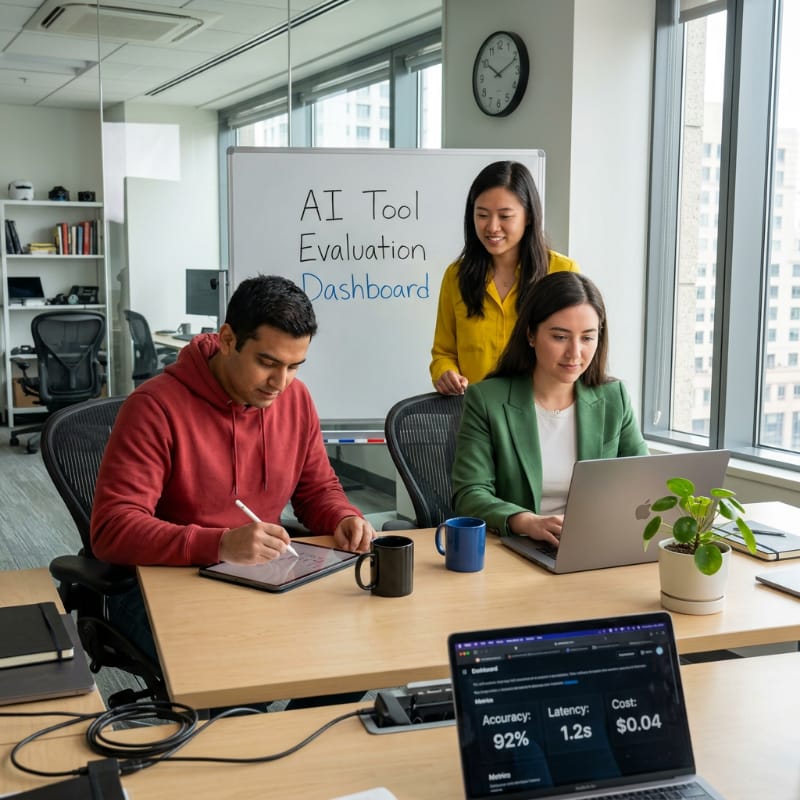
All 3 people with correct clothing colors (green blazer, red hoodie, yellow shirt). Correct spatial positioning — man left of woman, woman in yellow standing behind. Whiteboard text "AI Tool Evaluation Dashboard" present and readable. Dashboard metrics (Accuracy: 92%, Latency: 1.2s, Cost: $0.04) visible. 2 coffee mugs. 1 plant. 1 clock. Photorealistic office environment with natural lighting. Perfect stylistic score — 100/100.
✗ Where it failed
Clock shows approximately 10:10 instead of the required 10:15. Dashboard metrics appear on a separate device in the foreground rather than clearly on the laptop screen being used by the woman in green. Integrity score (41) impacted by evaluation output format deviations — extra "Text Rendering" and "Forbidden Elements" sections introduced that were not in the evaluation steps.
✓ Entities Detected
woman in green blazerman in red hoodiewoman in yellow shirtlaptoptabletwhiteboardcoffee mugindoor plantwall clockwindowsdeskfurniture
⚠️ Attribute Mismatches
Wall clock time: Shows ~10:10, required 10:15 Dashboard location: On separate foreground device, not clearly on the laptop screen
📐 Spatial Relationships
Man left of woman: ✓ Verified present Woman in yellow behind: ✓ Verified present All three visible: ✓ Confirmed
🎨 Style & Perceptual
Style: Photorealistic with slight commercial polish. Natural lighting, sharp focus, natural colors — strong match to requested style. Lighting: Soft, diffused natural lighting. Natural window light from right side. Perceptual: Strong naturalness, appropriate depth of field. Minor AI generation smoothness on facial features and hair.
🚩 Issues Flagged
blurry text (minor)artifactclock time off by 5 min
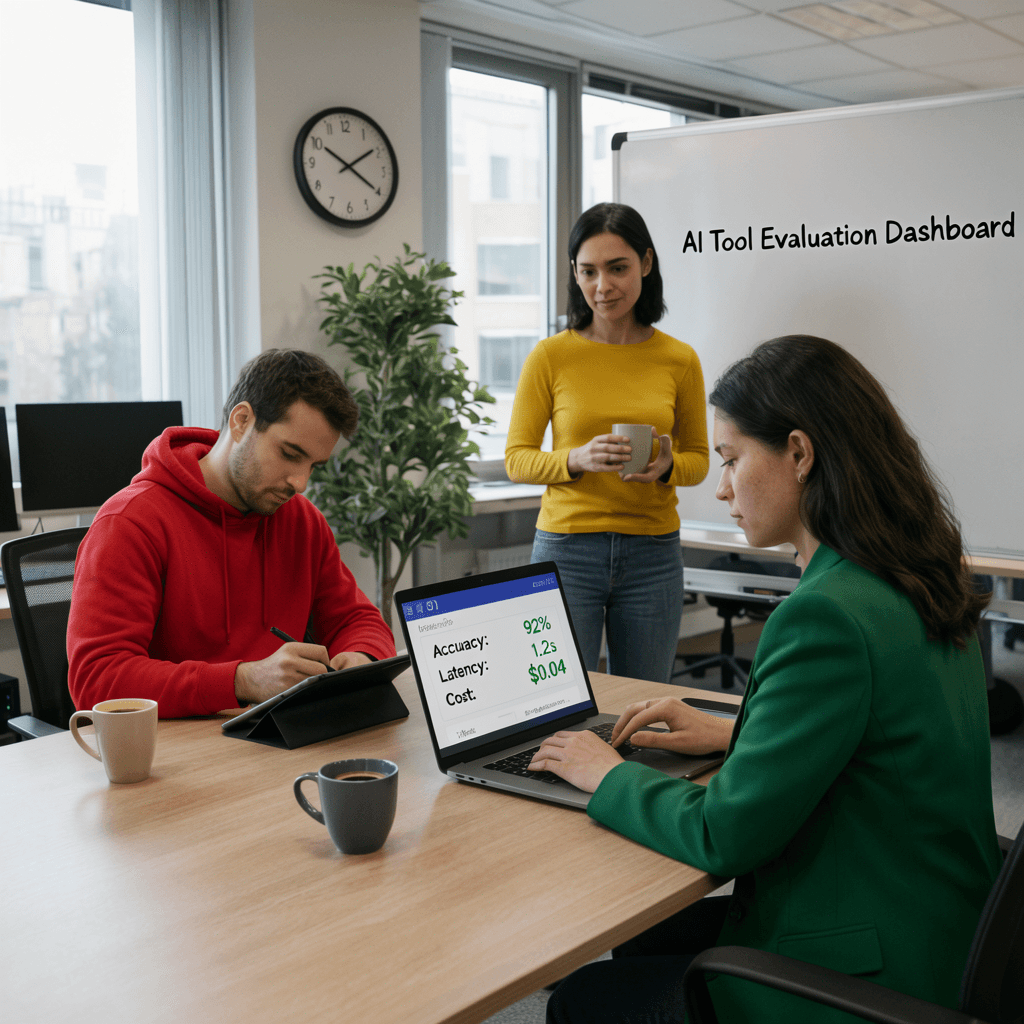
Highest semantic score of all 7 tools — 90/100. All 3 people in correct clothing (green blazer, red hoodie, yellow shirt). Whiteboard text "AI Tool Evaluation Dashboard" correct. Laptop dashboard metrics (Accuracy: 92%, Latency: 1.2s, Cost: $0.04) accurate. 1 plant (correct). Photorealistic stock photography style. Strong perceptual naturalness — faces clear, body proportions correct, no significant distortions.
✗ Where it failed
Critical spatial failure — man in red hoodie positioned on the RIGHT of the woman with laptop, not the required LEFT. 3 coffee mugs visible (beige mug by man, dark mug on table, mug held by woman in yellow) instead of exactly 2. Clock shows approximately 10:10 instead of 10:15. Forbidden element: extra coffee mug. Warm saturated accent colors conflict with "natural colors" requirement.
✓ Entities Detected
woman in green blazerman in red hoodiewoman in yellow shirtlaptoptabletwhiteboardcoffee mugindoor plantwall clockdeskchairwindow
⚠️ Attribute Mismatches
Wall clock time: Shows ~10:10, required 10:15 Coffee mugs: 3 visible, required exactly 2 Man positioning: Right of woman, required left
📐 Spatial Relationships
Man left of woman: ✗ FAILED — man is on the right Woman in yellow behind: ✓ Verified present All three visible: ✓ Confirmed
🎨 Style & Perceptual
Style: Photorealistic stock photography. Soft natural lighting, warm saturated accents — aligns with requested style but accent colors violate "natural colors". Lighting: Soft natural lighting, diffused daylight — strong match to requested natural daylight. Perceptual: Strong naturalness, natural poses. Very minor texture inconsistencies. No watermarks, distortions, or anomalies.
🚩 Issues Flagged
extra coffee mug (forbidden)wrong spatial positionclock time off by 5 minartifact (minor)
3
OpenART AI
Partially Compliant — strong visuals, failed clock time and plant count
68
/100
Semantic70✓ Pass
Stylistic94✓ Pass
Integrity50✗ Fail
Consistency60✗ Fail
Perceptual70✓ Pass
🧩
Model Used: SeedreamOpenART AI hosts 100+ models — we tested Seedream specifically for this benchmark. Different models within OpenART AI will produce different results. Read our full OpenART AI review covering multiple models.
✓ What it got right
All 3 people in correct clothing colors (green blazer, red hoodie, yellow shirt). Correct spatial positioning — man left of woman, woman in yellow standing behind both. Whiteboard text "AI Tool Evaluation Dashboard" correct and readable. Laptop displays Accuracy: 92% and Cost: $0.04 correctly. Latency: 1.2s present (formatting acceptable). 2 coffee mugs (correct). 1 plant (correct). Photorealistic quality with strong stylistic score — 94/100.
✗ Where it failed
Clock shows approximately 2:10 — one of the worst clock failures in the test, required 10:15. Two plants visible instead of exactly one. Vibrant, saturated primary color palette (bold red, bright yellow, vivid green) directly contradicts the "natural colors" requirement. Minor hand anatomy artifact on woman in yellow. Laptop screen dashboard graphics appear somewhat artificial on close inspection.
✓ Entities Detected
woman in green blazerman in red hoodiewoman in yellow shirtlaptoptabletwhiteboardcoffee mugindoor plantwall clockwindowsdeskfurniture
Man left of woman: ✓ Verified present Woman in yellow behind: ✓ Verified present All three visible: ✓ Confirmed
🎨 Style & Perceptual
Style: Photorealistic, DSLR-quality, sharp focus — matches requested style. Soft, natural lighting from windows with even illumination. Lighting: Natural daylight from windows, soft diffused — good match but lacks explicit score comparison. Perceptual: Good naturalness, appropriate lighting and shadows. Minor unnatural hand/arm positioning on woman in yellow. Faces well-rendered, proportions mostly correct.
🚩 Issues Flagged
clock time severely wrong (2:10 vs 10:15)extra plant (forbidden)saturated palette vs natural colorsartifact (minor)
4
Ideogram
Partially Compliant — blurry text and multiple object count failures
66
/100
Semantic76✓ Pass
Stylistic62✗ Fail
Integrity60✗ Fail
Consistency60✗ Fail
Perceptual70✓ Pass
✓ What it got right
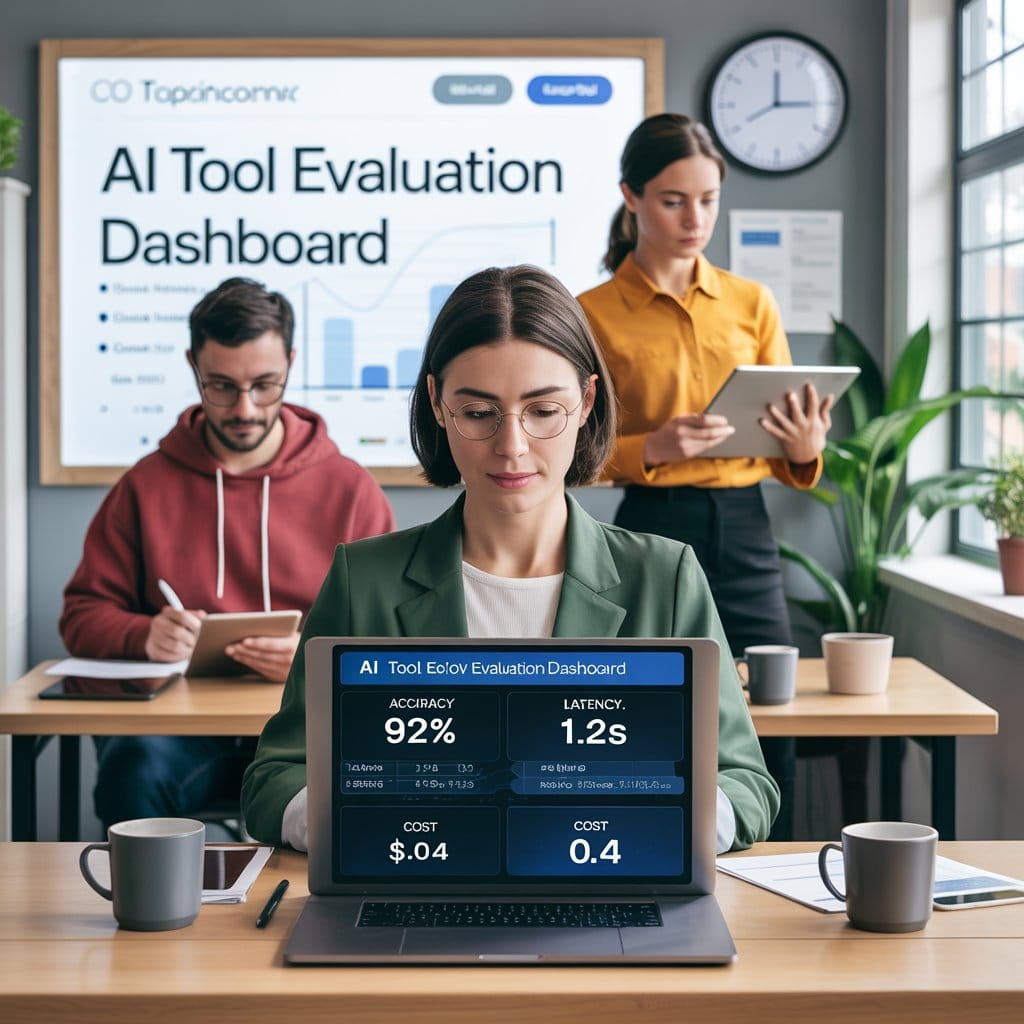
All required entities present — all 3 people in correct clothing colors (green blazer, red hoodie, yellow shirt), laptop, tablet, whiteboard, coffee mug, indoor plant, wall clock, windows, desk, furniture. Correct spatial relationships — man left of woman, woman in yellow standing behind both. Whiteboard text and dashboard metrics (Accuracy: 92%, Latency: 1.2s) present. Photorealistic style with natural office environment.
✗ Where it failed
Blurry text — a forbidden element — explicitly identified as present. Garbled text in logo and screen also noted. Clock shows approximately 9:10–12:00, not 10:15. Multiple plants visible instead of exactly one. Cost metric shows both '$0.04' and '0.4' creating confusion and duplication. 3–4 coffee mugs visible instead of exactly 2. Man in red hoodie positioned behind/left of woman rather than clearly seated to her left.
✓ Entities Detected
woman in green blazerman in red hoodiewoman in yellow shirtlaptoptabletwhiteboardcoffee mugindoor plantwall clockwindowsdeskfurniture
Man left of woman: ✓ Present but man is positioned behind/left — not clearly seated beside Woman in yellow behind: ✓ Verified present All three visible: ✓ Confirmed
🎨 Style & Perceptual
Style: Photorealistic with slight commercial polish. Natural lighting, sharp focus, natural colors — style match is strong but evaluation lacks completeness in checking all prompt constraints. Lighting: Soft, diffused natural lighting with studio enhancement — natural window light from right side. Studio enhancement not requested — slight deviation. Perceptual: Good naturalness, believable depth of field. Minor AI generation smoothness on facial features and hair. Text on laptop screen shows minor inconsistencies.
Partially Compliant — confused role assignments, wrong clock, misspelled metrics
66
/100
Semantic66✗ Fail
Stylistic94✓ Pass
Integrity62✗ Fail
Consistency40✗ Fail
Perceptual70✓ Pass
✓ What it got right
3 people present with correct clothing colors (green blazer, red hoodie, yellow shirt). Whiteboard text "AI Tool Evaluation Dashboard" correct and readable. Photorealistic style with strong stylistic score — 94/100. 2 coffee mugs (correct). 1 plant. 1 clock visible. Modern office setting with professional appearance. All forbidden elements confirmed absent — clean integrity on negative constraints.
✗ Where it failed
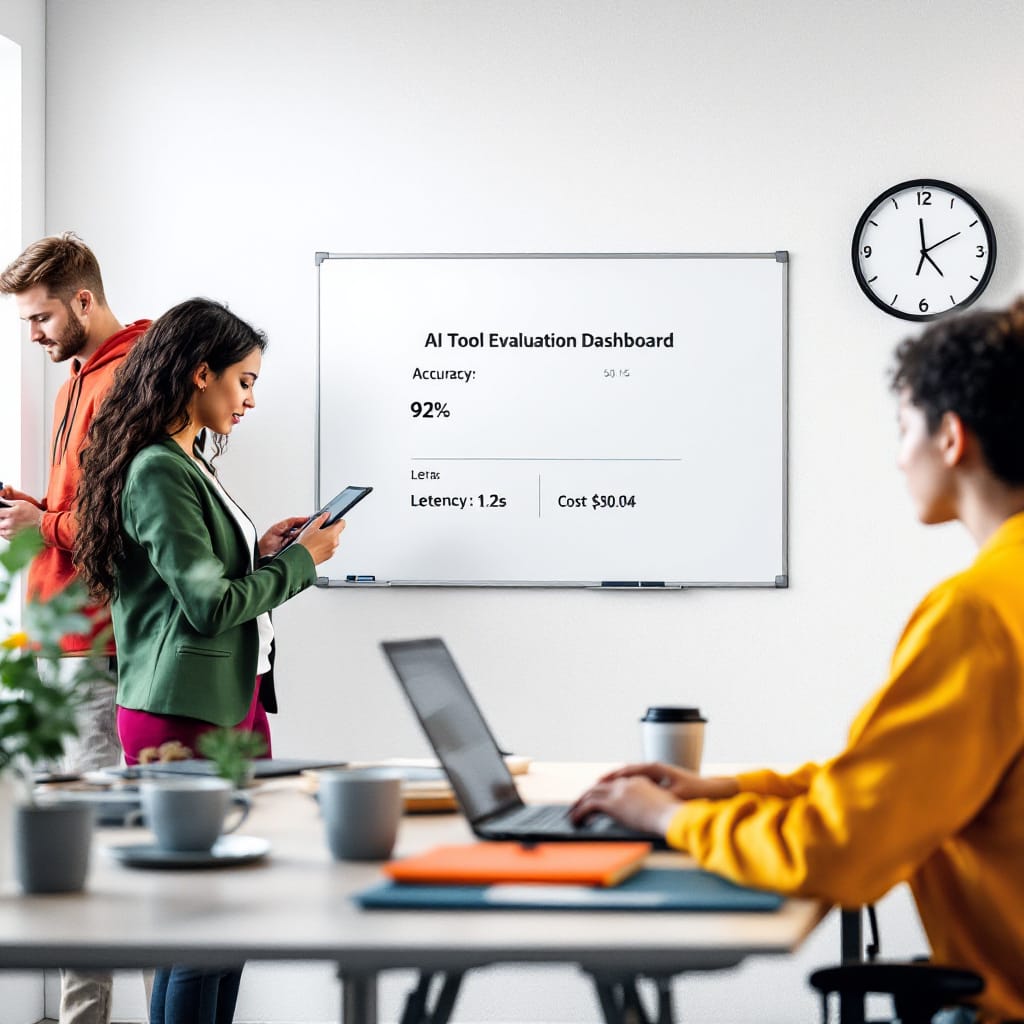
People's roles completely swapped — woman in green is standing (should be working on laptop), woman in yellow is seated at laptop (should be standing near whiteboard). Man in red hoodie appears on the left but not clearly writing on a tablet. Laptop screen misspells "Latency" as "Letency" and shows "$90.04" instead of "$0.04". Clock shows approximately 12:05, not 10:15. No windows visible — absent from scene. Lowest consistency score of all photorealistic tools — 40/100. Vibrant jewel tone color palette (emerald green, coral/orange, mustard yellow, magenta/purple) violates "natural colors" requirement.
✓ Entities Detected
woman in green blazerman in red hoodiewoman in yellow shirtlaptoptabletwhiteboardcoffee mugindoor plantwall clockdeskfurniturewindows ✗ absent
⚠️ Attribute Mismatches
Roles swapped: Green blazer woman standing, yellow shirt woman seated — both wrong Laptop text: "Letency" (misspelled), "$90.04" (wrong cost) Wall clock: Shows ~12:05, required 10:15 Windows: Absent from scene Color palette: Jewel tones vs required natural colors
📐 Spatial Relationships
Man left of woman: ✓ Approximately present Woman in yellow behind: ✗ FAILED — she is seated, not standing behind Woman in green on laptop: ✗ FAILED — she is standing, not on laptop
🎨 Style & Perceptual
Style: Photorealistic, DSLR-quality — correctly identified and matches request. Strong 94/100 stylistic score. Lighting: Soft diffused natural with studio supplementation — primary source is natural daylight, strong match. Studio supplementation not requested — minor deviation. Perceptual: Professional office scene, generally natural lighting, realistic spatial relationships. Minor artifacts: woman's hand holding tablet slightly unnatural, some sharpness inconsistency between foreground and background.
Partially Compliant — perfect visual quality but failed on prompt specifics
61
/100
Semantic45✗ Fail
Stylistic100✓ Pass
Integrity48✗ Fail
Consistency60✗ Fail
Perceptual70✓ Pass
✓ What it got right
3 people in correct clothing colors (green blazer, red hoodie, yellow shirt). Correct spatial positioning — man left of woman, woman in yellow standing behind. Whiteboard with correct text "AI Tool Evaluation Dashboard" present. Modern office environment with photorealistic quality. Natural lighting from large windows. 1 plant. 1 clock. Perfect stylistic score — 100/100. All forbidden elements confirmed absent — no cartoon style, no extra people, no watermarks, no distorted hands.
✗ Where it failed
Whiteboard metrics critically wrong — shows '$3s' and '90¢' instead of required 'Latency: 1.2s' and 'Cost: $0.04'. Laptop screen dashboard not clearly readable with required metrics. 3 coffee mugs visible instead of exactly 2. Clock time cannot be verified as showing 10:15. Man holding a tablet but not clearly writing on it. Lowest semantic score among photorealistic tools — 45/100. Vibrant emerald green, mustard yellow, coral/orange accent colors — not strictly "natural colors".
✓ Entities Detected
woman in green blazerman in red hoodiewoman in yellow shirtlaptoptabletwhiteboardcoffee mugindoor plantwall clockwindowsdeskfurniture
⚠️ Attribute Mismatches
Whiteboard metrics: Shows '$3s' and '90¢' — completely wrong values Laptop dashboard: Not clearly readable with required metrics Coffee mugs: 3 visible, required exactly 2 Clock time: Unverifiable — cannot confirm 10:15 Man with tablet: Holding but not clearly writing
📐 Spatial Relationships
Man left of woman: ✓ Verified present Woman in yellow behind: ✓ Verified present All three visible: ✓ Confirmed Note: Spatial checks pass but no numeric compliance score provided by evaluator
🎨 Style & Perceptual
Style: Photorealistic, professional staging, soft natural lighting — perfect 100/100 stylistic score. Tied with Kittl for best visual quality in the test. Lighting: Soft, diffused natural lighting from large windows — strong match to requested natural daylight. Perceptual: Good naturalness, realistic depth of field. Minor hand anatomy inconsistencies. Some facial features appear slightly soft. Presentation board text and composition well-executed.
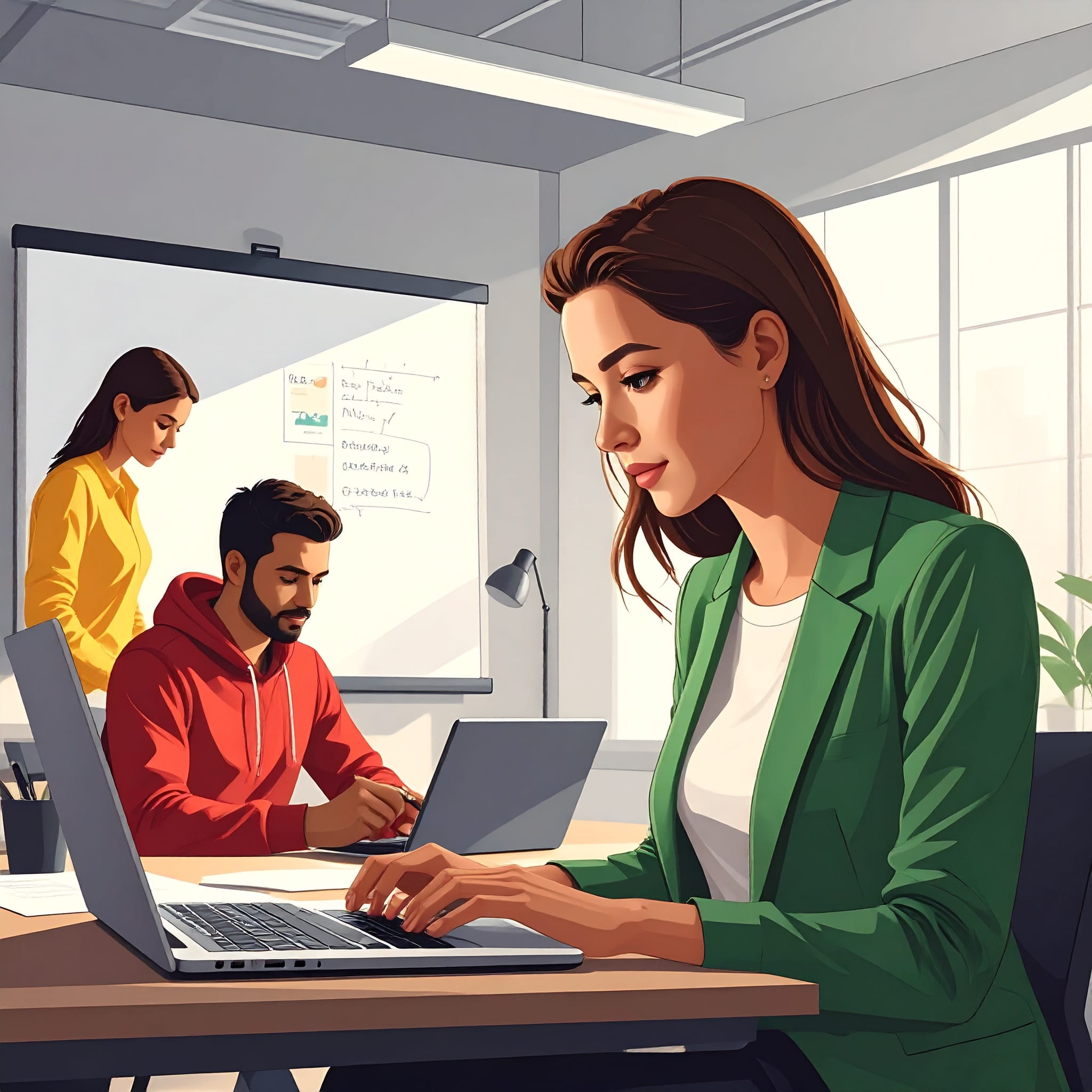
Non-Compliant — generated illustration, not a photograph
29
/100
Semantic47✗ Fail
Stylistic12✗ Fail
Integrity8✗ Fail
Consistency20✗ Fail
Perceptual70✓ Pass
✓ What it got right
3 people present with approximately correct clothing colors (green blazer, red hoodie, yellow shirt). Correct spatial positioning — man left of woman, woman in yellow behind. 1 plant possibly visible. Perceptual quality score (70) — well-executed as an illustration, clean with minimal distortions. Fingers slightly elongated but hair and form are coherent. No major anatomy failures. Composition and spatial relationships are logical.
✗ Where it failed
Fundamental disqualifying failure — generated a digital illustration/vector art style with clean gradient shading and polished commercial quality. The prompt explicitly forbade cartoon, illustration, and CGI styles. No coffee mugs present. No wall clock present. Whiteboard text illegible, does not show "AI Tool Evaluation Dashboard". No laptop dashboard metrics visible. Man using a laptop, not writing on a tablet. Spatial positioning of woman in green is in foreground rather than to the right as required. Multiple forbidden elements present: illustration style, cartoon look, glossy AI-art look, distorted hands, blurry text.
✓ Entities Detected
woman in green blazerman in red hoodiewoman in yellow shirtlaptopwhiteboardindoor plantwindowsdeskfurnituretablet ✗ absentcoffee mugs ✗ zerowall clock ✗ absent
⚠️ Attribute Mismatches
Style: Illustration/vector art — fundamentally wrong Man's device: Laptop, not a tablet (wrong) Coffee mugs: Zero present, required exactly 2 Wall clock: Absent, required 1 showing 10:15 Whiteboard text: Illegible — not matching required text Laptop metrics: Not visible
📐 Spatial Relationships
Man left of woman: ✓ Approximately present Woman in yellow behind: ✓ Approximately present Woman in green position: ✗ In foreground rather than to right — ambiguous Note: Spatial logic undermined by wrong style rendering
🎨 Style & Perceptual
Style: Digital illustration/vector art with semi-realistic approach — directly contradicts photorealistic DSLR requirement. Score: 12/100. This alone disqualifies the output. Lighting: Multiple sources including overhead fluorescent and warm backlighting — deviates from single natural daylight source requested. Perceptual: Well-executed as an illustration. Consistent lighting, appropriate shadows. Minor hand elongation. Hair rendering simplified. Clean with no major distortions — but wrong format entirely.
What this text to image prompt accuracy test reveals about AI image generators.
1. Clock time is universally broken. Every tool failed to render 10:15 correctly. Times ranged from 9:10 to 2:10. Exact analog clock time rendering is an unresolved failure point across all tested generators — and a reliable benchmark for text to image prompt accuracy.
2. Object counting is unreliable. "Exactly 2 coffee mugs" should be trivial. Most tools generated 3–4. Precise object count adherence failed in 6 of 7 tools — one of the clearest signals of low text to image prompt accuracy.
3. Visual quality ≠ prompt accuracy. Canva scored a perfect 100 on stylistic quality but only 61 overall. Beautiful output that ignores your instructions is still unusable output. Text to image prompt accuracy is what separates useful tools from impressive-looking ones.
4. Style compliance is binary. Adobe Express proves this. An otherwise coherent scene is completely unusable when it ignores the fundamental style requirement. Photorealistic means photorealistic — not vector art.
5. Kittl wins on consistency. The gap between Kittl (74) and the field is primarily the consistency dimension — the dimension that most directly reflects text to image prompt accuracy. Kittl scored 80 on consistency vs 40–60 for most competitors. That is the dimension that matters most for real-world use.
Kittl wins the text to image prompt accuracy benchmark.
74/100. The highest text to image prompt accuracy score in our test. The only tool that passed 4 of 5 dimensions. The strongest consistency score. Perfect visual quality. Honest about where it fell short — the clock, like everyone else. But ahead of the field where it counts.
Text to image prompt accuracy — your questions answered.
Based on our DeepEval benchmark test, Kittl scored highest at 74/100, followed closely by Krea at 72/100. Kittl scored top marks on visual quality (100/100) and showed strong semantic alignment, making it the most accurate tool for following detailed text-to-image prompts.
We gave all 7 AI image tools the exact same complex photorealistic prompt and evaluated each output using DeepEval across 5 dimensions: Semantic Alignment, Stylistic quality, Integrity, Consistency, and Perceptual Quality. Each dimension was scored independently and combined into a total score out of 100.
Adobe Express scored 29/100 because it generated an illustration-style image rather than the photorealistic output explicitly required. The prompt specifically forbade cartoon, illustration, and CGI styles. It also missed several required objects including coffee mugs and the wall clock.
DeepEval is an open-source AI evaluation framework. In this test it scored each image output against the original prompt across 5 dimensions: Semantic Alignment, Stylistic match, Integrity, Consistency, and Perceptual Quality — giving us objective, reproducible scores rather than subjective opinion.
Kittl scored 74/100 versus Canva's 61/100. Kittl outperformed Canva primarily on semantic alignment (80 vs 45) and consistency (80 vs 60). Canva scored full marks on visual quality (100) but failed on prompt specifics including incorrect whiteboard metrics and wrong coffee mug count.
The wall clock time. Every single tool failed to render 10:15 correctly — results ranged from 9:10 to 2:10. Object count accuracy (exactly 2 coffee mugs, exactly 1 plant) was also a consistent failure point across most tools.
No. The highest total was Kittl at 74/100. Kittl and Canva both scored 100/100 on visual quality, but no tool fully satisfied all constraints simultaneously — particularly exact clock time, object counts, and precise spatial relationships.
Prompt accuracy determines whether the tool actually does what you tell it to. For creators and marketers who need specific scenes, exact text on screens or whiteboards, or controlled composition, a tool that ignores instructions produces unusable output regardless of how visually appealing it looks.
Krea scored 72/100 — just 2 points behind Kittl — and showed the highest semantic alignment score (90/100) of all tools. However, a spatial positioning error (man placed on wrong side) and 3 coffee mugs instead of 2 were the critical gaps. Krea is a strong close second but Kittl's overall consistency made it the winner.
A 400+ word photorealistic office scene requiring exactly 3 people in specific clothing, precise spatial relationships, a whiteboard with exact text, a laptop screen showing specific metrics, exactly 2 coffee mugs, 1 indoor plant, and 1 wall clock showing 10:15. The full prompt is displayed above on this page.

 Krea
Krea OpenART AI
 Ideogram
 Photoroom
 Canva
Canva Adobe Express