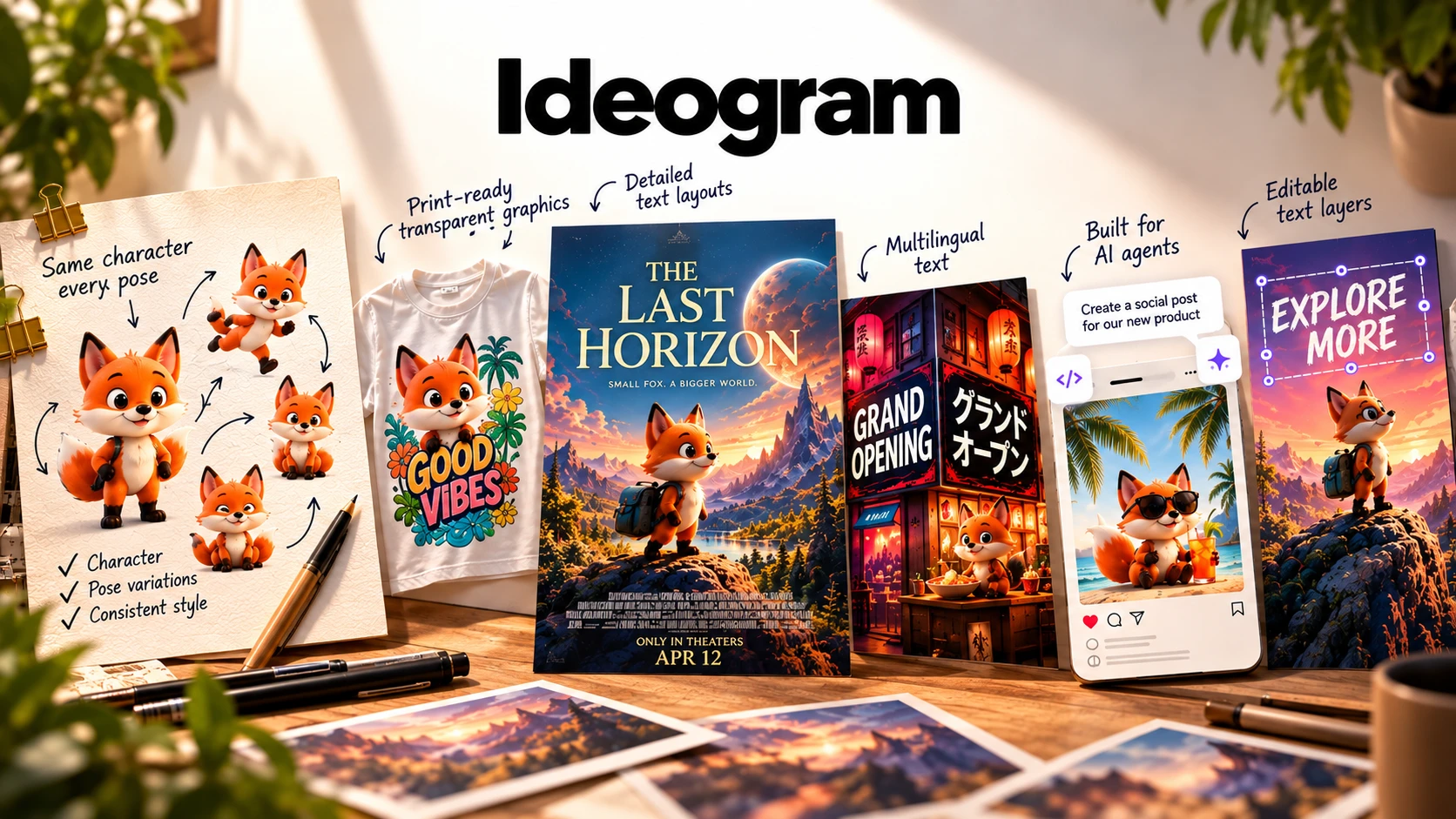
An AI image platform built around one original problem, getting readable text inside a generated image, that has since grown into a full toolkit: editable text layers, character consistency, print-on-demand tools, and an API for teams that want to automate it.
Ideogram launched with a focus on solving one specific problem: getting readable, accurately spelled text inside a generated image. Readable text is still a major focus, but the platform now includes much more. Ideogram 4.0 is the platform's current flagship model, an open-weight model with multilingual text rendering and bounding-box layout control. Ideogram 3.0 is still available in the same platform, positioned more around photorealism and Style References. Around the models sit Layerize Text (editable text layers), Character (consistent characters across poses and scenes), print-on-demand tooling, and an API with MCP agent integration.
Earlier AI image generators often struggled to produce readable text inside images. Ideogram launched with a focus on solving that specific problem, and it's still one of the platform's main strengths.
Ideogram 4.0 is the platform's current flagship model. It is also an open-weight model, so the model weights can be downloaded and used for research, personal use, or commercial self-hosting under the relevant licenses, though most users will use Ideogram through its hosted app rather than self-hosting it. Ideogram 3.0 is still available as a separate model inside the same platform, positioned more around photorealism and brand-consistent design work.
Around the models, Ideogram now includes a set of purpose-built apps (Ad Resizer, Background Remover, Colorways, Material Swap, and Object Remover), an API for developers, and an MCP integration that lets AI agents like Claude or Cursor generate and edit images directly inside a conversation.
The core workflow hasn't changed much: write a prompt, generate, pick the result you like, refine it, export. Putting text in quotes inside your prompt is still how you tell Ideogram exactly what words should appear in the image.
What's different from a couple of years ago is what happens after you generate. Two features stand out immediately: Layerize Text, which turns the text in a finished image into separate, editable layers, and Character, which lets you upload one photo and generate the same character in new poses, outfits, or scenes.
According to Ideogram, Ideogram 4.0 was trained differently from earlier versions. The model first learns to describe a scene as structured data: objects, text, layout, background. It then learns to recreate the image from that structured description. Ideogram says this approach gives more reliable composition and layout control. The facts below are specific to Ideogram 4.0; Ideogram 3.0 is still available separately in the same platform.
Ideogram 4.0 generates readable text in multiple languages, not just English.
Ideogram 4.0 supports placing text and design elements using bounding boxes, useful for dense layouts like posters with a lot of text, such as a movie credit block.
Ideogram 4.0's model weights are available on Hugging Face for research and personal use under a non-commercial license. Commercial self-hosting starts at $300/month for 10,000 images/month.
Ideogram describes Ideogram 4.0's native output as "realistic 2K images." The Print on Demand feature can separately upscale output to 8K for print use.
This is a major change from older versions of Ideogram. Press "Layerize Text" on a generated design and each line of text becomes its own selectable, editable layer: you can retype it, change the font, or resize it without regenerating the image.
That directly addresses what used to be one of Ideogram's biggest limitations: text baked permanently into the image, with a typo or wording change meaning a full regeneration.
Upload one reference photo and Character generates that same person or character across new poses, outfits, and scenes, aiming to keep the face and identity consistent from one generation to the next. It also supports face-swapping a character into an existing scene (Magic Fill) and remixing the composition of another image with your own character.
Ideogram cites independent creator testing that compared this feature against Midjourney, Leonardo AI, and Nano Banana across six rounds (base generation, pose changes, expressions, outfit swaps, environment changes, and a complex cinematic prompt), and says Ideogram was the only one that kept the character's identity locked across every round.
Ideogram can generate images with a transparent background natively (no separate background-removal step), edit those transparent images with a text prompt while keeping the transparency intact, and upscale output up to 8K for print-ready resolution. There's also a product mockup feature for placing a design onto real products without templates.
This is aimed at people producing designs for print-on-demand storefronts: a t-shirt graphic, a sticker, a mug design, where a clean transparent PNG and print resolution both matter.
If you need higher resolution for large-format print, you'll need the separate upscaling step (up to 8K through the Print on Demand tools), not a setting on the base generation.
Free accounts get a limited number of credits on a recurring basis; paid plans add a monthly credit allowance plus faster ("priority") generation, and how many credits a generation costs depends on the model and rendering settings you pick.
The open-weight release of Ideogram 4.0 is aimed at developers and businesses that want to self-host or fine-tune it. If you just want to generate images through your browser, the licensing tiers around self-hosting won't be relevant to you.
Very long or complex text inside an image can still take more than one attempt to get exactly right, even with Ideogram 4.0's layout improvements. Short phrases and headlines are still the more reliable use case than full paragraphs.
Ideogram 4.0 (open weight), with Ideogram 3.0 also available in the same platform.
Multilingual, with layout and bounding-box control for dense text like posters.
Layerize Text turns on-image text into separate, editable layers.
One reference photo, applied across new poses, outfits, and scenes.
Around 2K; up to 8K available through upscaling for print.
Generated natively, no separate background removal needed.
Web app, plus an official iPhone/iPad app; no official Android app as of this review.
REST API, plus an MCP integration for agents like Claude and Cursor.
Ideogram 4.0 weights downloadable on Hugging Face (non-commercial), with paid commercial licensing available.
Prices below reflect Ideogram's pricing page on the annual billing rate (up to 33% off the monthly rate, shown crossed out), as checked on September 30, 2026. Prices, credit amounts, and plan limits can change after that date. Check current pricing →
For trying Ideogram out.
Billed annually ($180/year), or $20/month billed monthly.
Billed annually ($504/year), or $60/month billed monthly.
Billed annually, or $30/user/month billed monthly (minimum 2 users).
Ideogram also lists an Enterprise tier: contact sales, post-paid, custom credit amount. It includes private custom models trained on your own visual data, volume discounts on the API (billed separately), and priority customer support.
Separately, self-hosting Ideogram 4.0's open weights commercially starts at $300/month for a 10,000 image/month allowance, which is a different track from the plans above and is aimed at developers running the model on their own infrastructure.
Early sessions are mostly about prompt wording, how it shapes both the image and where text lands within it, and getting used to putting on-image text in quotes.
The next layer to learn is the newer tools: Layerize Text for editing without regenerating, and Character for keeping a face or character consistent across multiple images. Both add real capability, but both are extra steps beyond a basic prompt-and-generate flow.
For teams, the API and MCP integration are a different kind of learning curve entirely, more about wiring Ideogram into an existing workflow than about learning the interface.
As of this review, Ideogram has a 3.9 out of 5 rating on Trustpilot ("Great"), from 165 reviews.
3.9 ★★★★☆
165 reviews, as of this review
This reflects 165 reviews on Trustpilot as of this writing. For current feedback, view all reviews on Trustpilot →
Useful for posters, ads, quote cards, and other graphics where the wording needs to be readable, and where being able to fix a typo or swap a headline afterward without regenerating matters.
Native transparency and print upscaling can cut out a separate background-removal step for merch and product designs.
The API, MCP integration, and open-weight model give options for automated or self-hosted workflows.
Worth considering a different tool if you:
Images where readable text matters: posters, quote cards, thumbnails, and logos. Editable text layers also make it useful when you need to fix a typo or swap a headline without regenerating the whole image.
Ideogram's current flagship model. It's open-weight, so the model weights can be downloaded for research, personal use, or licensed commercial self-hosting. It supports multilingual text rendering and bounding-box layout control, and Ideogram describes its native output as realistic 2K images.
Yes. Ideogram 3.0 is still live in the same platform, positioned more around photorealism, Style References, and brand-consistent design work.
A feature that turns the text in a finished image into separate, editable layers, so you can retype, resize, or change the font on a line of text without regenerating the image.
Upload one reference photo and Character generates that same person or character across new poses, outfits, and scenes, aiming to keep identity consistent. It also supports face-swapping into an existing scene and remixing another image's composition.
Around 2K, not native 4K. The Print on Demand tools can upscale output up to 8K for print use, so higher resolution is reachable through upscaling rather than the base generation.
Yes, an official iPhone/iPad app. There's no official Android app as of this review.
The model weights are downloadable on Hugging Face under a non-commercial license for research and personal use. Commercial self-hosting requires a separate license, currently listed at $300/month for 10,000 images/month, with custom Enterprise licensing for larger deployments.
Yes, a REST API, plus an MCP integration that lets AI agents like Claude or Cursor generate and edit images directly inside a conversation.
If you need a broader production pipeline with LoRA-trained styles and masked editing, Leonardo AI may be a better fit. If you want faster real-time generation with less setup, Krea AI is worth considering. For e-commerce product photography specifically, Photoroom may serve you better.
Readable text is still one of Ideogram's main areas of focus. What's changed is how much is built around that core. Editable text layers, character consistency, print-on-demand tooling, an open-weight model, and agent integration through MCP have turned a narrow text-rendering tool into a broader design platform.
Ideogram is particularly useful for text-heavy visuals that may need editing after generation. Those newer API, MCP, and licensing features are mainly relevant if you need to automate image generation or run the model yourself.
Write a prompt, put your text in quotes, and see how the current version compares to what you might remember from an older Ideogram release.
Affiliate link. We may earn a commission at no extra cost to you. Our review is always independent.
 Try Ideogram →
 OpenArt AI
 Photoroom
 LetsEnhance
 Magnific
 Kittl
Kittl Krea AI
 Phot.AI
 CHATGPT
 Stable Diffusion
 Leonardo AI
 Canva AI
 Adobe Express
 Fotor
Fotor Topaz Photo AI
 NightCafe
 Midjourney AI