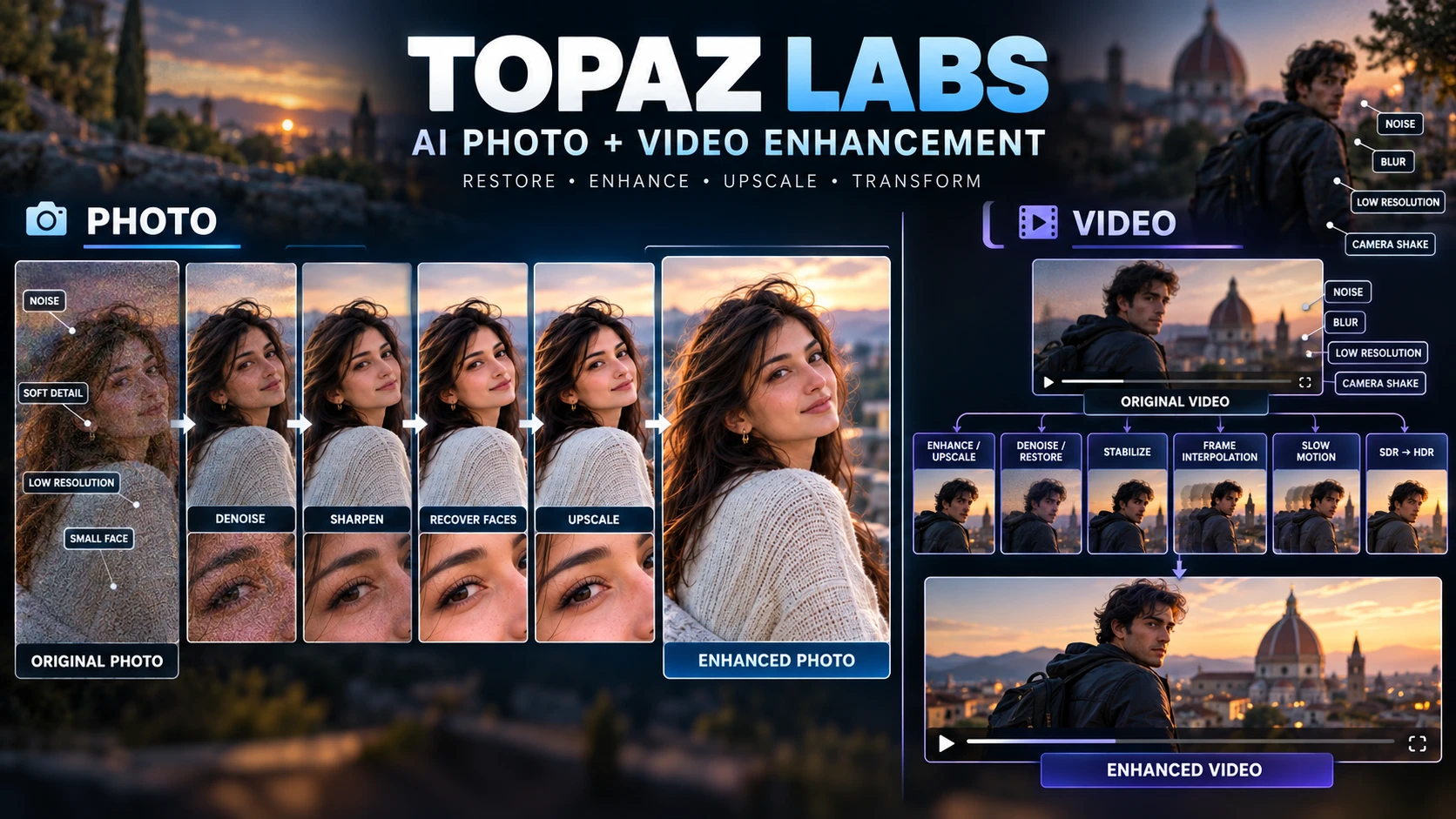
AI photo restoration and upscaling software for photographers — now owned by Adobe, but still sold as its own product.
A specialist tool, not a general editor: Topaz Photo exists to fix and enlarge photos you already have, rather than build new designs from templates. It's now owned by Adobe, but Topaz Labs still sells and supports it as its own product.
Topaz Photo (formerly marketed as "Topaz Photo AI") is desktop software for fixing and enlarging photos: removing noise, sharpening detail, recovering faces, and upscaling images. It's made by Topaz Labs, a company that has been building AI-powered photo and video enhancement software for more than twenty years, headquartered in Dallas, Texas.
In September 2026, Adobe completed its acquisition of Topaz Labs. Adobe has said Topaz will continue to exist as a standalone brand, and that Topaz's apps — including Topaz Photo — will keep being sold as standalone products, with the same support customers get now. Topaz Labs' CEO, Eric Yang, is staying on to lead the team. What's not yet clear is whether pricing or licensing will change over the longer term now that Adobe owns the company — this review reflects what's publicly confirmed as of the acquisition closing.
Topaz Photo is built for a narrower job than an all-purpose editor like Fotor or Canva: fixing and enlarging photos you already have, not building social posts or marketing graphics from templates.
Cleaned-up versions of blurry or grainy shots.
Enlarged photos prepared for large prints.
Recovered detail in hair, skin texture, and eyes.
Dust, scratches, and missing detail repaired.
Lighting and color balance fixes.
Blemishes and surface damage removed.
Topaz Photo runs as a standalone desktop app (Mac and Windows) or as a plugin inside Photoshop and Lightroom Classic.
Two examples of how these tools get used together, rather than one at a time in isolation:
Start with the original scan, remove dust and scratches, fix noise if the scan is grainy, recover faces if facial detail is weak, upscale the result, then export for printing.
Denoise first, correct exposure and color, recover the face if needed, sharpen, and upscale only if you need a larger print.
If you have 50 wedding photos that all need the same noise reduction, you don't have to process each one by hand — batch processing applies the same enhancement across multiple images in one pass. Some reviewers report batch jobs stopping partway through on large sets, so it's worth checking a batch finished completely before moving on.
Topaz uses AI to rebuild detail that's missing or damaged. Its models look at the image and estimate what that detail probably looked like. That's why it can improve blurry or low-resolution photos — but it also means the result isn't always a perfect copy of the original. There's no prompt and nothing being generated from scratch; it's restoration, working from a real photo, not creation.
Combines upscaling, sharpening, and denoising in one pass. It's useful as a quick starting point, but the separate tools give more control for photos that need it.
Deserves some caution. It reconstructs facial detail rather than recovering the original pixels — worth keeping in mind for restoration work where exact accuracy matters (forensic, archival, or anything where "plausible" isn't good enough).
AI upscaling and restoration don't bring back information that was never captured in the first place. A few realistic expectations:
The important thing to remember is that Topaz is estimating missing detail. It isn't recovering information that the original photo never captured.
Topaz Labs sells these as two separate products, and it's a common point of confusion.
Topaz Photo is the broader enhancement tool: noise removal, sharpening, color correction, face recovery, and general photo fixing, with upscaling included. Topaz Gigapixel is the specialist for upscaling specifically — it uses additional, dedicated upscaling models not included in Photo, aimed at bigger enlargements and specialized source material (low-resolution images, AI-generated art, CG textures, archived photos).
In practice: if your main need is general photo fixing with some upscaling along the way, Topaz Photo covers it. If your main need is specialized upscaling, Gigapixel gives you more dedicated models and controls. Topaz Labs' own guidance is that the two work well together, which is part of why they're bundled in the Topaz Studio plan.
Topaz Labs also sells Topaz Video, a separate product for enhancing video instead of still photos: upscaling, denoising, frame interpolation for slow motion, stabilization, motion deblur, and SDR-to-HDR conversion. It runs as a standalone app or as a plugin for After Effects and DaVinci Resolve — the video equivalent of Topaz Photo's Photoshop/Lightroom plugin.
They're built for different types of media: Photo works on still images, while Video is designed for video files. Bought separately, Topaz Photo is $199/yr and Topaz Video is $299/yr (both under Topaz's "Annual, best price" billing). Buying both together is cheaper through the Topaz Studio bundle at $399/yr, which also includes Gigapixel and the rest of the Topaz lineup.
Topaz Video is aimed at restoration and enhancement, not full video editing. It's useful when the footage itself is the problem — low resolution, noise, camera shake, motion blur, or a need for smoother slow motion. It won't replace an editor like DaVinci Resolve or Premiere Pro, and heavily damaged footage can still come out with artifacts or invented detail, the same trade-off Topaz Photo makes with still images.
Topaz Photo isn't a replacement for Photoshop or Lightroom — it's a specialist add-on. Photoshop and Lightroom handle broad editing, compositing, cataloging, and organizing a photo library. Topaz Photo handles a narrower job: AI-driven noise removal, sharpening, upscaling, and detail recovery. It adds these specialist tools to a broader Photoshop or Lightroom workflow.
The plugin option is built around this: run Topaz Photo's enhancement inside Photoshop or Lightroom Classic as one step in a larger edit, rather than switching to a separate app and back. Most photographers who use Topaz Photo are still using Photoshop or Lightroom for everything else.
Topaz Labs ended one-time license sales for Photo, Video, and Gigapixel on October 3, 2025. Everything is subscription-only now. If you're comparing this against older reviews that mention a ~$99 one-time price, that option no longer exists for new purchases.
Topaz's stated refund policy is 2 days from purchase — much shorter than many competitors. Test the free trial thoroughly before buying.
Adobe has said Topaz Photo stays a standalone product with continued support, but this is a recent change and how it plays out longer-term (pricing, integration, licensing) isn't fully settled yet.
If you're looking for a tool that creates new images from a text prompt, Topaz Photo isn't built for that — it only works on photos you already have.
The Personal plan's commercial use rights are limited to organizations under $1M USD in annual revenue; larger businesses need the Pro plan.
AI processing is demanding — see System Requirements below before buying if you're on an older machine.
Topaz Photo's AI processing is resource-intensive, so the computer running it matters more than with a typical editing app.
| Component | Requirement |
|---|---|
| Windows | Windows 10 (build 19045+) or Windows 11 |
| Mac | macOS 13 Ventura or higher (macOS 14+ recommended for full features) |
| RAM | 16GB minimum; 24GB or more recommended, especially for large upscales |
| GPU | A dedicated GPU (NVIDIA, AMD, or Intel ARC) with at least 6GB VRAM is the minimum; 8GB+ VRAM is recommended. An integrated GPU can work but with limited performance. |
| Storage | 60GB minimum, 70–100GB recommended |
| Not supported | Virtual machines, NAS setups, eGPUs, and Linux |
If you're using an older laptop or integrated graphics, expect slower processing, especially with large files — this matches the "slow rendering on high-resolution files" complaint that shows up in user reviews.
| Feature | Specs & Context |
|---|---|
| Company | Topaz Labs (Dallas, Texas), acquired by Adobe, deal closed September 2026 |
| Platforms | Windows, macOS (desktop app); plugin for Photoshop and Lightroom Classic |
| Licensing model | Subscription only — perpetual licenses discontinued October 3, 2025 |
| Upscaling | Included in Photo via Gigapixel models; Gigapixel (separate product) offers additional specialized models |
| Rendering | Unlimited local and cloud rendering on all plans |
| Commercial use | Limited to under $1M annual revenue on Personal; full rights on Pro |
| Refund policy | 2 days from purchase |
| Bundle option | Topaz Studio — includes all 7 Topaz apps (Photo, Video, Gigapixel, Image Web, Topaz for Mobile, Astra, and Bloom) |
Prices can change — check Topaz's live pricing page for current figures, particularly given the recent Adobe acquisition. Check current pricing →
$17/mo billed annually ($199/yr).
$50/mo billed annually ($599/yr).
Annual, best price. $69/mo with no annual commitment.
Both do AI-assisted photo work, but they're built for different jobs and different users.
| Feature | Topaz Photo | Fotor |
|---|---|---|
| Core strength | Deep, specialist photo restoration and upscaling | General photo editing plus templates and design |
| Starting price | $25/mo (Personal, monthly) or $17/mo billed annually | $8.99/mo (Pro) |
| Free plan | Trial only, no free tier | Yes (Basic, limited) |
| Templates | None — restoration/editing only | 100,000+ (Pro) |
| Refund window | 2 days | Not automatic; contact support |
| Company | Topaz Labs, now Adobe-owned | Everimaging |
Topaz Photo is better suited to detailed restoration and large prints. Fotor is more useful if you also want templates and general photo editing at a lower price.
Portraits, real estate, product photography that needs detail recovery.
Dust/scratch removal and detail reconstruction are core strengths.
Want these tools inside their existing workflow via the plugin, without switching apps.
Who probably shouldn't use Topaz Photo: anyone who needs templates or design layouts (Fotor or Canva cover that), or anyone generating new images from a text prompt rather than fixing existing photos.
Topaz Labs (the company overall, covering Photo, Video, and Gigapixel) has a 3.7/5 TrustScore on Trustpilot, based on 56,534 reviews at the time we checked. This is company-wide rather than specific to Topaz Photo alone — Topaz Photo's own dedicated Trustpilot page wasn't accessible at the time of writing, so treat this as a broader signal rather than a product-specific score. On G2, Topaz Photo AI has too few reviews (2, at the time we checked) to draw a meaningful conclusion from.
3.7 ★★★★☆
56,534 reviews, as of this review — Topaz Labs overall, not Topaz Photo specifically
You're restoring an old, damaged, or low-quality photo and need dedicated recovery tools, not a general editor's basic fix.
You're preparing an image for a large print and need real upscaling quality.
You want this as a plugin step in that workflow, rather than a separate app.
Yes — it's the same product, rebranded from "Topaz Photo AI" to "Topaz Photo" as part of Topaz Labs' broader product lineup (Topaz Photo, Topaz Video, Topaz Gigapixel).
Yes. Adobe completed its acquisition of Topaz Labs in September 2026. Adobe has said Topaz Photo will continue to be sold as a standalone product with the same support customers get today.
No. Topaz Labs ended one-time (perpetual) license sales for Photo, Video, and Gigapixel on October 3, 2025. All current plans are subscription-based.
$25/month, or $17/month billed annually ($199/year) for the Personal plan. The Pro plan is $63/month, or $50/month billed annually ($599/year).
No, but there is a free trial. There's no ongoing free tier like Fotor's.
2 days from purchase — a short window, so test the trial thoroughly first.
Photo is the broader enhancement tool with upscaling included; Gigapixel is the specialist for upscaling specifically, with additional models for bigger enlargements. They're meant to work together.
No. They're separate products sold separately — Topaz Photo works on still images ($199/yr), Topaz Video works on video files ($299/yr). Both are included if you buy the Topaz Studio bundle ($399/yr).
No. It's a specialist add-on for AI-driven noise removal, sharpening, and detail recovery — it runs as a plugin inside those apps, or standalone, but doesn't replace their broader editing and cataloging tools.
Yes, it's available as a plugin for Photoshop and Lightroom Classic, in addition to running as a standalone app.
We checked Topaz Labs' own product and system-requirements documentation, pricing pages, Adobe's public statements on the acquisition, third-party coverage of the perpetual-license change, and user feedback on Trustpilot and G2 when preparing this review. Topaz Photo's own product-specific Trustpilot page wasn't accessible at the time of writing, so the Trustpilot figure here reflects Topaz Labs as a company rather than this product alone — we've flagged that clearly above. We update this page as Topaz Photo's ownership, pricing, or features change, particularly given the recent Adobe acquisition.
This page contains affiliate links: if you sign up through them, we may earn a commission at no extra cost to you — which never affects what we recommend.
Topaz Photo is a specialist tool for photo restoration, not a general editor: denoising, sharpening, and face recovery are its strongest features, and the Photoshop/Lightroom plugin fits it into an existing workflow. The subscription-only pricing, short refund window, and September 2026 Adobe acquisition are real factors to weigh before buying.
If you regularly fix and enlarge real photos, Topaz Photo is built for that job. If you need templates or general editing, Fotor or Canva are better suited to those tasks.
You can explore Topaz Photo's current plans and see whether Personal or Pro fits your needs.
Affiliate link. We may earn a commission at no extra cost to you. Our review is always independent.
 OpenArt AI
 Photoroom
 LetsEnhance
 Magnific
 Ideogram
 Kittl
Kittl Krea AI
 Phot.AI
 CHATGPT
 Stable Diffusion
 Leonardo AI
 Canva AI
 Adobe Express
 Fotor
Fotor Topaz Photo AI
 NightCafe
 Midjourney AI