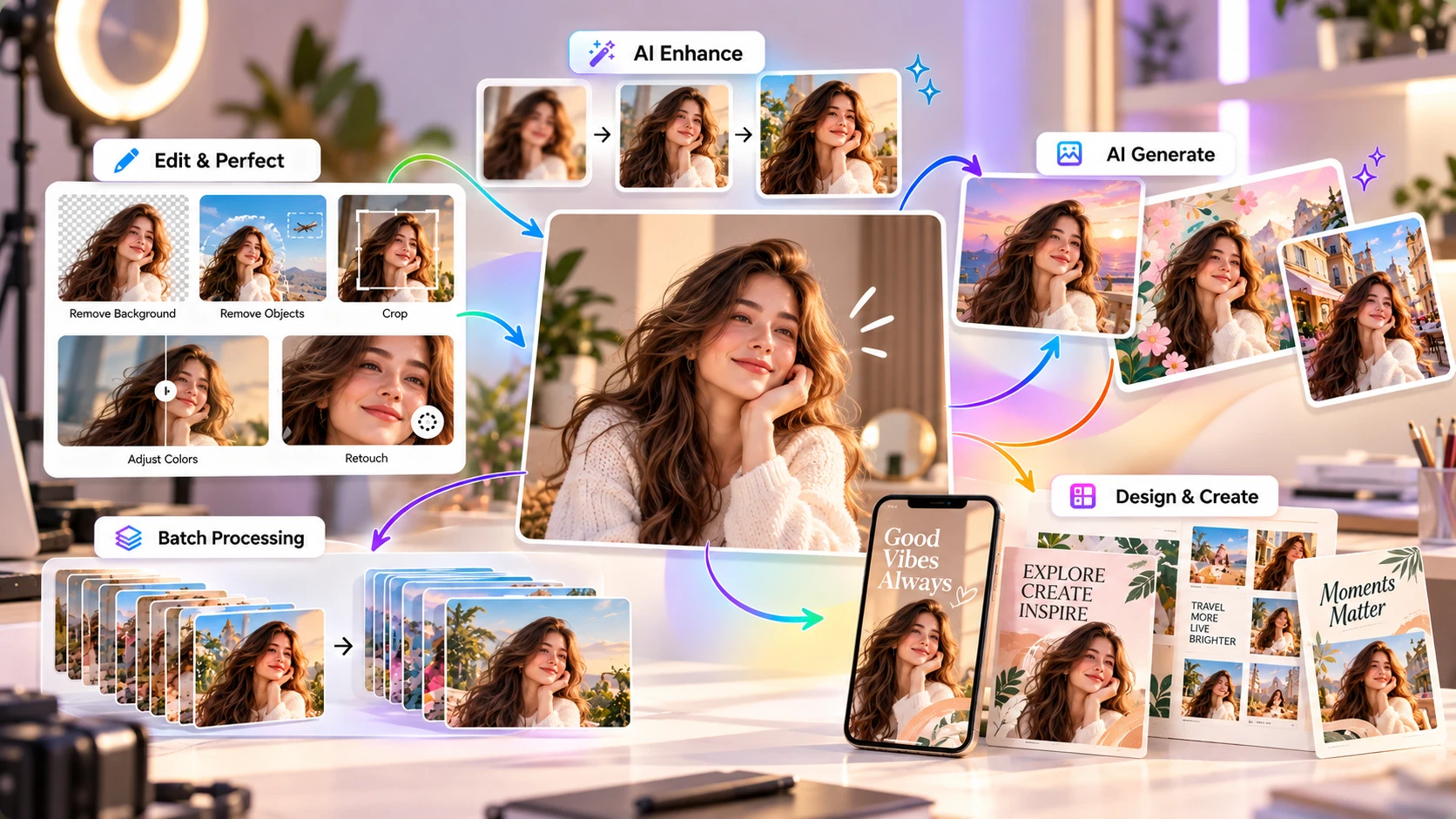
A browser-based photo editor and design tool with AI touch-up, background removal, and templates built in. Fotor leans photo editing first, design second.
Fotor is a photo editing and design tool for the web, desktop, and mobile. It was made by Everimaging, a company founded in 2012 in Chengdu, China. It started as a photo editor — cropping, filters, retouching, collages — and has since added graphic design templates and a growing set of AI tools on top. Fotor says it has more than 800 million users across 200+ countries. The company does not break that figure down into active users or paying customers.
Where Canva and Adobe Express lead with templates and layout tools, Fotor leans more toward photo editing first, design second. If your main job is fixing and enhancing photos — portraits, product shots, real estate photos — Fotor's toolset is built around that. If you mainly need social posts, presentations, or marketing graphics from templates, Canva or Adobe Express cover that ground more directly.
Portraits, product shots, real estate, before/after touch-ups.
Combine multiple photos into one layout.
Social media posts and marketing visuals from templates.
Greeting cards and invitations from pre-built layouts.
Illustrations, art, avatars, and headshots from a text prompt.
AI Slides, available on the Pro+ plan.
Fotor's AI tools fall into two groups: editing AI and generative AI.
Background removal, object removal, photo enhancement — works on photos you already have. You upload an image, and the tool automatically detects and processes the relevant part (the subject, the background, a flaw). These are narrower, well-defined editing tasks rather than open-ended image generation.
The AI Image Generator creates images from a text prompt, similar to tools like Ideogram or Krea AI, though it isn't a specialized or leading model in that category; it's one feature among many rather than Fotor's main draw.
An AI chat assistant aimed at simplifying the process of generating visual content through conversation rather than manual tool use. Sisi is a newer part of Fotor's product lineup, so its capabilities may continue to change.
AI generations run on a credit system. Credit costs vary by feature. Basic tools like the Image Generator can start at 1 credit, while face editing and AI video generation can use considerably more.
Paid plans include a set number of credits per month (see Pricing below). Unused subscription credits can roll over for up to 5 months while your subscription stays active; they expire if you cancel.
Batch editing is designed to speed up repetitive photo work, and it's worth understanding before you pay for a higher tier for it.
Brand kits let you save a set of colors, logos, and fonts so repeat designs stay consistent — useful if you're a small business or freelancer producing recurring content, less useful if you're a one-off user. Both features are gated to Pro+ and above, so factor that into which plan you actually need.
Fotor's own support documentation lists 100,000+ templates as part of what the Pro plan includes, spanning social media graphics, marketing visuals, cards, and invitations.
This is a smaller library than Canva's (1.6M+ free, 3.6M+ on Pro) or Adobe Express's. If templates and design variety are your priority, Fotor is the thinner option of the three; if photo editing quality is your priority, template count matters less.
A single editing canvas with tool panels on the side — closer to a simplified Photoshop-style layout than Canva's drag-and-drop template-first approach.
Adjust, crop, remove background — straightforward for pure photo editing.
Works similarly to Canva and Adobe Express: pick a template, swap in your content, adjust.
Multiple G2 reviewers describe it as beginner-friendly for quick edits, and the one-tap auto-enhance feature is called out specifically as fixing common exposure problems without manual slider work.
512MB storage, watermarked non-HD downloads, and a limited number of complimentary AI credits. You'll hit the ceiling quickly if you're generating AI images regularly.
A recurring theme across reviews (see What Real Users Say, below) is unexpected renewal charges and difficulty cancelling. Check your renewal date and cancellation settings when you sign up.
Per Fotor's own support documentation, cancelling a subscription stops future renewals — it does not refund what you've already paid. You keep access through the end of your current billing period. Contact support directly if you believe you have a case for an exception.
Not the main product. If text-to-image generation is your primary need, a dedicated tool (Ideogram, Krea AI) is built specifically for that job, rather than being one feature among many.
Some reviewers report slowdowns and browser crashes when editing high-resolution photos in the web app.
| Feature | Specs & Context |
|---|---|
| Company | Everimaging (Fotor), founded 2012, Chengdu, China |
| Platforms | Web browser, Windows, macOS, iOS, Android |
| Free plan storage | 512MB cloud storage |
| Pro plan storage | 2GB cloud storage |
| Pro+ plan storage | 100GB cloud storage |
| AI credit system | Costs vary by feature — basic tools start at 1 credit, heavier tools (video, watermark removal) cost more |
| Credit rollover | Subscription credits can accumulate for up to 5 months while the subscription remains active; they expire on cancellation |
| Pro monthly AI credits | 100 credits/month |
| Pro+ monthly AI credits | 300 credits/month |
| Batch editing | Pro+ and above only |
| Refund policy | No refunds on already-paid fees by default (per ToS); cancellation stops future renewal only |
Prices can vary by billing period, region, promotions, and plan changes. The figures below are what we saw at the time of writing. Check current pricing →
512MB storage, watermarked non-HD downloads, limited AI credits.
$3.33/mo billed annually ($39.99/yr).
$7.49/mo billed annually ($89.99/yr).
API/SDK access, high-volume solutions.
Fotor's live pricing page also lists a higher-tier "Max" plan (larger AI Agent chat allowance, more concurrent generations, 500GB storage) aimed at heavy AI-agent users. Check the live pricing page for the current figure before committing.
AI Headshot packages are also sold separately as one-time purchases, without requiring a subscription.
| Feature | Free | Pro | Pro+ |
|---|---|---|---|
| Storage | 512MB | 2GB | 100GB |
| Templates | Limited | 100,000+ | 100,000+ |
| AI credits/mo | Limited | 100 | 300 |
| Batch editing | — | — | ✓ |
| Brand kits | — | — | ✓ |
| Downloads | Watermarked, non-HD | HD | HD |
| Feature | Fotor | Canva |
|---|---|---|
| Core strength | Photo editing (retouching, background/object removal, enhancement) | Templates and design layout across many formats |
| Free plan | 512MB storage, limited templates, watermarked downloads | 1.6M+ templates, 5GB storage |
| Template library | ~100,000+ (Pro) | 1.6M+ free, 3.6M+ on Pro |
| Starting paid price | $8.99/mo (Pro) | $12/mo (Pro, billed annually as $144/yr) |
| AI image generation | Included, secondary feature | Included (Magic Studio), secondary feature |
| Batch photo editing | Pro+ and above | Not a core feature |
| Company | Everimaging, founded 2012 | Canva, founded 2012 |
Canva has a much larger template library and is more focused on multi-format design. Fotor's batch editing and photo-specific AI tools (background/object removal, enhancement) are more purpose-built for processing photos you already have.
Editing product photos — background removal and batch editing handle volume work directly.
The core editing AI tools are built for exactly this kind of touch-up work.
Want quick fixes without learning Photoshop — one-tap enhance and simple tools cover common needs.
The one-time headshot packages are a low-commitment option, no subscription required.
Who probably shouldn't use Fotor: anyone whose main need is a large, varied template library for marketing/social content — Canva has 1.6M+ free templates and Adobe Express has a larger asset library. Also anyone whose primary need is text-to-image generation — a dedicated image AI tool is built specifically for that, rather than being one feature among many.
Fotor has a 3.6/5 TrustScore on Trustpilot, based on 1,581 reviews at the time we checked. The ratings are polarized: about 48% are five-star and about 39% are one-star, with relatively little in between.
On G2, Fotor Photo Editor is rated 4.2/5 across 342 reviews. The two platforms serve different audiences (Trustpilot skews general consumer, G2 skews software/design professionals), so the ratings aren't directly comparable.
3.6 ★★★★☆
1,581 reviews, as of this review
You're editing and enhancing existing photos regularly — background removal, retouching, upscaling — rather than starting from a blank template.
You need to batch-process product or headshot photos and don't want to edit each one by hand.
You want AI headshots without committing to a subscription.
Yes, there's a free (Basic) plan, but it comes with real limits: 512MB storage, watermarked non-HD downloads, and a small number of complimentary AI credits.
$8.99/month, or $3.33/month billed annually ($39.99/year).
Pro+ adds AI Slides, batch editing, brand kits, and significantly more storage (100GB vs 2GB) and monthly AI credits (300 vs 100), for $19.99/month ($7.49/month billed annually).
Not by default. Cancelling stops future renewal charges but doesn't refund what you've already paid, per Fotor's own terms. You can contact support if you believe you have a case for an exception.
Fotor says unused subscription credits can accumulate for up to 5 months while the subscription stays active. Credits expire if you cancel. Check the current credit terms before relying on unused credits.
Yes, but only on Pro+ and above, and the batch operations are limited to what Fotor documents (background removal/replacement being the main one) — not unlimited scripted editing.
Fotor's own support documentation cites 100,000+ templates as part of the Pro plan. This is notably smaller than Canva's or Adobe Express's libraries.
Yes — this is one of its stronger, more specific use cases: background removal and batch editing are built for processing multiple product shots efficiently.
We checked Fotor's own product and support documentation, third-party pricing and review aggregators (G2, Capterra, TrustRadius, SaaSworthy), and user feedback on Trustpilot and G2 when preparing this review, including where its ratings are polarized and where its billing practices draw complaints. Ratings are sourced from Trustpilot (larger sample: 1,581 reviews) and G2 (smaller but professionally-skewed sample: 342 reviews) rather than self-assigned. We update this page as Fotor's pricing, plans, or features change — check Fotor's live pricing page for current figures, particularly for the newer "Max" tier.
This page contains affiliate links: if you sign up through them, we may earn a commission at no extra cost to you — which never affects what we recommend.
Fotor is a solid choice if your work is mostly photo editing — fixing, enhancing, and processing real photos — rather than building marketing content from templates. Its background/object removal and batch editing are genuinely useful for product photography and portrait touch-ups.
Its template library is a fraction of Canva's or Adobe Express's, and billing/cancellation complaints show up repeatedly in reviews, so read the subscription terms before you commit. If photo editing is the actual job, it's worth trying.
You can explore Fotor's current plans and see whether Pro or Pro+ fits your needs.
Affiliate link. We may earn a commission at no extra cost to you. Our review is always independent.
 OpenArt AI
 Photoroom
 LetsEnhance
 Magnific
 Ideogram
 Kittl
Kittl Krea AI
 Phot.AI
 CHATGPT
 Stable Diffusion
 Leonardo AI
 Canva AI
 Adobe Express
 Fotor
Fotor Topaz Photo AI
 NightCafe
 Midjourney AI