Real-time generation. Photorealistic output. Create and refine images as you type.
Krea AI is a real-time AI creative suite covering image generation, video generation, AI upscaling, image-to-image, image-to-video, LoRA finetuning, 3D generation, and a set of mini apps — all from a single browser-based platform. The standout capability: results appear as you type, with no render button and no waiting queue — you see the effect of a prompt change almost immediately.
We ran Krea 2 Medium — Krea's mid-tier image model — against four deliberately demanding prompts covering photorealism, exact text rendering, multi-panel character consistency, and extreme macro detail. Each result was judged on whether it followed the prompt and how convincing the final image looked, scored out of 100 using our in-house scale on content match (did it include what was asked?) and visual quality & integrity (does it hold up as a real image?) — subjective, not an industry-standard benchmark. Three passed and one failed, and we show the failure too. These are our own tests, not marketing renders.
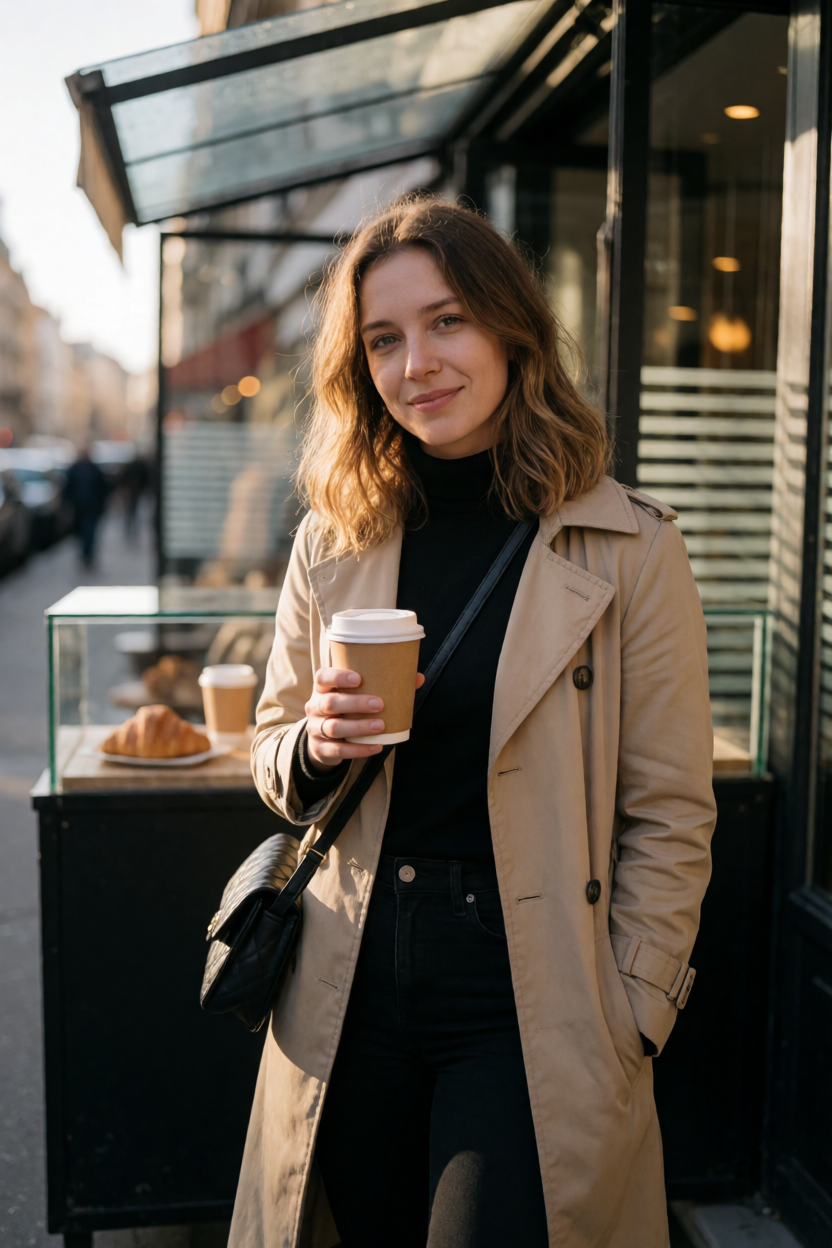
Prompt: "A candid street portrait of a 27-year-old woman standing outside a small Paris café during golden hour, wearing a beige trench coat and holding a takeaway coffee… 85mm f/1.4, natural skin texture, anatomically correct hands, shallow bokeh, ultra-photorealistic, RAW quality."
Content match — 85/100: all entities present (woman, beige trench coat, takeaway coffee, street café); golden-hour light evident. Camera specs can't be verified from pixels.
Visual quality — 92/100: genuine candid look, warm directional light, sharp subject with intentional bokeh, anatomically correct hands, subtle flyaway hairs and realistic eye reflections.
Verdict: Convincing and natural — one of Krea 2 Medium's strongest results.
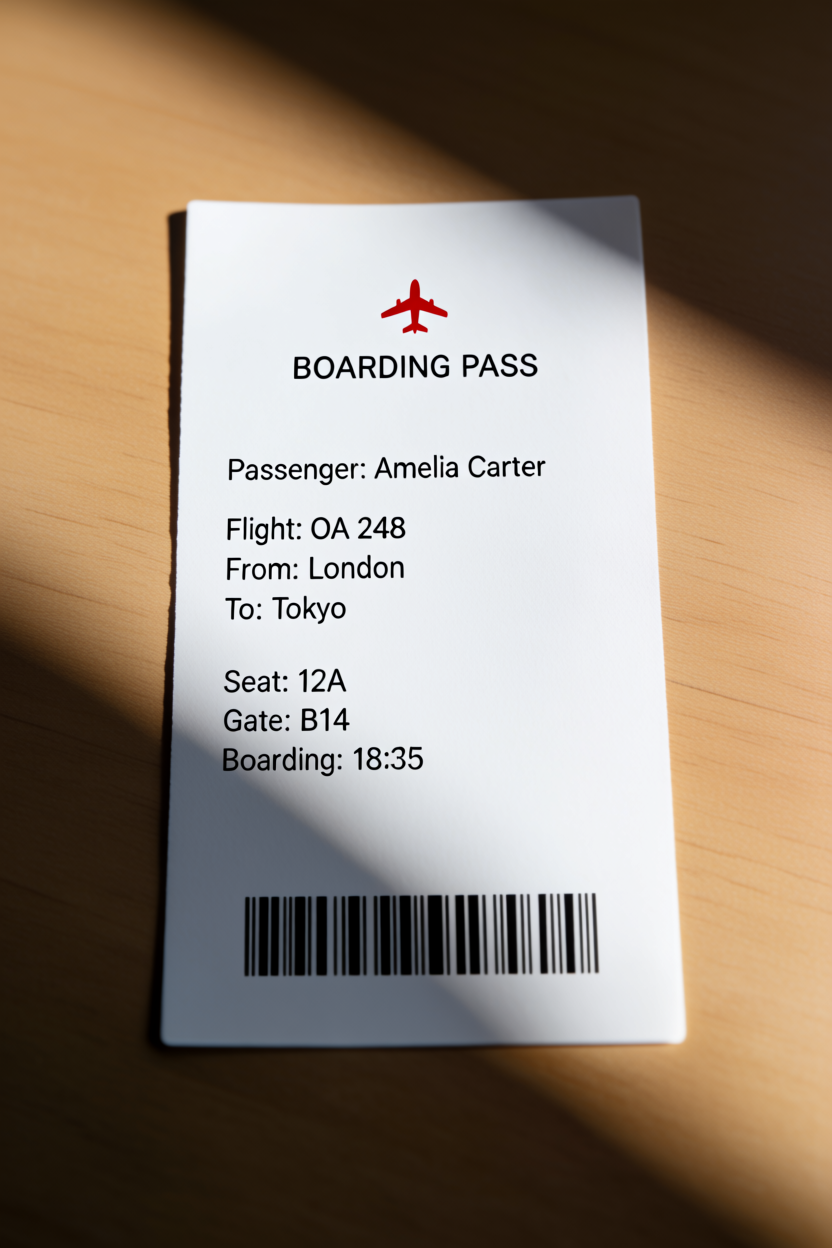
Prompt: "Design a minimalist airline boarding pass on a wooden desk containing exactly this text: BOARDING PASS · Passenger: Amelia Carter · Flight: OA 248 · London → Tokyo · Seat 12A · Gate B14 · Boarding 18:35. Clean airline typography, perfect spelling and spacing. Photorealistic cardstock."
Content match — 95/100: every field rendered with correct spelling (Amelia Carter, OA 248, London→Tokyo, 12A, B14, 18:35); clean typography, barcode, wooden-desk surface.
Visual quality — 92/100: sharp text, natural directional shadows, realistic paper texture, proper perspective and alignment.
Verdict: Excellent — accurate, readable text is a genuinely hard test, and Krea 2 nailed it here.
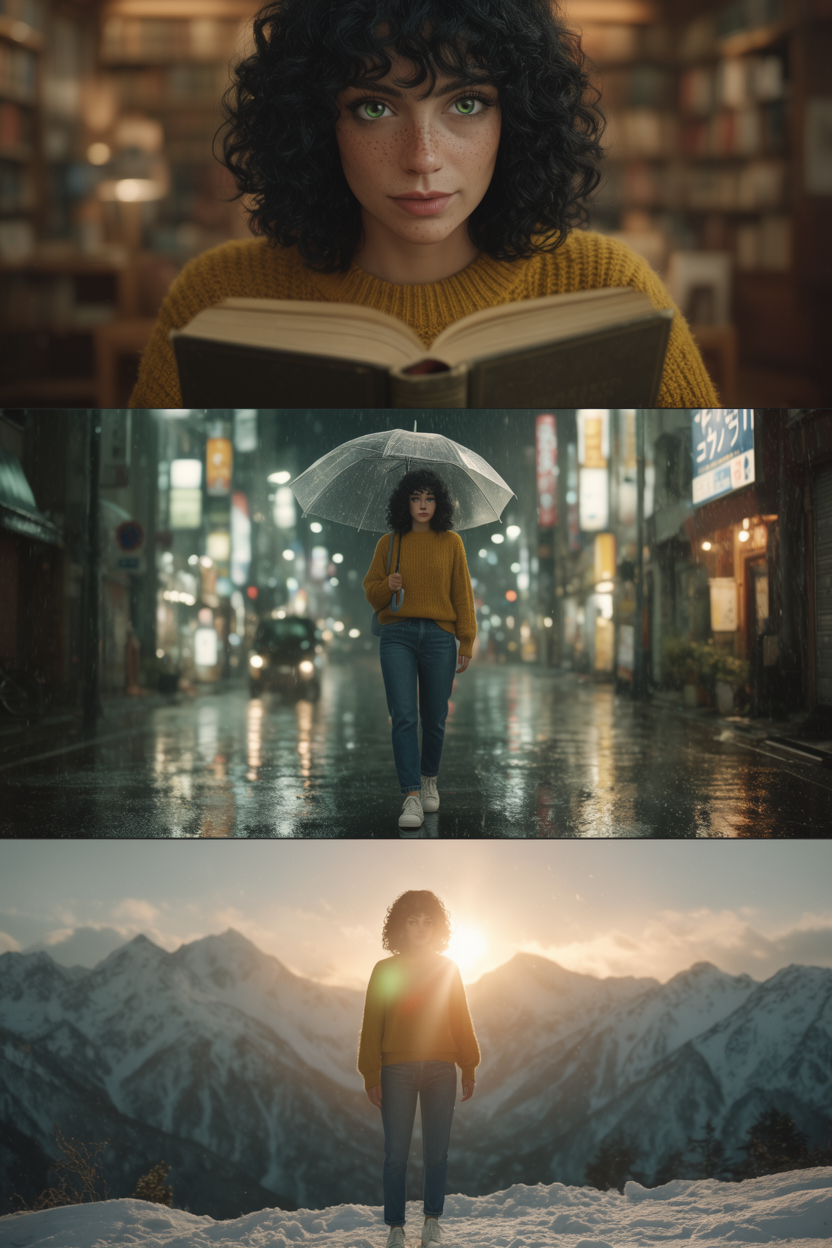
Prompt: "A cinematic triptych featuring the same woman in every panel — shoulder-length curly black hair, green eyes, freckles, mustard-yellow sweater, blue jeans, white sneakers. Panel 1: library; Panel 2: rainy Tokyo street with a transparent umbrella; Panel 3: snowy mountain at sunrise. Identity must remain identical across all three."
Content match — 85/100: all three scenes, props, and the described features are present and the triptych layout is correct.
Visual quality — 60/100: the failure point. Cinematically graded, but with clear CGI tells — unnaturally perfect, waxy skin, over-idealised symmetry, and subtle facial-proportion drift between panels that weakens character continuity.
Verdict: Great composition, but photorealism and identity consistency across panels break down — a fail on visual integrity.
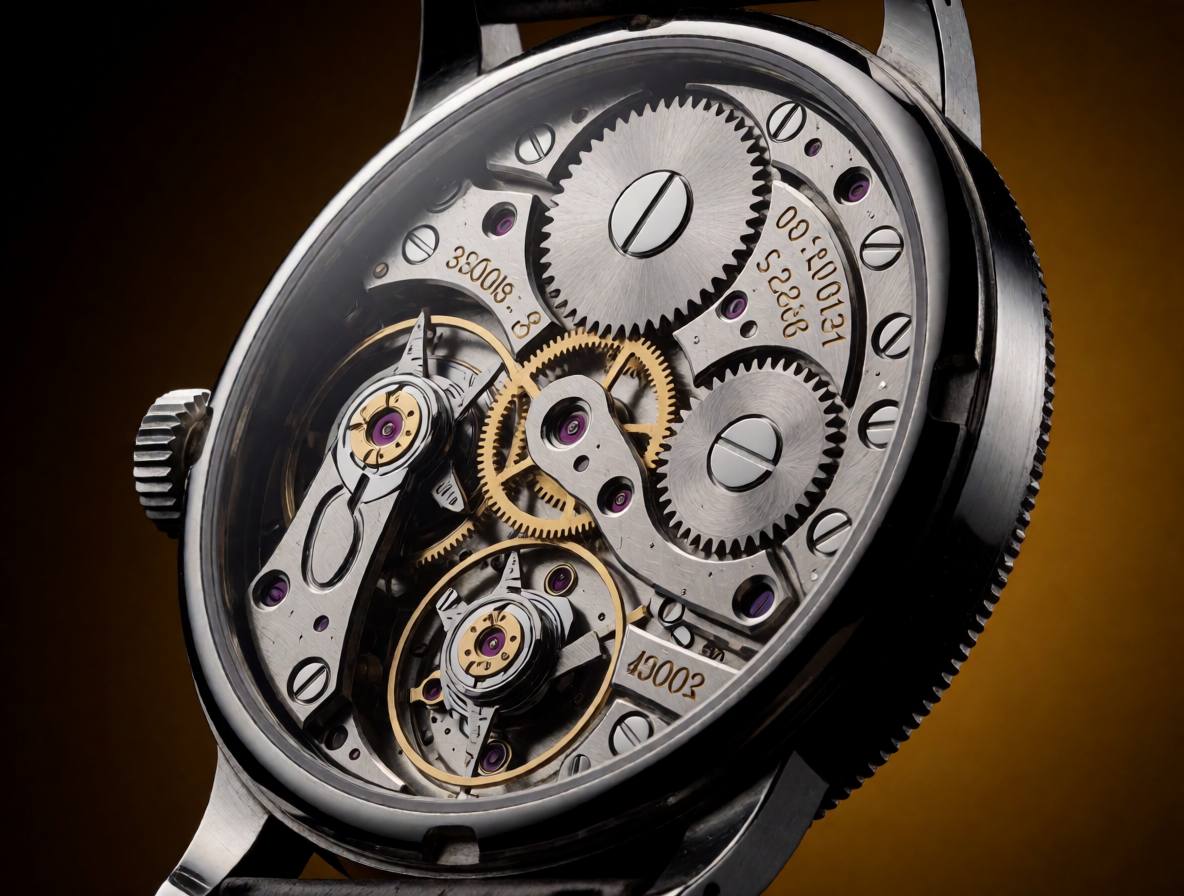
Prompt: "A professional macro photograph of an antique mechanical wristwatch with its back removed — hundreds of machined gears, ruby bearings, springs, engraved serial numbers, polished screws, brushed steel, oil sheen, dramatic studio lighting. 3:1 magnification, hyper-realistic 8K product photography."
Content match — 85/100: gears, ruby bearings, springs, engraved serials, polished screws, and brushed-steel components all present; dust particles and micro-scratches are subtler than asked.
Visual quality — 90/100: exceptional sharpness, accurate gear geometry and proportions, dramatic studio lighting with realistic metallic reflections.
Verdict: Strong macro result — the mechanical detail and lighting hold up under scrutiny.
| # | Prompt subject | Content match | Visual quality | Overall |
|---|---|---|---|---|
| 1 | Paris Café Portrait — golden hour | 85/100 | 92/100 | ✅ PASS |
| 2 | Airline Boarding Pass — exact text | 95/100 | 92/100 | ✅ PASS |
| 3 | Cinematic Triptych — same woman ×3 | 85/100 | 60/100 | ❌ FAIL |
| 4 | Antique Watch — 3:1 macro, 8K | 85/100 | 90/100 | ✅ PASS |
Three passes and one failure point to a clear pattern. Krea 2 Medium is excellent at single-subject photorealism — the Paris café portrait and the antique-watch macro both scored 90+ on visual quality — and, notably, at accurate in-image text, rendering every field of the boarding pass with perfect spelling. Its one real weakness is multi-panel character consistency: holding the same believable person across several shots, where its realism slips into a waxy, CGI look with subtle facial drift.
Bottom line: Krea 2 Medium is not weak at photorealism — the opposite. It's strong at producing a single photorealistic image, but unreliable at repeating the same person photorealistically across many.
Krea AI takes a different approach to AI image generation. Where Midjourney, DALL-E, and Stable Diffusion make you wait — type a prompt, wait 10–30 seconds, see the result, iterate — this one shows you the image as you type.
The main difference is that you can adjust the prompt while watching the image change, instead of guessing what a prompt will produce and finding out 10–30 seconds later. You can see the effect of a prompt change almost immediately.
It is not just an image generator. The full creative suite covers real-time image generation, video generation, AI upscaling and enhancement, image-to-image generation, image-to-video animation, LoRA finetuning, 3D generation, and a set of specialised mini apps — all browser-based, no installation required. The Krea 2 model powers the latest generation workflows with improved quality and prompt adherence.
The honest framing: its main advantage is how quickly you can move from an idea to a usable, photorealistic image. Most of Krea's other tools support that same fast, iterative workflow.
It does not make you wait. It makes you iterate. And iteration is where great images actually come from.
The first session is easy to understand: there is no separate Generate button and no queue to wait in. You start typing and the image appears, evolving with every character you add.
You are not iterating blindly — you see what each word does to the image. "A cat" — you see a cat. "A fluffy orange cat sitting on a windowsill at golden hour" — the scene completes itself as you type it.
Speed is the mechanism. But the bigger effect isn't speed alone: it's the ability to test ideas without waiting for a new generation, which changes how you approach prompting. A fundamentally different creative process.
In other tools, you write a prompt, generate, wait, evaluate, adjust, generate again, wait again — each cycle costing real time. Here, that friction is gone entirely. You explore. You try "cinematic lighting" — see what happens. Add "golden hour" — watch the warmth appear. Remove a word — see the image shift. You stop trying to get the prompt right and start discovering what works.
Image-to-image generation extends this further. Upload a reference image — product render, concept art, photograph — and the platform uses it to guide the output. Image-to-video takes it a step further: animate any still image into a short video clip without leaving the platform.
Krea's main advantage is combining real-time generation with a broader set of image, video, editing, and enhancement tools.
The defining feature: the image updates as you type, with no render button or waiting queue. That makes experimentation the workflow instead of an afterthought.
It produces convincing photorealistic results, particularly for portraits, products, and scenes with controlled lighting. The Krea 2 model delivers improved quality and prompt adherence over earlier versions.
Upload any still image as a reference for image-to-image generation — concept art, product renders, photographs. Image-to-video animation turns static images into short cinematic clips directly within the platform, no separate tool needed.
Beyond images, this capability creates short video clips from text prompts or still images. Motion transfer allows applying movement styles from one video to another. Part of the broader creative suite.
The built-in upscaler enhances and restores images with strong quality preservation. Upscale generated outputs to 4K or upload existing photos for quality improvement — a complete image production workflow without switching platforms.
Train custom LoRA models on your own image and video datasets for consistent brand identity, character styles, or product aesthetics. Trained LoRAs can be shared with the community — a significant advantage for teams and power users.
Two videos from Krea's own YouTube channel, each with a short summary so you can scan what it covers before pressing play — the Krea 2 foundation-model announcement and a hands-on basics tutorial.
The official announcement of Krea 2 (K2), the company's first foundation model built from scratch and designed for aesthetics, style, and creative control — moving beyond the generic "AI look" into grainy film, cinematic stills, and digital painting.
A tutorial on Krea 2's exploratory prompting style: you don't need a perfect prompt. Start vague and iterate fast — a simple prompt yields a diverse range of styles, letting you discover directions you can then refine.
The platform extends well beyond image generation, with a set of specialised mini apps covering editing, enhancement, and video workflows — all accessible from the same browser-based interface.
Automatically remove image backgrounds with AI — clean results suitable for product photography, compositing, and marketing assets.
AI-powered generative editing — modify, extend, or replace regions of an existing image using natural-language instructions. Real-time editing keeps the same instant feedback loop as generation: edits update live on the canvas as you make them, so you refine an image the same way you create one.
Smooth video clips by generating intermediate frames — increase frame rate and create fluid motion from lower frame rate source footage.
Apply an artistic style to a video clip — transform footage into a different visual aesthetic while preserving the underlying motion and composition.
Upscale video resolution with AI — improve the quality of existing footage for higher resolution distribution without re-shooting.
Apply the motion pattern from one video to another — transfer movement styles across different subjects and scenes for creative video production.
Animate a still image to match an audio track, creating realistic lip-synced videos from a single photo — useful for avatars, explainers, and talking-head content.
Build custom pipelines with Nodes and Apps — automate repetitive tasks, chain generation and editing steps, and share Node Apps with your team. Available on Pro and Business plans.
Krea AI is not only an image tool — video generation is a core part of the suite. You can generate short clips two ways: text-to-video, describing a scene and getting a clip back, and image-to-video (animate image), turning any still — concept art, a product render, or an AI-generated image — into motion. Because Krea is a multi-model platform, the same canvas gives you access to leading video models rather than a single engine.
The real-time philosophy carries over: you iterate on prompts and references quickly instead of waiting on long render queues. Around generation sit the video mini apps — video upscaling to lift footage to higher resolution, frame interpolation to smooth motion, video style transfer to restyle a clip, motion transfer to move one subject's movement onto another, and lip sync to match a still to an audio track. Together they make Krea a place to create, animate, and finish video without switching platforms.
Krea is model-agnostic. Alongside its own Krea 2 foundation model, it gives you access to 64+ image and video models in a single interface, and new models are added regularly. That means you can run one prompt across several models and pick the best result — without a separate subscription for each.
With over 1000 styles on Krea 2 — from risograph to cinematic to watercolour — plus the wider model roster, you get both breadth of models and granular style control from one creative suite. You can also train and fine-tune your own models on top: LoRA fine-tuning turns any of these generative models into a custom, on-brand generator.
Historically a weak spot for models like Midjourney and DALL-E. Krea 2 is noticeably better — in our tests it rendered a full boarding pass with perfect spelling — but it still isn't guaranteed for dense or complex layouts. For anything where crisp readable text is mission-critical (logos, long signage), Ideogram 2.0 remains the safest purpose-built choice.
It excels at photorealism. Stylised outputs — oil painting, illustration, watercolour, abstract — are competent but not the strongest in the category. In our assessment, Midjourney still leads for artistic and painterly styles with a broader aesthetic range.
There is an iOS app — Krea: AI Images and Videos — available on the Apple App Store. Android is not yet available. The desktop browser experience remains the primary workflow for real-time generation, with the mobile app giving access to core features on the go.
The free tier limits daily generation count, caps resolution, adds a watermark to all exports, and restricts use to personal projects only. Video generation, 4K upscaling, LoRA finetuning, and API access all require a paid plan. Check krea.ai for current pricing.
No negative prompting. Limited inpainting depth. The platform is intentionally focused on generation workflows. For creators who need frame-level control over specific image regions, dedicated editors like Photoshop or OpenArt AI go significantly deeper.
Midjourney's Discord community is massive — prompt sharing, style exploration, and community inspiration resources are abundant. This community is smaller and less active. If learning from a large creative community is part of how you work, Midjourney still wins on that dimension.
| Feature | Specs & Context |
|---|---|
| Generation model | Krea 2 — updated model with improved photorealism, stronger prompt adherence, and better frame-to-frame consistency for video workflows. |
| Generation speed | Real-time — results appear as you type. No render button. No generation queue. |
| Output quality | Photorealistic, particularly for portraits, landscapes, and product imagery. Rivals Midjourney and DALL-E 3 for realism. |
| Resolution | Free tier: standard resolution. Paid plan: up to 4K upscaling with strong quality preservation. |
| Image-to-image | Upload any still image as a generation reference. Guides output toward the visual structure of the reference while applying prompt-driven changes. |
| Image-to-video | Animate any still image into a short video clip — concept art, product renders, portraits, or AI-generated images all become potential video assets. |
| Video generation | Text-to-video and image-to-video generation. Includes motion transfer — apply movement styles from one video to another subject or scene. |
| Upscaler | AI upscaling and image enhancement built into the platform. Upscale generated images or upload existing photos for restoration and quality improvement up to 4K. |
| Video upscaling | Upscale video resolution with AI. Improve the quality of existing footage for higher resolution distribution. |
| LoRA finetuning | Custom LoRA training for images and video. Train on your own datasets for consistent brand identity, character styles, or product aesthetics. LoRAs can be shared with the community. |
| 3D generation | Text-to-3D and image-to-3D generation. Useful for game assets, product mockups, and concept visualization. Accessible within the broader creative suite. |
| Generative editing | AI image editor for modifying, extending, or replacing regions of existing images using natural language. Background remover, frame interpolation, and video style transfer also included. |
| Asset manager | Built-in organisation tool for generated images, videos, and trained LoRAs. Manage generation history, create collections, and access assets across sessions. |
| Platform | Browser-based. iOS app available on the Apple App Store (Krea: AI Images and Videos). No Android app currently available. |
| API access | API available on Pro plan — integrate real-time image and video generation into existing creative pipelines and automation workflows. |
| Text rendering | Limited — not reliable for accurate text inside images. Use Ideogram 2.0 for logos, signs, and any image requiring crisp readable text. |
| Model roster | 64+ image and video models in one place — Krea 2 plus Flux, Ideogram, Gemini, Seedream, GPT Image 2, Veo 3.1, Runway, Luma, Kling, Hailuo, and more. New models added regularly. |
| Built-in styles | Over 1000 built-in styles on Krea 2 — from risograph to cinematic to watercolour — for precise creative control over the look of a generation. |
| New model releases | Actively updated — the latest models (including the newest Seedream Pro releases) are added regularly, so the platform stays current. |
| Lip sync | Animate a still image to match an audio track for realistic lip-synced videos — useful for avatars and talking-head content. |
| Workflow automation | Nodes and Apps let you build custom pipelines, automate repetitive tasks, and share Node Apps with your team (Pro and Business plans). |
| Commercial rights | For the hosted app: the Pro plan includes commercial usage rights for images and video you generate; free-tier output carries a watermark and is personal-use only. This is separate from the downloadable Krea 2 model weights, which carry their own Krea 2 Community License — see "Open Source" below. |
Here's a differentiator few major AI image generators can claim: Krea 2's weights are downloadable, and the inference code on GitHub is Apache-2.0. That's a genuinely open release compared to most mainstream image models, which stay entirely behind an API.
One precision worth making: the weights themselves aren't released under a permissive open-source license like Apache or MIT — they're released under Krea's own Krea 2 Community License. Under that license, commercial use is free as long as your company's total annual revenue (across all affiliated entities, trailing twelve months) is under $1 million USD; above that threshold, Krea's license requires you to obtain a separate enterprise license before continuing commercial use. "Open-weights" is the more accurate term than "open-source" for the models specifically; the inference code is the part that's conventionally open-source.
On quality, Krea describes Krea 2 as the most aesthetic open-source image model available, and it has ranked as a top text-to-image model from an independent lab on public benchmarks. For anyone searching "Krea open source" or "Krea GitHub," the short answer is: yes, the weights and inference code are both publicly downloadable — just under Krea's own community license, not an unrestricted open-source one.
Krea is priced by plan and compute. The free tier gives you a daily allowance of compute units with no credit card; paid plans add monthly credits, commercial licensing, faster generation, and the full model roster. Annual billing saves around 40% across paid plans.
| Plan | Price (monthly) | Best for |
|---|---|---|
| Free | $0 | Getting started — a daily allowance of compute units, no credit card required |
| Basic | $9 | Individuals who want a commercial license, monthly credits, and full access to image and 3D models |
| Pro | $35 | Power users running multimodal workflows across image, video, and 3D |
| Max | $70 | Heavy daily users and small studios |
| Business | $200 | Creative teams and agencies |
| Enterprise | Custom | Custom compute packages, security, and controls — priced on request |
*Prices in US dollars and accurate at time of publishing; annual billing saves roughly 40%. Check krea.ai for current plans, credits, and discounts.
Cost per image and value vs Midjourney. Krea uses a compute and credit system, so the number of images you can create depends on the model and task. A Krea subscription also includes video generation, upscaling, and LoRA finetuning, whereas a comparable Midjourney tier covers image generation only — so comparing the two on price per image alone doesn't capture the full difference between the services.
Krea is useful in industries where teams need to create and change visual ideas quickly.
Generate photo-like architecture visualizations and turn sketches or massing models into rendered concepts in real time — useful for early design exploration and client presentations.
Restyle a room, test materials and palettes, and explore layouts fast with image-to-image, using a photo of the space as the reference.
Create product shots, lifestyle scenes, and marketing visuals, then remove backgrounds and upscale to 4K — a full product-image workflow in one place.
Prototype characters, environments, and assets quickly, train a LoRA for a consistent art style, and generate 3D objects with AI for concept and pre-production work.
A fast social media workflow from idea to post: ideate visuals in real time, generate platform-ready images and short image-to-video clips, add text with a dedicated tool (Krea's text rendering is limited), then upscale and export in the right aspect ratio for each platform.
Krea AI and Midjourney are two prominent options for AI image generation, but they take different approaches to the workflow — which one fits depends on how you work.
| Feature | Krea AI | Midjourney |
|---|---|---|
| Generation speed | Real-time as you type | 10–30 seconds per generation |
| Photorealism | Excellent | Excellent |
| Artistic styles | Good for many styles | Stronger for artistic styles |
| Text in images | Limited | Limited |
| Image-to-image | ✓ Supported | ✓ Supported |
| Image-to-video | ✓ Included | ✗ Not available |
| Video generation | ✓ Included | ✗ Not available |
| AI upscaler | ✓ Built-in | Limited |
| LoRA finetuning | ✓ Image + Video | ✗ Not available |
| 3D generation | ✓ Included | ✗ Not available |
| Mini apps | ✓ 6 tools | ✗ Not available |
| API access | ✓ Available | Limited |
| Mobile app | ✓ iOS | ✓ iOS + Android |
| Community | Growing | Massive Discord |
| Best for | Speed, suite breadth, iteration | Artistic range, community |
Choose Krea AI when iteration speed and creative suite breadth are your priorities. Choose Midjourney when artistic range and community learning matter most. Many creators use both.
Getting started takes minutes. No installation, no configuration — open the browser and start generating. Here is what to do in your first session.
Sign up with Google or email. No credit card required for the free tier. You are generating within two minutes of landing on the page.
Select Image Generation from the dashboard. The canvas loads with a prompt field — no buttons to press, no settings to configure.
Type a subject, then add environment, lighting, and style one word at a time — this is the core workflow, not generate and wait, but type and see.
Upload an existing image as a visual reference. The platform will use it to anchor the generation while your prompt drives the output. This is a quick way to see the image-to-image capability in action.
Click export for PNG or JPG. On Pro, run through the upscaler before exporting for 4K output. The whole workflow from first word to finished file takes minutes, not hours.
Krea is easy to start with because the result updates while you type — there's no separate "learn the interface" step before you can see output. The harder part is learning which prompts, models, styles, and settings work best for the kind of image you want, which is true of any AI image tool.
If prompt iteration is a core part of how you work, waiting between generations breaks your flow. Real-time feedback lets you refine a prompt while watching the image change, instead of generating, waiting, and adjusting in separate steps.
You need images that read as real photographs for client work, social content, or product visuals. The photorealistic output is a genuine strength here, and the built-in editing, upscaling, background removal, and video tools mean you rarely need to leave the platform for a full asset.
If you need to explore many visual directions before settling on one — concept exploration, early client presentations, rapid prototyping — the real-time feedback and photorealistic output give you usable direction faster than a wait-and-regenerate workflow.
Being honest about fit is what makes a recommendation worth trusting. Here is when another tool will serve you better.
Krea AI's G2 profile is still small — 5.0 out of 5, but across just 2 reviews in the AI Image Generators category — so treat it as an early signal rather than a large-sample verdict. What's there is positive, and it lines up with the rest of this review.
With only two reviews, this sample is too small to draw broad conclusions from. The two reviews mention speed, model access, and ease of use, while also noting occasional slow generation and the need for detailed prompts. Source: Krea reviews on G2 — 5.0/5 across 2 reviews at the time of writing.
Rapid photorealistic image generation where iteration speed matters — results appear as you type, so you can refine a prompt in real time instead of waiting between generations. The wider suite also covers video generation, upscaling, image-to-image, LoRA finetuning, and 3D generation.
Limited daily image generations, standard 1024×1024 resolution, a watermark on all exports, and personal use only. Video generation, 4K upscaling, LoRA finetuning, and API access all require a paid plan — see krea.ai for current pricing.
Yes, an iOS app — Krea: AI Images and Videos — on the Apple App Store. There's no Android app yet. The desktop browser remains the primary workflow; the mobile app covers core features on the go.
Krea's current generation model — improved photorealism, stronger prompt adherence, and better frame-to-frame consistency for video compared to earlier versions. It powers the current generation workflow in the platform today.
Yes — upload an existing image as a visual reference and it guides the output. It also supports image-to-video, animating a still image into a short clip.
Yes, for both images and video, on the Pro plan. Train custom models on your own datasets for a consistent brand identity, character, or product style. Trained LoRAs can be shared with the community.
Yes — text-to-3D and image-to-3D, available on the Pro plan. Useful for game-asset prototyping, product mockups, and concept visualization.
Yes, on the Pro plan. It lets developers integrate real-time image and video generation into existing creative pipelines and automation workflows.
It's improved a lot. Older AI image generators struggled badly with text, but Krea 2 is much better — our test rendered a full boarding pass with perfect spelling. Results can still vary on dense or complex layouts, so for mission-critical logos and signage, Ideogram 2.0 remains the safer purpose-built choice.
Krea and Midjourney take different approaches. Krea leads on speed, real-time feedback, and suite breadth — video generation, upscaling, LoRA finetuning, 3D generation, and mini apps, none of which Midjourney offers. Midjourney leads on artistic and painterly style range and has a much larger community. Many creators use both — Krea for speed and iteration, Midjourney for specific artistic styles.
This review was researched and written by the TechScribe editorial team. Our assessment is based on Krea AI's product, documentation, open-weight releases (Krea 2 on GitHub and Hugging Face), and live pricing, combined with verified user feedback from G2 (5.0 out of 5 across 2 reviews at the time of writing). Where Krea has real limits — text rendering, artistic-style range, an iOS-only mobile app, and free-tier caps — we say so plainly, and we update this page as Krea's models and pricing change.
TechScribe publishes hands-on, no-hype reviews of AI image, video, and design tools. This page contains affiliate links: if you sign up through them, we may earn a commission at no extra cost to you — which never affects our rating or what we recommend.
Krea AI made a deliberate choice — prioritise the feedback loop above everything else.
Krea AI is built around one priority: a fast feedback loop between prompt and image. That shows up across the product — instant generation, word-by-word refinement, image-to-image, video generation, the upscaler, LoRA finetuning, 3D generation, the mini apps, and the API all serve the same goal of getting from idea to finished image quickly.
Midjourney is stronger for the artistic styles we tested. Ideogram is more focused on text rendering. OpenArt AI offers deeper structural editing controls. This one has the speed — and increasingly, the suite.
It is trying to answer one question well — how fast can you get from an idea to an image you are proud of?
For creators who value rapid iteration, Krea can be considerably faster to work with than a traditional generate-and-wait workflow.
Krea AI does not solve every image generation problem. It solves a problem that matters for creators who iterate: the time between idea and image. And with a creative suite that now covers video, 3D, upscaling, and LoRA finetuning, it does considerably more than that.
Open the free tier, start typing, and watch the image appear. That single moment tells you everything you need to know about whether this workflow fits how you create. No render button. No waiting. Just iteration.
Affiliate link — we may earn a commission at no extra cost to you. Our review is always independent.
 Photoroom
 LetsEnhance
 Kittl
Kittl Krea AI
 Phot.AI
 CHATGPT
 Leonardo AI
 Canva AI
 Adobe Express
 Fotor
Fotor Topaz Photo AI
 NightCafe
 Midjourney AI