
Magnific AI used to be one tool: an upscaler. It is now a full creative suite — image and video generation, upscaling, 3D, and a 250-million-asset stock library, all under one account and one credit pool.
Magnific AI is an all-in-one AI creative suite, owned by Freepik, that combines image and video generation, photorealistic upscaling, 3D generation, and a 250-million-asset stock library in a single workspace and credit pool. It started out as a standalone upscaler; that engine is still in there, but it is now one feature inside a much bigger production suite. Built for designers and marketers who want generation, upscaling, and stock assets without switching apps.
Most reviews still call Magnific AI "the upscaler." That was true before 2026. It isn't anymore.
Magnific AI is owned by Freepik, which rebranded its entire company under the Magnific name in April 2026. That merger brought Freepik's 250-million-asset stock library, its image and video generation models (Flux, Mystic, Ideogram, Imagen, Nano Banana 2, GPT Image 2, Seedance 2, Veo 3.1, Kling 3, Runway Gen 4), its 3D tools, its workflow-automation canvas (Spaces), and the original Magnific upscaling engine into one workspace, one credit pool, and one license.
The original upscaler — now called the Signature Engine — is still in there, and it's still one of the strongest tools around for reconstructing detail in a blurry or low-resolution image. It just isn't the whole product anymore. It's one feature inside a much bigger suite.
Open Magnific AI and you land in a full creative suite, not a blank prompt box. Your first real decision isn't which model to use — it's whether to generate an image at all.
If the shot you need already exists somewhere as a real photo — a product, a landmark, a stock scene — searching the 250-million-asset library is faster and cheaper than prompting a model to fake it. Save generation for things that don't exist yet, or a look no photo could give you. New users who prompt everything from scratch burn through credits recreating what a quick search would have found in five seconds.
Most reviews still benchmark Magnific AI against Topaz Gigapixel or LetsEnhance on upscaling alone. That comparison misses the point post-rebrand — Magnific now competes with platforms like OpenArt and Adobe on breadth, not just with upscalers on sharpness.
The actual advantage is that image, video, 3D, and stock all sit under one license and one credit pool. A team that used to pay for a generator, a video tool, and an upscaler separately can run all three from one account and one bill.
The Signature Engine still matters, though. Freepik's AI upscaler — the original Magnific technology — still holds up well for social, web, and everyday creative use. Push it to maximum resolution (10K) or heavy zoom and you'll start to see over-sharpening and softer fine detail. Inside this bigger suite, it's still the anchor feature, not a diluted add-on.
Flux 1.1, Mystic 2.5, Ideogram, Imagen, Nano Banana 2, and GPT Image 2, all under one account. Switch models per job instead of being stuck with one look.
The original Magnific upscaler, still one of the strongest around for reconstructing detail in a soft or low-res image.
Image and video generation, including 4K video with audio, plus upscaling — all in one stack instead of separate tools.
250M+ licensed assets sitting next to the generative tools — useful whenever a real photo beats a generated one.
Real-time collaborative workspaces and shared credit pools, aimed at agencies rather than solo use.
Commercial licensing across image, video, stock, and editing under a single agreement, instead of five separate ones.
The Signature Engine gives you two opposite ways to process an image.
Simple rule: if the image is already right and just needs to be sharper, use Precision. If you want the AI to reinterpret it, use Creative.
Magnific has presets tuned to specific content types. Pick the one that matches what you're upscaling.
Scale options: 2x, 4x, 8x, 16x. Engines: Illusio (illustrations), Sharpy (photos), Sparkle (balanced noise reduction).
This is the closest direct competitor for upscaling, and the two tools solve it in opposite ways.
Restore what's there, or reimagine what could be — Topaz for the first, Magnific for the second.
Magnific's video tool covers both text-to-video and image-to-video, using several different underlying models.
The standout feature is Visual Prompting: instead of writing out a long text prompt, you upload a starting image and sketch arrows or short notes directly on the canvas to show the motion you want. It's a faster, more precise way to direct a shot than describing it in words.
Two tools that work together as a 3D pipeline: turn a photo into a 3D object, then place that object in a scene.
Tripo is faster and better for organic shapes. Trellis 2 is slower but more accurate for complex objects.
Compose mode places and arranges objects. Shoot mode moves a virtual camera around the finished scene to capture it.
The pipeline in practice: product photo → 3D model → composed scene → finished campaign image, without hiring a 3D artist or a photographer.
Spaces is a node-based canvas. You connect steps — generate, upscale, create video, export — into a workflow you can reuse instead of repeating manually every time.
This is what turns Magnific from a generator into something closer to a small production system — useful for agencies that need the same process repeated across many jobs.
Magnific's own tutorials, covering Spaces, Cinematic Shot, Visual Prompting, and the image generator.
Connecting an image generator, upscaler, and export step into one reusable pipeline.
Applying cinematic lighting and color grading to give a generated photo the look of a film still.
Upload a start frame, sketch a note on the canvas, and generate motion in that direction.
Model selection, prompting, and output settings in the image generation interface.
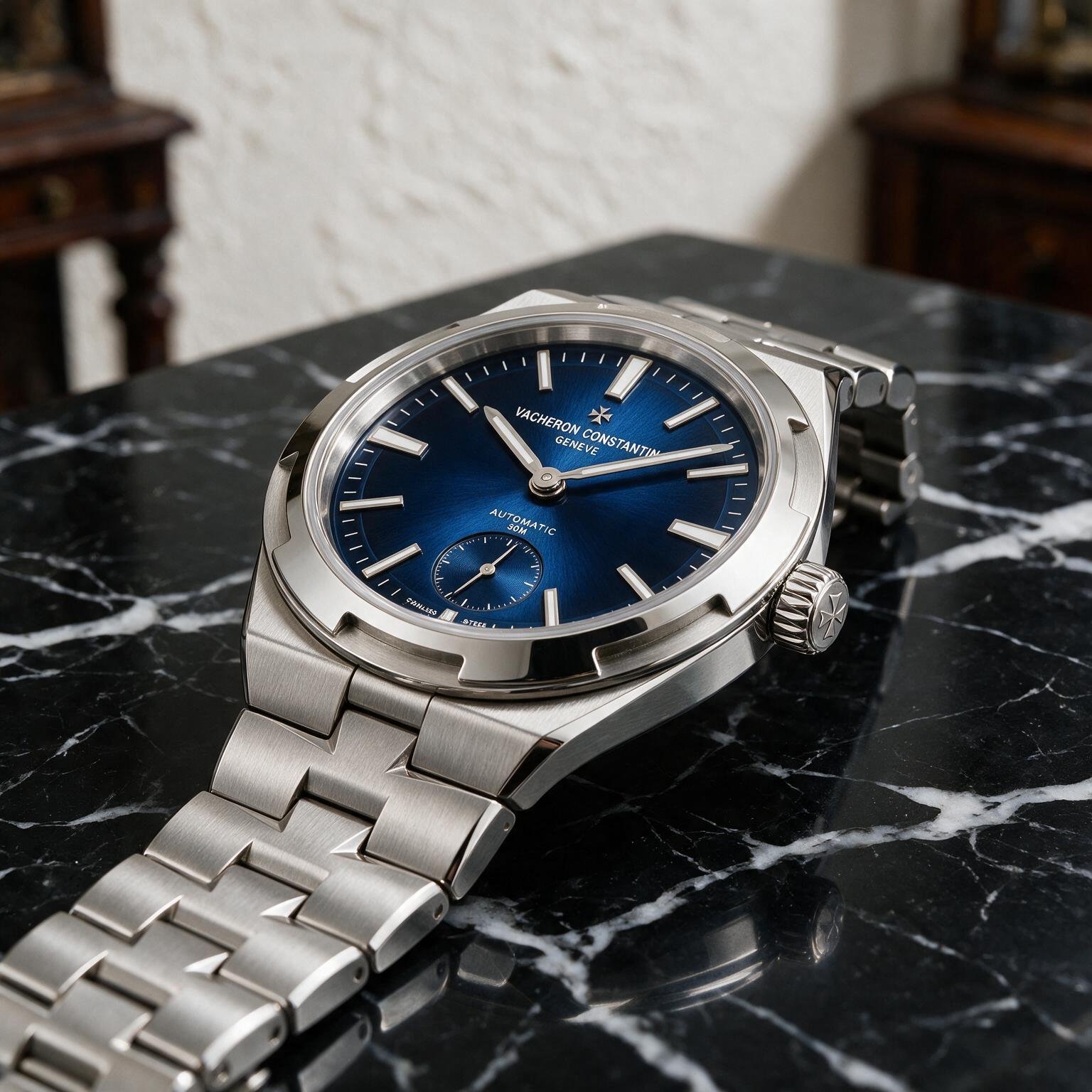
"A luxury stainless steel wristwatch displayed on a polished black marble pedestal inside a premium studio. The watch features a brushed steel bracelet, sapphire crystal with realistic reflections, an engraved crown, and a dark blue sunburst dial with intricate hour markers. Captured using a professional product photography setup with a 100mm macro lens, softbox lighting, subtle rim lighting, ultra-sharp focus, luxury advertising quality, clean black background, realistic shadows, and physically accurate reflections."
 Magnific Auto
TechScribe real test · 2026
Magnific Auto
TechScribe real test · 2026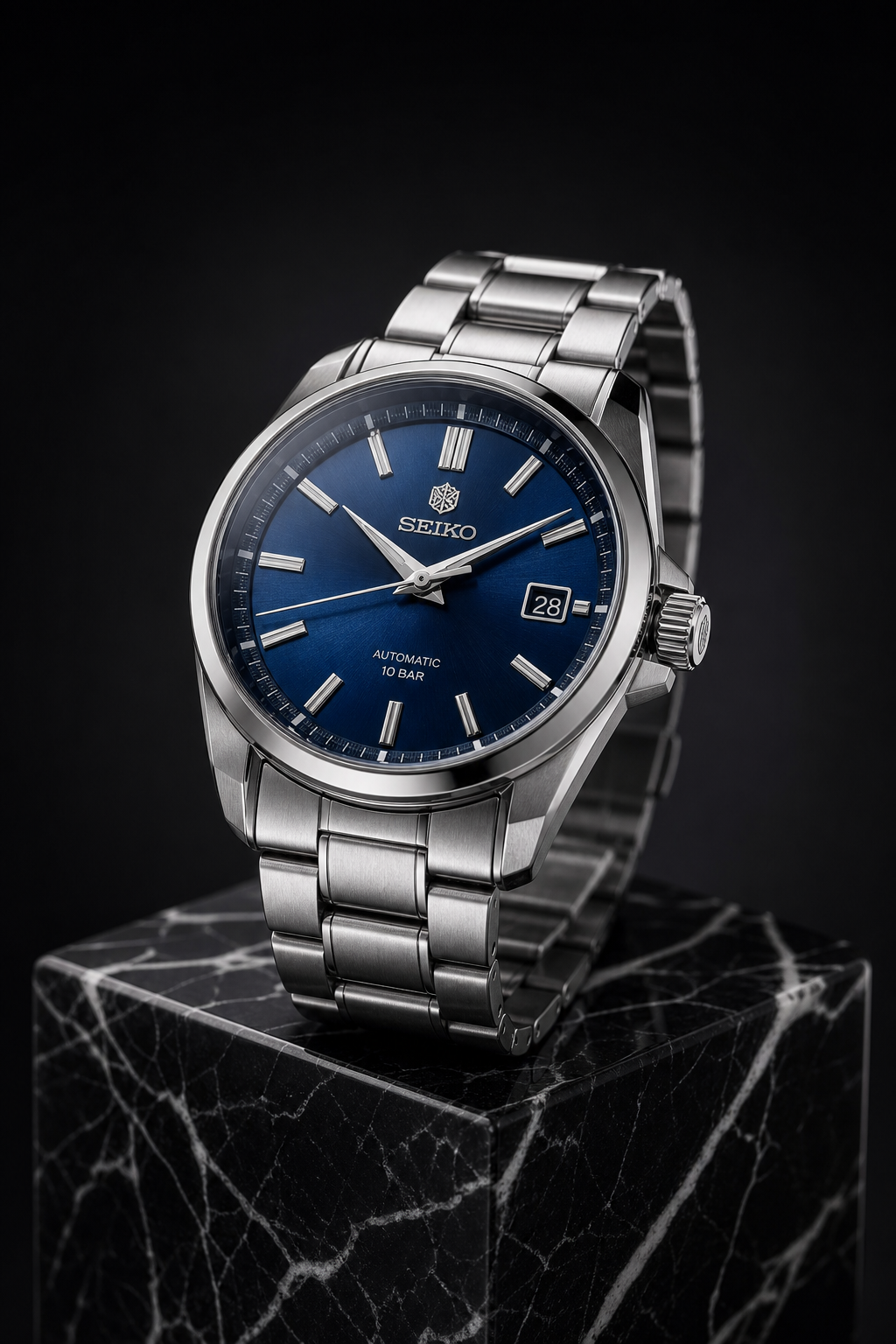 GPT Image 2.0
TechScribe real test · 2026
GPT Image 2.0
TechScribe real test · 2026We ran the same prompt through both models: a steel wristwatch on black marble, studio lighting, macro detail. Magnific Auto won this one — the brushed metal, sapphire-crystal reflections, and shallow depth of field look like a real product photograph. GPT Image 2.0 is close behind, sharp and well-composed, but the materials read a bit more like a 3D render than a photo. One quirk from both: neither watch stayed generic. Magnific's design leans Vacheron Constantin, GPT's leans Seiko, even though the prompt never named a brand.
| Category | Magnific Auto | GPT Image 2.0 |
|---|---|---|
| Prompt Adherence | 9.2 | 9.2 |
| Photorealism | 9.9 | 9.5 |
| Material Rendering | 9.9 | 9.5 |
| Reflections & Lighting | 9.8 | 9.4 |
| Macro Detail | 9.8 | 9.6 |
| Composition | 9.8 | 9.7 |
| Luxury Appeal | 9.9 | 9.5 |
| Overall | 9.8 | 9.5 |
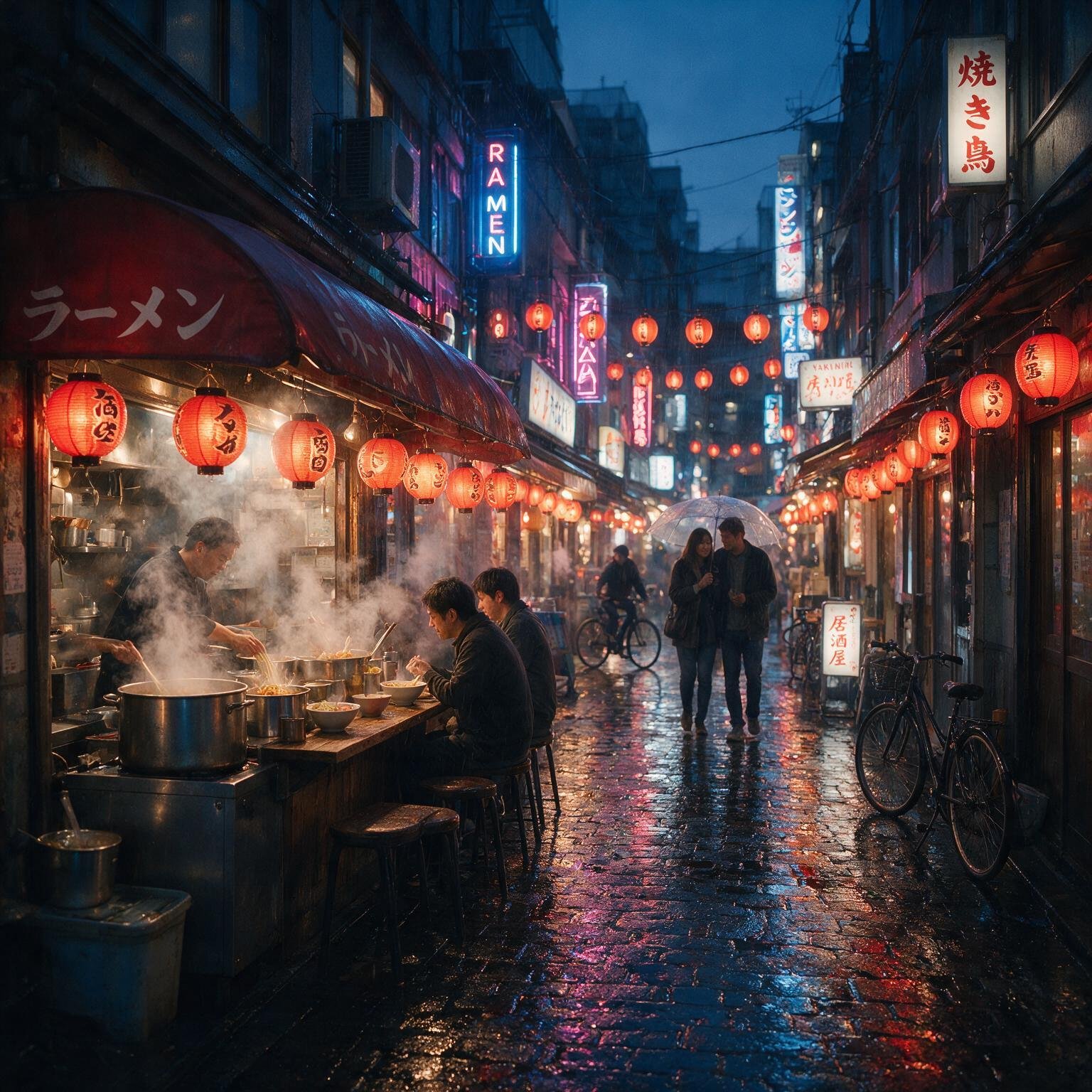
"A bustling Japanese night market during light rain with six distinct people naturally interacting. A ramen chef prepares steaming bowls in the foreground while customers sit beneath glowing lanterns. Neon signs reflect realistically on the wet pavement, bicycles line the narrow alleyways, umbrellas catch falling raindrops, and steam drifts naturally through the scene. Cinematic lighting, layered depth, physically accurate reflections, atmospheric fog, ultra-high detail, realistic human anatomy, no duplicated faces or malformed hands."
 Magnific Auto
TechScribe real test · 2026
Magnific Auto
TechScribe real test · 2026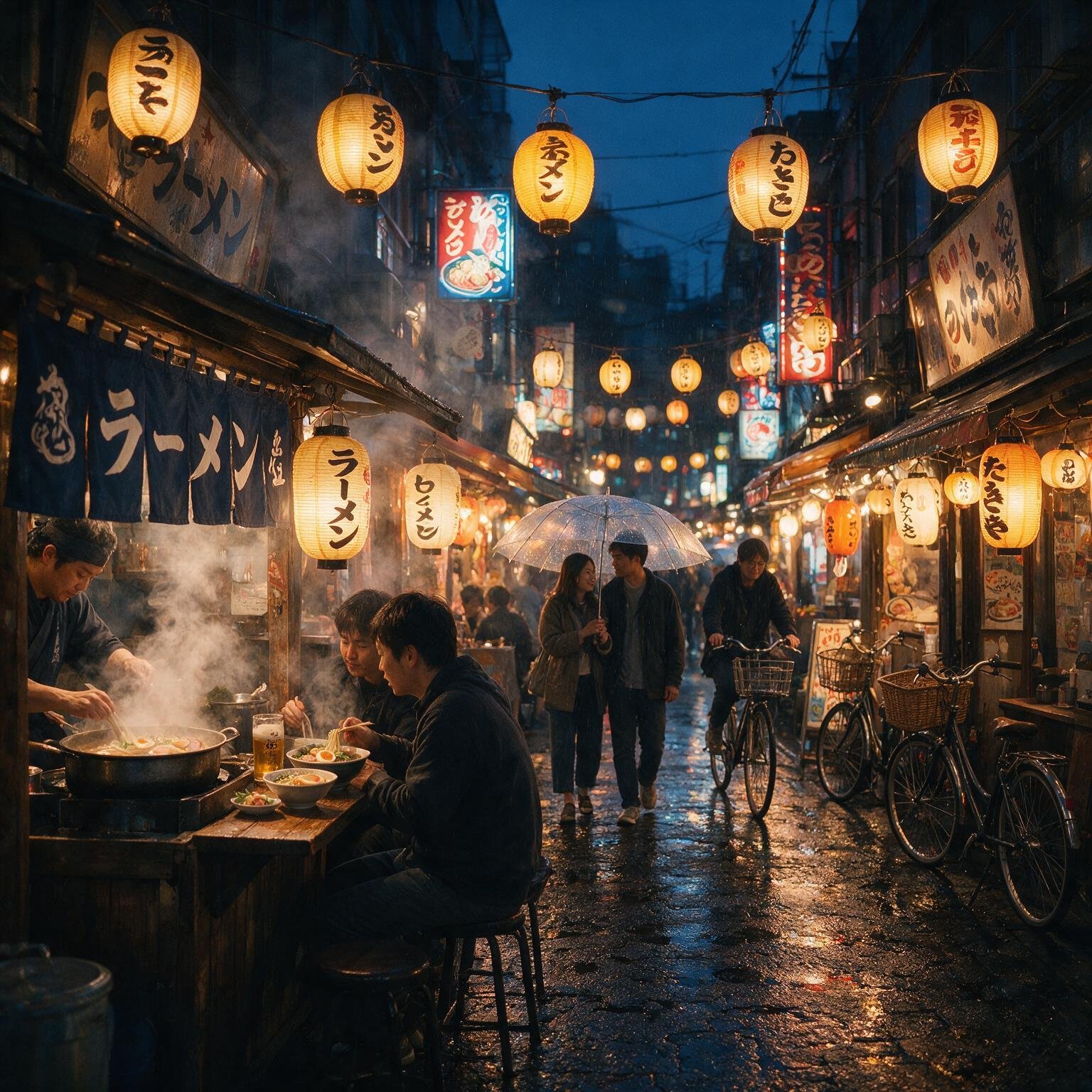 Seedance
TechScribe real test · 2026
Seedance
TechScribe real test · 2026For a crowded, rain-soaked night market with six people, Magnific Auto pulled ahead on realism — the wet pavement reflects the neon signs convincingly, and the lantern light and steam blend naturally into the scene. Seedance packed in more visual detail and stuck slightly closer to the prompt, but its lighting reads more stylized than photographic, and the ground reflections are less convincing. Both kept faces and hands correctly formed despite the crowd, which is where image models usually struggle.
| Category | Magnific Auto | Seedance |
|---|---|---|
| Prompt Adherence | 9.6 | 9.8 |
| Photorealism | 9.9 | 9.7 |
| Human Anatomy | 9.8 | 9.7 |
| Environmental Detail | 9.9 | 9.9 |
| Lighting & Atmosphere | 10.0 | 9.7 |
| Reflections & Wet Surfaces | 10.0 | 9.6 |
| Composition | 9.9 | 9.9 |
| Overall | 9.9 | 9.7 |
"Design a premium travel infographic for Japan using a clean editorial magazine style on a white background. The infographic must contain exactly the following text:
JAPAN TRAVEL GUIDE
Best Time to Visit
• March – May
• October – November
Top Destinations
• Tokyo
• Kyoto
• Osaka
• Mount Fuji
Travel Tips
• Purchase a JR Pass
• Carry cash for small shops
• Learn basic Japanese greetings
Include a simple map of Japan with four location markers, minimalist flat icons for transportation, food, temples, and nature, plus subtle red accent colors inspired by the Japanese flag. Use a professional editorial layout with perfect alignment, balanced spacing, consistent typography, crisp vector-style graphics, and premium print quality. Every word, punctuation mark, and bullet point must be reproduced exactly as written. Do not add, remove, or change any text."
 Magnific Auto
TechScribe real test · 2026
Magnific Auto
TechScribe real test · 2026 GPT Image 2.0
TechScribe real test · 2026
GPT Image 2.0
TechScribe real test · 2026This test checked something models often get wrong: reproducing exact text and bullet points inside a designed graphic. Both Magnific Auto and GPT Image 2.0 got it right — correct headings, correct bullets, no typos, clean editorial layout. Magnific leaned into bolder icons and illustration; GPT Image 2.0 leaned into cleaner typography and spacing. It's a genuine tie — pick based on style, not capability.
| Category | Magnific Auto | GPT Image 2.0 |
|---|---|---|
| Prompt Adherence | 9.7 | 9.7 |
| Text Accuracy | 9.7 | 9.7 |
| Typography | 9.8 | 9.9 |
| Layout & Alignment | 9.8 | 9.9 |
| Graphic Design Quality | 9.8 | 9.9 |
| Illustration Quality | 9.8 | 9.8 |
| Overall | 9.8 | 9.8 |
"A luxurious Scandinavian living room with floor-to-ceiling windows overlooking snow-covered mountains during early morning. Warm natural sunlight streams through sheer linen curtains, casting soft shadows across light oak flooring. The room features a cream linen sofa, two walnut lounge chairs, a white marble coffee table, matte black floor lamps, indoor olive trees, woven rugs, ceramic décor, and built-in oak shelving filled with books. The expansive glass windows display realistic reflections while preserving the mountain view outside. Captured using a full-frame camera with a 24mm tilt-shift lens, architectural photography, perfectly straight vertical lines, physically accurate global illumination, premium interior design, ultra-photorealistic, RAW photography quality, highly detailed textures, natural color grading, and no distorted furniture, warped geometry, or unwanted text."
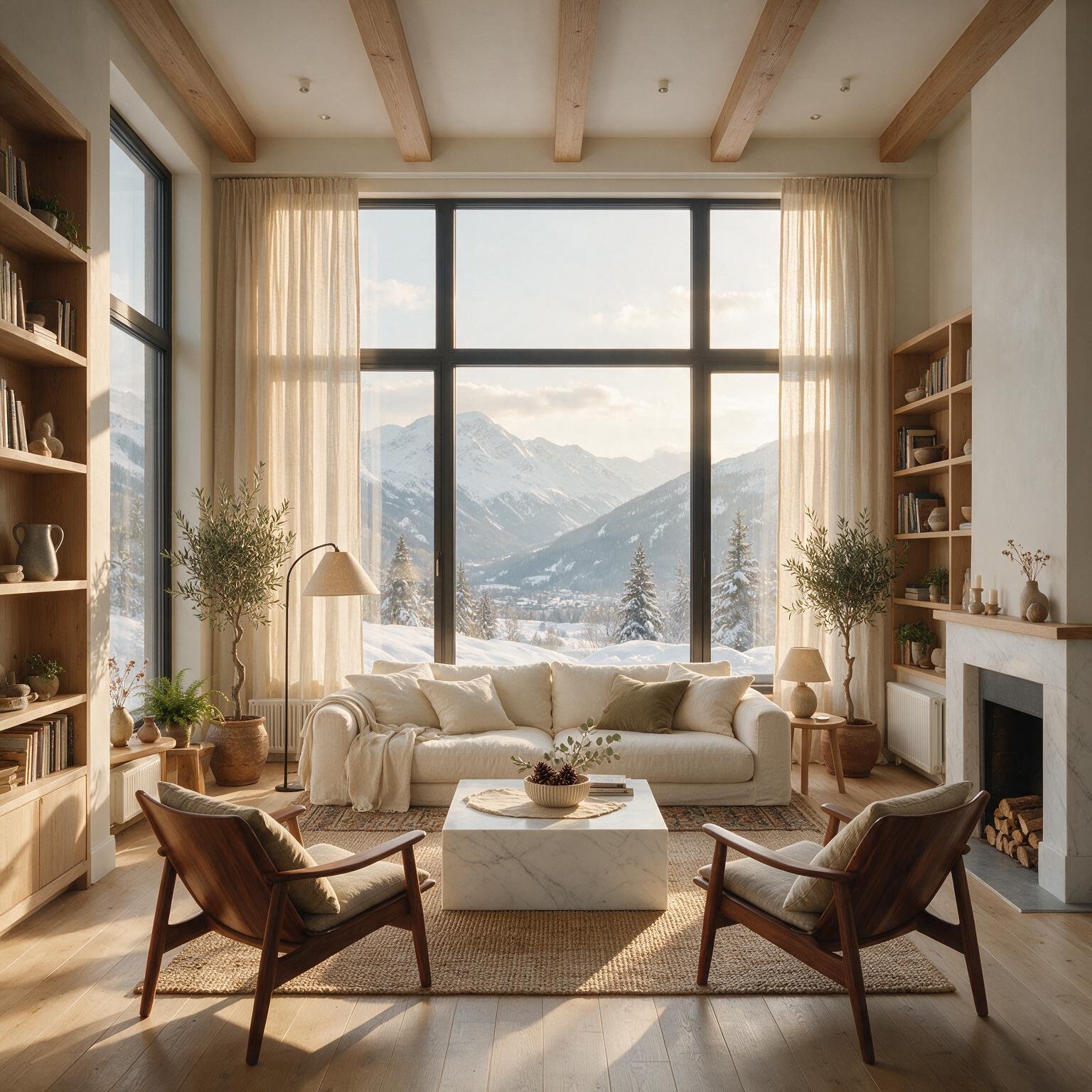 Magnific Auto
TechScribe real test · 2026
Magnific Auto
TechScribe real test · 2026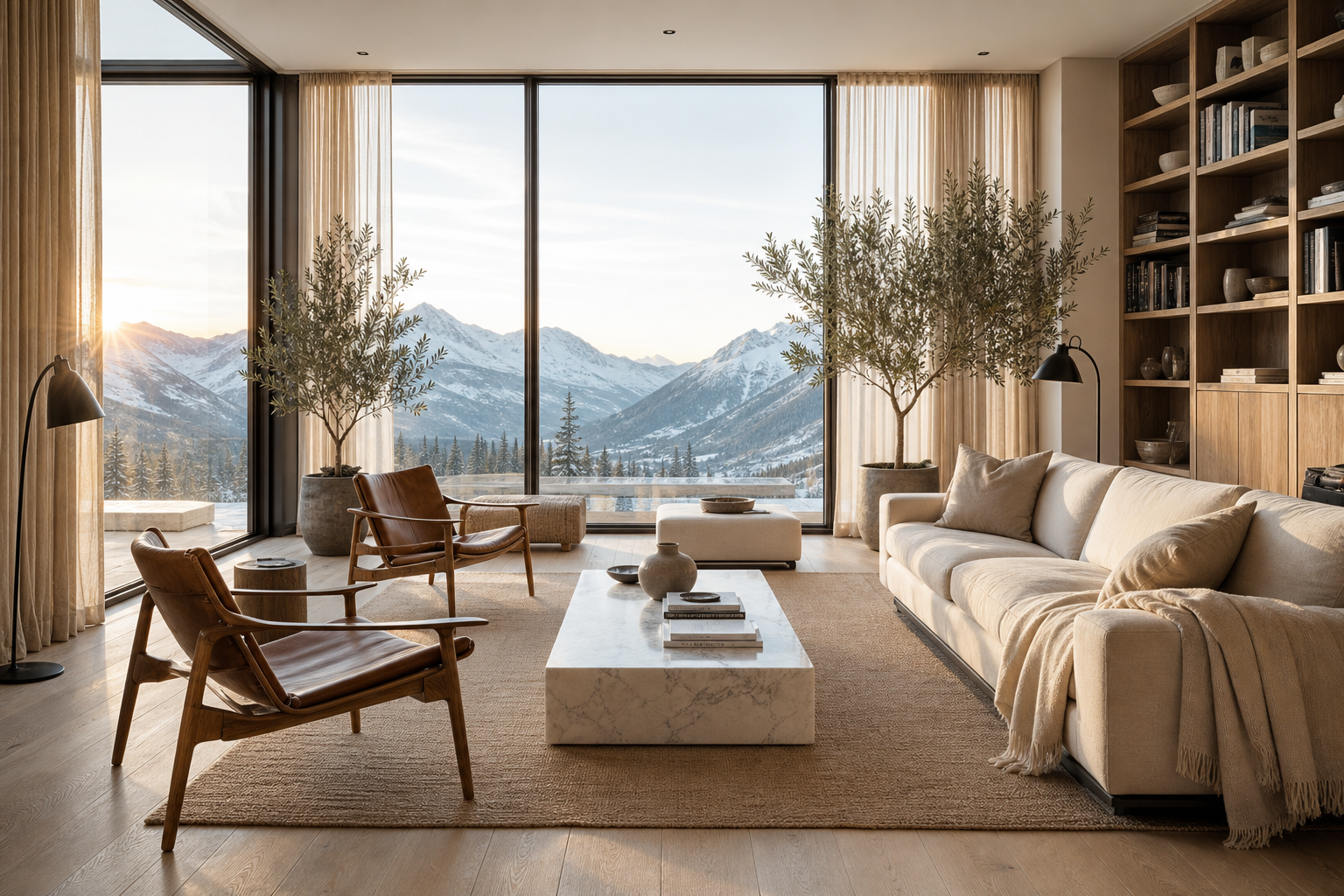 GPT Image 2.0
TechScribe real test · 2026
GPT Image 2.0
TechScribe real test · 2026Same result for architectural interiors. Both models produced a convincing, well-lit Scandinavian living room with straight lines, correct proportions, and no warped furniture — the kind of image you could mistake for a real-estate listing photo. Magnific's materials (linen, marble, oak) read slightly more textured up close; GPT Image 2.0's version leans a touch warmer and cleaner. Either is good enough for interior-design or real-estate marketing work.
| Category | Magnific Auto | GPT Image 2.0 |
|---|---|---|
| Prompt Adherence | 9.9 | 9.9 |
| Photorealism | 9.9 | 9.8 |
| Architectural Accuracy | 9.9 | 9.9 |
| Lighting & Global Illumination | 10.0 | 9.9 |
| Material Rendering | 9.9 | 9.8 |
| Composition | 9.9 | 9.9 |
| Interior Design Quality | 9.9 | 9.9 |
| Overall | 9.9 | 9.9 |
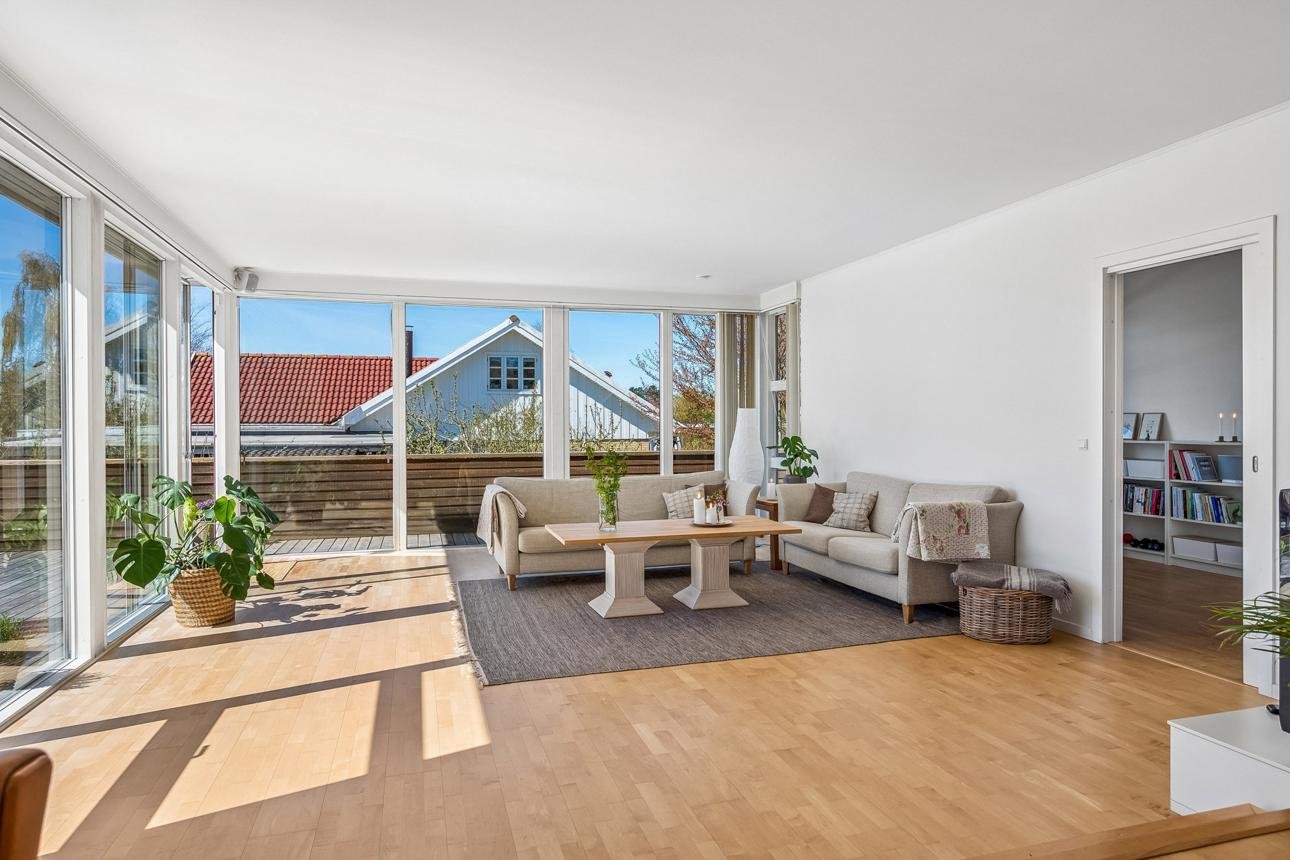
"Transform this image into a luxury penthouse at night while preserving the exact camera angle, room layout, furniture placement, and perspective.
Replace the outdoor view with a modern city skyline at night filled with illuminated skyscrapers. Turn on warm ambient lighting throughout the room, light the fireplace, replace the coffee table décor with a crystal decanter and two whiskey glasses, add a sleeping golden retriever on the rug, and place a modern abstract painting above the fireplace.
Keep every existing piece of furniture in exactly the same position. Do not change the room dimensions, architecture, windows, walls, or composition. Maintain photorealistic quality with physically accurate lighting, shadows, reflections, and seamless edits."
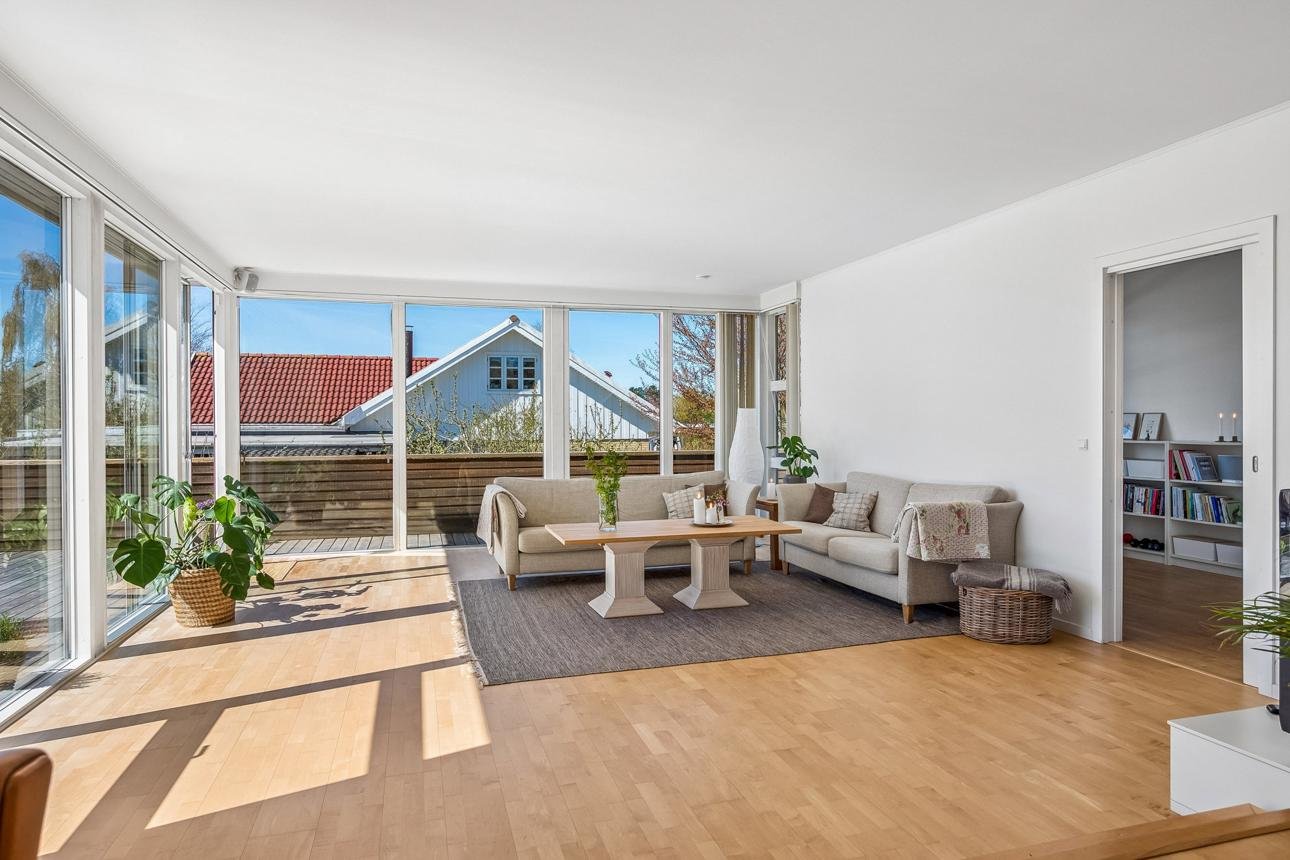 Before
TechScribe real test · 2026
Before
TechScribe real test · 2026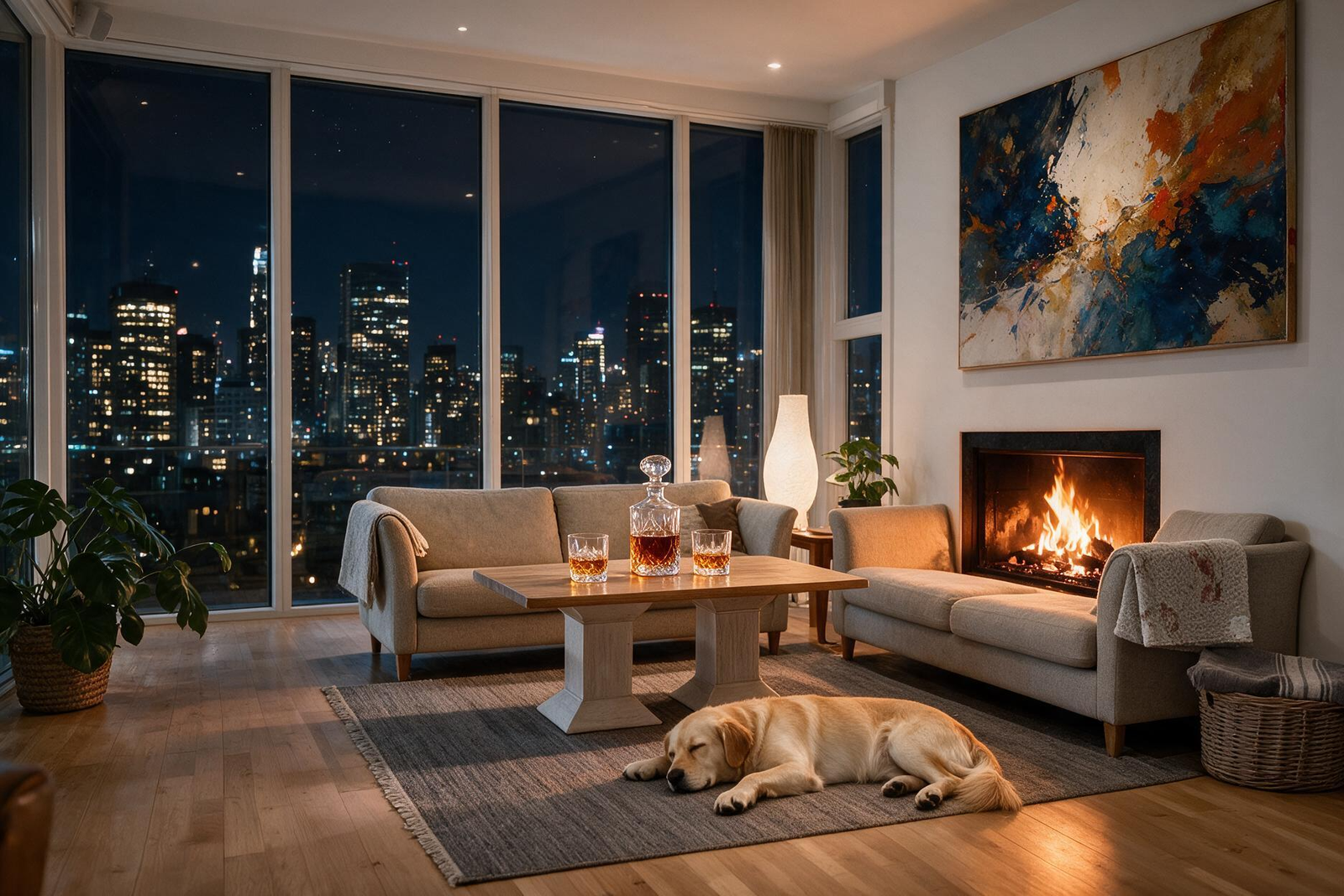 After
TechScribe real test · 2026
After
TechScribe real test · 2026This tests something harder than generation: editing an existing photo without breaking it. We asked Magnific to turn a daytime living room into a lit-up penthouse at night — new skyline, a lit fireplace, new objects on the coffee table, a sleeping dog, new art on the wall — while keeping the room's actual layout and camera angle untouched. It held up. The furniture stayed exactly where it was, the new objects cast realistic shadows, and the result looks like the same room shot at a different time rather than a new image built from scratch.
| Category | Score |
|---|---|
| Prompt Adherence | 9.9 |
| Scene Preservation | 10.0 |
| Geometry Consistency | 10.0 |
| Object Editing | 9.9 |
| Lighting Transformation | 10.0 |
| Photorealism | 9.9 |
| Edit Seamlessness | 9.9 |
| Overall | 9.9 |
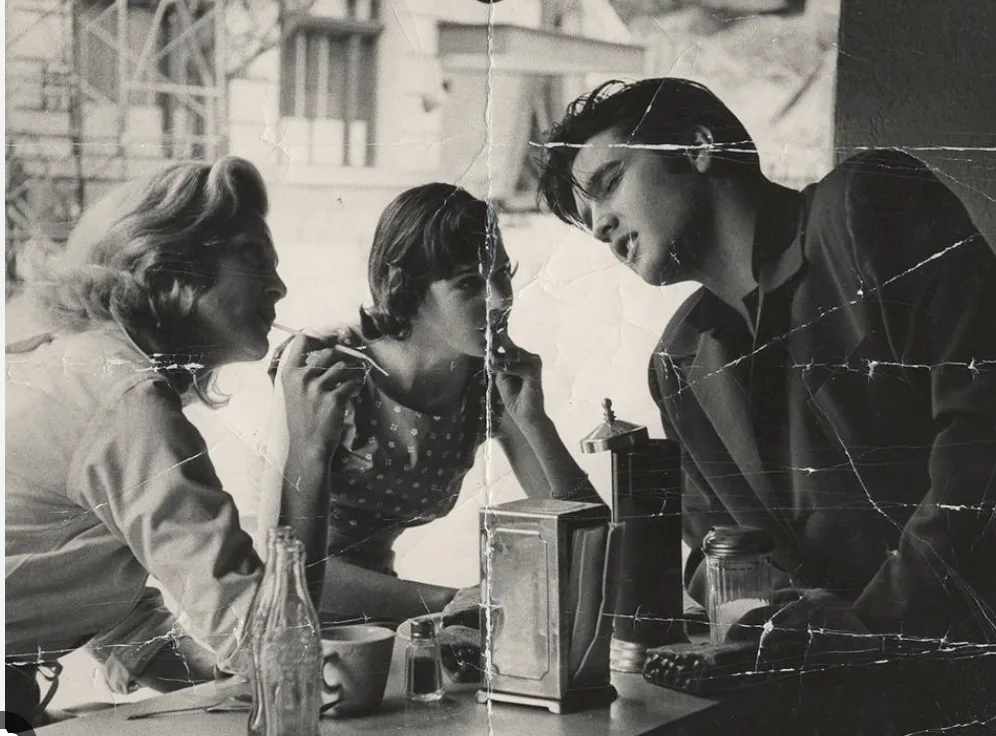
Evaluate Magnific's Image Enhancement feature on a vintage black-and-white photograph with visible scratches, fold lines, and physical damage. The enhancement should improve clarity, recover fine details, and preserve facial features while maintaining the historical authenticity of the original image.
 Before
TechScribe real test · 2026
Before
TechScribe real test · 2026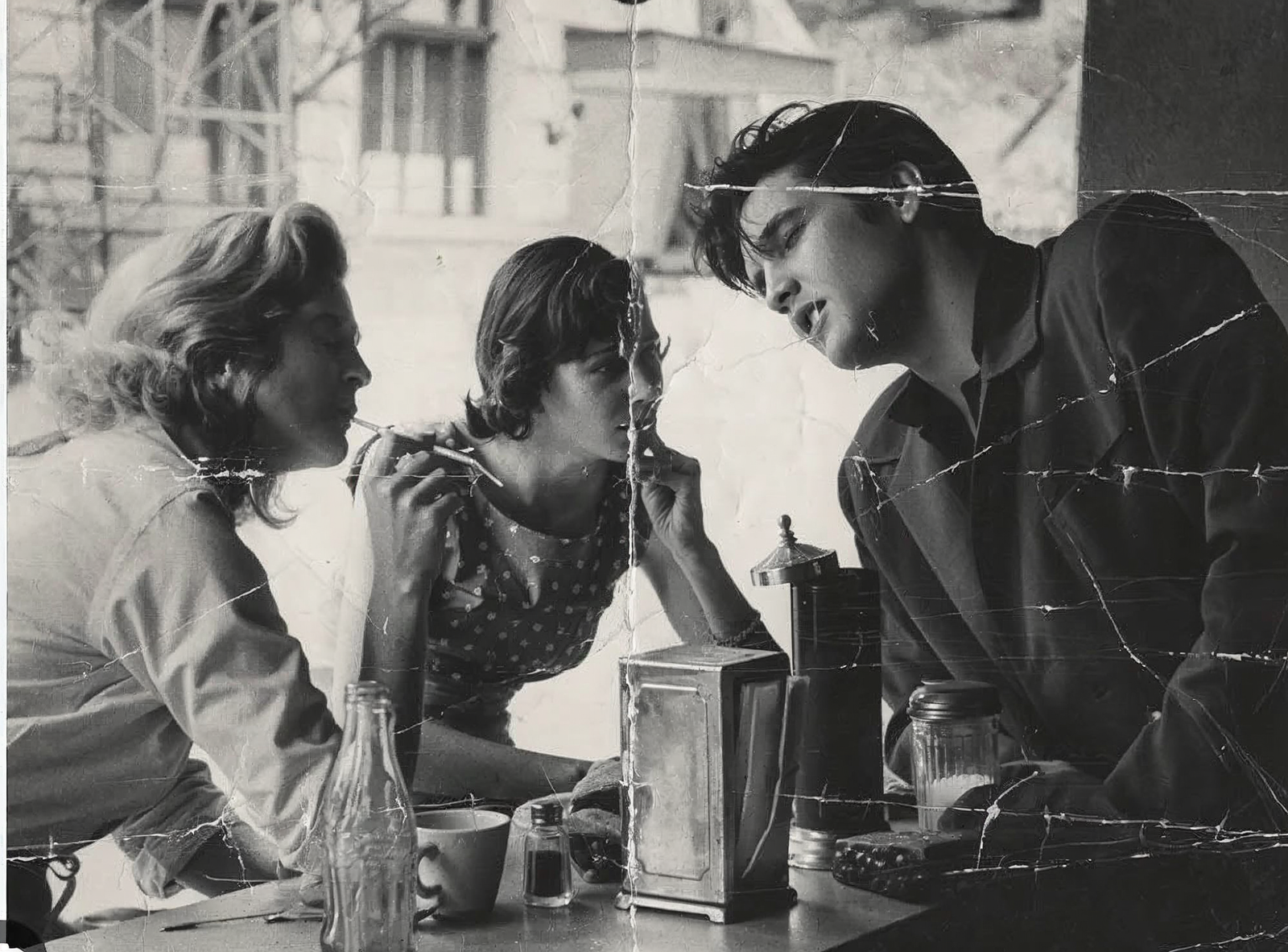 After
TechScribe real test · 2026
After
TechScribe real test · 2026Enhancement, not restoration, is the honest way to describe this feature. We fed it a scratched, creased black-and-white photo. It sharpened faces, recovered texture in clothing and small objects, and kept the original tone and grain intact. What it didn't do is fix the actual damage — scratches and fold lines across the image were mostly still there afterward. If you want an old photo to look clearer while still looking old, this works well. If you want the damage gone, this isn't the tool for that.
| Category | Score |
|---|---|
| Detail Recovery | 8.8 |
| Sharpness Enhancement | 9.0 |
| Facial Preservation | 9.8 |
| Texture Recovery | 8.9 |
| Historical Authenticity | 9.8 |
| Damage Repair | 6.8 |
| Overall | 8.7 |
Evaluate Magnific AI's Background Removal feature by assessing its ability to isolate a highly complex foreground subject containing fine biological structures, semi-transparent elements, intricate edges, and overlapping objects while preserving natural detail and producing a clean extraction suitable for professional use.
 Before
TechScribe real test · 2026
Before
TechScribe real test · 2026 After
TechScribe real test · 2026
After
TechScribe real test · 2026We picked a deliberately hard subject for background removal: a snail, mushrooms, fern leaves, thin flower stems, and a butterfly, all with fine, overlapping edges — the kind of image that usually breaks segmentation tools. Magnific held onto almost all of the fine detail, including the butterfly's antennae and the snail's feelers, without the ragged edges or color halos that typically show up around thin structures. A few of the very finest plant edges got slightly simplified, but you'd need to zoom in to notice.
| Category | Score |
|---|---|
| Subject Detection | 10.0 |
| Edge Accuracy | 9.9 |
| Fine Detail Preservation | 9.9 |
| Thin Structure Handling | 9.8 |
| Halo & Edge Cleanliness | 9.9 |
| Natural Appearance | 9.9 |
| Overall | 9.9 |
"A luxurious penthouse living room at night overlooking the Manhattan skyline through floor-to-ceiling glass windows. A modern fireplace casts warm orange light across elegant furniture. Rain streaks the windows while city lights shimmer in the distance. A half-filled crystal whiskey decanter and two glasses rest on a walnut coffee table. Soft cinematic lighting, dramatic shadows, anamorphic composition, subtle film grain, volumetric light, shallow depth of field, ultra-photorealistic, looks like a still frame from a Christopher Nolan film."
 Before
TechScribe real test · 2026
Before
TechScribe real test · 2026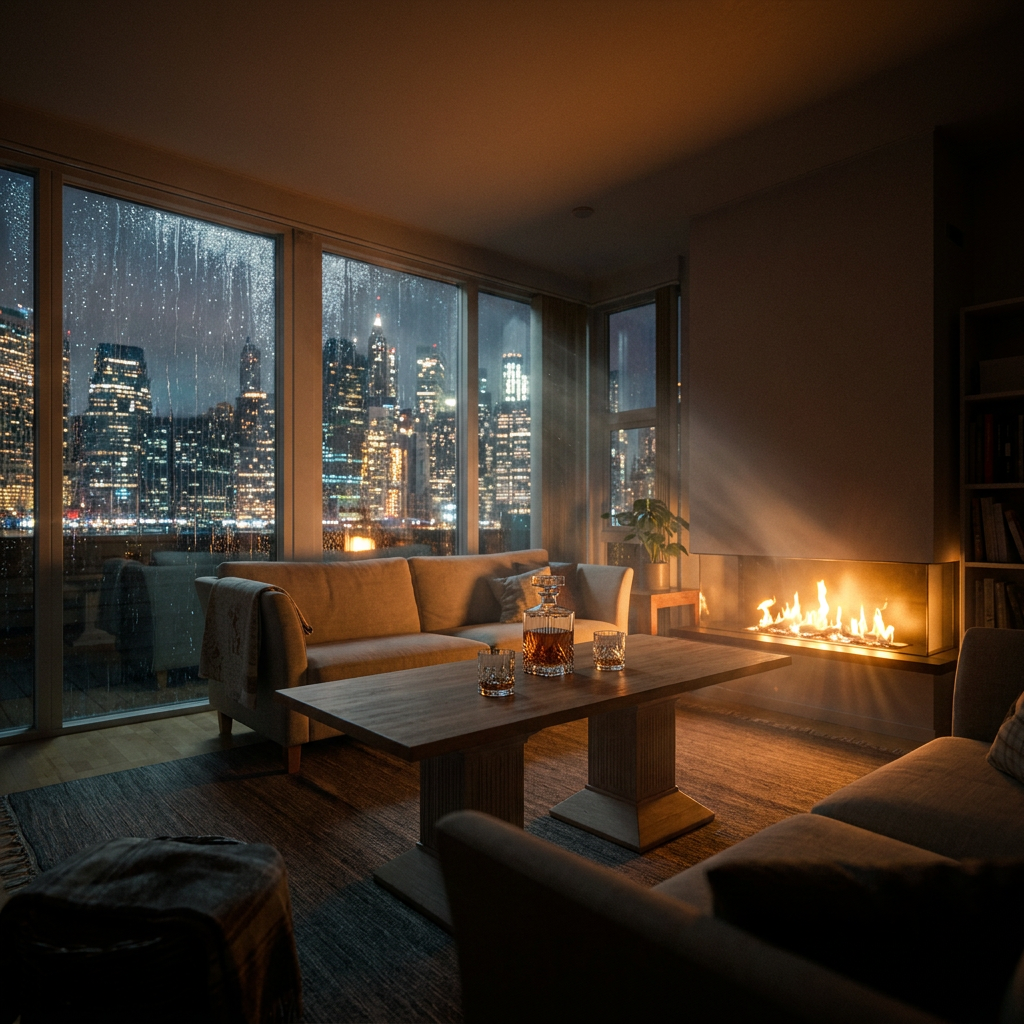 After
TechScribe real test · 2026
After
TechScribe real test · 2026A tougher version of the editing test above — turning a plain daytime room into a moody, rain-streaked night shot with a lit fireplace and a Manhattan skyline outside the window. The room's geometry and camera angle held steady through the transformation, and the new elements — rain on the glass, whiskey glasses on the table, fireplace glow — were added convincingly. The one thing it didn't fully deliver: the requested shallow depth of field and anamorphic look. The image stayed sharper and more evenly focused than a real anamorphic lens would produce.
| Requested Element | Result | Evaluation |
|---|---|---|
| Penthouse at night | Successfully transformed from daytime to nighttime | ✅ Excellent |
| Manhattan skyline | Convincing illuminated skyline integrated into windows | ✅ Excellent |
| Floor-to-ceiling windows | Original window geometry preserved | ✅ Excellent |
| Fireplace | Added with realistic flames and warm illumination | ✅ Excellent |
| Warm orange lighting | Fireplace realistically lights surrounding furniture | ✅ Excellent |
| Rain on windows | Rain streaks clearly visible across the glass | ✅ Excellent |
| Whiskey decanter and glasses | Added naturally on the coffee table | ✅ Excellent |
| Dramatic shadows | Strong cinematic contrast achieved | ✅ Excellent |
| Volumetric lighting | Visible light rays from fireplace | ✅ Excellent |
| Cinematic atmosphere | Strong movie-like visual style | ✅ Excellent |
| Preserve room layout | Overall room structure maintained | ✅ Excellent |
| Preserve camera angle | Original viewpoint retained | ✅ Excellent |
"A young woman stands inside a Paris café during golden hour, smiles naturally, takes a sip of coffee, gently brushes a strand of hair behind her ear, and looks out of the window. Cinematic camera movement, ultra-photorealistic, realistic facial expressions and hand movement, 5–6 seconds."
TechScribe real test · 2026
TechScribe real test · 2026
Both Magnific Auto and Seedance 2.0 completed every single action in the prompt — sipping coffee, brushing hair back, looking out the window, golden-hour light — so this came down to polish, not capability. Magnific's version has slightly steadier facial animation and smoother camera movement; it reads a bit more like a shot commercial. Seedance's version is close behind, just marginally less refined. Worth being clear: this is one prompt, not a general verdict on either video model.
| Requested Element | Magnific Auto | Seedance 2.0 |
|---|---|---|
| Paris café | ✅ | ✅ |
| Golden hour lighting | ✅ | ✅ |
| Natural smile | ✅ | ✅ |
| Drinks coffee | ✅ | ✅ |
| Brushes hair behind ear | ✅ | ✅ |
| Looks out the window | ✅ | ✅ |
| Cinematic camera movement | ✅ | ✅ |
| 5–6 second duration | ✅ | ✅ |
| Photorealistic appearance | ✅ | ✅ |
"A majestic snow leopard slowly walks across a rocky mountain ridge during sunrise. The camera performs a slow cinematic tracking shot as the leopard pauses, looks toward the horizon, and its thick fur gently moves in the mountain breeze. Natural animal movement, realistic muscle animation, ultra-photorealistic, 5–6 seconds."
TechScribe real test · 2026
TechScribe real test · 2026
Both models handled the hardest part of this test well: keeping a walking animal's body proportions consistent from frame to frame, which is usually where video models fall apart. Magnific's leopard looks fuller-bodied and more natural in its gait; Kling's version is close but reads slightly leaner, with gait that's marginally less convincing in a couple of frames. Again — one test, not a blanket ranking of either model.
| Requested Element | Magnific AI Auto | Kling 3.0 |
|---|---|---|
| Snow leopard | ✅ | ✅ |
| Rocky mountain ridge | ✅ | ✅ |
| Sunrise lighting | ✅ | ✅ |
| Slow walking motion | ✅ | ✅ |
| Cinematic tracking shot | ✅ | ✅ |
| Looks toward horizon | ✅ | ✅ |
| Thick fur | ✅ | ✅ |
| Natural animal movement | ✅ | ⚠️ Slightly less convincing |
| Realistic muscle animation | ✅ | ⚠️ Good but slightly less natural |
| Ultra-photorealistic | ✅ | ✅ |
The full suite is also available as a mobile app.
Needs iOS 18.6 or later. About 160 MB. Covers image and video generation, upscaling, background removal, and stock access.
Rated 4.4+ stars from thousands of reviews. Projects sync across devices.
A full Figma plugin brings most of the AI toolset directly into the design canvas, without switching apps.
Magnific runs on credits. Every generation or upscale uses some of your monthly allowance, and unused credits do not roll over to the next month.
| Plan | Monthly | Annual (per month) | Credits/month | Best for |
|---|---|---|---|---|
| Premium | $20 | ~$7.25 | 20,000 | Trying it out, light regular use |
| Premium+ | $45 | ~$33.75 | 45,000 | Regular creators who want unlimited generation on most models |
| Pro Starter | $110 | ~$82.50 | 112,500 (higher tier available) | Heavy users and small agencies |
Paying annually saves roughly 60% on the sticker monthly price. There's also a free plan (up to 20 generations a day, personal use only, no extra credits), and paid plans carry a 30-day refund guarantee. Prices are in USD and can vary by region.
Midjourney still wins on raw image quality and isn't part of this suite. Magnific optimizes for breadth, not the single best-looking image you can get anywhere.
Each image costs roughly 75 credits, and heavy upscaling eats credits fast. They don't roll over — use them or lose them.
There’s a genuine free plan — 20 generations a day, personal use only — rather than a time-limited trial. Paid plans carry a 30-day refund guarantee.
Freepik became Magnific in April 2026. The underlying company and library didn't change, but you'll still see Freepik branding in places.
Push to maximum 10K resolution or heavy zoom and you'll see over-sharpening or softer detail. Know this before betting on large-format print.
$110/month for Pro Starter is the standard monthly rate. Paying annually brings it down to about $82.50/month — roughly 25% cheaper if you commit for the year.
Each has its own look — pick the right one per job from one interface.
Text-to-video and image-to-video, from one platform.
Precision or Creative mode. Creativity, Resemblance, Fractality, and HDR sliders. 2x to 16x.
Photo to GLB file in under 2 minutes. Tripo for speed, Trellis 2 for fidelity.
Save a workflow as a reusable template for the whole team.
Search instead of prompt when the real thing already exists.
Built for teams, not solo use.
Same company and library, new brand name.
Try a familiar model like Flux or Imagen first, then run that same image through the Signature Engine. The jump in detail is the first real sign of what this suite offers beyond ordinary generation.
You'll start testing the same prompt across different models, and defaulting to a stock search for anything literal instead of generating it — which saves real credit spend.
By now you're generating, upscaling, pulling stock, making video, and building 3D scenes from one account — and you know when it's worth stepping outside the suite (Midjourney for image quality, Topaz for restoration fidelity) and when staying inside saves more than it costs.
Wants generation, some upscaling, and occasional stock access, without paying for a team plan. Premium covers this — Pro Starter is overkill for one person.
Needs several models available without juggling separate logins and licenses for each one. One agreement to review instead of five makes billing clients easier to audit.
Needs image, video, 3D, and upscaling without separately managing Runway, a dedicated upscaler, and a 3D tool. All of it lives in one account here.
Shoot one clean product photo, then use Precision mode to sharpen it for multiple listing sizes without inventing fake detail that could mislead buyers.
Switch between Flux, Mystic, Ideogram, Imagen, Nano Banana 2, and GPT Image 2 to find the right look, then push it further with Creative mode’s Fractality and HDR sliders.
Run a soft or low-res image through the Signature Engine to recover detail — a genuine restoration and enhancement job, not a from-scratch generation.
Upload a product or lifestyle photo, sketch the motion with Visual Prompting, and get a short video clip without a separate video tool or shoot.
Run a photo through the 3D Generator to get a GLB file in under two minutes, then place it in a composed scene with 3D Scenes for a finished campaign image.
Build a generate → upscale → export workflow once in Spaces, save it as a template, and reuse it across every new client job instead of repeating the same manual steps.



There’s a free plan: up to 20 generations a day, personal use only, with no extra credits. It’s not a time-limited trial — it stays free as long as you stay within those limits.
At the time of this review: Premium $20/month (~$7.25/month billed annually), Premium+ $45/month (~$33.75/month billed annually), Pro Starter $110/month (~$82.50/month billed annually). Prices are in USD, can vary by region, and can change — check current pricing directly.
Yes, paid plans carry a 30-day refund guarantee.
No. Credits reset each month, and whatever you don’t use is gone — they don’t carry over.
Yes. Freepik acquired the original Magnific upscaler in 2024, then rebranded its entire company under the Magnific name in April 2026. The library and underlying company didn’t change — you’ll still see Freepik branding in places.
Image: Flux, Mystic, Imagen, Ideogram, Nano Banana 2, GPT Image 2. Video: Seedance 2, Veo 3.1, Kling 3, Runway Gen 4, MiniMax Hailuo 02, PixVerse 6 — all from one account and credit pool.
The Signature Engine scales up to 16x, with a practical ceiling around 10K resolution. Push past that or apply heavy zoom and you’ll start to see over-sharpening or softer detail.
Yes — iOS (18.6+, App Store) and Android (Google Play) apps cover image and video generation, upscaling, background removal, and stock access, with projects syncing across devices.
Commercial licensing is included across image, video, stock, and editing under a single agreement on paid plans. This review couldn’t independently verify every edge case of that license — confirm the current terms directly before relying on it for client work.
Magnific AI isn't the best image generator on the market. It isn't the best upscaler, the best video tool, or the best 3D tool, either. What it is, is one of the most complete consolidated suites — the one place that does all of those things adequately instead of one thing exceptionally.
Freepik acquired the original Magnific upscaler in 2024 and rebranded its whole company under that name in April 2026. That wasn't just a new logo — it folded a 250-million-asset stock library, a dozen image and video models, 3D tools, and a workflow-automation canvas into one account with one credit pool and one license.
For a solo creator, that's probably more than you need. For a team producing across image, video, 3D, and stock — and managing licensing across clients — it replaces five or six separate subscriptions with one. That's the real pitch: not a better model, a smaller stack.
The tradeoffs are real, too. Midjourney still produces sharper-looking images. Topaz Photo AI is more faithful for professional restoration. Ideogram direct is a safer bet for heavy text-in-image work. If you need everything under one license instead, few suites in this category put all of these tools in one place.
Get started with Magnific AI →
Some links on this page are affiliate links. If you sign up through them, TechScribe may earn a commission at no extra cost to you.
 Photoroom
 Magnific
 Ideogram
 Kittl
Kittl Phot.AI
 CHATGPT
 Stable Diffusion
 Leonardo AI
 Canva AI
 Adobe Express
 Fotor
Fotor NightCafe
 Midjourney AI