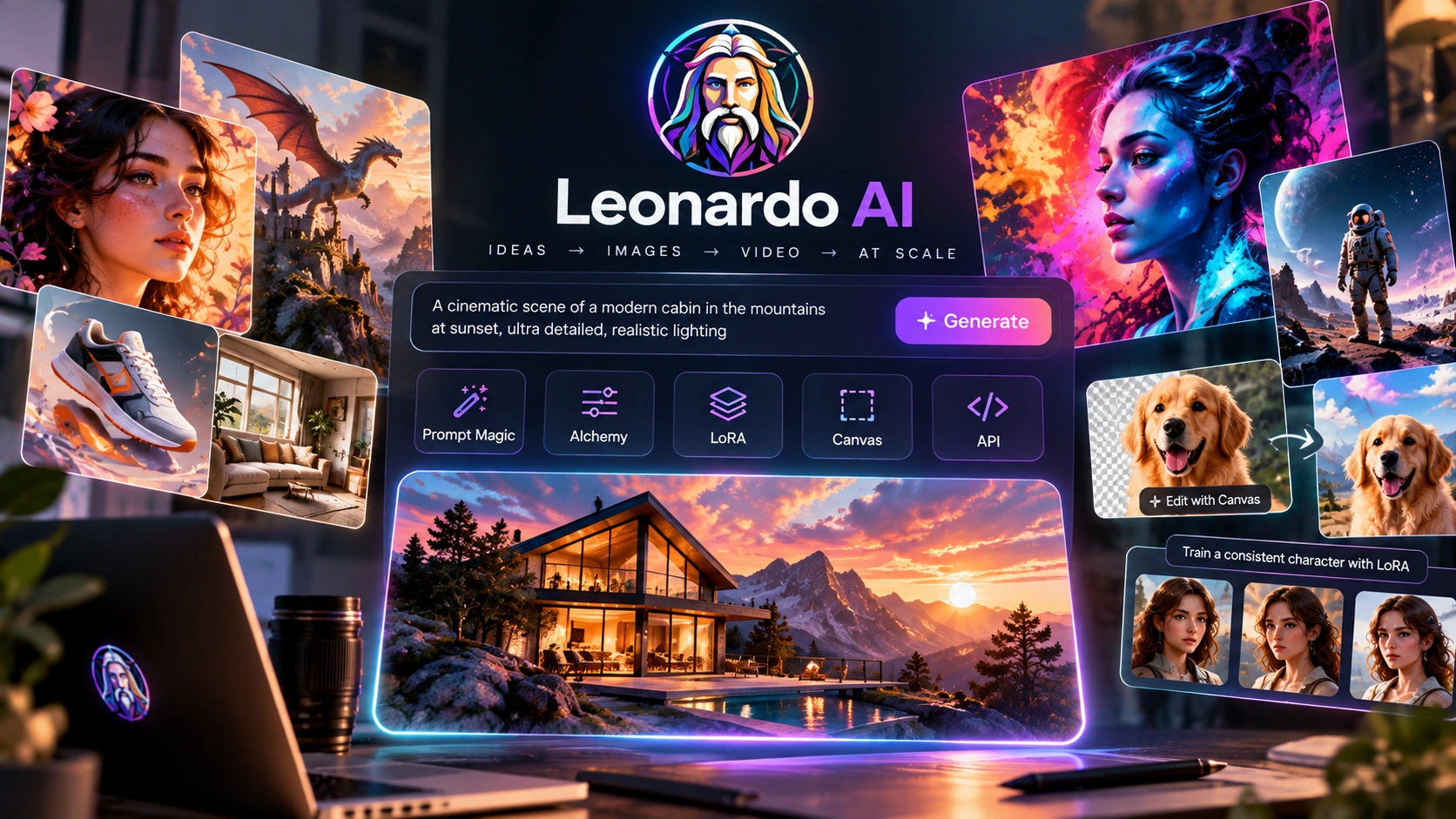
A production tool built for making many images that all look like they belong together, using Prompt Magic, Alchemy, LoRA training, Canvas editing, and an API for automation.
Leonardo AI is built for teams that need many consistent images, not just one great one. Prompt Magic rewrites vague prompts to be more specific before generation starts. Alchemy is an extra rendering pass that adds detail and cleans up textures. LoRA lets you train a small add-on that teaches the model a specific style or character without retraining the entire model. Canvas lets you mask part of an image and regenerate only that area. The Creative API exposes all of this so it can run through code instead of the manual interface.
Most AI image tools are judged on their best single output: the one striking image that shows off what the model can do. The harder part is making many images that still look like they belong to the same set: same character, same color palette, same lighting, image after image.
Leonardo AI is built around that problem. Midjourney is tuned for visual surprise, and you often don't know exactly what you'll get. Leonardo AI gives you more control over repeatable results, especially when you use tools such as LoRA and Character Engine. For a production pipeline, that kind of control can matter more than getting one great image.
The tools that make this possible: Prompt Magic for interpreting vague prompts, Alchemy for a detail pass, LoRA for locking in a style or character, and Canvas for editing one part of an image without touching the rest. The Creative API ties these together for teams that need this at volume.
Starting out, Leonardo AI feels similar to most text-to-image tools. You type a prompt, pick a model (Phoenix is the default), and get an image back. The differences show up once you look at the panel next to the canvas.
Prompt Magic is a toggle that expands your prompt with more descriptive detail before generating, which helps if your prompt was short or vague. Alchemy is a second toggle: turn it on and the same prompt produces a version with sharper detail and cleaner textures, since it's an added refinement pass rather than a different model.
The bigger advantage becomes clear when you start reusing the same setup. You can create a style or character once and use it across multiple images, instead of starting from scratch every time. That becomes clearer in Canvas: mask a small area of a finished image and Leonardo AI regenerates that area, leaving the rest of the composition and lighting largely untouched, a different way of editing than generating the whole image again and hoping it's closer.
Leonardo also offers video generation, according to the company, using several models and workflows.
Video generation with realistic motion and cinematic quality.
Video generation with camera control and animation effects.
Faster video generation aimed at social media and short clips.
What people use it for:
Clips formatted for Reels, Shorts, and TikTok.
Storyboards and short sequences from still images.
Product videos without a physical shoot.
Animated logos and brand motion assets.
Early visual concepts before full production.
Most reviews focus on how good a single Leonardo AI image looks compared to other models. That misses where the tool is actually useful day to day.
The more important pair is LoRA training combined with Canvas masking. Together they solve two separate problems: keeping a style or character consistent, and editing one part of an image without breaking the rest.
LoRA training: Training a full image model from scratch costs more time and money than almost anyone can justify. LoRA works around this by adjusting a small part of the model's existing weights to learn one specific thing: an art style, a character's face, a brand's look. The goal is for that identity to carry across the images you make with it, so you don't need to re-describe it in every prompt.
Canvas: Canvas isn't a simple paint-over tool. Canvas limits the regeneration to the area you mask, so the rest of the image can be preserved. For a complex image where one detail is wrong but everything else is right, that's typically a quicker fix than starting over.
The trade-off is simple: Leonardo AI puts more emphasis on control and consistency than on one-off image generation.
Prompt Magic adds more detail to short or vague prompts before generation.
An added rendering pass, not a separate model. It sharpens detail and cleans up textures on top of a normal generation.
A small add-on that teaches the model a specific style or character without retraining the entire model.
Mask part of an image and only that area gets regenerated, while the rest of the image is meant to stay as it was.
Uses reference images to help keep a character's identity consistent across separate generations. Combined with LoRA, this is aimed at making recurring characters possible across a series.
Exposes the same models, Alchemy, and LoRA pipeline through an API, so teams can automate generation at volume instead of doing it manually in the interface.
Prices below reflect Leonardo's pricing page as checked on September 30, 2026, on the annual billing rate (up to 20% off the monthly rate, shown crossed out below). Prices and plan limits can change after that date. Check current pricing →
For casual creators who want to explore AI art.
For daily hobbyists and enthusiasts.
For semi-professionals and active creators who need more output.
For professional creators, small businesses, and content producers.
Leonardo also lists a Leo for Teams tier for design teams, studios, agencies, and businesses, built around a shared Fast Tokens pool and shared token bank, unlimited relaxed generations for all members on selected models*, priority customer support, enterprise-grade security and IP protection, team collections and shared workspaces, centralized billing, and streamlined team workflows. It isn't priced on the page; you'd talk to their sales team for a rate.
*"Unlimited" generations on these plans apply only to the models Leonardo designates as eligible at any given time, and paying annually is what unlocks the discounted per-month rate shown above; paying monthly costs more.
Guidance Scale, Schedulers, Alchemy, Prompt Magic, and LoRA selection all require some understanding of how diffusion models work. Skip learning them and your results will likely be inconsistent, without an obvious reason why.
The library of community-trained models is a genuine advantage, but testing them to find the right one for a specific job takes real time. Budget for that.
Getting consistent results (training a LoRA, using Character Reference, masking carefully in Canvas) takes more setup than a simple prompt-and-generate tool. That's a deliberate trade-off, worth knowing about before you start.
Leonardo AI can still struggle with readable text inside images. If you need text in your image, plan for extra editing afterward.
Each additional person in a scene adds more chances for errors: extra limbs, wrong proportions, people overlapping oddly. This tends to get worse quickly as a scene gets more crowded, not gradually.
Leonardo AI doesn't simulate real-world physics. Glass, water, and complex reflections are often rendered as flat textures rather than calculated accurately, so don't expect them to look physically correct.
Worth considering a different tool if you:
Phoenix and a library of community-trained models for specific styles.
Expands vague prompts with more descriptive detail before generation starts.
An additional pass that adds detail and cleans up textures after the initial generation.
A small add-on that teaches the model a specific style or character without retraining the entire model.
Regenerates the pixels inside a masked area, while the rest of the image is meant to stay unchanged.
Uses reference images to help keep a character's identity consistent across multiple generations.
Cloud-based servers. No local hardware needed.
Lets you call the same models and tools through code for automated, batch jobs.
You write prompts, toggle Prompt Magic on and off to see the difference, and start noticing which base models work for which kinds of images. This stage looks like any other text-to-image tool.
You learn how Guidance Scale and negative prompts change the output, and what Alchemy actually adds. Results start feeling more predictable, closer to what you expected, more often.
You move from one-off generations to a repeatable setup: training or picking a LoRA for style or character, using Canvas for targeted fixes, and using reference images to help keep a character consistent.
Before you rely on a LoRA for a real project, test it across several different prompts and subjects, not just the one image that looked good during training. A LoRA that works well for one pose can behave inconsistently on others.
If you're producing assets for a campaign, game, or brand where every image needs to look like it belongs to the same set, LoRA and Character Engine are built to help with that, and Canvas lets you fix one wrong detail without redoing the whole image.
If you already understand diffusion models, or are willing to learn, you'll want Guidance Scale, negative prompts, Alchemy, and Prompt Magic exposed and adjustable, not hidden behind a single generate button.
If you need generation and LoRA-based styling available through code rather than a manual interface, the Creative API exposes Leonardo's models for batch jobs that plug into an existing workflow.
Consider Leonardo AI when you need a consistent set of images, not just one.
Here's when Leonardo AI isn't the right fit, and what to use instead.


The following are features Leonardo has announced for 2026.
Image-to-video with more control over objects, lighting, and camera movement.
Aimed at keeping a consistent visual style across multiple video shots.
Frame-by-frame video editing and automated editing tools.
Aimed at keeping characters and voices consistent across multiple video scenes.
Gen-4.5 is Leonardo's newest image-to-video model, according to the company. It's built to give more control over how objects move, how the scene is lit, and how the camera behaves when turning a still image into a short video sequence.
Control how individual objects in a scene move.
Adjust lighting, weather, and other environmental details.
Set camera angles and movement.
Aimed at a consistent visual style across a full video sequence.
Aleph 2.0 adds frame-level editing tools and automated editing agents for more advanced video work.
Edit specific frames directly.
Automate repetitive editing and generation tasks.
Aimed at a consistent look across shots.
Adjust individual elements and environmental conditions after the fact.
This feature is designed to keep a character's appearance and voice consistent across multiple video scenes, using reference images, character sheets, and specific prompting.
Upload reference images to define how a character looks.
Provide a voice sample to help keep audio consistent.
Specific prompt patterns that help maintain consistency.
Generate multiple scenes with the same character, aiming to keep expressions and body language consistent between them.
GWM-1 focuses on keeping a consistent visual style and camera behavior across multiple video shots.
Aimed at a consistent look across shots.
Set camera angles and movement.
Aimed at a consistent overall look across a sequence.
Adjust environmental conditions across a shot list.
The Creative API lets you call Leonardo's models through code, so generation, Alchemy, and LoRA can run as part of an automated batch pipeline instead of through the manual interface.
Requests per minute, hour, or day differ between free and paid tiers.
Text-to-image, image-to-image, LoRA training, and Alchemy refinement.
Set up with an API key.
For example, generating a large batch of branded product images using one trained LoRA.
Use a varied set of images with consistent subject quality and lighting.
Upload your images and choose the training settings for your use case.
Rank, steps, and learning rate can affect how the LoRA learns and generalizes.
Test the trained LoRA with several different prompts before using it on a real project.
Look for concept bleed, pose bias, and other inconsistencies.
| Dimension | Leonardo AI | Krea AI |
|---|---|---|
| Generation | More controls | Faster, simpler workflow |
| Consistency | LoRA + Character Engine | Different approach |
| Learning curve | More to learn | Easier to start |
| Workflow | Built for repeatable production | Built around fast iteration |
💡 Consider Leonardo AI if you need controlled, repeatable production. Consider Krea AI if you want real-time generation with less setup.
Canvas restricts regeneration to whatever area you mask, instead of the whole image. That's meant to preserve the rest of the image's lighting and composition, and it typically costs less than regenerating everything.
Changing a character's shirt color without redoing the rest of the scene, or removing an object from a busy background.
Canvas can be more efficient than regenerating the whole image when only one area needs to change.
We compared the same prompt across multiple generations on both tools (Leonardo AI using LoRA and Character Engine, Midjourney using its character reference feature) to see how well each one maintained character and visual consistency.
What we looked at: how similar the character stayed across outputs.
What we looked at: how much the color palette and overall composition drifted from one generation to the next.
In our comparison, Flux 2 Pro stayed close to the prompt, while Seedream 4.5 produced more artistic results.
Offers more controls for repeatable workflows, including LoRA and Canvas.
At the time of this review, Leonardo AI had a 4.5 out of 5 rating on G2, from 33 verified reviews.
4.5 ★★★★★
33 verified reviews, as of this review
This summary reflects 33 reviews on G2 as of this writing. For current feedback, view all reviews on G2 →
According to Leonardo, Canva acquired the company and integrated its image generation into Canva's platform.
Leonardo says Coca-Cola has used it for visual production at scale, and Ducati for automotive design and asset production.
By the numbers (as stated by Leonardo AI):
Published at leonardo.ai/safety
Published at leonardo.ai/data-security
Leonardo AI has apps for iOS and Android that cover most of what the desktop version does.
Generate images from your phone using the same models as desktop.
Mask and edit part of an image on mobile.
Use pre-built templates for common tasks.
Upscale images from your phone.
Access the same projects as your desktop account.
As of this review, 4.8 stars on the iOS App Store and 4.7 on Google Play, both from thousands of reviews.
Pre-built setups for common tasks, so you don't start from a blank prompt each time.
Prompts already written for a specific outcome.
Model and parameter choices already picked for the task.
The template encodes what usually works, not just a starting prompt.
Skip the setup step for common tasks.
For consistent, branded product images.
For consistent characters across games, animation, or stories.
For on-brand marketing assets, quickly.
For faster iteration on visual concepts and social content.
A dedicated tool for increasing image resolution and quality, aimed at print-ready or high-resolution output.
Adds detail beyond basic pixel scaling.
Upscales up to 4K, according to Leonardo.
Aims to keep the image coherent while increasing resolution.
Upscale several images at once.
For brochures, posters, and other printed material.
Improves image quality for e-commerce listings.
Produces resolution suited to different platforms.
Helps keep a brand's image library consistent, and can restore older, lower-resolution images.
Built for teams producing visual content at scale, not just individual creators.
Work on shared projects instead of passing files around.
Tools aimed at a consistent visual identity across the team.
Centralized storage with tracked changes.
Batch generation instead of manual, one-off work.
Automate batch pipelines for larger production needs.
Share a trained LoRA across the team to help keep style and character consistent.
Keep a shared visual direction across the team.
Generate at scale rather than one at a time.
Generate campaign assets at scale with consistent branding.
Handle client work with a repeatable process.
Build character and environment assets collaboratively.
Aim for consistent visual identity across everything the brand publishes.
Producing a consistent set of images, not just one. LoRA helps lock in a style or character across many generations. Canvas lets you edit one part of an image without redoing the rest. The Creative API can automate this at scale.
They're built for different priorities. Midjourney is tuned for visual surprise and artistic style, often without much predictability. Leonardo AI gives you more tools for control and repeatable results. If you're building a consistent set of assets, Leonardo AI's controls are more useful. If you want one striking image with strong artistic style, Midjourney may get there faster.
An added rendering pass that sharpens detail and cleans up textures on top of a standard generation. It's not a separate model. It's a refinement step applied afterward.
LoRA is a small add-on that teaches the model a specific style or character without retraining the entire model. It's cheaper and faster than full fine-tuning.
A masking tool. Mask part of an image and only that area gets regenerated, and the rest of the image is meant to stay as it was.
An API that exposes Leonardo's models, Alchemy, and LoRA pipeline so teams can automate generation instead of using the manual interface.
Yes, for iOS and Android, with image generation, Canvas editing, Blueprint Templates, and the Universal Upscaler.
Pre-built workflows with prompts, settings, and best practices already set up for tasks like product photography, character design, marketing visuals, and social media content.
A tool for increasing image resolution using AI, aimed at print-ready and high-resolution output.
Yes: shared projects, brand consistency tools, asset management, and the Creative API for automated batch work at scale.
If you want a simpler prompt-and-generate experience, Krea AI may be a better fit. If you need text-heavy images, Ideogram 2.0 is worth considering. For e-commerce product imagery at scale, Photoroom may be a better fit. If you care more about visual style than repeatability, it's worth comparing Leonardo AI with Midjourney. And if you aren't planning to learn settings like Guidance Scale, Schedulers, and LoRA, a simpler tool may serve you just as well.
The skills you learn here (prompting, masking, using reference images, and training LoRAs) can also help when you use other AI image tools.
Leonardo AI puts more weight on control and repeatability than on producing one unpredictable, striking image. Prompt Magic adds more detail to a vague prompt before generation. Alchemy is designed to add detail while keeping the overall composition. LoRA helps lock in a style or character across the images that use it. Canvas lets you fix one part of an image without redoing the rest.
It's not the simplest tool to start with, and it's not built for someone who wants to type one prompt and walk away with a finished image. It's built for producing images that need to look like they belong together.
If that's your use case, the extra setup (learning Guidance Scale, training a LoRA, using Canvas properly) can make sense when you're producing a large batch of images. If you only need a single image, a simpler tool may be enough.
Generate a first image with a base model of your choice, then turn on Alchemy and compare the result. Try masking part of the image in Canvas and regenerating just that area. That should be enough to tell you whether this fits your workflow.
Affiliate link. We may earn a commission at no extra cost to you. Our review is always independent.
 Try Leonardo AI →
 Photoroom
 LetsEnhance
 Magnific
 Ideogram
 Kittl
Kittl Krea AI
 Phot.AI
 Canva AI
 Adobe Express
 Fotor
Fotor Topaz Photo AI
 NightCafe