AI Image & Video Generator — Style References, Personalization, and Consistent Characters
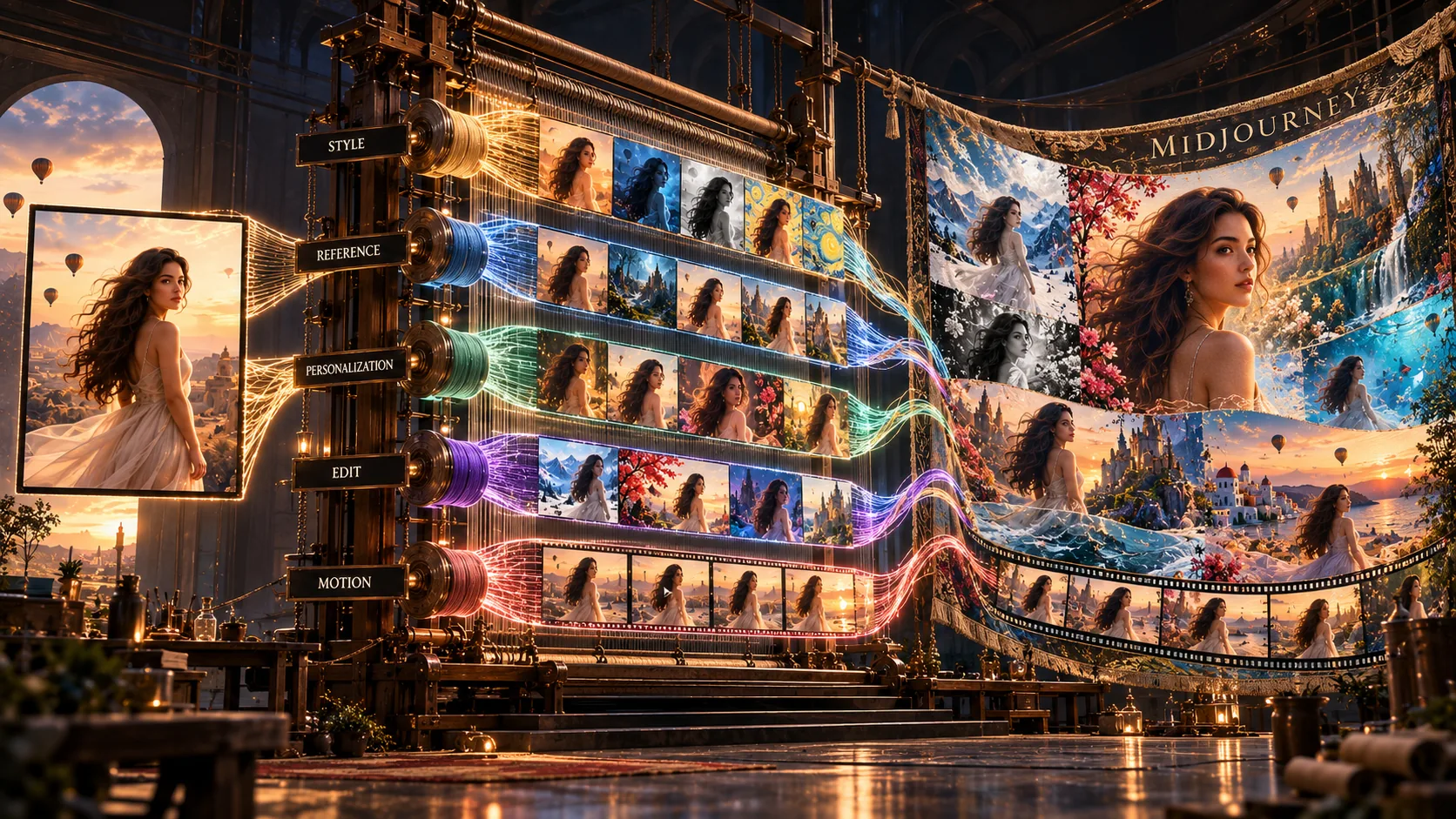
Midjourney is an AI image and video generator. You type a text prompt, and it returns a set of images built from that description. It started as a Discord bot in 2022 and has since added a full web interface, video generation, and tools for keeping a consistent visual style across many images.
Midjourney started as a Discord bot in 2022. Since then it's added a full web interface, video generation, and tools for keeping a consistent visual style across many images — Style References, Personalization, and the Edit Model.
Midjourney's current default model is V8.2 (released July 24, 2026). V8.2 replaced three older, separate tools — Omni Reference, Character Reference, and Retexture — with a single Edit Model. If you've read older Midjourney guides that describe those three as separate features, that's now out of date.
Midjourney is subscription-only. There's no free tier and no free trial — you need a paid plan to generate anything.
$8/mo billed annually ($96/yr).
$24/mo billed annually ($288/yr).
$48/mo billed annually ($576/yr).
$96/mo billed annually ($1,152/yr).
A few things worth knowing before picking a plan:
You write a prompt describing what you want, and Midjourney generates four image variations. From there you can upscale one, generate more variations of it, or edit it further. The same idea extends to video: Midjourney turns a still image into a 5-second video, extendable up to 21 seconds.
Two features become especially useful once you start doing more than basic prompts:
Upload a reference image and Midjourney pulls its color palette, lighting, and overall look, then applies that look to a new subject you describe.
Midjourney builds a profile of what you tend to like, based on images you've ranked, and leans future generations toward that taste. Its results become more useful after you've ranked enough images to build a preference profile.
As of V8.2, this replaced the older separate Omni Reference, Character Reference, and Retexture tools. It uses written instructions plus up to four reference images, and it can help keep a character, product, or other subject consistent across multiple generations, or restyle an existing image while keeping its composition.
Midjourney is widely used for photorealistic-looking images, and its current models can produce detailed lighting, skin texture, and material rendering. Results still vary by prompt, and complex hands and poses can still produce errors — "closely matches real-world photography" is a description of typical results, not a guarantee on every generation.
Midjourney has a full web interface at midjourney.com, separate from the original Discord bot. It includes a dashboard, an Explore feed (public community generations, searchable — you can see the exact prompt and parameters behind any public image), a Create tab, an archive of your past generations, and a canvas-style editor.
Discord is still supported for people who prefer it, but it's no longer required — the web app covers full generation and editing. Draft Mode trades image quality for speed, useful for testing prompt directions quickly before committing GPU time to a full-quality render.
Moodboards let you collect reference images to define a visual direction — color palette, lighting, composition — before generating anything. Useful for teams aligning on a look before production starts, rather than iterating on individual prompts one at a time.
| Parameter | What it does |
|---|---|
--ar | Sets aspect ratio (e.g. --ar 16:9) |
--v | Sets model version (e.g. --v 8.2) |
--q | Sets render quality/GPU cost |
--s or --stylize | Controls how much Midjourney's default aesthetic is applied |
--iw | Sets how strongly an image prompt influences the result |
--no | Excludes elements from a generation |
--chaos | Increases variation between the four results |
--seed | Locks a specific starting point for reproducible results |
--sref | Applies a Style Reference image |
--p | Applies your Personalization profile |
--edit | Edit Model — modifies an image using written instructions plus up to 4 reference images |
--style raw | Reduces Midjourney's default stylization, follows the prompt more literally |
--weird | Pushes results toward more unconventional output |
| Feature | Midjourney | DALL-E 3 |
|---|---|---|
| Photorealistic images | Photorealistic image generation | Supported |
| Text in images | Can require several attempts | Generally good |
| Style control | Style References, Moodboards, Personalization | Different, prompt-driven workflow |
| Character/subject consistency | Edit Model with reference images | Image editing/reference workflow |
| Editing | Edit Model | Built-in image editing |
| Learning curve | More product-specific terms | Familiar chat interface |
| Feature | Midjourney | ChatGPT Images | Adobe Firefly | Ideogram |
|---|---|---|---|---|
| Photorealistic images | Photorealistic image generation | Supported | Supported | Supported |
| Exact text | Can require several attempts | Generally good | Supported | Strong focus |
| Editing | Edit Model | Conversational editing | Built-in editing tools | Editing tools |
| Text/typography | Can struggle with exact text | Handles text | Handles text | Designed for text-heavy images |
| Learning curve | More product-specific terms | Chat-based | Familiar editor workflow | Familiar interface |
Midjourney is useful for people creating visual concepts and working with a consistent style:
Working on visual direction for a project.
Creating campaign concepts before committing a production budget.
Generating product images in different settings without new photography.
Building moodboards and lighting references before a shoot.
Who need campaign images without arranging a new photo shoot.
G2 currently lists Midjourney at 4.4/5 from 102 reviews.
The written reviews also mention a learning curve, confusion around the Discord-based workflow, the cost of higher-tier plans, and the lack of traditional manual editing tools.
Source: Midjourney reviews on G2.
| Version | Released | Notes |
|---|---|---|
| V6 | Dec 2023 | Better prompt accuracy on longer prompts, improved image prompting |
| V6.1 | Jul 2024 | ~25% faster renders, more coherent detail |
| V7 | Apr 2025 | Introduced Draft Mode and Omni Reference |
| V8.1 | Apr 2026 | 4–5x faster rendering, added 2K "HD" still images |
| V8.2 (current) | Jul 2026 | Replaced Omni Reference/Character Reference/Retexture with a single Edit Model; improved Personalization |
Midjourney also runs Niji, a separate model line built with Spellbrush for anime and Eastern art styles, currently on Niji 7 (Jan 2026).
Midjourney's Terms generally give subscribers ownership of content they create, subject to a couple of specific exceptions:
By default, everything you generate is public and can be remixed by other users — Midjourney's Terms grant Midjourney a broad license to display and reuse what you create. Stealth mode (Pro and Mega only) keeps your generations private and out of the public feed. Even with Stealth mode on, anything you generate in a shared space like a Discord server is visible to everyone in that server.
Yes. Midjourney can produce detailed, photorealistic-looking images, although results still vary by prompt.
One notable difference is Personalization: Midjourney builds a profile of your preferences over time and can use it to influence future generations.
Yes. The V8.2 Edit Model (--edit) can use up to four reference images to help keep a character, product, or other subject consistent across generations.
Generally yes — you own what you create, subject to the ownership exceptions above (the $1M-revenue/Pro-or-Mega rule in particular). Check Midjourney's current Terms of Service before using images in client or commercial work.
Yes. The web app at midjourney.com covers generation, editing, and your history — Discord is optional now, not required.
A way to set visual direction — palette, lighting, composition — by collecting reference images before you start generating.
We checked Midjourney's own documentation (subscription plans, parameter list, video generation costs, and Terms of Service) and its G2 reviews page when preparing this review. We update this page as Midjourney's pricing, models, or features change — its V8.2 update in July 2026 changed how several older reference tools work, so we've flagged that clearly above.
This page contains affiliate links: if you sign up through them, we may earn a commission at no extra cost to you — which never affects what we recommend.
Midjourney is a paid-only image and video generator with strong control over visual style and reference-based generation. The main trade-offs are the subscription cost, a real learning curve, and limits around exact text and manual image editing. Its current V8.2 model also changed how some older reference features work — Omni Reference and Character Reference are gone, folded into the Edit Model — so older Midjourney guides describing those as separate tools are out of date.
You can explore Midjourney's current plans and see whether Basic or Standard fits your needs.
Affiliate link. We may earn a commission at no extra cost to you. Our review is always independent.
 OpenArt AI
 Photoroom
 LetsEnhance
 Magnific
 Ideogram
 Kittl
Kittl Krea AI
 Phot.AI
 CHATGPT
 Stable Diffusion
 Leonardo AI
 Canva AI
 Adobe Express
 Fotor
Fotor Topaz Photo AI
 NightCafe
 Midjourney AI