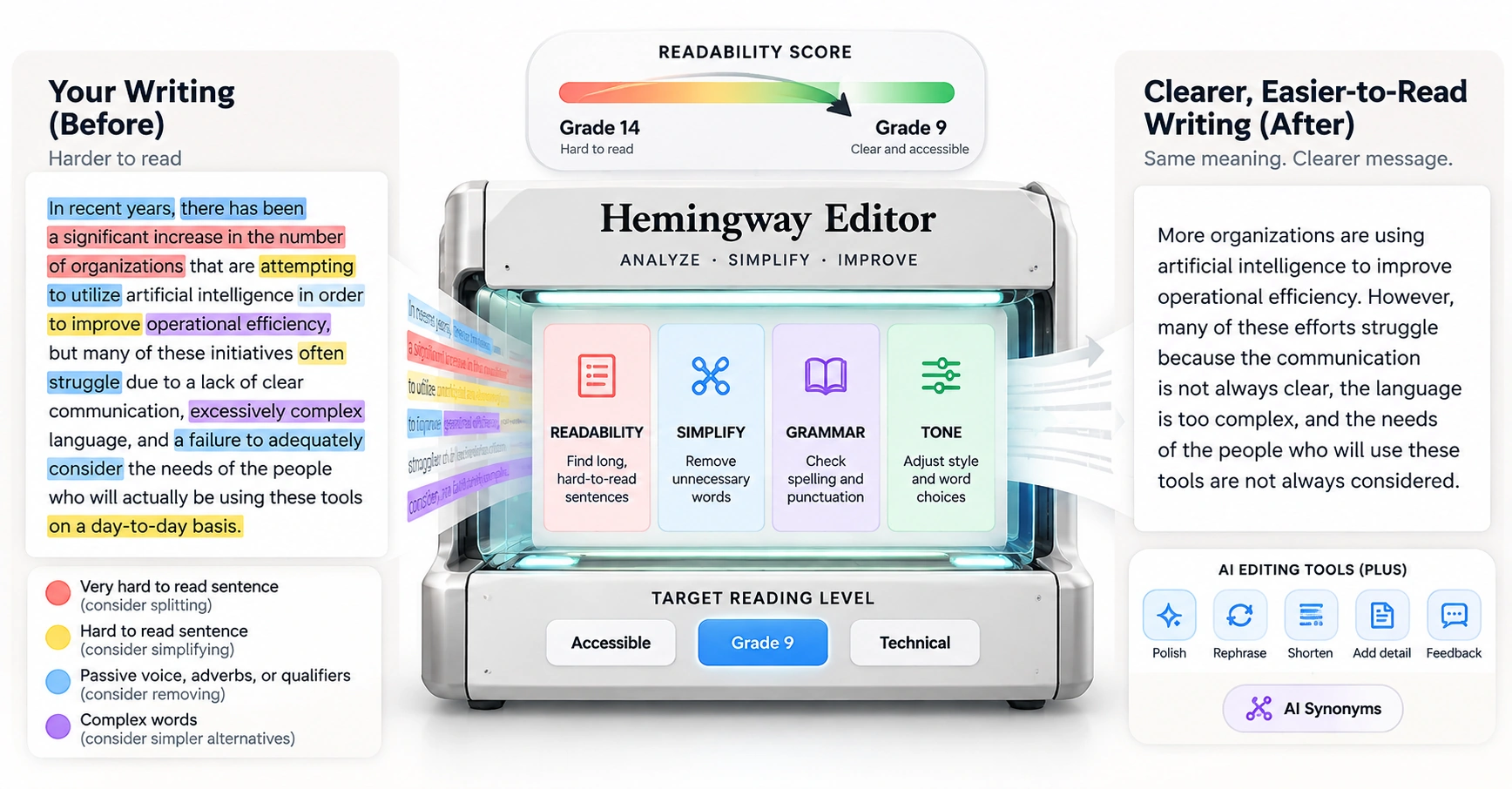
Most writing tools check whether a sentence is correct. Hemingway Editor checks whether anyone can actually get through it. Paste text in and it marks up hard-to-read sentences, passive voice, adverbs, and complex words in color, then gives the whole thing a plain-language grade level. The free web editor does the highlighting. Hemingway Editor Plus adds AI that rewrites the flagged sentences for you. This review covers what it actually does, a hands-on look at how much it simplifies different kinds of writing, real pricing, G2 reviews, and who gets genuine value from it.
Pricing and features can change. Check Hemingway's current pricing page before you subscribe.
Hemingway Editor is a readability tool. It points you straight at where your writing is hard to read: paste text into the free web editor and it starts marking things up in color, long sentences, passive voice, adverbs, and words that have a simpler option sitting right next to them. A reading grade level sits up top, estimating how advanced the writing is for an average reader. It shows you where the problems are; you go fix them yourself, unless you're on Plus, where the AI can do the fixing too.
It's built around one idea: write plainer. Shorter sentences, active voice, fewer qualifiers. It works on writing you've already got, a draft, an email, a paragraph you're stuck on, rather than starting you from a blank page. If you tend to write long, wordy drafts, this is a fast way to see exactly where that's happening.
One thing worth knowing before you paste anything sensitive in: Hemingway states it doesn't sell your data, doesn't use it to train an AI model, and doesn't use it for advertising, a vendor claim not independently audited here, but worth knowing given how many writing tools quietly do the opposite.
Open the editor and paste in an email or a paragraph, and within a second or two, parts of it start changing color. Yellow and red mark sentences that are hard, or very hard, to read. Blue shows up wherever you've used passive voice, adverbs, or other weakening phrases, and purple flags long words that have shorter substitutes. Off to the side, a grade-level score sits alongside your word count and reading time, and the grade level drops as you simplify things.
What you encounter in session one: the free web editor, no signup needed to paste text, sentences highlighted by problem in color, your readability grade level in the sidebar, and the habit of splitting red sentences and cutting clutter until the highlights clear. What used to be a vague feeling that a paragraph was clunky turns into a specific list of sentences to fix, which is most of the value of a session or two with this tool.
What Hemingway Editor measures is readability, and it puts a number on that. People sometimes lump it in with grammar checkers because of the color-coded marks, and on the free tier that's not quite right, grammar correction isn't the focus there. Hemingway Editor Plus adds a dedicated grammar, spelling, and punctuation checker on top, but the tool's core identity is still readability: instead of a vague sense that a paragraph "feels dense," it gives you a map of exactly which sentences are causing the problem.
The highlights, by color. Yellow means a sentence is hard to read. Red means it's very hard, and usually worth splitting into two. Blue marks passive voice, adverbs, and other weakening phrases together. A sentence gets flagged when the subject receives the action rather than performing it, or when it hedges more than it needs to. Complex words show up in purple, with a plainer word suggested right there.
The grade level is simpler than it sounds: a reading-level score for whatever you've written. For general-audience web writing, many publishers aim for relatively accessible reading levels, often around grades 8 to 10; the right target depends on the audience and subject, and the number moves as you edit. Grammarly asks whether a sentence is correct. Hemingway Editor asks whether a reader can actually follow it, and shows you every place the answer is no.
A few things Hemingway Editor does particularly well, worth calling out specifically.
Hard-to-read sentences, passive voice, adverbs, and complex words all get marked in color as you write. The visual system makes these problems easy to spot at a glance.
A single number for how readable your writing is, so you can write to a target audience instead of guessing.
One click can turn a flagged wordy sentence into a cleaner version, while other tools handle tone, length, phrasing, and structure.
Reshape a passage to be shorter, more confident, more formal, or more persuasive without a full rewrite.
The core web editor, highlights and grade level, is free, with no signup needed to paste text and see the marks. The interface has nothing on screen but your text and the highlights.
Hemingway states it won't sell your data, use it to train an AI, or use it for advertising. That's a stated policy, not something independently audited here.
The color-coded highlights are the core of the tool, and once you know what each one means, they stop feeling random.
Marks a very hard-to-read sentence: lengthy, complex, and dense. Split it, or cut it down.
Marks a sentence that's hard to read, often meandering or convoluted. Tighten it or break it in two.
Marks three weaknesses together: passive voice, where the subject receives the action rather than performing it, adverbs, and qualifying phrases. Make the sentence active, or cut the hedge.
Marks a complex word with a simpler word suggested, so "utilize" becomes "use."
Marks grammar, spelling, and punctuation issues. It's a Hemingway Editor Plus feature, not part of the free highlights.
The grade level underneath updates as you go. The goal isn't zero highlights; some passive voice is fine, and some long sentences earn their length. Treat the highlights as a second opinion, not a rule. If a sentence works better long, keep it long.
Hemingway Editor Plus lets you choose a target reading level instead of chasing one fixed number for every piece of writing. Three presets are available: Accessible, for writing aimed at the widest possible audience; Default, Hemingway's standard target of grade 9; and Technical, for writing that can run denser, such as academic or specialist content. Pick the preset that matches your audience, and the grade-level score and highlights adjust against that target instead of a one-size guideline.
Once you know what the colors mean, editing in the free online editor is a short, repeatable loop.
Plus adds a set of one-click AI tools on top of the free highlights, each aimed at a different kind of edit. You can accept or adjust a suggested change instead of rewriting every flagged sentence yourself.
Simplify rewrites a flagged sentence, or an entire highlighted paragraph, in plainer language, aiming to keep the original tone and details while bringing the grade level down. It's the most direct route from a highlighted problem to a fix.
Polish & Clarify cleans up a flagged sentence: fixing passive voice, cutting clutter, and tightening wording while keeping the core meaning.
Creative Rephrase rewrites a sentence or passage a different way while keeping the same core idea, useful when a straight cleanup still doesn't sound right.
Shorten It and Add Detail move length in either direction: condense a bloated paragraph, or expand a thin one with more specifics.
Add Headings, Bullets, and Bolding restructures a wall of text into something more scannable, without changing the underlying writing.
Custom Rewrite takes a plain instruction, something like removing jargon, changing tense, or adding a short example, and applies it directly; it's the most flexible of the AI tools.
Tone Adjustment reshapes a passage along a chosen style, shorter, more confident, more formal, more casual, or more persuasive, without a full rewrite.
Hemingway's own site includes a worked example of this in action: a single dense, jargon-heavy sentence about market research gets split into three shorter, plainer ones that keep the same core idea. It's a reasonable illustration of what Simplify does: fewer qualifiers, shorter sentences, same meaning, not necessarily more memorable writing, but a lot easier to read.
Plus also includes an advanced grammar, spelling, and punctuation checker beyond a basic spellcheck, shown as the green highlights, unlimited even when your AI sentence rewrites are capped by plan.
An earlier hands-on test published on this site ran five sample paragraphs of overwritten text, the kind you'd find in an actual contract, email, or press release, through Hemingway Editor's Simplify tool, and recorded the grade level before and after each one.
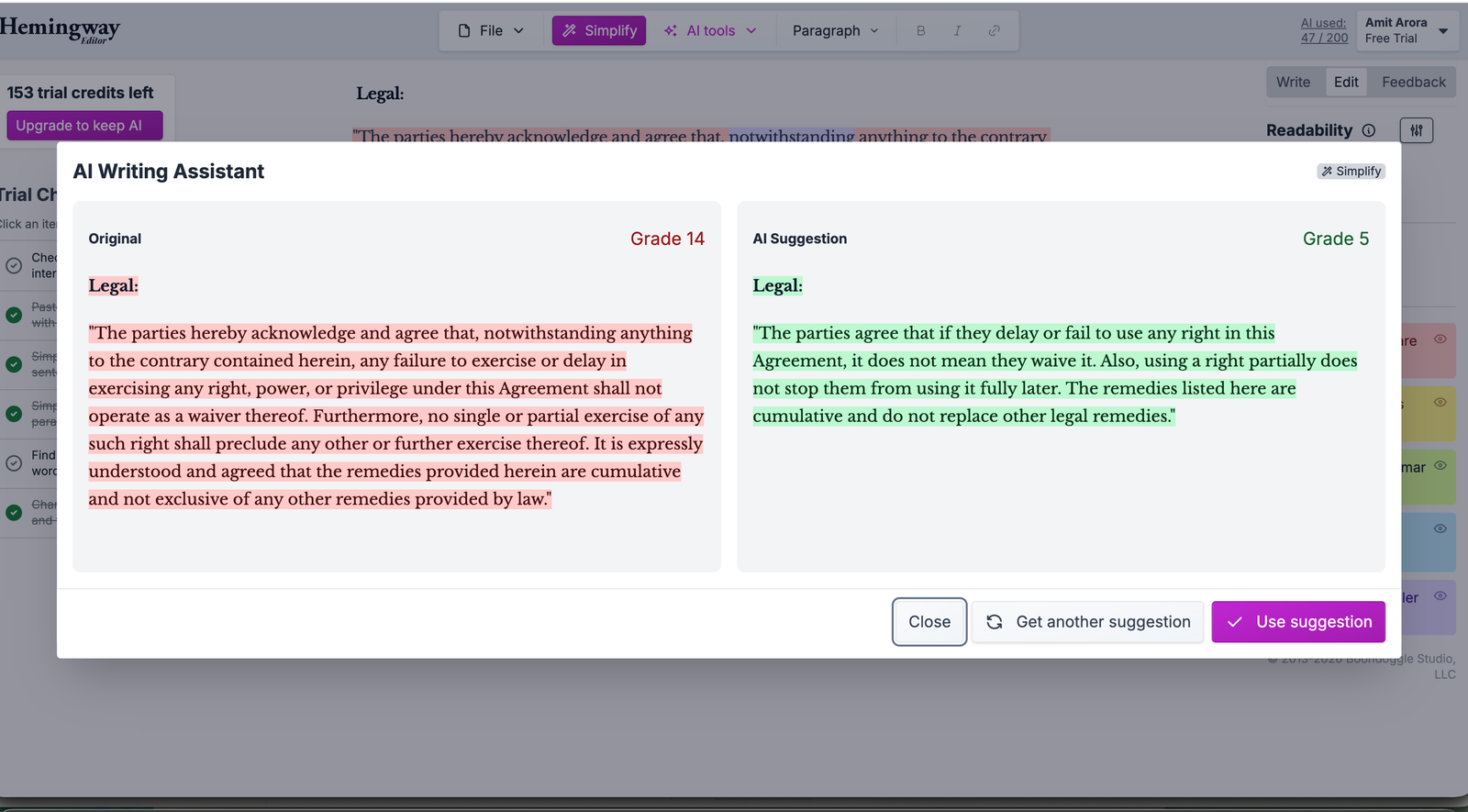
A legal non-waiver clause, originally around grade 14, came down to roughly grade 5, the steepest drop in the set. The simplified version read as covering the same general ground, though a grade-level drop alone doesn't confirm legal equivalence. A lawyer would likely keep some of the original's specific phrasing intentionally, since legal wording can carry meaning that a readability rewrite may remove. It's useful for understanding what a clause means, riskier to paste into an actual contract.
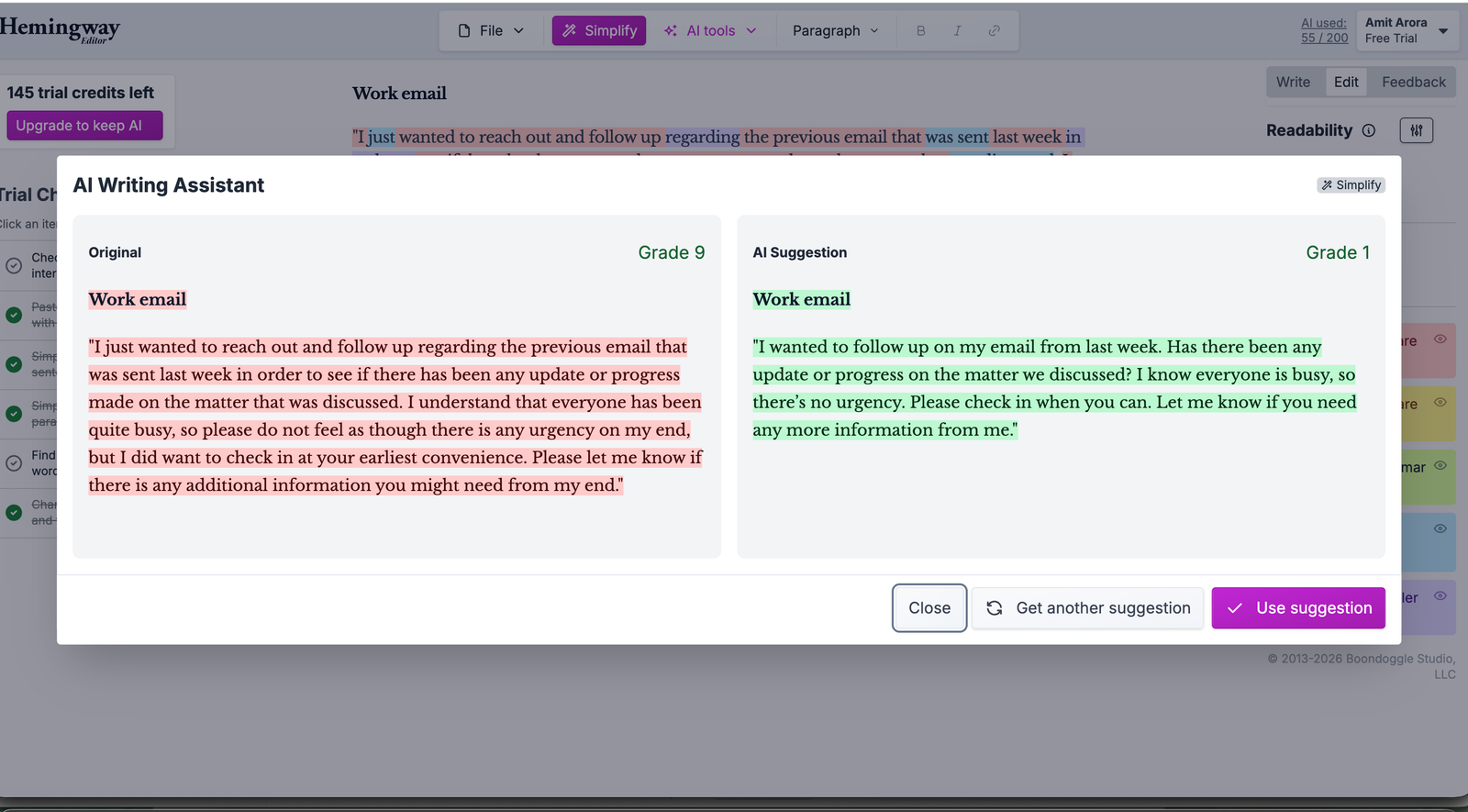
A rambling work email, originally around grade 9, dropped to roughly grade 1. The simplified version kept the same basic ask and information, though it read a little blunt for a professional inbox without a greeting added back in.
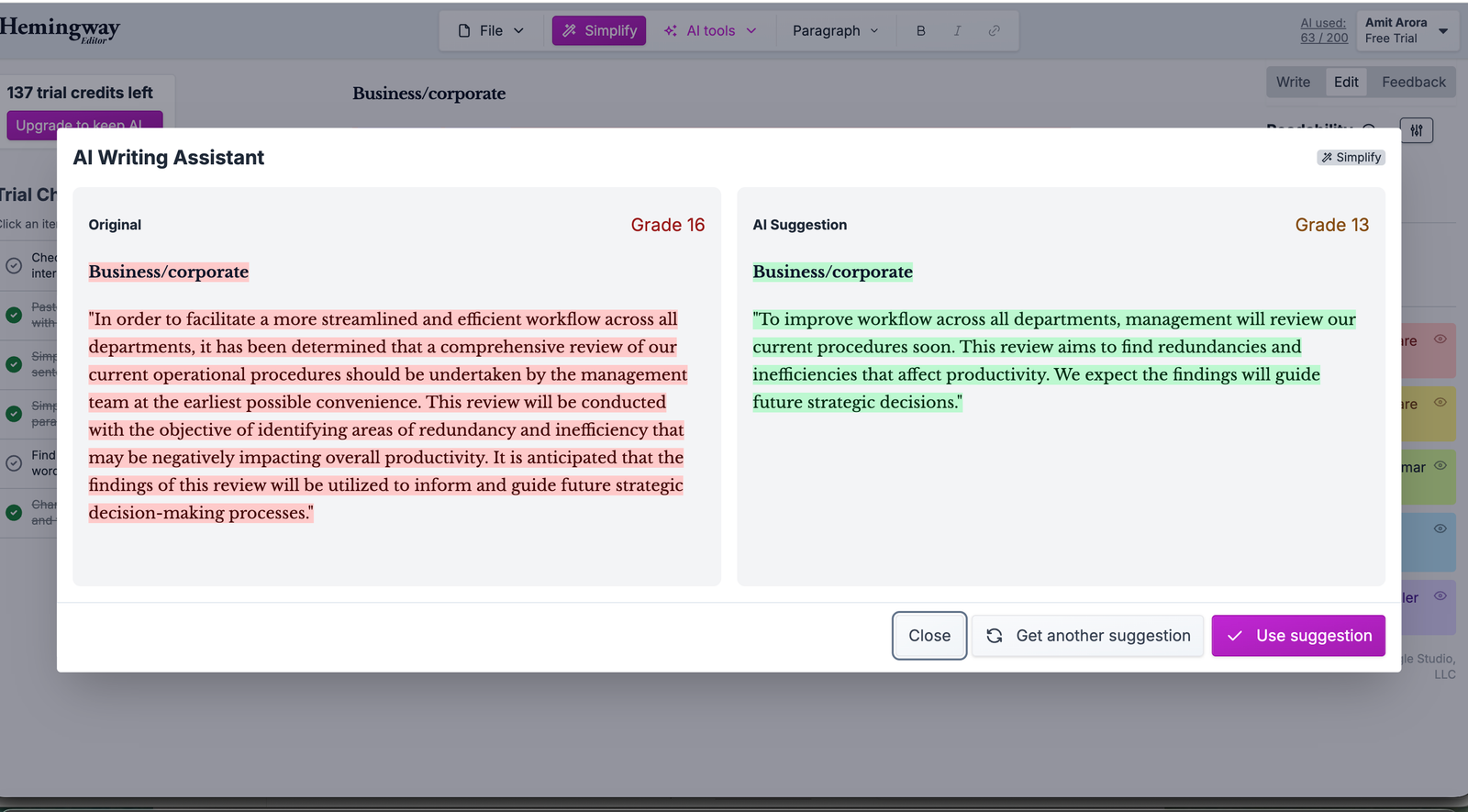
A dense corporate memo, originally around grade 16, came down to roughly grade 10. The rewrite was shorter and more conversational, closer to the tone of an internal management memo.
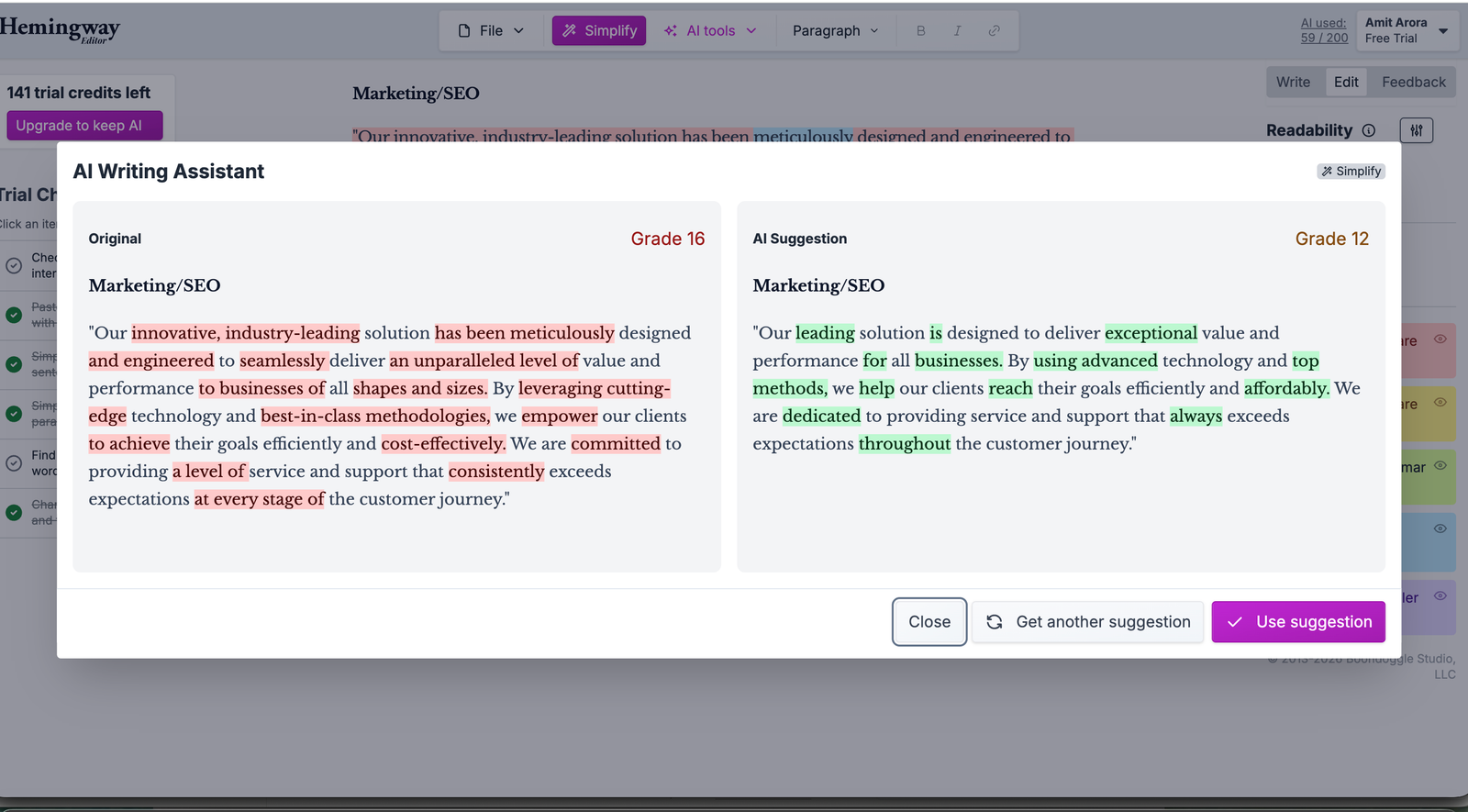
Marketing copy, originally around grade 16, dropped to roughly grade 12. But it kept several of its vague, empty-sounding modifiers intact, a sign Simplify shortens sentences without necessarily fixing marketing-speak habits.
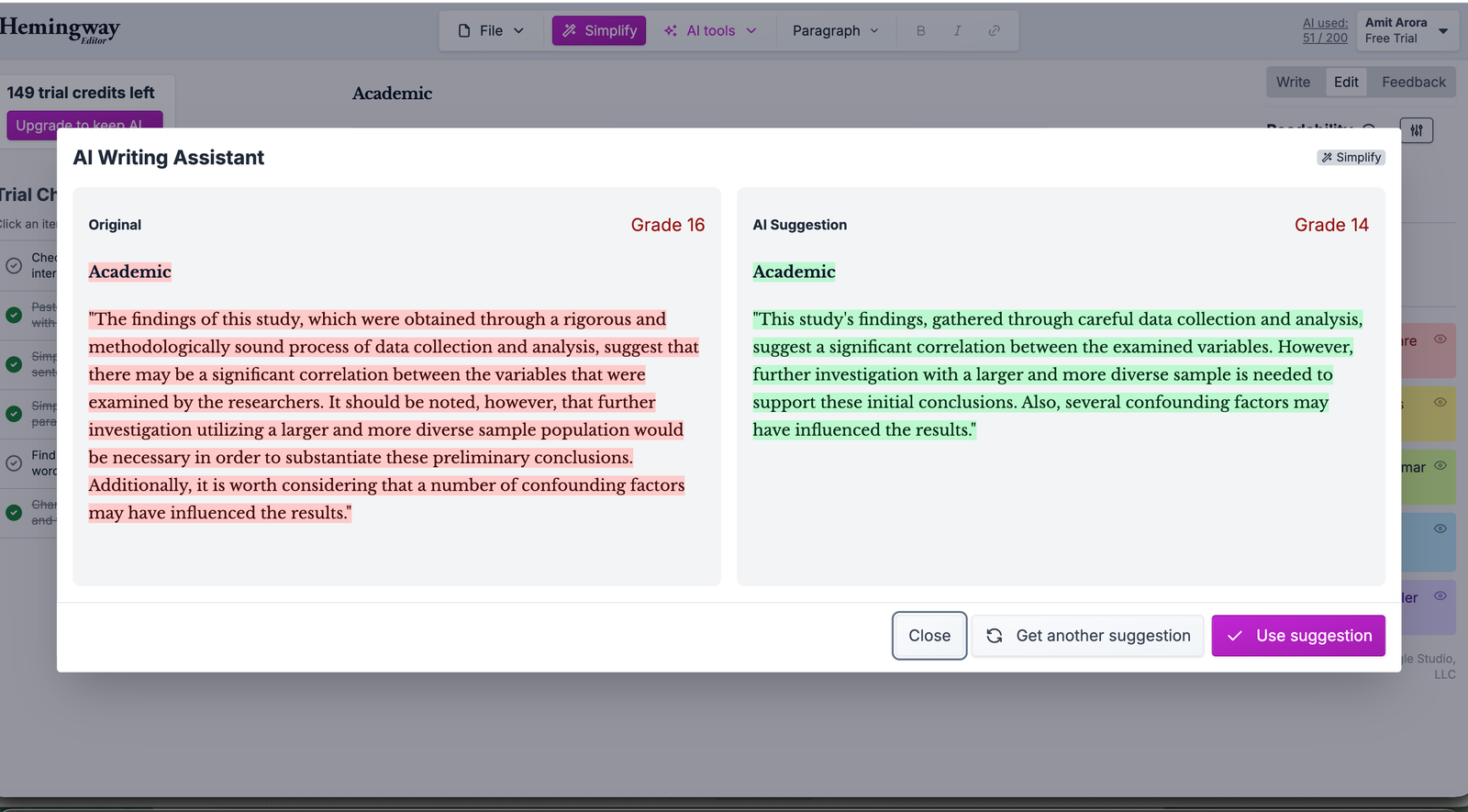
An academic abstract, originally around grade 16, moved the least, down to roughly grade 14. That tracks with how academic writing resists simplification: dense phrasing there is often doing real precision work, not just padding.
The results varied by type of writing. Legal and business prose changed the most, while the academic abstract changed the least.
Feedback works across a whole draft instead of one sentence. It gives a written review of structure, logic, flow, clarity, and tone, pointing out what's working as well as what isn't.
AI Synonyms works like a thesaurus that reads the whole sentence first: highlight a word or phrase and it suggests options that fit the context, not a generic list.
Together, these tools cover sentence rewrites, contextual word choices, and whole-document feedback.
Hemingway Editor isn't built around US English only. A dialect setting also supports British, Canadian, Indian, Australian, Irish, South African, and New Zealand English. Switching the dialect changes the spelling, grammar, and AI suggestions Hemingway uses, so standard Indian-English spelling and grammar, relevant for a meaningful share of TechScribe's own readers, aren't flagged as errors the way they would be under a US-only setting.
Hemingway App and Hemingway Editor are the same tool; people use both names. It comes in more than one form, and it's worth knowing which is which.
The free web editor is the core experience: paste text, see highlights, read your grade level. Free, in the browser, no signup needed, available in all major browsers.
Hemingway Editor Classic is the desktop version ($19.99, one-time, Mac or PC) that runs the highlights offline, with formatting and one-click publishing to WordPress. It does not include the Plus AI; its own product page states directly that it "does not include new AI features."
Hemingway Editor Plus is the AI subscription, web-based, adding sentence rewrites, tone controls, Feedback, and AI synonyms. Plus also supports importing Word (.docx), Markdown (.md), and HTML (.html) files, exporting edited text in those same formats, a dark-mode display setting, and the target reading-level control covered above.
There's no browser extension and no official mobile app for either version. The free web editor has no save or export option; you copy your finished text out by hand. Classic imports Word (.docx) documents and exports as HTML, Markdown, plain text, PDF, or Word, with direct publishing to WordPress. Formatting stays simple in both the free editor and Plus: bold, italic, and basic headers, no tables, images, or multi-column layouts. Classic adds bullet lists, numbered lists, and block quotes on top of that.
On top of the three products, Hemingway offers a handful of free standalone tools built on the same engine: a free grammar checker, a free paraphrasing tool, a free AI proofreader, and a free readability checker, each a single-job page usable without an account.
In a few fields, readability is central to the work itself.
Hemingway Editor holds a 4.4/5 rating on G2 based on 50 reviews in the proofreading-software category, per G2's product page, checked October 2026.
What Users Like Most
What Users Like Least
The tool has also picked up mainstream press over the years, including confirmed coverage from Fast Company; older coverage from outlets including the New Yorker, NPR, Esquire, PC Magazine, Yahoo, Lifehacker, and ABC News has been reported previously but wasn't individually re-verified this round. G2 ratings and review counts change over time; check G2's current Hemingway page for the latest figures before relying on this summary.
The web editor is free. The paid plans all live under Hemingway Editor Plus, the AI tier. Hemingway Editor Plus offers a 2-week free trial, no credit card required, that cancels automatically. Annual billing saves money over monthly, at least on the Individual 5K tier.
Highlights and grade-level scoring, no signup needed.
$8.33/month when billed annually ($100/year).
$12.50/month either way, billed monthly or annually ($150/year).
$12.50/user/month either way ($150/user/year annually).
Contact sales.
Most AI rewrites, using tools like Simplify, Polish & Clarify, or Custom Rewrite, draw one credit per sentence from that monthly allowance. Hemingway doesn't charge a credit for qualifiers or simpler-word suggestions, the purple highlights, or for a rewrite that fails to actually lower the grade level, and grammar, spelling, and punctuation fixes are unlimited and don't count against it either.
Beyond Plus, Hemingway Editor Classic is a separate one-time purchase ($19.99) that runs the highlights offline and doesn't include any of the Plus AI. Teams can also pay by invoice. Realistically, the free editor alone is worth using indefinitely. A paid plan only becomes worthwhile once you'd rather have the AI do the rewriting for you.
| Maker | Boondoggle Studio, LLC |
| Products | Free web editor, Classic desktop ($19.99 one-time), Editor Plus (subscription) |
| Signature Feature | Color-coded readability highlights: hard-to-read sentences, passive voice, adverbs, complex words |
| Scoring | A single readability grade-level number |
| Target Reading Level | Accessible, Default (grade 9), or Technical (Plus) |
| English Dialects | US, British, Canadian, Indian, Australian, Irish, South African, New Zealand |
| Plus AI | Simplify, Polish & Clarify, Creative Rephrase, tone and length controls, Custom Rewrite, Feedback, AI Synonyms, grammar fixes, dark mode, metered by plan |
| Free Tools | Grammar checker, paraphraser, AI proofreader, readability checker, all on the same engine |
| Platforms | Web (free and Plus), desktop app for Mac and Windows (Classic). No browser extension, no official mobile app |
| Privacy | States it does not sell data, train AI on it, or use it for ads (vendor claim, not independently audited) |
| Free Tier | Yes, the web editor; no signup needed to paste text and see highlights |
| Pricing | Free web editor. Plus from $8.33/month billed annually. Classic desktop $19.99 one-time. Per Hemingway's own pricing page, checked October 2026 |
Hemingway Editor is easy to understand because the main workflow is simple: paste text, review the highlights, edit the flagged sentences, and check the grade level. The harder part is learning when to ignore its suggestions. A long sentence is not automatically a bad sentence, and passive voice is sometimes appropriate.
You write for a general audience and want it read. Hemingway Editor keeps your posts short, active, and scannable, a format that tends to work well for online reading.
Your writing tends to run dense. The highlights cut through that so your point lands the first time, with the grade level keeping you honest.
Academic and formal writing habits often carry over into everyday writing. Hemingway Editor teaches concision directly, showing you the exact sentences to simplify. With Plus, it can rewrite them while you learn the pattern.
These tools overlap, but only Hemingway Editor is built specifically around readability. The others correct, paraphrase, generate, or rewrite in your voice; Hemingway Editor measures how hard your writing is to read and pushes it plainer.
| Tool | Primary Focus | Best For |
|---|---|---|
| Hemingway Editor | Readability scoring and color-coded clarity highlights. | Writers whose drafts run long and dense and want a concrete target to simplify toward. |
| Grammarly | Real-time grammar, spelling, and tone correction across every app. | An always-on correctness layer rather than a readability gauge you paste into. |
| ProWritingAid | Style and grammar reports across a full manuscript. | Long-form editing with deep, multi-report analysis. |
| QuillBot | Mode-based paraphrasing with preset rewrite styles. | Anyone whose whole job is paraphrasing existing text. |
| Wordtune | Context-based rewrite menu in your own voice, plus summarizing. | Rewrites that still sound like you, not just a plainer grade level. |
| Jasper | Brand-governed, from-scratch content generation at scale. | Generating long-form campaigns rather than simplifying a draft you already have. |
If your writing tends to run long and dense, start with Hemingway Editor. Grammarly is better if you want correctness checked everywhere you type. ProWritingAid suits writers who want deep style reports on a full manuscript. QuillBot is built for paraphrasing, Wordtune for rewrites that still sound like you, and Jasper for generating new long-form content rather than simplifying what you've already written.



This review is published by TechScribe.in, an independent publisher covering copywriting and marketing AI tools including Jasper, Writesonic, Copy.ai, QuillBot, Rytr, and Wordtune. It's based on hands-on evaluation of Hemingway Editor's interface and documented feature set, including a prior in-house test of the Simplify tool on five real sample paragraphs, cross-checked against Hemingway's own current pricing page and publicly available information. Where a claim, press mention, or pricing detail couldn't be independently confirmed this round, we say so rather than present it as freshly verified.
Hemingway Editor, also called Hemingway App, is a readability tool. It highlights hard-to-read sentences, passive voice, adverbs, and complex words in your writing, and gives it a grade-level score. The free web editor shows the highlights; Hemingway Editor Plus adds AI that rewrites the flagged sentences.
Yes. The core web editor is free for highlights and readability scoring. Hemingway Editor Plus, which adds AI rewrites, tone controls, and Feedback, is a paid subscription with a 2-week free trial that needs no credit card. There's also a one-time desktop app, Hemingway Editor Classic, for $19.99.
Yellow marks a hard-to-read sentence and red a very hard one. Blue marks passive voice, adverbs, and other weakening phrases together, and purple highlights complex words with simpler alternatives. On Hemingway Editor Plus, green marks grammar, spelling, and punctuation issues. A readability grade level updates as you edit.
The free editor highlights readability issues for you to fix yourself; it isn't built around grammar. Hemingway Editor Plus adds a dedicated grammar, spelling, and punctuation checker, shown as green highlights, unlimited on every paid plan.
Plus starts at $8.33 per month (Individual 5K, billed annually), with an Individual 10K plan at $12.50 per month, a Team plan at $12.50 per user per month, and a custom-priced Enterprise tier for larger organizations. All include a 2-week free trial.
No. The Classic desktop app ($19.99) runs the highlights offline but does not include the Plus AI features; its own product page states plainly that it doesn't include the newer AI features. AI rewrites, tone controls, and Feedback are part of the Plus subscription only.
Grammarly focuses on grammar, spelling, and tone across every app. Hemingway Editor focuses on readability: it scores how hard your writing is to read and highlights the sentences slowing readers down. Many writers use both.
Paste your text into the editor, or write in Write mode, then work through the highlighted issues: split red sentences, untangle yellow ones, make passive voice active, cut adverbs and weakening phrases, and swap complex words for simpler ones. Watch the readability grade level drop toward your target. On Plus, the AI can rewrite flagged sentences for you in a click.
The core highlighting and readability scoring run on a rules-based algorithm, not generative AI. Hemingway Editor Plus adds AI features on top: sentence rewrites, tone and style changes, Feedback, and an advanced grammar checker for the trickier errors.
Yes. It runs in your browser for free, no download or account needed to paste text and see the highlights. There's also a one-time Classic desktop app for offline use, and Hemingway Editor Plus for the AI features.
The free web editor is itself the free option, and already covers the highlights and grade-level scoring most people need. If you specifically want a free grammar checker instead, the free tiers of Grammarly or QuillBot cover basic grammar fixes, and LanguageTool is a free open-source option that checks several languages.
No. The free web editor needs no login or account; paste your text and the highlights appear right away. Hemingway Editor Plus does require an account, since it tracks your AI usage and saves your settings.
Yes. Plus adds a dedicated grammar, spelling, and punctuation checker on top of the free readability highlights, shown as green marks in the editor. It's unlimited on every paid plan and doesn't draw from your monthly AI sentence allowance.
Yes, on Plus. You can choose Accessible, Default (grade 9), or Technical instead of aiming at a single fixed number, and the highlights and grade-level score adjust against whichever target you pick.
Yes. Along with US English, Hemingway Editor supports British, Canadian, Indian, Australian, Irish, South African, and New Zealand English as dialect settings, so standard Indian-English spelling and grammar are handled according to that dialect setting instead of being flagged as errors.
Most AI rewrites, using tools like Simplify, Polish & Clarify, or Custom Rewrite, draw one credit per sentence from your plan's monthly allowance (5,000, 10,000, or 20,000 depending on plan). Qualifiers and simpler-word suggestions don't use a credit, and a rewrite that doesn't lower the grade level doesn't use one either. Grammar, spelling, and punctuation fixes are unlimited.
Hemingway Editor is still built around one clear strength: making dense writing easier to read. The newer Plus tools take that core idea further, with AI rewriting, grammar correction, tone controls, Feedback, and the other editing tools covered above. It isn't primarily a from-scratch content generator; its AI works on text you select and asks you to direct the edit, rather than drafting from a blank page the way Jasper does, and its grammar checking still doesn't go as deep as Grammarly's. What it's good at is taking a paragraph you've already written and making it clearer, sometimes uncomfortably so.
If your drafts tend to run long, and you'd rather have something point out exactly which sentences are the problem instead of a vague sense that it "feels off," it's worth keeping in a tab. The free version alone covers most of the job. Plus is for when you'd rather have the AI handle the rewriting too.
The free web editor needs no signup; paste in a paragraph and see your first highlights right away.
Independent review. Prices and features may change; always check the official Hemingway Editor site for the latest information.
 Writesonic
 Copy.ai
 Rytr
Rytr Hemingway Editor