Copy.ai is a workflow automation platform for sales and marketing teams, built around turning a single trigger into multiple pieces of output automatically. This review covers what it actually does, what it costs, how it compares to Jasper and ChatGPT, and who gets real value from it. Pricing runs from $29/month for the Chat tier up to $3,000/month for Scale, plus custom Enterprise pricing, and there's no free plan.
Pricing and features can change. Check Copy.ai's current pricing page before you subscribe.
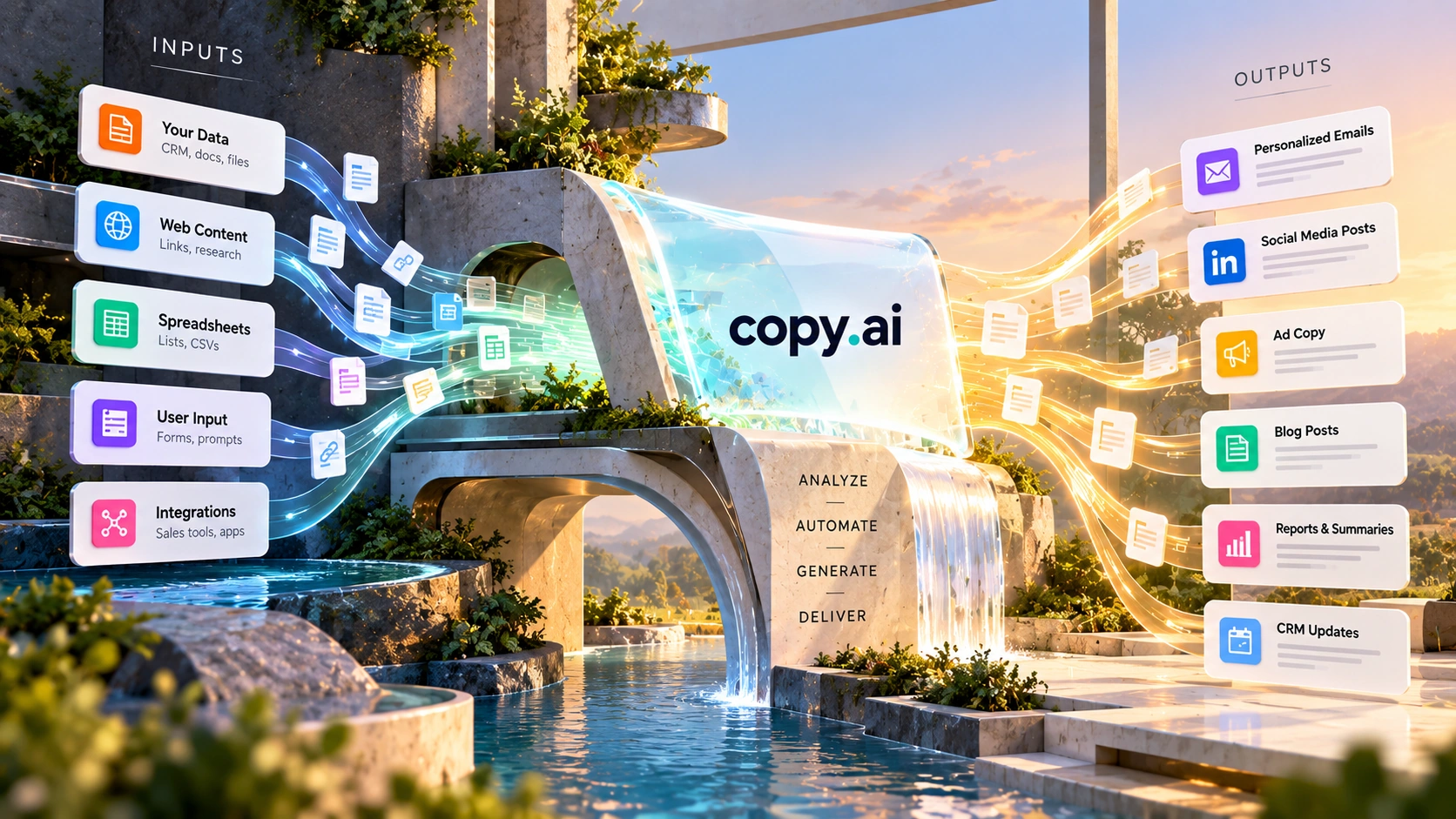
Copy.ai is a workflow automation platform for sales and marketing teams, built around turning a single trigger into multiple pieces of output automatically. A workflow can take a trigger such as a new lead and generate several related outputs, such as an email draft, LinkedIn message, CRM note, and internal summary, without anyone opening the tool to write it. The platform is organized around a small set of components, Workflows, Actions, Tables, Infobase, Brand Voice, Chat, and Copy Agents, covered in detail further down this review.
Mechanically, a workflow moves through four stages: trigger, data, actions, and output.
That sequence, trigger, data, actions, output, stays the same whether the workflow is doing lead enrichment, outreach drafting, or campaign variants. Only the specific Actions and destinations change.
Copy.ai currently runs five tiers, with no free plan. Figures below are from Copy.ai's own pricing page, checked October 2026.
$24/month billed annually. 5 seats.
Billed annually, $12,000/yr. 75 seats.
Billed annually, $24,000/yr. 150 seats.
Billed annually, $36,000/yr. 200 seats.
Custom seats and pricing.
There is no self-serve free tier. The jump from Chat's 5 seats to Growth's 75 seats and $1,000/month is a significant step, worth planning for before committing to the platform for a small team that might later need to scale.
Copy.ai actually ships two different ways of working, and the pricing table above can be confusing without knowing the difference.
Chat is a prompting interface for one-off tasks. Copy.ai's own platform documentation describes it as letting users rapidly complete one-off tasks and to-dos, and it can draw on Brand Voice and Infobase to keep output on-brand even for a quick request. It behaves like a standard AI writing assistant: you ask, it answers. Chat is designed for one-off tasks rather than automatically repeating a workflow.
Workflows are the automation layer. They run on workflow credits (20,000/month on Growth, scaling up through Expansion and Scale), and they're what most of this review focuses on, the trigger-to-output pipelines that keep running on their own once built.
Chat alone, available at the $29/month Chat tier, is enough for a team that mainly wants AI-assisted writing without automation. The jump to Growth's $1,000/month specifically pays for workflow credits and the automation layer, not just more seats, which is part of why that jump feels steep: it's a different product tier, not a bigger version of the same one.
Copy.ai holds a 4.7 out of 5 rating across 180 reviews on G2, and is listed across three G2 categories: AI Content Creation, AI Sales Assistant, and AI Writing Assistant. Individual reviewer quotes weren't available to pull directly for this piece, so this review relies on the aggregate rating and category placement rather than quoting specific reviews.
G2 ratings and review counts change over time. Check G2's current Copy.ai page for the latest figures before relying on this summary.
Prose quality is only part of the picture with Copy.ai. The platform is more focused on repetitive sales and marketing work: outreach that follows a set structure, follow-ups triggered by CRM events, and campaign variants for different audience segments.
The platform's most distinctive capability is what it calls compound output logic: one trigger can generate several outputs at once. A new lead entering the CRM might simultaneously produce an email draft, a LinkedIn message, a CRM note, and an internal summary, all from a single workflow run. You define the pattern once, then the workflow can run it repeatedly, with consistency enforced by the pipeline rather than by whoever happens to be writing that day.
Copy.ai positions its API and workflows for integration into an existing go-to-market (GTM) stack rather than as an add-on. A workflow can start when something happens in another tool. That could be a form submission, a new CRM record, or a webhook. The workflow can then send its output back to the system you use. The workflow can run without someone opening Copy.ai every time. Exact endpoint names and authentication flow aren't covered here since they weren't independently verified against current developer documentation; check Copy.ai's own docs before building against the API.
The platform is built from a small number of named components. Copy.ai's own platform documentation describes each one:
| Workflows | The orchestration layer; workflows trigger a chain of Actions based on events to automate a process end to end |
| Actions | Individual pre-built AI steps inside a workflow, described by Copy.ai as letting users harness AI without being AI experts |
| Tables | A queryable data layer that feeds workflows and Actions with structured data, and stores the results |
| Infobase | A repository of company information, brand facts, product details, that workflows and Chat can reference to stay accurate and on-brand |
| Brand Voice | Tone and style controls that keep output consistent across every workflow and Chat response |
| Chat | A prompting interface for one-off tasks, layered on top of Brand Voice and Infobase |
| Copy Agents | Described by Copy.ai as combining AI decision-making with guardrails to automate targeted tasks. Copy.ai's own component documentation doesn't spell out exactly how an Agent differs from an Action, so that distinction isn't fully clear from public material |
In practice, Tables hold the data, Infobase holds the company context, Brand Voice holds the tone, and Actions and Agents are the steps that use all three inside a Workflow.
Copy.ai states 2,000+ integrations, with named logos for Salesforce, HubSpot, Gong, Zapier, Outreach, and Salesloft. The number alone doesn't say much. What matters is what those connections actually do.
Two patterns cover most of it. Native integrations connect Copy.ai directly to specific tools. The CRM enrichment use case, for example, names Salesforce and HubSpot specifically: a change in a CRM field can trigger a workflow, and the enriched result, lead scoring, segmentation, stage-progression notes, writes back into the same record automatically.
The Zapier integration works more generally. According to Copy.ai's own documentation, a Zap can trigger every time new content is generated in Copy.ai, with the output sent on to tools like Google Drive, Buffer, Hootsuite, Salesforce, Outreach, or Salesloft, without anyone copying and pasting between apps. In practice, this is what lets a workflow's output reach wherever a team actually works, a CRM record, a shared drive, a social scheduler, instead of staying inside Copy.ai until someone manually moves it.
Copy.ai groups its own use cases into sales, marketing, and operations categories.
Prospecting: research and personalized outreach generation combined into one workflow, so a rep's prospect list turns into tailored first-touch messages without drafting each one by hand.
Inbound lead processing: a new inbound lead can trigger qualification, enrichment, and a first response automatically, cutting the lag between a form submission and first contact.
CRM enrichment: Copy.ai names Salesforce and HubSpot specifically here. Lead and account records get enriched with lead scoring, segmentation, and stage-progression data as part of the workflow itself, rather than through manual research.
Deal coaching and forecasting: listed as one of Copy.ai's own sales use-case categories. This review didn't find enough independently verifiable detail to describe how it works beyond the name.
Account-based marketing (ABM): account-level content generated instead of individual-level content, so ABM campaigns can scale without a matching increase in manual writing.
Content creation: listed as one of Copy.ai's own categories, overlapping with the compound-output workflows described earlier in this review.
Translation and localization: outreach and campaign content adapted for different markets as part of the same workflow, rather than a separate pass afterward.
Copy.ai describes itself as model-agnostic rather than built on a single AI provider. Its pricing page names OpenAI, Anthropic, and Google's Gemini models as available on the Chat tier specifically, and its homepage adds Perplexity to that list for the platform more broadly, so exactly which models are available may depend on the tier.
Being model-agnostic matters mainly for flexibility. A workflow or Chat response isn't locked to one provider's model, which can matter if a team already has a preferred vendor relationship or wants access to newer models as they're released. This review did not find any Copy.ai material claiming one model performs better than another inside the platform, and doesn't make that claim either.
Both tools target marketing and go-to-market teams, but they focus on different types of work, and the comparison is already covered from Jasper's side on this site. Jasper puts more emphasis on brand-consistent content, built around AI Agents and brand-governed Content Pipelines aimed at teams who need consistent brand voice across campaigns. Copy.ai puts more emphasis on repeatable workflows and automation, built around Workflows, Actions, and Agents on a queryable Tables layer, aimed at teams who want the same type of output produced automatically and repeatedly from a trigger.
Copy.ai's named integration count (2,000+, including Salesforce, HubSpot, Gong, Zapier, Outreach, and Salesloft, per Copy.ai's own site) is considerably larger than what Jasper names on its pricing page, and Copy.ai's entry tier covers more seats by default (5 seats at $29/month versus Jasper's 1 seat at $59/month). Both are model-agnostic; Copy.ai names OpenAI, Anthropic, Google, and Perplexity specifically, while Jasper describes itself as LLM-agnostic without naming providers. If your main need is brand-focused content creation, Jasper may be the closer fit. If the same output needs to be produced repeatedly from a trigger, Copy.ai is better suited to that workflow. Check both vendors' current pricing pages before comparing total cost directly, since both have multiple tiers and custom enterprise pricing.
ChatGPT is a general-purpose conversational tool that works well for one-off drafts and open-ended generation. Copy.ai is built around structured, trigger-based Workflows, although it also has a separate Chat tier.
The practical difference shows up most in repetition. Asking ChatGPT to draft ten similar outreach emails means ten separate prompts. A Copy.ai workflow can process many leads without requiring a separate prompt for each one.
Copy.ai's interface doesn't open to a blank chat box. It opens to workflows, automation templates, and GTM use cases, closer to a product demo than a typical writing tool. That can make the first session more about understanding the architecture than producing output. A practical way through that is building one small, complete workflow before exploring anything else:
The interface looks closer to a workflow-automation tool like Zapier than to a chat-based writing assistant, which means the learning curve is different from most AI writing tools, not necessarily harder, just unfamiliar if you're expecting a chat box. A first-time user may spend the first session understanding the architecture rather than producing output, which is normal for this kind of tool. Starting with a single-trigger, single-output workflow (see above) can make the platform easier to understand. Past that point, the shift is from asking "what should I write?" to "what can I automate?", at which point manual content tasks become the exception rather than the default.
By team type:
A different tool may be a better fit in these cases:



There's no free self-serve plan currently, the entry point is $29/month ($24/month annual) for the Chat tier. For a team that outgrows Chat's 5 seats, the next tier (Growth) jumps to $1,000/month, a steep step that's worth planning for in advance rather than discovering at renewal time.
The platform isn't built for one-off or highly creative content; output is standardized and consistent rather than stylized, so a single piece of brand storytelling is better handled elsewhere. Initial setup takes time because you have to decide what should trigger the workflow, what data it needs, and what it should produce. That means the value isn't visible in the first session, and teams with only occasional, varied content needs likely won't get enough repetition to justify that setup cost. HIPAA compliance isn't addressed anywhere in Copy.ai's public material, and SSO support is suggested by a logo on Copy.ai's security page but isn't spelled out in text; teams with either requirement should confirm directly with Copy.ai before committing.
Copy.ai's dedicated security page confirms SOC 2 Type II compliance, and the company offers its SOC 2 report directly to prospective customers on request. The same page states three data-handling principles as core commitments: Copy.ai does not train its models on customer data, does not share a customer's prompts with other customers, and does not sell customer data.
An SSO logo appears on that same security page, suggesting some level of single sign-on support, though Copy.ai doesn't spell out which tier includes it or how it's implemented. GDPR and CCPA compliance are stated on Copy.ai's homepage, though the dedicated security page doesn't restate them directly. HIPAA compliance isn't mentioned anywhere this review could find, officially or otherwise.
For a product priced at $1,000 to $3,000-plus a month at the tiers that matter for automation, a regulated business, a healthcare or financial-services company, or any organization with its own compliance obligations should request the SOC 2 report and confirm HIPAA and SSO specifics directly with Copy.ai before committing, rather than relying on this review or the marketing site alone.
| Platform | Browser-based, cloud-native, no installation required |
| Core engine | LLMs combined with workflow orchestration |
| Input types | Structured workflows with trigger-action architecture, rather than individual prompts |
| Workflow builder | Multi-step pipelines with branching logic, data enrichment, and multi-output capability |
| Data enrichment | Workflows can ingest CRM data, lead information, and external signals to personalize outputs |
| API access | Supports integration with existing GTM stacks, including CRM connections and external triggers |
| Integrations | Copy.ai states 2,000+ integrations, including Salesforce, HubSpot, Gong, Zapier, Outreach, and Salesloft (vendor's own figure) |
| Security and compliance | SOC 2 Type II confirmed directly; GDPR and CCPA stated by Copy.ai; SSO suggested but not detailed; HIPAA not mentioned (see Security and Compliance above) |
| Output types | Text, focused on sales and marketing use cases; no native image or video generation |
| Automation level | High, end-to-end workflows are the core design, closer to a general automation tool than a typical AI writer |
| Best for | RevOps (revenue operations), growth, and automation-focused teams; less suited to solo creators or one-off content needs |
Automating repetitive sales and marketing tasks, outbound sequences, lead follow-ups, CRM-triggered content, and multi-channel campaigns, so the same type of content gets produced automatically rather than written by hand each time.
Jasper centers on brand-consistent content creation; Copy.ai centers on automating that content through repeatable workflows. See the comparison section above for the detail.
Chat is a prompting interface for one-off tasks, available from the $29/month tier. Workflows are the automation layer that runs a defined process automatically every time a trigger fires, available from the Growth tier and up. See the Chat vs Workflows section above for detail.
No, not currently. Copy.ai's pricing starts at the Chat tier, $29/month or $24/month billed annually, for 5 seats. There's no self-serve free tier on the current pricing page; an Enterprise plan with custom pricing is available by contacting sales.
Yes. API access is built for integration into an existing GTM stack, with workflows triggerable by external events and outputs pushable to a configured endpoint, so CRM connections and custom automations are core capabilities rather than afterthoughts.
One trigger generating several outputs at once, for example a new CRM lead producing an email draft, a LinkedIn message, a CRM note, and an internal summary from a single workflow run.
Workflows (the automated processes), Actions (the steps inside a workflow), Tables (the data foundation), Infobase (a referenceable knowledge repository), Brand Voice (tone consistency controls), Chat (a one-off prompting interface), and Copy Agents (automated agents that execute targeted tasks within a workflow).
Copy.ai's biggest advantage is its ability to turn repetitive sales and marketing tasks into repeatable workflows. That makes it a strong fit for teams with high-volume processes, but the price and setup effort make less sense for occasional content work.
That focus comes with real tradeoffs. There's no free plan, the learning curve is different from a typical chat-based writing tool, and the setup investment only pays off with genuine repetition and volume. For a team running high-frequency outreach or GTM motions that repeat constantly, that tradeoff is likely worth it. For someone who needs a single, brand-voiced piece of content written once, a more direct writing tool is probably the better fit.
Start with one small workflow, a single trigger and a single output, before building out the compound-output branches.
Independent review. Prices and features may change; always check the official Copy.ai site for the latest information.
 QuillBot
 Copy.ai
 Wordtune
 Hemingway Editor