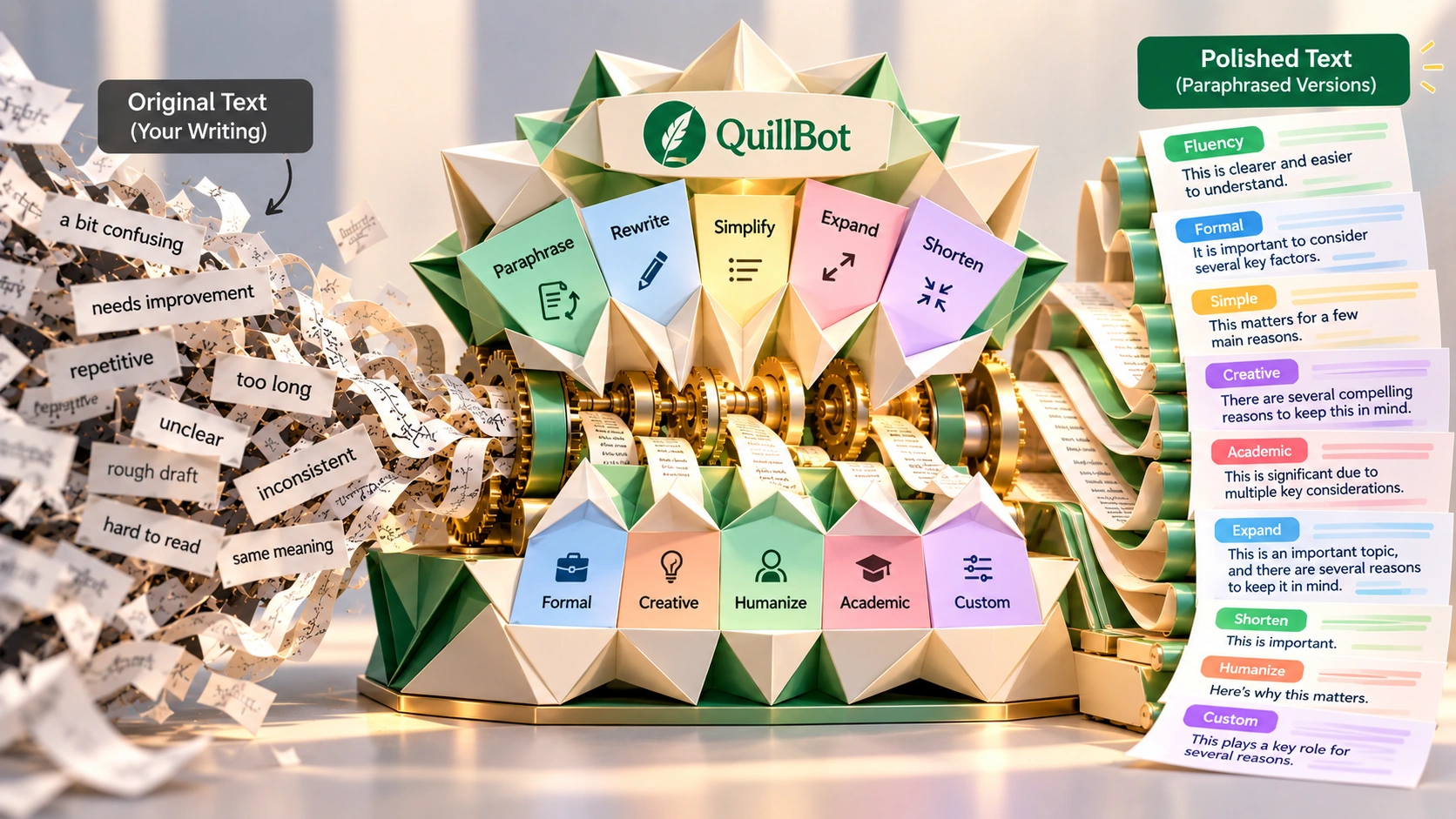
QuillBot started in 2017 as a paraphrasing tool and has grown into a much broader writing, image, voice, and document platform, while keeping its original editing layer as the core strength. This review covers what it actually does, how accurate the paraphrasing is, the AI Detector and Humanizer, real pricing, G2 reviews, and who gets genuine value from it. QuillBot has a free plan; Premium runs $8.33/month billed annually, and a separate Team plan is available.
Pricing and features can change. Check QuillBot's current pricing page before you subscribe.
QuillBot started as a paraphrasing tool built by three University of Illinois students in 2017. It helped writers rephrase sentences and improve clarity, and over time it added grammar checking, summarization, and citation tools, becoming the editing tool people knew it as.
Today, QuillBot does much more than that.
QuillBot now positions itself around "Write, Design & Create," a tagline that currently appears directly on quillbot.com. Under that banner, the product spans three groups of tools:
QuillBot is owned by Learneo, Inc., an education technology company. Learneo was formerly known as Course Hero, before it rebranded in 2022. QuillBot itself has grown from a single-purpose paraphrasing tool into a much broader product, while keeping the original editing layer as its core strength.
Opening QuillBot for the first time involves no onboarding sequence, no brand setup flow, and no workflow configuration. There is a text box. You paste a draft, choose a mode, and the rewritten output appears next to the original almost immediately.
What a first session typically includes:
QuillBot rewards people who already have something written. If a draft exists, however rough, QuillBot has what it needs to work with.
QuillBot has a free plan, a Premium plan for individuals, and a separate Team plan. Figures below are from QuillBot's own pricing page and help center, checked October 2026.
2 paraphrasing modes, Standard and Fluency.
Billed annually, shown as 58% off the standard rate at the time of this review.
Via "Explore Team Plan" on quillbot.com.
QuillBot's own pricing page doesn't display an undiscounted monthly rate alongside the $8.33 annual-billing figure, so that figure, confirmed directly on quillbot.com at the time of writing, is the number worth checking against whatever is showing when you actually sign up, since promotional pricing on subscription products shifts over time.
Who actually needs Premium: the free plan covers occasional, light use, a few hundred words of paraphrasing a day, basic grammar checking, and small amounts of image or chat generation. Premium earns its cost once any of that becomes routine: longer documents, repeated paraphrasing passes, the Plagiarism Checker, or regular use of the image, presentation, or website tools. Someone who pastes in the occasional sentence can likely stay on Free; someone editing drafts daily or relying on the wider toolset will hit the free limits quickly.
QuillBot started with paraphrasing, and that is still one of its strongest features. But the current product covers much more.
QuillBot is most useful when a draft already exists and needs a final editing pass. Most writers know when a sentence doesn't sound right. The annoying part is fixing it. You have to stop, work out what's wrong, rewrite it, and read it again. QuillBot removes most of that work. Paste the sentence, pick a mode, compare the result. That makes small edits much faster, especially when you're working through a long document.
Example of a tighter rewrite using Fluency mode:
Input (raw AI output): "The utilization of artificial intelligence in the domain of content creation has been observed to result in significant improvements in the efficiency with which content is able to be produced. It is important to note that the quality of outputs may vary depending on the nature of the inputs provided."
Output: "AI has dramatically accelerated content production. The tradeoff is consistency: output quality depends on how well the prompt is written. Better prompts generally produce better results."
The rewrite is shorter and more direct, but it still needs a human check to make sure no nuance was lost.
Two videos from QuillBot's own YouTube channel, covering the free paraphrasing tool and a resume-writing guide.
A demo and tutorial walking through QuillBot's free paraphrasing tool.
A QuillBot video on what employers actually look for in a resume.
QuillBot currently offers 10 paraphrasing modes in total, confirmed directly on quillbot.com's paraphrasing tool page. Two are available on the free plan; the rest require Premium.
| Standard (free) | Rewrites text with new vocabulary and word order. |
| Fluency (free) | Improves clarity and readability without changing the meaning. |
| Formal (Premium) | Rephrases text in a more polished, professional register. |
| Simple (Premium) | Presents the same content in easier-to-follow language. |
| Creative (Premium) | Rephrases text in a more original, less literal way. |
| Academic (Premium) | Expresses text in a more technical, scholarly register. |
| Expand (Premium) | Lengthens the text while keeping the meaning intact. |
| Shorten (Premium) | Conveys the same meaning more concisely. |
| Humanize (Premium) | Rewrites text to read in a more natural, human voice, QuillBot's own answer to the "this reads like AI" problem. |
| Custom (Premium) | Rewrites text to match a description you provide, rather than a fixed preset. |
The best mode depends on what you are trying to change. Use Formal for client-facing writing, Fluency for smoothing a rough draft, and Shorten when a passage is too long.
Paraphrasing is still the core of the product. So how reliable is the output?
On general, plain-language text, the rewrite usually holds up well. It keeps the original meaning, fixes grammar along the way, and reads naturally. That is broadly consistent with the positive feedback from G2 users and independent reviews.
The risk grows with denser, more technical material. Independent write-ups on using QuillBot for academic and research writing flag that meaning can shift subtly in technical passages, results sections, methods descriptions, anything with precise numbers, names, or domain-specific terms, where a word swapped for a close synonym changes the actual claim being made. The G2 cons mirror this: users report occasional contextual misunderstanding and meaning shifts, mostly on specialized content.
For everyday business writing, a quick read-through is normally enough. For anything with specific numbers, names, technical terms, or a claim that needs to stay exact, compare the rewrite against the original line by line before using it, rather than assuming the meaning survived the rewrite untouched. This is not a benchmarked accuracy test, so treat it as a practical guideline rather than a measured accuracy score.
QuillBot now includes several image and design tools alongside its writing features.
Turns text prompts into images. Free accounts get 3 images per day; Premium raises that to 300 images per month, both figures confirmed directly through QuillBot's help center. Styles include photorealistic, anime, watercolor, cyberpunk, 3D, and concept art.
Creates logos for brands and businesses without requiring design skills.
Generates thumbnails for video, blog, and social content.
Creates characters for games, stories, or branding.
Designs book covers for self-published authors and publishers.
Removes backgrounds and makes other image edits in place.
QuillBot also offers three audio tools:
Produces voiceovers for video, podcasts, and presentations, output as MP3.
Turns text into natural-sounding audio using a library of voices, generated in whatever language the input text is written in.
Creates custom character voices for games, animation, and audiobooks, adjustable by tone, gender, age, accent, and mood.
QuillBot has also added an AI Presentation Maker and an AI Website Builder.
The AI Presentation Maker generates slide decks from a prompt or outline. Free accounts get 3 presentation generations per day; Premium raises that to 30 per month.
The AI Website Builder generates a working site from a description. Free accounts get 5 site creations; Premium raises that to 20.
Both are confirmed, currently listed tools on quillbot.com, though neither has the long track record of QuillBot's paraphrasing and grammar tools, so treat them as newer additions rather than the product's proven core.
QuillBot Flow is described directly by QuillBot as an AI co-writer assistant that brings academic research, note-taking, paraphrasing, summarizing, translation, AI review, and plagiarism checking into a single workspace, rather than separate standalone tools. Free accounts get 10MB of Flow storage; Premium raises that to 100MB. In practice, Flow puts several of QuillBot's existing research and writing tools into the same workspace.
Paraphrasing is what QuillBot is best known for, but it sits inside a wider set of writing and originality tools built around the same account.
A newer tool that checks whether an image is likely AI-generated.
Scans text against published sources, available on Premium up to 25,000 words/month.
A newer feature for certifying content's originality or authorship.
Condenses long text into key points, with modes for a concise summary, bullet points, or a more detailed overview.
Formats references in APA, MLA, Chicago, and other academic styles.
The AI Detector and AI Humanizer get their own sections below, since they're two of the tools people search for by name.
Most of these tools sit in the same interface, so moving between them doesn't mean switching apps or subscriptions.
QuillBot's AI Detector scans text and scores how likely it is to be AI-generated, on a 0 to 100 percent scale. It highlights the specific sentences driving that score, with explainer cards for why each one was flagged, and Premium accounts can download the report. It needs at least 80 words to run, and QuillBot itself says longer passages, 300 words or more, produce more reliable scores. Free accounts get 10 scans per day; Premium is unlimited.
QuillBot states its detector has "a 99% detection rate, according to independent evaluations from RAID," a figure that's QuillBot's own claim about its own tool, not an independent test run for this review. QuillBot also lists several limitations: scores are signals, not verdicts; no AI detector is 100% accurate; heavily edited or paraphrased AI text is harder to catch; and formulaic human writing can score unexpectedly high. QuillBot itself says results shouldn't be the sole basis for an academic or employment decision. That matches the broader caution in the academic integrity note further down this review: treat a detector score as one input, not proof.
QuillBot's AI Humanizer rewrites AI-generated text to read more naturally, and it shows up in two places in the product: as its own standalone tool, and as the Humanize paraphrasing mode covered earlier. Free accounts get 3 uses; Premium use is unlimited. It is designed for AI-generated text that sounds repetitive or overly uniform, smoothing out the patterns that detectors (QuillBot's own and others) tend to flag, while aiming to preserve the underlying meaning.
QuillBot's document toolkit has grown well past a basic PDF editor. It now covers editing and annotating PDFs directly (text boxes, highlighting, drawing, images), merging and splitting files, rotating, cropping, and rearranging pages, extracting specific pages, and locking, unlocking, protecting, or compressing a PDF. A separate document converter handles format changes in both directions: PDF to Word, PDF to JPG or PNG, and Word, Excel, or PowerPoint back to PDF.
QuillBot holds a 4.4 out of 5 rating across 79 verified reviews on G2 at the time of this review.
What Users Consistently Praise
Where Users See Room for Improvement
This reflects G2's listing at the time of writing; visit G2 directly for the most current reviews.
QuillBot is available across several surfaces, so you can often use it without leaving the app where you're writing.
The extension works inside several common writing and communication apps. QuillBot's own product page lists Gmail, Google Docs, LinkedIn, Outlook, Slack, Confluence, Notion, Facebook, X, and WhatsApp by name, and states more broadly that it works on hundreds of sites, anywhere there's a text box to write in. Coverage isn't universal; QuillBot's own help center notes that the widget only activates once you're signed into your QuillBot account on that site, and a small number of sites aren't supported. For most day-to-day writing (email, docs, social, chat), the extension works inline without needing a separate tab.
QuillBot's language coverage varies by tool. The Translate tool supports 52 languages and dialects, confirmed directly on quillbot.com. A separate synonym feature inside the writing tools is available in English, Spanish, French, German, and Portuguese. QuillBot doesn't publish a separate language list for the paraphraser and grammar checker; English is the most established language experience across QuillBot's writing tools. The AI Image Generator's interface is localized in English, Spanish, French, and German. If you're working primarily in another language, it's worth testing a few samples before committing a workflow to it.
These two get used interchangeably, but they solve different problems. The grammar checker fixes what's technically wrong, spelling, punctuation, subject-verb agreement, sentence fragments, while leaving your actual wording and structure in place. The paraphraser rewrites the sentence itself, adjusting structure, tone, and word choice, which can fix grammar issues as a side effect, though that isn't its main job.
In practice, run the grammar checker first when a draft has technical errors you want fixed without changing your voice. Reach for a paraphrasing mode when the grammar is already fine but the sentence just doesn't read well, or needs a different tone.
For business and enterprise users, it is important to know how QuillBot handles pasted text, drafts, client documents, and other potentially sensitive material.
Confirmed directly on QuillBot's own trust center:
QuillBot's trust center does not list a SOC 2 certification. That doesn't mean one doesn't exist, only that it isn't shown on the page that lists everything else. If SOC 2 compliance is a hard requirement for your organization, request current documentation directly from QuillBot rather than relying on this or any third-party summary.
QuillBot is more focused than many AI writing assistants. Its strongest tools are paraphrasing, grammar correction, and rewriting existing text. Those are useful when you already have a draft and want to improve it quickly.
For people who write inside Gmail, Google Docs, LinkedIn, or similar sites day to day, the browser extension is usually the more practical way to use QuillBot, working inline rather than in a separate tab.
Academic paraphrasing was one of QuillBot's original mainstream use cases. Students still use it to rework their own drafts for clarity, check work against the Plagiarism Checker and AI Detector, and lean on the Citation Generator and Summarizer when working through source material.
Grammarly is the more direct comparison point for students specifically. It leans harder into real-time correction as you type, while QuillBot's strength stays in a deliberate, on-demand rewriting pass on a completed draft.
A note on academic integrity: there's a real difference between using QuillBot to polish a draft you wrote and using it to reword a source closely enough to avoid a plagiarism check. Paraphrasing a source doesn't remove the need to cite it; a changed sentence structure doesn't change whose idea or finding it originally was. AI-detection results also aren't proof of anything on their own, they can be wrong in both directions, so they're worth treating as one input rather than a verdict. Beyond those general points, the right standard is whatever your own school or institution's AI policy says, since those vary.
| Platform | Browser-based. Chrome, Edge, and Safari extensions; Android and iOS apps; Windows and macOS desktop apps; Microsoft Word add-in. |
| Integrations | Works inline inside Gmail, Google Docs, LinkedIn, Outlook, Slack, Confluence, Notion, Facebook, X, WhatsApp, and hundreds of other sites, once signed in. |
| Paraphrasing | 10 modes total: Standard and Fluency (free), plus Formal, Simple, Creative, Academic, Expand, Shorten, Humanize, and Custom (Premium). |
| Grammar correction | Built in, applied automatically alongside rewriting. |
| AI Image Generator | 3 free images/day; 300 images/month on Premium. Styles include photorealistic, anime, watercolor, cyberpunk, 3D, and concept art. |
| AI Presentation Maker | 3 free generations/day; 30/month on Premium. |
| AI Website Builder | 5 free creations; 20 on Premium. |
| AI Voice tools | Voiceover, voice, and character voice generation, output as MP3, customizable by tone, gender, age, accent, and mood. |
| AI Content and Image Detectors | Check whether text or an image is likely AI-generated. |
| Plagiarism Checker | Up to 25,000 words/month on Premium. |
| AI Humanizer | 3 free uses; unlimited on Premium. |
| Summarizer | Up to 1,200 words free; up to 6,000 words on Premium. |
| Citation Generator | APA, MLA, Chicago, and other formats. |
| PDF tools | Edit, merge, split, rotate, crop, compress, protect, unlock, and convert PDFs. |
| Translate | 52 languages and dialects; 5,000 characters free, unlimited on Premium. |
| QuillBot Flow | Combined research, writing, and plagiarism-check workspace; 10MB free storage, 100MB on Premium. |
| AI Chat | 20 queries/day free; unlimited on Premium. |
Paste a draft, pick a mode, compare the output. No configuration required; the only learning curve is figuring out which mode fits which type of content.
Instead of trying every mode, you start reaching for the right one immediately: Formal for client-facing content, Fluency for internal writing and smoothing AI output, Shorten for dense technical material.
You paste, rewrite, compare, and move on. Writing gets finished faster because the final editing pass takes less work.
Emails, proposals, and client documentation need clarity and professional tone without spending time on line-by-line rewrites. QuillBot handles the wording, so you can spend more time on the actual message.
Clear thinking in a field doesn't always translate into fluent expression in English on the first pass. QuillBot can help turn a rough English draft into clearer, more natural prose. Translation covers 52 languages and dialects, and the synonym feature inside the writing tools supports English, Spanish, French, German, and Portuguese.
First drafts come from ChatGPT, Jasper, or another generator, and QuillBot is the editing step used to make AI-generated drafts sound more natural, while also covering the image, voice, and presentation needs around that content.
A different tool may be a better fit in these cases:


QuillBot is strongest at refining existing text. Its image and design tools are easier to use than dedicated design software, but they also offer less control. That makes QuillBot a weaker fit for a few types of users.
This review is published by TechScribe.in, an independent publisher covering copywriting and marketing AI tools including Jasper, Grammarly, Copy.ai, Writesonic, and Rytr. It's based on hands-on evaluation of QuillBot's interface and documented feature set, cross-checked against QuillBot's own current pricing, help center, and trust center pages. Where a detail couldn't be independently confirmed, including the current Chrome Web Store rating and install count, and current SOC 2 status, that's said plainly rather than presented as fact.
They serve different purposes. Grammarly focuses on catching grammar errors and suggesting tone improvements as you type. QuillBot rewrites entire sentences and paragraphs to improve fluency and readability. A common workflow is to generate with ChatGPT or Jasper, refine with QuillBot, then do a final pass with Grammarly.
Fluency is one of two paraphrasing modes available on the free plan. It smooths out AI-sounding patterns, uniform sentence structure, repeated phrases, mechanical rhythm, while preserving the original meaning.
10 in total. Standard and Fluency are free. Formal, Simple, Creative, Academic, Expand, Shorten, Humanize, and Custom require Premium.
The Translate tool covers 52 languages and dialects. A separate synonym feature inside the writing tools works in English, Spanish, French, German, and Portuguese. English is the most established language experience across QuillBot's writing tools. The AI Image Generator's interface is localized in English, Spanish, French, and German.
Yes, through its AI Image Generator. Free accounts get 3 images per day; Premium raises that to 300 per month. Styles include photorealistic, anime, watercolor, cyberpunk, 3D, and concept art.
Yes. The free plan includes 2 paraphrasing modes, basic grammar checking, limited use of the AI detector, summarizer, humanizer, image generator, and other tools. Premium unlocks all 10 paraphrasing modes, unlimited use of most core tools, and higher limits across image, presentation, and website generation.
$8.33/month when billed annually, shown as 58% off the standard rate at the time of this review. QuillBot's pricing page doesn't display an undiscounted monthly figure, so check the current rate shown at signup.
As a browser extension (Chrome, Edge, Safari), Android and iOS apps, Windows and macOS desktop apps, and a Microsoft Word add-in, in addition to the main web app.
No. QuillBot is cloud-based and needs an internet connection for all of its tools: paraphrasing, grammar checking, image generation, voice tools, PDF editing, and everything else.
What started as a paraphrasing tool built by three students in 2017 has become something considerably larger.
QuillBot's editing and refinement layer, paraphrasing, tone shifting, and grammar correction, remains genuinely strong. It's still the product's best-known core. Around that core, QuillBot has built out image generation, logo and thumbnail design, voice generation, an expanded PDF toolkit, a presentation maker, a website builder, and QuillBot Flow. All of it sits under one account, under the "Write, Design & Create" banner.
QuillBot is still at its best when you already have words on the page and need to improve them. The newer image, voice, presentation, website, and PDF tools make the subscription more useful, but they are not replacements for specialized tools in those categories.
If you regularly rewrite, polish, summarize, or check existing content, QuillBot is easy to recommend. If you mainly need a tool to create content from a blank page or do deep design work, there are better options.
Paste a real draft, run it through a couple of paraphrasing modes, and compare the output before deciding whether Premium is worth it.
Independent review. Prices and features may change; always check the official QuillBot site for the latest information.
 QuillBot
 Writesonic
 Copy.ai
 Rytr
Rytr