Dorik AI Review: Speed-to-Live Website Builder for Beginners
AI Website BuildersDorikDorikDurableDurableMixoMixoUseArticleUseArticleEmergentEmergentLovableLovableRunableRunableCarrdCarrd AI Website Builders
Dorik
Honest Deep Dive

Dorik AI: The Fastest Way to Launch Your Website Without Coding

Describe your site, get a live multi-page draft in under a minute β€” then refine it with a no-code visual builder that keeps everything fast.

No-Code
Fast Launch
Free Plan
What is Dorik?

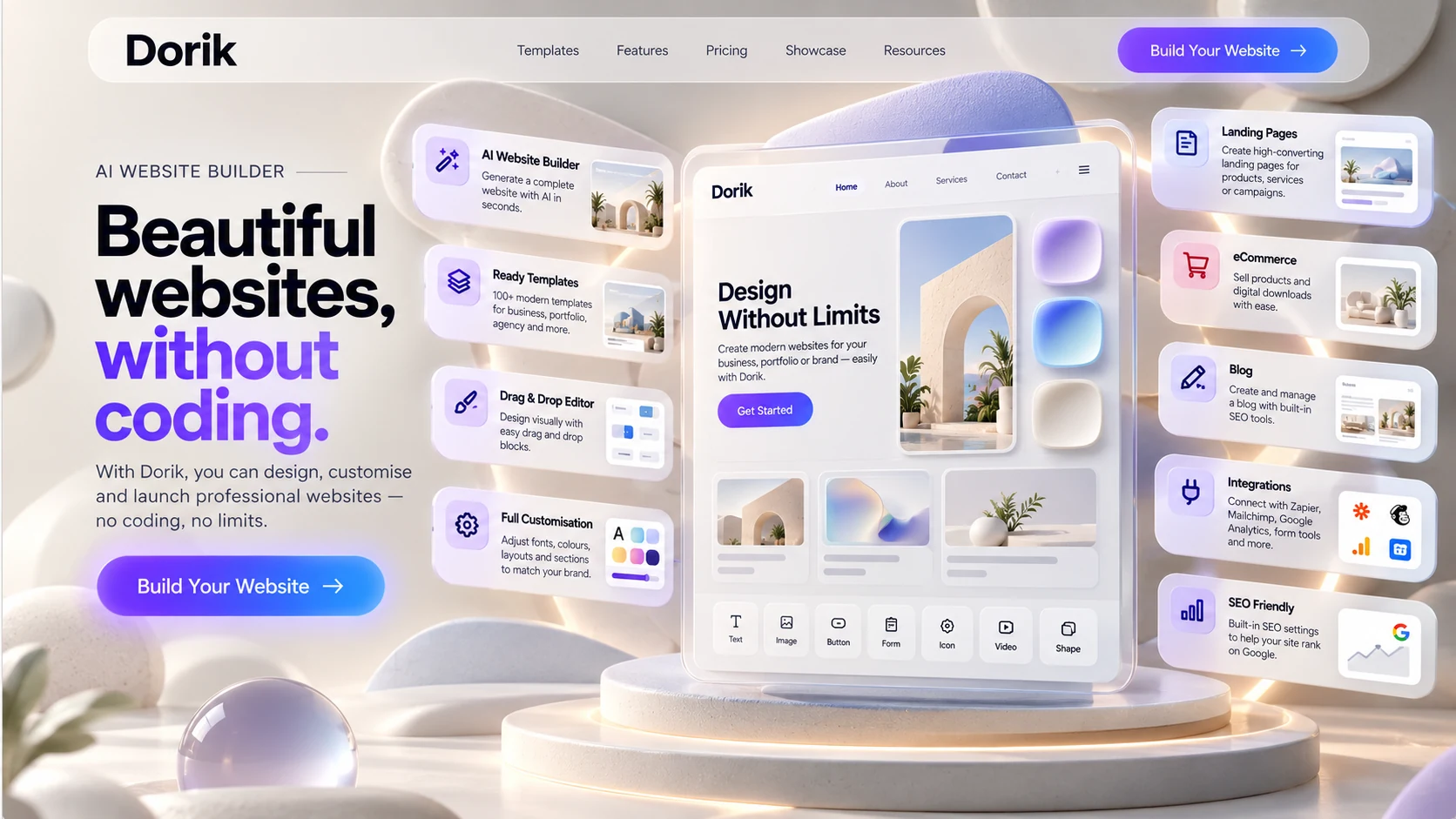
Dorik AI is an AI-powered, no-code website builder. Describe your site in a sentence and Dorik generates a full multi-page layout β€” copy, images, and structure β€” in under a minute. From there, a drag-and-drop editor lets you refine every section without touching code. Built-in hosting, a static-leaning architecture that keeps sites fast by default, and a CMS with collaborator access round it out. The tool you open when you need to be live by end of day.

The Launcher, not the System β€”
speed-to-live over long-term flexibility

Most platforms try to be everything. This one does one thing well β€” getting you live, fast, and AI generation is the mechanism that makes that possible. Here is the distinction that matters: most website builders optimise for flexibility. Dorik optimises for speed-to-launch. That is a fundamentally different design choice.

Durable automates your business workflows. Mixo validates your startup idea. Emergent gives developers full-stack, production-grade control. UseArticle builds content-first affiliate sites. Dorik sits in a different position here β€” describe what you want, get a live multi-page draft in under a minute, then refine it visually. The AI removes the blank-page decision. The no-code editor removes the technical one. Together they get you from idea to published in the same session.

It is worth understanding the trade-off clearly. Dorik is a closed system. You gain speed, simplicity, and built-in hosting. You trade modular control, plugin flexibility, and the ability to swap components. This means if Dorik goes down or changes its pricing, you cannot simply export the engine to another host β€” you are betting on their platform stability. That is not a criticism. It is the product decision that makes everything else about Dorik work, and the one risk every professional builder should understand before committing.

Dorik removes the delay between idea and being online.

The shift from setup
to publishing.

Your first session with Dorik does not feel like setup. It feels like publishing. You choose a template. You edit the content. You publish. There is no hosting decision to make, no plugin list to work through, no technical blocker between you and a live URL.

What your first session with Dorik looks like
  • Describe your site in a sentence β€” Dorik AI generates a full multi-page draft with copy and images
  • Choose a template instead, if you'd rather start from a clean layout β€” clean, modern, mobile-ready out of the box
  • Edit content directly in the visual builder β€” no code, no dashboard switching
  • Connect your custom domain β€” no separate hosting account required
  • Publish β€” your site is live, fast-loading, and stable under traffic
  • Add collaborators β€” give a VA or client CMS access without full builder permissions

The realization arrives quickly: shipping a website is easier than you thought. Not because Dorik is doing something magical β€” but because it has removed every decision that does not directly contribute to getting you online. Most website builders front-load complexity. Dorik front-loads the result.

Dorik compresses the distance between idea and execution.

In Action

Channel ownership and upload dates for these videos have not been independently verified. Confirm the source channel before publishing.
Demo
Demo

Not just AI generation β€”
a speed-to-market engine with two layers stacked

Most reviews describe it as a website builder with an AI generator bolted on. That misses the point entirely. It is a Speed-to-Market Engine, and the AI generation is only the first of two layers that make it fast. The question it answers is not "what can I build?" It is "how fast can I go live with something clean?"

Layer one β€” AI removes the blank page. Describe your site and Dorik generates a full multi-page layout, copy, and images in under a minute. That eliminates the structural decisions β€” what sections, what order, what to write first β€” that eat the most time in a manual build.

Layer two β€” the hidden architecture advantage. Dorik generates static-leaning pages. Because output is lightweight by design, your site is fast by default once it's live β€” not as the result of optimisation work done later. You do not need a caching plugin or a performance consultant to make a Dorik site load quickly. This is the insight most reviewers miss entirely β€” they focus on the AI generator and stop there. Professionals who have spent time debugging slow WordPress installs will immediately understand why the second layer matters just as much as the first.

The operator insight: most early-stage sites do not need a complex system. They need to exist, look professional, and load fast. It solves exactly that β€” without asking you to learn anything first. It is the tool for the stage before complexity is required, not the tool you build permanent infrastructure on.

Dorik is the launch layer β€” the tool you reach for when speed is the priority and complexity is not yet required.

Dorik AI Features: What Makes It Stand Out

πŸͺ„
Prompt-to-Site Generation

Describe your business and Dorik generates a complete multi-page layout β€” structure, copy, and images β€” typically in under a minute. Regenerate a single section or the entire layout with one click if the first pass isn't right.

✍️
AI Copywriting

Built-in AI writing generates headings, paragraphs, calls to action, and metadata to match a chosen tone β€” formal, casual, or promotional. Highlight any text and rewrite it in place without leaving the editor.

πŸ–ΌοΈ
AI Image Generation

Generate original visuals and illustrations from a text description directly inside the builder β€” a way to avoid repetitive stock photography without switching tools.

🎨
AI Quick Style

AI-suggested color palettes and font pairings you can apply site-wide in one click, rather than adjusting design tokens page by page.

What we could verify

Prompt-to-site generation, AI copywriting, and AI image generation are all confirmed directly on Dorik's own site and corroborated by independent reviews. AI generation is available on the free plan for up to 2 websites, with unlimited generation on Pro and Agency plans.

How to Get Started with Dorik in Minutes

πŸ“
Step 1: Describe Your Site
  1. 1
    Sign up free and describe your business in a sentence, or pick a template if you'd rather start from a clean layout.
πŸͺ„
Step 2: Let Dorik AI Generate
  1. 2
    Dorik generates a full multi-page layout β€” structure, copy, and images β€” typically in under a minute.
πŸ–±οΈ
Step 3: Customize Visually
  1. 3
    Drag and drop to adjust layout, colors, fonts, and content β€” regenerate any section you don't like with one click.
🌐
Step 4: Connect Your Domain & Publish
  1. 4
    Connect a custom domain (available on paid plans) or publish instantly to a free Dorik subdomain. No separate hosting setup required.

Where it genuinely
impresses.

⚑
Rapid Deployment β€” from idea to live in hours

From idea to live site in hours, not days. The fastest onboarding in this category. No hosting decisions, no configuration phase, no technical blocker before your first page is published.

πŸ–±οΈ
No-Code Builder β€” zero technical dependency

If you can click and type, you can publish with Dorik. The visual builder requires no coding knowledge, no template configuration, and no design background. The learning curve is the shortest in this category.

🎨
Clean Templates β€” professional without customisation

Ready-to-use designs that look modern and professional without requiring any customisation work. You do not need to make them look good β€” they already do. Pick one and start editing content.

πŸ‘₯
CMS with Collaborator Access β€” lean team advantage

Manage a blog or directory without database complexity. The white-label dashboard and collaborator access let you give a virtual assistant or client the ability to update content without granting them full builder access. For solo operators running lean, this is a significant operational advantage.

🌐
Built-in Hosting β€” no separate infrastructure

No hosting decision to make, no separate invoice, no infrastructure setup. Everything lives in one place. The static-leaning architecture means sites are fast and stable under traffic without additional optimisation work.

πŸš€
Low Friction Workflow β€” smallest learning curve

The smallest learning curve in this category. You do not need to read documentation before you can publish. Session one ends with a live site β€” not with a half-configured dashboard and a list of things still to set up.

White-Label CMS for Agencies

Agencies are a genuine target segment here, not an afterthought. The white-label CMS lets an agency brand the entire client-facing dashboard as its own β€” clients never see the Dorik name.

🏷️
White-Label Dashboard

A fully branded client dashboard. Clients manage their own content without ever encountering the Dorik name or interface branding.

🧾
Client Billing

Send invoices and receive payments from clients directly through the dashboard β€” no separate invoicing tool required.

πŸ‘₯
Role-Based Access

Assign designers, developers, editors, and clients exactly the access level they need β€” Owner, Administrator, Developer, Editor, or Author. Agency plan includes unlimited collaborators.

πŸ”Œ
API for Custom Workflows

Programmatically manage CMS data, collections, and SEO fields to build custom client workflows on top of Dorik rather than working only through the visual dashboard.

Build Data-Driven Sites with Airtable Integration

Connect an Airtable base and Dorik displays that data in a beautiful, filterable interface β€” no code, no separate database to manage. It's a native integration, free on all plans, with real-time sync so changes in Airtable appear on the live site automatically.

Practical use cases: job boards, business directories, product listings, event calendars, and team profiles. Choose from layout options like grid, table, or job-board style, and give visitors filtering and search out of the box.

Native SEO Tools for Blogging

The blog isn't a bolted-on afterthought β€” it comes with per-post SEO controls built into the same editor: meta titles, descriptions, custom slugs, canonical URLs, and auto-generated sitemaps, with schema markup, a robots.txt editor, and LLMs.txt available on Pro and above. There's no separate SEO plugin to install or configure, and the resources for setting any of it up live in Dorik's own help docs rather than requiring a third-party guide.

This also feeds directly into the monetisation options covered below β€” the same blog you're optimising for search can sell subscriptions or gated content without switching platforms, and post updates can trigger email notifications to your subscriber list through the integrations already covered.

Membership Site Builder: Paywalls and Gated Content

Dorik supports gated and paid-member-only content with three access levels: Public, Members Only, and Paid Members. Payments run through Stripe with no commission taken on top β€” Dorik doesn't take a cut of subscriber revenue.

πŸ’³
Step 1: Connect Stripe
  1. 1
    Connect your Stripe account and enable Test Mode to preview the payment flow before going live.
πŸ”’
Step 2: Set Access Levels
  1. 2
    Set each page or blog post to Public, Members Only, or Paid Members, and configure monthly, yearly, or one-time pricing.
πŸšͺ
Step 3: Design the Member Portal
  1. 3
    Customize your Sign-Up, Sign-In, and Login portal to match your brand, plus a floating member-access button.
πŸ“₯
Step 4: Import Existing Subscribers
  1. 4
    Migrating from Ghost, Substack, WordPress, or Medium? Import your existing subscriber list directly rather than starting from zero.
Worth knowing

Dorik's membership tools are built for digital subscriptions and gated content, not full ecommerce. There's no product catalog, cart, or inventory management β€” for a physical-product store, a dedicated ecommerce platform is the better fit.

Dorik vs. Webflow, Framer, and Durable: When to Choose What

ToolPrimary FocusBest For
DorikSpeed-to-launch with AI generation, static-leaning architecture, and a genuinely free tier.Beginners, freelancers, and agencies who need to be live today.
WebflowDeep visual design control and a mature plugin/CMS ecosystem.Designers who want pixel-level control and are willing to accept a steeper learning curve.
FramerDesign-first, animation-heavy sites with a lighter CMS layer than Webflow.Portfolios and marketing sites where visual polish is the priority over content management.
Durable30-second AI site generation bundled with CRM, invoicing, and business automation.Service businesses that need client management tools alongside the website itself.
Vs. Durable for a local business site, specifically

Both generate a site from AI in roughly the same timeframe. The real difference is what's bundled around it: one gives you a white-label CMS, collaborator access, and Airtable-backed data sites; the other gives you CRM, invoicing, and client management built in. If the business needs to manage clients and billing as much as it needs a website, Durable's bundle is the closer fit. If the priority is a clean, fast, content-driven site with room to add a blog or membership layer, Dorik is the better starting point.

A few things worth
understanding upfront.

⚠️
The Control Ceiling β€” simplicity is a deliberate constraint

Advanced customisation β€” custom layouts, complex logic, granular CSS control β€” runs into limits faster than it would on Webflow or WordPress. The cleaner the system, the less room it gives you to override it. This is by design, not oversight.

πŸ”Œ
The Integration Constraint β€” forms and analytics, not pipelines

It integrates well with forms, Stripe, and Google Analytics. It is not designed for complex API-driven workflows, custom authentication, or third-party data pipelines. If your site needs to connect to more than a few external tools, you will feel the constraint within months.

πŸ“…
The Outgrow Point β€” plan for 12–18 months (CRITICAL)

It works best early. A site that starts here often migrates to WordPress or Webflow at the 12–18 month mark as projects grow to require 100+ pages, complex integrations, or deep SEO infrastructure. This is not a flaw β€” it is the product's honest design boundary. Launch, then migrate when the project has earned it.

πŸ”’
Platform Dependency Risk β€” closed system, no engine export

It is a closed system. If their pricing changes significantly or the platform experiences instability, your options are limited β€” you cannot simply export the engine and redeploy elsewhere. Every professional builder should factor this in before committing client work or a long-term project to any closed platform.

πŸ—ΊοΈ
The Correct Mental Model β€” launch layer, not final architecture

This is stage one, not the permanent system. Use it to get live, validate your idea, and establish your online presence. Treat it as the fastest bridge between zero and online β€” not the foundation you build permanent infrastructure on.

πŸ“¦
Best Use Case Boundary β€” under 50 pages, low integration needs

It works best for landing pages, portfolios, MVP blogs, and small business sites under 50 pages. When your project requires 100+ pages, deep SEO control, or heavy customisation β€” you are entering infrastructure territory and the tool has changed.

What it actually
looks like under the hood.

FeatureDorik β€” Current Specs
AI GenerationPrompt-to-site: full multi-page draft with copy and images, typically under a minute. AI copywriting and AI image generation available in-editor. Free plan: up to 2 AI-generated sites. Unlimited on Pro and Agency.
ArchitectureStatic-leaning page generation. Fast by default β€” no caching plugins, no performance consultants required. Speed is built into the output, not engineered later.
BuilderVisual drag-and-drop, no-code editor. 250+ UI blocks. Beginner-friendly from session one with zero technical prerequisite.
Templates120+ pre-designed templates across industries. Clean, modern, mobile-responsive out of the box. Professional without customisation work.
CMSBuilt-in blog and directory management. Collaborator access β€” give VA or client content editing permissions without full builder access. White-label dashboard, client billing, and role-based access on Agency plan.
Membership & PaywallsPublic, Members Only, and Paid Members access levels. Stripe integration, no commission taken. Subscriber import from Ghost, Substack, WordPress, or Medium.
Airtable IntegrationNative, free on all plans. Displays Airtable data in filterable grid, table, or job-board layouts with real-time sync β€” job boards, directories, listings, event calendars.
HostingIncluded on all plans. No separate hosting setup. Unlimited bandwidth and storage on paid plans.
Custom DomainsUnlimited custom domains on free plan β€” the most generous free tier in this category.
SEOMeta titles/descriptions, custom slugs, canonical URLs, 301/302 redirects, auto-generated sitemaps, and schema markup built in. Robots.txt editor, LLMs.txt, and custom schema on Pro and above. Hreflang support for multilingual sites.
IntegrationsForms Β· Stripe/PayPal/Gumroad Β· Google Analytics Β· Zapier Β· Airtable Β· Weglot/ConveyThis (translation). Not designed for complex custom API-driven workflows beyond what the CMS API supports.
Export FlexibilityCode export available on paid plans (HTML/CSS/JS). The platform engine itself is not portable β€” closed system.
Pricing EntryGenuinely free plan β€” unlimited sites, unlimited custom domains, blog, forms, payment buttons. Pro from approximately $18/month.

What to expect
session by session.

S1
Session One
You publish. No setup friction. No decisions before your site exists.

Choose a template, edit the content, connect your domain, go live. No hosting decision to make, no plugin list to work through. Session one ends with a live site β€” not a half-configured dashboard. The speed at which it arrives is the revelation.

S3
Sessions Two to Three
You refine. CMS explored, collaborator access configured, blog live.

Sessions two and three reveal Dorik's operational breadth. The CMS is set up. A blog is added. Collaborator access is configured so your VA or client can update content without touching the builder. The platform feels familiar. You are not learning the tool β€” you are just using it.

S5+
Session Five Onwards
You hit limits. Advanced users start to notice what Dorik cannot do.

Deep layout control, complex integrations, granular SEO configuration β€” the constraints surface. At this point the tool has done its job. The question becomes whether the project has grown beyond it. For most early-stage sites, the honest answer is yes β€” at around the 12–18 month mark. That is not a failure. That is the product working as designed.

Pro Tip

Use Dorik to get live and validate. Do not over-invest in building a complex Dorik site if your project is likely to need advanced features within 12 months. Launch now, migrate to WordPress or Webflow later when the project has earned the infrastructure investment.

Three operators who will
get real value from this.

🌱
The Beginner
First website. Zero technical knowledge. Zero patience for configuration.

Building their first website with no coding knowledge, no hosting experience, and no desire to spend a week on setup. It removes every barrier between zero and live. The result looks professional from session one.

✍️
The Creator
Clean online presence. Fast. No system needed β€” just a site.

Needs a portfolio, personal brand page, or service site that looks professional today. Does not need a complex system β€” needs a clean URL that represents them well and loads fast. It delivers exactly that without asking them to become a web developer first.

βš™οΈ
The Solo Operator
Speed over depth. Collaborator access for VA or client.

Values speed over depth. Has an idea, wants to test it online, and needs a CMS that allows a VA or client to update content without touching the builder. The collaborator access is the feature that turns this from a personal tool into a small team workflow.

The Dorik Threshold

Use it when your primary goal is getting online quickly and your site does not need to do anything complex. If you can describe your website in one paragraph β€” and it does not involve user accounts, complex e-commerce, or 50+ pages β€” Dorik is probably the right tool for this stage.

Anti-Persona β€” Do not use Dorik if:
  • You need system-level control over every layout element
  • Your site depends on complex integrations or API-driven content
  • You are building long-term SEO infrastructure with hundreds of pages
  • You need modular architecture you can extend indefinitely
  • You are committing a client's long-term business to a closed platform without understanding the portability risk

Dorik is not for scalable systems. It is for fast execution. If you need the former, look at Webflow, WordPress, or Emergent. If you need the latter, Dorik is the right call.

See what Dorik AI generates from your idea

Describe your site and get a live multi-page draft in under a minute β€” no credit card required to try it.

Generate Your Site Free β†’

Who should
look elsewhere.

Dorik's speed is its strength. These situations call for a different layer of the stack.

G2 Reviews
From 255 verified users

It holds a 4.6/5 rating on G2 based on 255 verified user reviews. Here is what users consistently praise β€” and where they see room for improvement.

G2 Community Rating
4.6
From 255 verified users
What Users Love
  • Ease of use β€” a user-friendly interface and seamless integration options. (25 mentions)
  • Intuitive interface β€” makes website creation easy and enjoyable for everyone. (20 mentions)
  • Responsive customer support β€” effectively addresses user needs and inquiries. (19 mentions)
  • Easy creation process β€” quick access to features without coding knowledge. (15 mentions)
  • Wealth of features and customisation options β€” makes it easy to create professional websites. (11 mentions)
Top Concerns
  • Lack of advanced features β€” limited integrations affecting customisation and flexibility. (8 mentions)
  • Limited features β€” restrict customisation and integration options for advanced projects. (7 mentions)
  • Pricing β€” the premium plan considered expensive for the subscription required for full features. (5 mentions)
  • Learning difficulty β€” challenging for first-timers needing assistance with optimisation. (5 mentions)
  • Design confusion β€” some users find aspects of the design confusing, affecting usability. (4 mentions)
Want the Latest Reviews?

This summary reflects 255 verified G2 reviews as of this writing. Visit G2 for the most current user feedback.

View all reviews on G2 β†’

Who Wrote This Review

This review is published by TechScribe.in, an independent publisher covering AI website builders including Durable, Mixo, UseArticle, Emergent, Lovable, and Runable. Our reviews are based on hands-on evaluation of each product's interface and documented feature set, cross-checked against publicly available information. Where a claim β€” a specific feature, a pricing detail, an SEO capability β€” could not be independently verified, we say so rather than presenting it as fact.

FAQ

Best used for fast website launches β€” landing pages, portfolios, personal brands, MVP blogs, and small business sites. Describe your site and get a full multi-page draft in under a minute; the static-leaning architecture then keeps that site loading fast by default. It is the fastest path from idea to a live, professional-looking URL without touching code.
Yes. There's a genuinely free plan that includes unlimited sites, unlimited custom domains, a blog, forms, and payment buttons. AI generation is available on the free plan for up to 2 websites, with unlimited AI generation on Pro and Agency plans.
Its biggest limitation is the outgrow point. It is a closed system β€” you cannot export the engine to another host. Sites that start here often migrate to WordPress or Webflow at the 12–18 month mark as projects grow to require 100+ pages, complex integrations, or deep SEO infrastructure.
It is significantly faster to launch than WordPress and requires zero technical setup. WordPress offers far more long-term flexibility, plugin ecosystem, and SEO control. Use it to get live quickly; consider migrating to WordPress when your project outgrows its design boundary.
Yes. The CMS includes collaborator access, allowing you to give a virtual assistant or client the ability to update blog content and manage pages without granting them full builder access.
Yes. It supports Public, Members Only, and Paid Members access levels with Stripe integration and no commission taken. You can also import existing subscribers from Ghost, Substack, WordPress, or Medium. It's built for digital subscriptions and gated content, not full ecommerce with product catalogs or inventory.
Yes. The white-label CMS lets agencies brand the client-facing dashboard as their own, send invoices and receive payments directly, and assign role-based access (Owner, Administrator, Developer, Editor, Author) to designers, developers, editors, and clients.

The verdict

Dorik made a deliberate choice β€” prioritise speed-to-launch over long-term flexibility.

Everything reflects that: AI-powered generation that turns a one-sentence description into a live multi-page draft, clean templates, no-code editor, built-in hosting, minimal learning curve, static-leaning architecture that makes sites fast by default, and a CMS with collaborator access that lets solo operators run lean. It is not trying to be the most powerful platform. It is trying to be the one that gets you live fastest β€” and succeeds at that job every time.

The platform dependency risk is real and worth acknowledging. Dorik is a closed system. If you are building something long-term and complex, that matters. If you are building something that needs to exist today, it does not.

Dorik is the Launch Layer. It does not build complex systems. It eliminates the delay between having an idea and being online β€” and for the right stage of the right project, that is exactly what is needed.

Final Truth

Dorik will not scale your infrastructure. It will launch your presence today β€” and for the right stage of the right project, that is precisely what it is designed to do.

Launch your website with Dorik

Open Dorik, pick a template, and publish your first page. You will know within your first session whether this is the right tool for your stage. That is when the speed advantage becomes real.

Dorik logo Launch with Dorik β†’
See it in action

Real workflows using Dorik

Back to Top