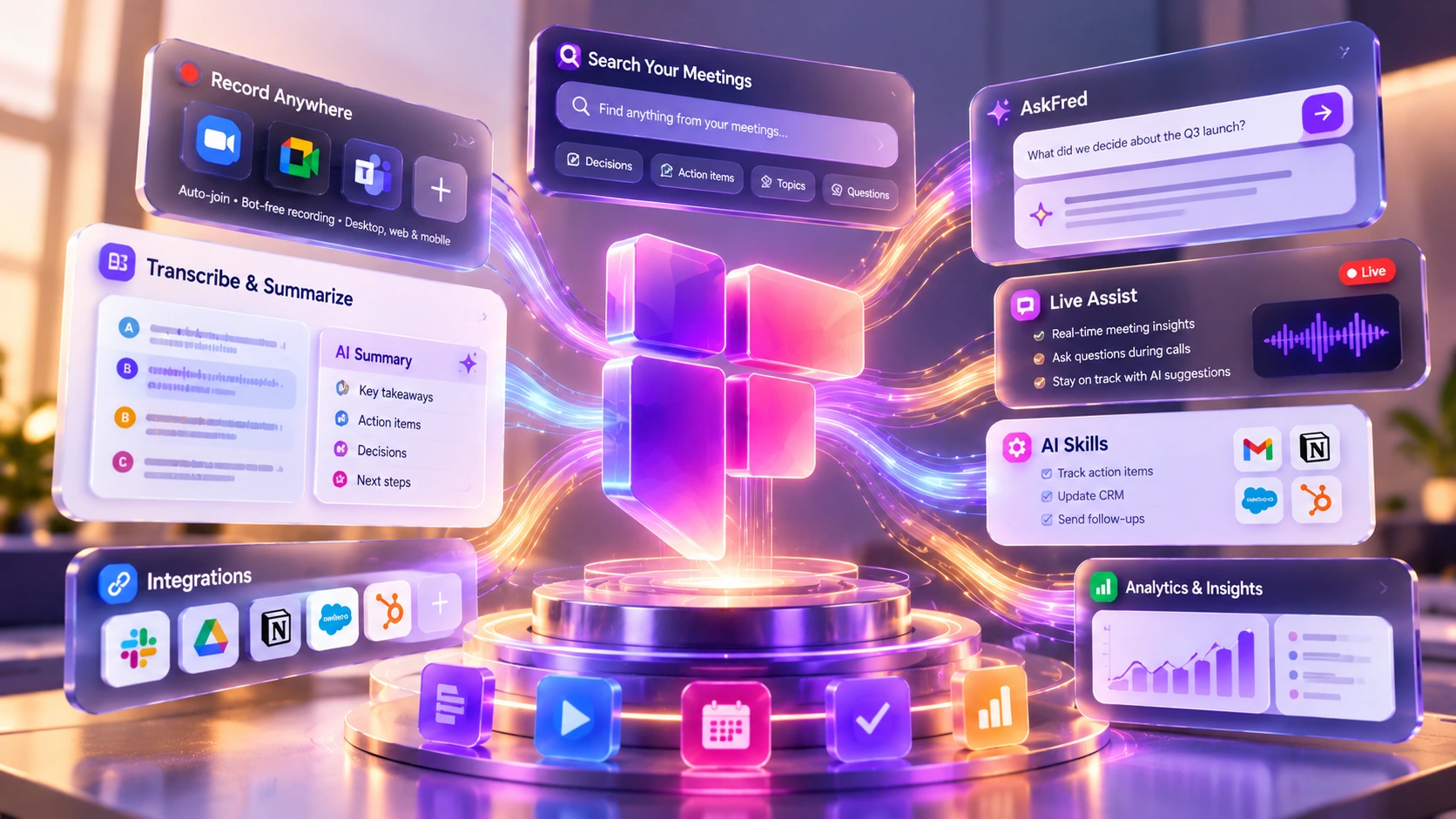
Fireflies AI records, transcribes, and makes meeting conversations searchable across an organization's recorded history. This review covers how it actually works, current pricing across four plans, what independent G2 reviewers report, its real limitations, and who gets genuine value from it.
Pricing and features can change. Check Fireflies' current pricing page before you subscribe.
Fireflies AI is a meeting assistant that records, transcribes, and makes conversations searchable across an organization's recorded meeting history. Its bot, Fred, joins Zoom, Google Meet, Microsoft Teams, and Webex calls automatically, transcribes in real time across 100+ languages, extracts action items, and lets you search months of past meetings using plain-language questions instead of keywords.
Many meeting-recording tools put the emphasis on the single call: a transcript gets generated, a summary gets sent, and the conversation isn't built to be revisited later. Fireflies puts more weight on the meeting as an operational record worth retrieving months later, not just minutes after it ends. That shows up most clearly in semantic search, meaning search that matches the meaning of your query rather than exact word matches, and in AskFred, its conversational assistant: both let you ask a natural-language question across your entire meeting library and get back a relevant moment, the speaker, and the surrounding context.
Setup is calendar-based: connect Google or Outlook, and Fred can be configured to auto-join your eligible scheduled calls going forward, with meeting filters and recording settings controlling which calls actually get captured. Beyond scheduled video calls, Fireflies also captures conversations through a Chrome extension, a mobile app for in-person conversations, and dialer integrations (Aircall, RingCentral) or a direct API for phone calls and pre-recorded audio. The desktop app adds a bot-free option: it can record a call's system audio directly, with no Fred joining as a visible participant, across a wide range of platforms including Google Meet, Zoom, Teams, WhatsApp, Discord, and phone calls (with some extra setup on macOS and Windows). That comes with real trade-offs, though: no-bot capture doesn't save a separate audio or video recording (you get a transcript and summary only), doesn't produce named speaker labels, and Sales Assist isn't available without the bot present.
After each meeting, Fireflies produces a transcript, an AI summary of key points and decisions, automatically extracted action items with owner attribution where the conversation made ownership clear, and topic tags for later search. Bot-based recording gives you named speaker identification; bot-free system-audio capture gives you a transcript split by speaker but with generic labels like "Speaker 1," not names. You can also ask AskFred questions about that specific meeting conversationally instead of scrolling the transcript.
Four videos from Fireflies' own channel, each showing a different real-world workflow, a faster way to see the range before committing a session to it.
A recorded Office Hours session focused on AskFred, querying your meeting history conversationally instead of scrolling transcripts. (Fireflies AI channel)
A tutorial on Fireflies' CRM integrations, showing how notes, summaries, and action items push into Salesforce or HubSpot automatically after every call. (Fireflies AI channel)
A webinar on automating interviews, candidate scorecards, and ATS updates (Greenhouse, Lever) using Fireflies AI Skills built for recruiting workflows. (Fireflies AI channel)
A webinar covering patient-conversation capture, EHR workflow automation, and HIPAA compliance and privacy controls for healthcare teams. (Fireflies AI channel)
The feature that separates Fireflies from a basic transcription tool is semantic search across your full meeting history. Searching "pricing objections" can surface the moments where pricing objections came up, who raised them, and how they were handled, not just transcripts that happen to contain the word "pricing," though result quality still depends on transcription accuracy and how clearly the topic was discussed.
AskFred extends this into a conversational assistant: ask something like "What were the action items assigned to Sarah in the last three weeks?" and get a direct answer pulled from your meeting history, rather than searching manually. As with any AI-generated answer drawn from a transcript, it's worth spot-checking AskFred's response against the source meeting rather than treating it as guaranteed accurate.
Live Assist runs while a call is still in progress, on browser, the desktop app, and the mobile app; the Chrome extension also offers it, but only for Google Meet calls, not every platform the extension otherwise supports. It gives you a live, speaker-labeled transcript, AI-generated notes as people talk, and on-demand prompts for catching up or summarizing what's happened so far. AskFred is also available live, mid-call, pulling from the current conversation, past meetings, or uploaded documents.
Live Assist and its sales-focused counterpart, Sales Assist, are available to every Fireflies user regardless of plan. Two things do differ by plan and setup: Dynamic Topic Suggestions, which surfaces relevant cards as a conversation moves, is restricted to paid plans, and Sales Assist requires a Knowledge Base to be set up first before it can answer prospect questions in real time. Fireflies' Live Assist announcement lists 1 credit per Live Assist or AskFred query and 2 credits per Sales Assist query, though its broader AI-credits guide says credit costs generally scale with how complex a request is, so treat those as typical rates rather than fixed ones.
Beyond capturing and summarizing meetings, Fireflies offers a library of pre-built AI Skills, automated outputs that run against your transcripts without a prompt-engineering step each time. These are organized across 15 department categories: Security, Sales, Recruiting, Productivity, Product Management, Marketing, Management, HR, Healthcare, Finance, Engineering, Education, Customer Support, Customer Success, and Creativity. In sales, for example, a BANT skill extracts Budget, Authority, Need, and Timeline straight from a call transcript. Fireflies' own skills page doesn't publish a total skill count, so this review isn't going to guess at one.
Fireflies supports integrations that send meeting summaries, action items, and call notes into CRM platforms (Salesforce, HubSpot, Pipedrive, Redtail) and workflow tools (Slack, Notion, Jira, Asana, Trello, Monday, Confluence, Zapier) after a call ends. Exact fields and automatic behavior vary by integration and, for some, by plan.
Fireflies also runs an MCP server. MCP (Model Context Protocol) is a standard that lets an AI tool like Claude or ChatGPT pull information directly from another service, in this case your Fireflies meeting history, so you can ask those tools about past meetings in plain language instead of exporting transcripts yourself. It's available on every Fireflies plan including Free, though request limits scale by tier: Free gets 30 requests/minute and 500/day; Pro gets 60/minute and 5,000/day; Business and Enterprise pool 60 requests/minute per paid seat across the whole team (up to 1,200/minute on Business, 2,400/minute on Enterprise) with no daily cap. A Free-plan user gets Pro-level limits for their first 14 days. These limits are Fireflies' own; separately, whichever AI tool you connect has its own access requirements that can change independently, Claude requires a paid plan with Connectors access, for instance, and ChatGPT requires Plus, Team, or Enterprise.
Fireflies states plainly that it has never trained its AI models on customer meeting data, and that the AI providers it uses as sub-processors follow a zero-data-retention policy, meaning those providers don't keep a copy of the data they process for Fireflies. That's a separate question from whether Fireflies itself retains your data: Fireflies' own account storage does keep your transcripts and, with bot-based recording, your audio/video, until you delete it; Fireflies keeps capturing new meetings even after you hit your storage limit, but says you'll need to delete older meetings to access new ones. Neither protection automatically extends past Fireflies' own systems: once your meeting data reaches an external AI tool through the MCP server, that tool handles the data under its own policy, not Fireflies', so it's worth checking what Claude, ChatGPT, or any other connected tool does with the data before relying on this for sensitive meetings.
Fireflies currently lists four plans. Prices and credit counts below are confirmed directly against Fireflies' own pricing page.
Free forever. 400 mins of storage/team, per Fireflies' own pricing page.
$10/user/month billed annually. 8,000 mins of storage per seat.
Fireflies' own "Most Popular" label. $19/user/month billed annually. Unlimited storage.
Annual billing only. Unlimited storage.
Free-plan summaries are limited, while every paid plan gets unlimited AI summaries, per Fireflies' pricing page. Two separate credit pools support this: transcription credits cover transcribing and summarizing a meeting or uploaded file, and AI credits cover advanced features like AskFred, AI Skills, and Sales Assist. On Free, your transcription-credit starting balance depends on how you signed up (3 via the web app, 5 via the Chrome extension, 10 for new mobile-app users or 5 for existing ones), and turning on Auto-join makes the transcription step itself unlimited, though summarizing still spends a credit per meeting. Paid plans get unlimited transcription credits.
Free also includes 20 AI credits per month, the same whether you're on monthly or annual billing. Paid plans can buy more as an add-on: 50 credits for $5 per month per user, less on annual billing. Unused add-on credits don't roll over, and exhausting your included credits can auto-upgrade you to a higher tier unless you turn that off in Settings > Billing (Free hits a paywall instead). Free-plan storage is 400 minutes per team, per Fireflies' current pricing page.
Picking a plan: Free is enough to evaluate the product for a short period, not to run it as daily infrastructure. Pro fits a small team that needs real per-seat storage (8,000 minutes) without needing unlimited company-wide CRM or compliance features. Business makes sense once your team needs unlimited meeting storage or its other team-level features; it's not a meaningful AI-credit upgrade on its own, since the included credits don't scale cleanly with headcount either way (Business lists 30 AI credits versus Pro's 20, though Fireflies' documentation disagrees about the allocation and renewal terms, as above). Whether a paid top-up or a plan upgrade is the better fix for ongoing AI-credit usage depends on your team's actual usage and what's available on your account, so check both before assuming either one. Enterprise adds Private Storage, HIPAA/FERPA compliance, and admin controls, and also raises the MCP/API ceiling well above Business's (2,400 requests/minute pooled versus 1,200), so it's worth it for organizations that need any of those, whether that's a compliance requirement or a genuinely heavy API/integration workload; HIPAA and FERPA each require Enterprise plus Private Storage plus a signed agreement together, not Enterprise alone.
Fireflies reports having completed a SOC 2 Type II audit and states it is GDPR compliant, with 256-bit AES encryption for data at rest and TLS encryption in transit. These are vendor-stated claims rather than something this review independently audited. Its security page doesn't currently publish a certification date for the SOC 2 audit, and the underlying report is available under NDA rather than published.
HIPAA: Fireflies' general security page describes a "HIPAA Compliant version" as simply "available on request," but its actual HIPAA setup documentation is more specific and more restrictive: HIPAA compliance is only available on Enterprise plans, and requires both Private Storage and a signed Business Associate Agreement (BAA) together, neither one enables it alone. That marketing page being vaguer than the setup guide is itself worth knowing if you're evaluating Fireflies for a healthcare use case, since relying on the general page alone would understate what's actually required.
FERPA: Fireflies' setup documentation states FERPA compliance is likewise available only on Enterprise plans, and requires both Private Storage and an accepted Data Sharing Agreement (DSA), signed directly on Fireflies' site, together, following the same pattern as HIPAA.
Private Storage, which lets an organization choose where its meeting data is stored, is available on Enterprise and is a prerequisite for both HIPAA and FERPA compliance above.
Fireflies' standard transcription covers 100+ languages, but only one at a time per meeting by default, you pick (or it auto-detects) a single dominant language before the session starts. A separate feature, Multi-Language Mode, currently in beta, can detect and transcribe language switches that happen mid-meeting, across a smaller set of 60+ supported languages. It's restricted to Business and Enterprise plans.
Fireflies holds a 4.7 out of 5 rating on G2 from 754 reviews, rechecked directly against G2 on 2026-10-13. Review platforms update constantly, so treat this as a snapshot rather than a permanent verdict; check G2 directly for the latest reviews.
What Users Love
Top Concerns
These themes come from G2's own AI-generated summary of its review set, not this review's independent read of individual reviews, and are labeled as such.
Fireflies is aimed at organizations that lose real operational knowledge inside conversations, not individuals who just want a quick meeting summary.
Where decisions happen in meetings half the team can't attend, and search across past calls replaces chasing someone down for context.
Want CRM records updated automatically instead of relying on reps to log calls manually after the fact.
Engineering, product, design, and marketing teams that repeatedly lose context at handoffs between groups.
If you're a solo operator or small team that mainly wants quick, accurate meeting notes without building an organization-wide memory system, a lighter tool with a genuinely useful free plan, like Fathom, is a simpler starting point. If your primary need is sales-call analytics specifically (win/loss patterns, talk-time ratios, deal risk scoring) rather than general-purpose organizational search, a revenue-intelligence tool built specifically for that, like Gong, may fit more directly than Fireflies' broader memory-layer approach.





This review is based on Fireflies' official pricing page, security and compliance pages, help center and billing guides, blog posts on Live Assist and MCP, and G2's review listing, cross-checked across four independent audit rounds and two direct screenshots of the live pricing page, as of October 2026. This page contains affiliate links; if you sign up through one, TechScribe may earn a commission at no extra cost to you. That relationship has no bearing on the findings above.
It's worth it for teams that repeatedly lose operational knowledge inside conversations, decisions, context, and follow-ups that only exist in someone's memory of a call. For an individual or solo operator who just wants quick meeting summaries, a simpler tool with a genuinely free plan built for that use case is likely a better fit.
Recording, transcribing, and making meeting conversations searchable across an organization. It joins Zoom, Google Meet, Microsoft Teams, and Webex calls automatically, transcribes in real time, extracts action items, generates AI summaries, and lets you search months of meeting history with plain-language questions. It also syncs directly into CRM platforms like Salesforce and HubSpot and workflow tools like Slack, Notion, Jira, and Asana.
By default, as a bot participant called Fred, which joins automatically once you connect your calendar; Fred's presence in the participant list also serves as a visible recording indicator. The desktop app offers a bot-free alternative, capturing system audio directly instead, across most major meeting platforms.
Fireflies reports completing a SOC 2 Type II audit and states it is GDPR compliant, with 256-bit AES encryption at rest and TLS in transit; these are vendor-stated claims, not an independent audit by this review. It says it has never trained its AI models on customer meeting data, and that the AI providers handling that data follow a zero-retention policy, separate from the fact that Fireflies' own account storage does retain your transcripts and recordings until deleted. HIPAA and FERPA compliance are both Enterprise-only and each require Private Storage plus a signed agreement (a BAA for HIPAA, a DSA for FERPA). Data you let an external AI tool (like Claude or ChatGPT) access via the MCP server is handled under that tool's own policy, not Fireflies'.
Fred joins as a visible participant by default, which signals that recording is happening, but that visibility isn't the same as legal consent. Depending on your jurisdiction, especially in two-party consent regions, organizers may still need to explicitly inform participants and obtain consent before recording.
Based on how each product positions itself: Otter.ai leans toward accurate, real-time transcription and summaries for individuals and small teams, while Fireflies leans toward organizational memory at scale, semantic search across months of meetings, CRM automation, and workflow integrations. This is a comparison of positioning, not an independently tested head-to-head.
Yes, free forever, with 400 minutes of meeting storage per Fireflies' current pricing page, "Limited AI summaries" (unlike the unlimited summaries on every paid plan), and two separate credit pools. Transcription credits pay for transcribing and summarizing meetings or uploaded files, and your starting balance depends on how you signed up (3 via the web app, 5 via the Chrome extension, 10 for new mobile-app users or 5 for existing ones); turning on the "Auto-join calendar meetings" toggle makes transcription itself unlimited for meetings matching your chosen filter (web-conference link, meetings you own, or meetings with teammates), though a credit is still spent per meeting on the summary, and simply inviting fred@fireflies.ai as a guest to one meeting doesn't unlock that setting. Separately, 20 AI credits per month cover advanced features like AskFred, AI Skills, and Sales Assist. New sign-ups from September 1, 2026 onward are the ones these specific transcription numbers apply to; older accounts may have different entitlements.
Standard transcription covers 100+ languages, one dominant language per meeting by default. A separate beta feature, Multi-Language Mode, can handle language switches within a single meeting across 60+ languages, but it's limited to Business and Enterprise plans.
Yes, this is its core differentiating feature: natural-language search across your full meeting history by keyword, speaker, topic, or time period, plus AskFred for conversational queries, including live during a call through Live Assist.
Cancelling a paid plan is not the same as deleting your account. Cancelling downgrades your workspace to the Free plan at the end of your current billing cycle; your existing meetings and transcripts stay available, subject to Free-plan storage limits. Deleting your account entirely is separate and destructive: it permanently removes your workspace and its data. Deleting an individual meeting at any time permanently removes just that meeting and can't be restored. Download anything you need before cancelling or deleting.
Solo operators or individuals who mainly want quick meeting summaries are likely better served by a lighter tool with a genuinely useful free plan, like Fathom. Organizations where most meetings are highly sensitive (legal, healthcare, executive strategy) may also find the default visible-bot setup creates more friction than the memory system is worth, though the desktop app's bot-free recording option is worth considering for those specific cases.
Fireflies is built around a specific bet: that the real cost most organizations pay isn't a lack of meeting notes, it's losing decisions and context inside conversations that nobody can retrieve later. Its semantic search and AskFred assistant are the differentiating capability here, not just another AI summary generator. The tradeoffs are real too: a bot that's visible by default in most deployments, a free plan whose storage allowance is described inconsistently across Fireflies' own documentation, and compliance features (HIPAA, FERPA, Private Storage) that are genuinely restricted to Enterprise.
For a remote-first team losing institutional knowledge across meetings nobody can fully attend, a sales organization that wants CRM accuracy without manual logging, or a cross-functional team that keeps relitigating decisions because context gets lost at handoffs, Fireflies solves a specific, real problem. For an individual who just wants a fast, free meeting summary, it's more infrastructure than you likely need.
Connect a calendar and let Fred join a real call, then judge the transcript, search, and AskFred answers for yourself.
Independent review. Prices and features may change; always check the official Fireflies site for the latest information.
 Fireflies.ai
 Read AI