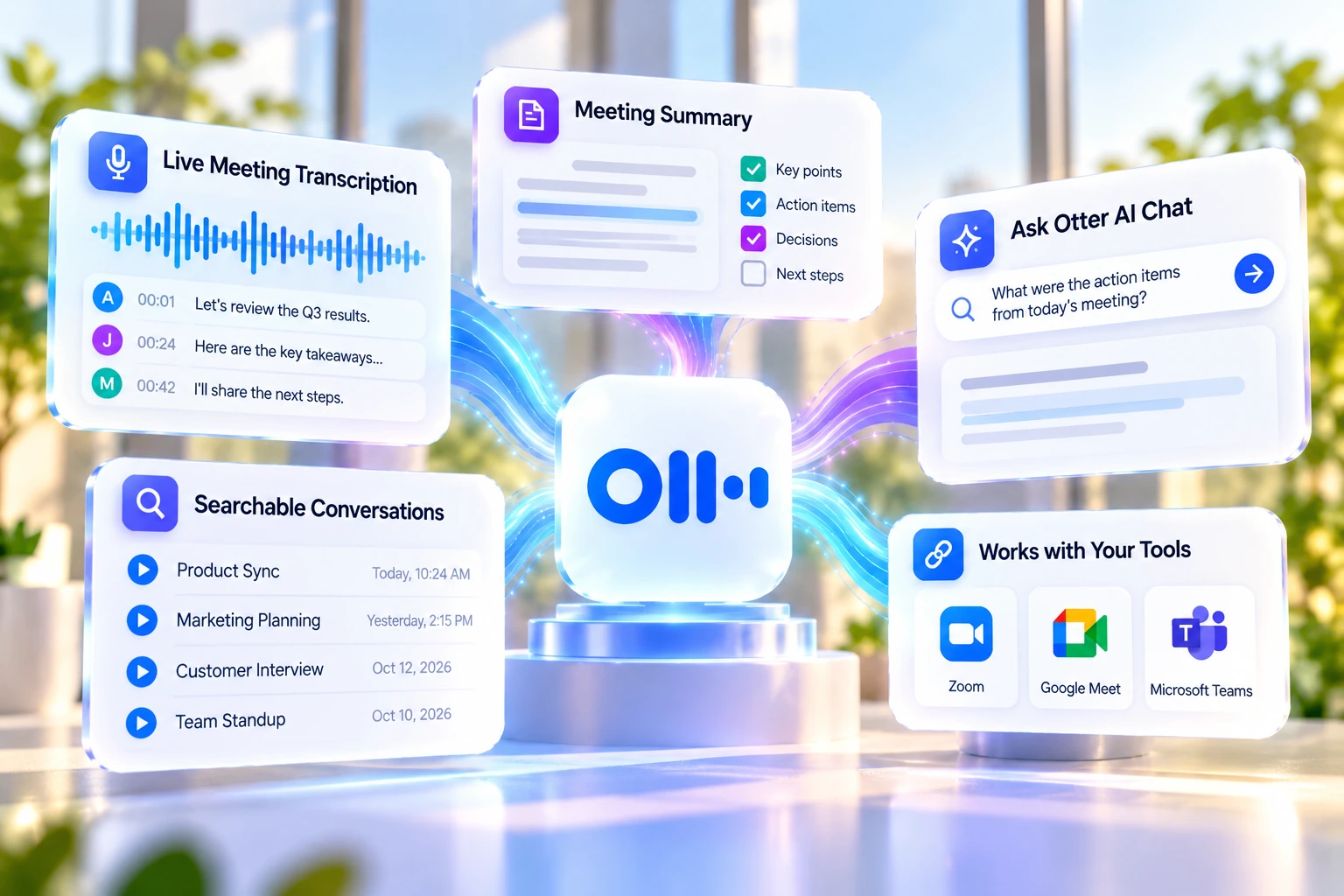
Otter AI joins calls on Zoom, Microsoft Teams, and Google Meet, records them, writes a transcript in real time, and turns that into a summary with action items. This review covers what it actually costs across all four plans, how the free and Pro minute limits really work, what Otter's auto-join settings mean for you, what G2 reviewers report, and how it stacks up against Fireflies and Fathom.
Pricing and features can change. Check Otter AI's current pricing page before you subscribe.
Otter AI is an AI meeting assistant. It joins calls on Zoom, Microsoft Teams, and Google Meet, records them, writes a transcript in real time, and turns that transcript into a summary with action items. Otter describes itself as built for sales, marketing, product, finance, operations, design, and customer-facing teams that want a record of their meetings without someone manually taking notes.
A feature called Otter AI Chat lets you ask questions about a meeting after it ends, things like "what did I miss" or "write a follow-up email to all participants." Otter also has iOS and Android apps.
Otter's transcription supports six languages as of a 2026 update: English, French, Spanish, German, Japanese, and Chinese, up from three (English, French, Spanish) before that update. Japanese support was added in late 2025.
Setup is simple: connect your Google or Outlook calendar, or hit record on your phone, and the system begins rendering speech into text right away. Otter doesn't publish an exact onboarding time, but there's no separate install step for the core experience.
The main thing a first session changes is how much attention you have free. In a busy multi-speaker call where people talk over each other, the usual problem of trying to listen, think, and write notes at once eases once a live transcript is on screen: if your attention drifts during crosstalk, you can scroll back a few lines and catch up without losing the thread.
What arrives at the end of the call is a structured summary with key points and action items, plus a searchable transcript with speaker labels, a record of what was discussed that doesn't depend on anyone's note-taking under pressure.
A transcript that arrives thirty minutes late is still useful. A transcript you can scroll back through mid-sentence changes how you participate, not just how you document.
Four videos from Otter's own YouTube channel, covering the enterprise pitch, tailored meeting summaries, the MCP Server, and the Agentic AI Chat experience.
Positions Otter AI as an essential tool for enterprise use, covering features built for large organisations. Uploaded 2025-12-02. (Otter AI's own channel)
How Otter's customisable AI-powered meeting summaries adapt by meeting purpose and functional role, sales, recruiting, project management. Uploaded 2025-10-09. (Otter AI's own channel)
Otter's Model Context Protocol server, letting meeting knowledge power workflows across AI tools like Claude. Uploaded 2025-10-09. (Otter AI's own channel)
Otter's enhanced chat experience for querying a corporate knowledge base: autonomous scheduling and action-item capture, automatic screenshot integration, and direct CRM queries. Uploaded 2025-10-09. (Otter AI's own channel)
Many reviews list transcription speed as just another feature. The more useful way to think about it: the most valuable moment to make a conversation accessible isn't after it ends, it's while it's still happening, so you're freed from listening, synthesizing, and writing at the same time. That tends to show up as better follow-up questions, since attention isn't split between the conversation and note-taking.
The shared-workspace version extends this: when multiple participants can see the same live transcript, disagreements about who said what get settled by scrolling to the line instead of arguing from memory, and action items can be tagged the moment they're spoken rather than reconstructed afterward.
Text streams onto the screen within seconds of being spoken, giving you immediate utility during the call rather than requiring you to wait for post-processing.
Multiple participants can highlight text, insert comments, and tag action items inside the rolling live transcript simultaneously, so the meeting note evolves as a shared working document in real time.
For users with hearing difficulties, auditory processing challenges, or language-barrier delays, the live transcript is a genuine accessibility tool. The conversation becomes readable as it happens, no playback required.
Search your ongoing conversation by keyword to pull up exactly what a speaker said five minutes ago, without interrupting the flow of the discussion.
For an individual user, getting started doesn't require IT involvement, a governance framework, or organizational sign-off: install the browser extension, connect your calendar, and it's ready to use.
Clean, distinct speaker separation for structured 1-on-1 conversations makes Otter AI a natural choice for interview capture. Several G2 reviewers describe the accuracy as reliable enough to use as a primary record, with only light editing needed.
Otter has four plans: Basic, Pro, Business, and Enterprise, priced and metered per user on every paid tier. Otter's pricing page shows both monthly and annual rates, plus a promotion that only applies with an India-issued credit card. Prices below are per user, in US dollars; the standard rate, the annual-billing equivalent, and the India-specific offer (where it applies) are shown separately.
Free, for getting started.
$8.33/user/month billed annually. An India-only promotion drops these to $8.49/$4.17 with an India-issued card.
Otter's own "Best Value" label. $19.99/user/month billed annually. A "20% off for 3 months" promo (to $24/mo) is for first-time subscribers only.
No public price. "Schedule a demo" per Otter.
One detail worth knowing before you buy: Basic's and Pro's minute limits are a single shared pool across live meetings, recordings, and imported files, per Otter's own pricing-page footnote, not three separate allowances. Business and Enterprise are different: live meeting transcription is unlimited, and only imported files draw against the 6,000-minute cap.
Prices are current as of this review. Otter's pricing page can change; check it directly before subscribing, especially if you're billing with an India-issued card, since that promotion changes the effective Pro price.
The live transcript is still the core of the product, but Otter's newer features are aimed at a different job: turning that transcript into something other systems and tools can act on, not just something you read.
Otter's Model Context Protocol server connects your meeting transcripts directly to AI assistants like Claude and ChatGPT. Search meeting history, analyze patterns across calls, and generate content from real meeting data without leaving your AI tool of choice.
Query your meeting history conversationally. On Enterprise, Advanced Agentic AI Chat goes further: autonomous scheduling and action-item capture, automatic screenshot context, and direct queries into connected CRM data.
Group meetings, audio files, action items, and chat by department, project, or series. Comment inline on a shared transcript, or chat with Otter AI directly inside the channel for a quick summary of everything in it.
Otter detects when a screen is being shared and automatically screenshots the slides, syncing each image into the transcript at the moment it appeared, useful for meetings where the visuals matter as much as what was said.
Capture audio locally from the desktop app without OtterPilot joining as a visible participant. Useful for in-person meetings, interviews, or calls where a bot presence isn't appropriate. Bot-free doesn't mean consent-free: tell participants you're recording and transcribing, the same as you would with OtterPilot visibly present.
Individual members can connect their own Salesforce or HubSpot account, subject to the user limits noted in the pricing section above. A conversation syncs automatically only when it's tied to a calendar event with at least one external guest and a matching contact already exists in the CRM, per Otter's own documentation. Workspace-wide install, central admin control, and custom field-mapping templates are Enterprise-only.
| Feature | Otter AI Current Specs |
|---|---|
| Transcription Delivery | Real-time streaming: words appear within seconds of being spoken, during the live conversation |
| Supported Languages | English, Spanish, French, German, Japanese, Chinese (Simplified); German and Chinese still in beta. Set manually before each meeting, except French+English together |
| Speaker Identification | Automated, highly reliable for 1-on-1s, requires review in dense multi-speaker conversations |
| Collaborative Features | Live highlighting, commenting, and task tagging inside the rolling transcript during the meeting |
| AI Summaries | Post-meeting: key points, decisions, and action items delivered after the call ends |
| In-Meeting Search | Full transcript search by keyword and speaker during the live conversation |
| Otter AI Chat | Query meeting history conversationally; Advanced Agentic AI Chat (Enterprise) autonomously handles scheduling, action items, and direct CRM queries |
| MCP Server | Connects meeting transcripts directly to Claude, ChatGPT, and other MCP-compatible AI tools for cross-tool search and content generation |
| AI Channels | Group meetings, recordings, action items, and chat by department or project; comment inline and chat with Otter AI within the channel |
| Slide Capture | Automatically screenshots shared slides during virtual meetings and syncs them into the transcript at the moment they appeared |
| Desktop App | Bot-free local audio capture, no OtterPilot participant required, useful for in-person or sensitive calls |
| OtterPilot | Automated meeting join via calendar sync: Zoom, Google Meet, Microsoft Teams |
| Mobile App | iOS and Android; captures in-person conversations in addition to online meetings |
| Free Plan | 300 minutes per month, 30-minute session limit per individual recording |
| Pro Plan | $16.99/month ($8.33/month billed annually): 1,200 minutes per month, extended session recordings |
| File Import | Pro plan: 10 pre-recorded file imports per month; Business plan for higher volume |
| CRM Integrations | Salesforce sync, HubSpot, subject to user limits per Otter's own pricing footnote |
| Other Integrations | Zoom, Google Meet, Microsoft Teams, Slack, Notion, Google Docs, Asana, Atlassian, Zapier |
No installation required for the core experience. Here's the sequence that gets you to a working live transcript fastest.
Link your calendar, let OtterPilot join your next scheduled call, and watch the live transcript appear in real time. Review the AI summary and extracted action items that arrive after the session, and check your OtterPilot settings to confirm it will only join the meetings you want captured automatically.
Invite a colleague to a shared workspace and try collaborative highlighting during a live meeting. Practice using the in-meeting keyword search to retrieve something said earlier in the call. Start building the habit of using the transcript as the primary reference point for follow-up rather than memory or manual notes.
Several long-time users describe reaching a point where they stop thinking about the tool and start treating the live transcript as a normal part of every conversation, sharing specific moments from it rather than relying on memory. How many sessions that takes varies by person and how often you meet, there's no fixed timeline.
Otter's own documentation confirms its Notetaker can automatically join calendar meetings, and that auto-join stays on until a user changes the setting; individual calendar events keep whatever setting was in place when they were last adjusted. This matches a G2 complaint quoted below, where a reviewer said Otter kept trying to join meetings after they disconnected it from their Google account. If you use Otter, check both your default auto-join setting and the settings on individual calendar events, and check your Google account's third-party app permissions. If you host or join a call with Otter's Notetaker present, tell everyone on the call it's recording and transcribing before you start, regardless of what Otter's own default settings do.
Otter's privacy and security page (otter.ai/privacy-security) states that stored data is encrypted using 256-bit AES server-side encryption on AWS S3 storage. Conversations are private by default, accessible only to you and whoever you explicitly choose to share them with.
Deleting a conversation moves it to Trash rather than removing it immediately. Otter automatically empties the Trash after 30 days; manually emptying it deletes the conversation at that point instead. If you need a transcript gone immediately, for instance after recording something sensitive, empty the Trash rather than assuming deletion is instant.
That same privacy and security page states Otter follows HIPAA requirements for how it collects, stores, and processes health-related information. It does not state there which plan includes a signed business associate agreement (BAA), and that HIPAA statement is not itself proof that every account or workflow is automatically compliant; if you need a BAA for healthcare use, confirm directly with Otter's sales team rather than assuming it's included on your current plan.
None of this replaces checking your own organization's recording and data-handling policy. Otter's security measures govern what it does with your data once captured; whether you should be recording a given conversation at all is a separate, consent-level question covered above.
Otter AI holds a 4.4 out of 5 rating from 505 reviews on G2 as of this writing. Review platforms update constantly, so treat this as a snapshot rather than a permanent verdict; check G2 directly for the latest reviews. The points below are drawn from individual G2 reviews; they illustrate reported experiences rather than represent a statistical sample. The pricing and feature details above are documented product facts; what follows is what specific people reported experiencing, which may not match every user's experience.
What Users Liked
What Users Disliked
Reviewers specifically praised staying focused on the prospect during discovery calls instead of scrambling to write things down.
Otter describes itself as built for these teams broadly, wanting a record of meetings without manual note-taking.
Basic's 300-minute monthly cap and 30-minute per-conversation limit fit someone trying it out or sitting in short calls, not someone in long meetings regularly.
Buyers who've chosen Otter and need more minutes, longer meeting lengths, or admin controls fit Pro and Business.
Capturing a lecture, seminar, or research interview while simultaneously processing complex information is cognitively demanding. Otter removes the note-taking burden entirely: the transcript appears live, the recording is searchable, and the AI summary identifies the key points.
Accurate quote capture in real time is the journalist's core challenge. The live transcript aims to capture everything said, though accuracy still depends on audio quality and accents; speaker labels separate sources clearly in 1-on-1 conversations, and the searchable archive makes quote verification fast during the write-up.
Remote and hybrid teams who want shared live visibility into conversations without the governance complexity of enterprise memory systems. Multiple people can see the same transcript, highlight the same moments, and tag the same action items at once.
Media is one of Otter's four official solution categories, alongside Business, Sales, and Education. News organization Glacier Media reports its reporters record 15 to 20 hours of interviews a month through Otter, with transcripts ready within minutes instead of the 30 to 60 minutes per interview manual transcription used to take, per Otter's own case study.
Otter supports English, Spanish, French, German, Japanese, and Chinese (Simplified); German and Chinese are still marked beta on Otter's own help center. There's one exception to setting a single language upfront: with French set as your default language, Otter will also pick up English in the same conversation. Every other language combination needs your primary language set before the call.
Otter performs best in structured conversations where speakers take turns clearly: interviews, lectures, 1-on-1s, focused small-group meetings. For larger group brainstorms with frequent interruptions, allow a few minutes to review speaker labels after the meeting.
The free plan caps individual meeting recordings at 30 minutes per session with 300 minutes per month total. For longer sessions or full-length lectures, the Pro plan unlocks 1,200 minutes per month and longer session recordings.
OtterPilot joins meetings automatically via calendar sync. Confirm which meeting types you want captured automatically, and exclude personal appointments or external client calls where an automated bot joining unexpectedly would create friction.
For highly technical meetings, engineering reviews, medical discussions, legal proceedings, Otter may not recognize domain-specific terminology accurately on first use. Review specialist terms after the session and use the correction feature to improve future accuracy.
When sharing transcripts with external participants, use the shareable public link feature rather than inviting them to your workspace. This avoids requiring recipients to create an Otter account before accessing the content.
These are three AI meeting assistants with the same basic job: join a call, transcribe it, summarize it. Prices below are each vendor's own current pricing page, per user.
| Category | Otter AI | Fireflies | Fathom |
|---|---|---|---|
| Free plan | 300 min/user/month, 30-min conversation cap, 25-conversation history limit | Unlimited transcription, 400 min storage/team, 2-hour recording limit, limited AI summaries | Unlimited recordings, transcriptions, and storage, with unlimited instant AI call summaries; Advanced call summaries are a Premium-and-up feature, per Fathom's own pricing page |
| Entry paid tier | $16.99/mo, or $8.33/mo billed annually | $18/mo, or $10/seat/month billed annually | Premium (individuals) $20/mo, or $16/mo annually; Team (2-user minimum) $19/user/month, or $15/user/month annually |
| Mid tier | $30/mo, or $19.99/mo billed annually | $29/mo, or $19/seat/month billed annually | $34/user/month, or $25/user/month billed annually |
| Enterprise | Contact sales | $39 per seat/month, billed annually only | Contact sales |
| Language support | Transcribes 6 languages (English, French, Spanish, German, Japanese, Chinese) | "100+ languages" per its own pricing page, not broken down further there | Transcribes 38 languages; 7 of those (English, French, German, Dutch, Italian, Portuguese, Spanish) also get automatically translated summaries on Premium/Team, per Fathom's help center (last updated May 2025) |
Language coverage isn't a clean three-way ranking: Otter's 6 are all transcription languages, Fathom transcribes 38 languages but only auto-translates summaries into English, French, German, Dutch, Italian, Portuguese, and Spanish on its Premium and Team plans, and Fireflies' "100+" is not broken down by transcription, translation, or summary support. None of this measures transcription quality or how well each tool handles accents or mixed-language meetings. On price, Otter and Fireflies land close together at both the entry and mid tier; Fathom's Team and Business tiers cost more per user than either, but require at least 2 users, so they aren't a direct comparison for a solo buyer against Otter Pro or Fireflies Pro.
Fathom Business includes sales-focused features such as CRM field sync, a Deal View, and AI coaching scorecards. Otter offers standard Salesforce and HubSpot integrations on Pro, both subject to user limits per Otter's own footnote, and adds custom CRM and dialer integrations at Enterprise. Fireflies' Business tier adds conversation intelligence and team analytics, a different kind of feature than CRM-specific tooling, though that isn't evidence Fireflies lacks CRM capability either, since CRM integrations weren't part of what was checked on its pricing page.
A second cut of the same comparison, feature by feature rather than plan by plan:
| Feature | Otter AI | Fireflies.ai | Fathom |
|---|---|---|---|
| Live transcript during the call | Yes, core strength Words stream in seconds, built for live visibility | Yes, Live Assist Real-time notes, AskFred available mid-call | No Post-meeting summary tool, not built for live viewing |
| Search across past meetings | Limited Search within the current session only, not history-wide | Yes, core strength Semantic search across months of meetings via AskFred | Limited "Ask Fathom" exists but is gated behind the paid plan |
| CRM integration | Deep Salesforce and HubSpot, subject to user limits per Otter's own footnote | Deep Salesforce, HubSpot, Pipedrive, automatic field sync | Mixed Salesforce personal connection has no stated plan limit; HubSpot allows a few personal connections on Free, but team-wide sync and Deal View need Business |
| Mobile / in-person capture | iOS and Android Captures in-person conversations, not just online calls | iOS and Android Same, plus desktop app and Chrome extension | None No mobile app yet; an iOS app is listed as "coming soon" on Fathom's own site, no ship date given |
Choose Otter if the conversation happening right now is what matters most. Choose Fireflies if you need to find a decision from three months ago. Choose Fathom if you want a genuinely free tool and don't need a mobile app, since Fathom's own site still lists its iOS app as "coming soon."
Otter AI covers the basics of an AI meeting assistant: joining calls, transcribing them in six languages, and summarizing them, with a free plan and three paid tiers scaling up to enterprise security features. G2 reviewers rate it 4.4/5 overall. Reviewers in this sample praised its transcription speed and cross-meeting search; the same sample raised accuracy in harder audio conditions, support response times, and account management as real weak points. Its Notetaker can also keep auto-joining meetings until you turn that setting off, so tell people on the call when Otter is recording and transcribing, and follow whatever consent rules apply where you are. Pricing depends on billing term and, for Pro, on whether you're paying with an India-issued card, so check the live price for your situation before buying.
Who should buy it: teams who've already chosen Otter and need more minutes, longer meeting lengths, or admin controls; Basic fits someone testing the product or sitting in short calls, not someone in long meetings regularly.
Who should compare first: a buyer who needs broad language coverage, a sales-specific workflow, or a free tier with unlimited recording and storage (as opposed to a monthly minutes cap) has reasons to compare Fathom or Fireflies first, per the comparison above, before committing to Otter.
This review was researched by the TechScribe editorial team, based on Otter AI's own pricing and documentation pages and verified G2 review data (4.4 out of 5 across 505 reviews).
This page may contain affiliate links: if you sign up through them, we may earn a commission at no extra cost to you, which never affects our rating or what we recommend.
An AI meeting assistant that joins Zoom, Microsoft Teams, and Google Meet calls, records them, writes a real-time transcript, and produces a summary with action items. It also has an AI Chat feature for asking questions about past meetings.
Yes. The Basic plan is free and includes 300 minutes per user per month of transcription, shared across live meetings, recordings, and imported files, plus a 30-minute cap per conversation.
Pro is $16.99/user/month ($8.33 billed annually), Business is $30/user/month ($19.99 billed annually, with a first-time-subscriber promo), and Enterprise is custom-priced through Otter's sales team. An India-only promotion lowers Pro's price further for India-issued cards.
No. On Basic and Pro, Otter's own pricing-page footnote confirms the monthly minutes (300 for Basic, 1,200 for Pro) are a single shared pool across live meetings, recordings, and imported files, not separate allowances. Business and Enterprise are different: live transcription is unlimited, and only imported files draw against the 6,000-minute cap.
Six, as of a 2026 update: English, French, Spanish, German, Japanese, and Chinese (Simplified). Japanese was added in late 2025; German and Chinese are still in beta, per Otter's help center. The only language pair Otter transcribes simultaneously is French and English, when French is set as the default.
It can. Otter's own documentation confirms auto-join stays on until a user changes the setting, and individual calendar events keep whatever setting was in place when last adjusted. Check both your default auto-join setting and individual event settings, plus your Google account's third-party app permissions.
Yes, on the Pro plan and above, though Otter's own footnote notes Salesforce and HubSpot integrations are subject to user limits. Enterprise adds custom CRM and dialer integrations.
Pricing is close between Otter and Fireflies at the entry and mid tiers. Fathom's paid tiers cost more per user but require at least two users. Language-wise, Otter transcribes 6 languages, Fathom natively covers 7 plus 29 more through translation, and Fireflies claims "100+" without a public breakdown.
Being honest about fit is what makes a recommendation worth trusting. A few concrete reasons to look elsewhere before you commit:




Connect your calendar and let Otter AI record, transcribe, and summarize your meetings. Basic is free; no credit card required.
Independent review. Prices and features may change; always check the official Otter AI site for the latest information.
 Fellow
 Otter AI