Surfer SEO compares your content to the pages already ranking for your target keyword, then tells you exactly what to change. Its main product, the Content Editor, scores your draft against those top-ranking pages as you write and flags gaps in word count, keyword and entity coverage, and structure before you publish. This review covers the core workflow, current pricing, what users say on G2, and who actually gets value from it.
Pricing and features can change. Check Surfer's current pricing page before you subscribe.
As of a 2026 update, the Content Editor's score is one bar split into two halves: an SEO half, based on the ranking pages, and an AI Search half, based on what gets cited in AI answers, rather than two separate scores.
Surfer describes its scoring model as checking against "500+ ranking factors," by its own description, covering keyword optimization, entity extraction, topic coverage, and topical authority. That number comes from Surfer directly and hasn't been independently audited for this review.
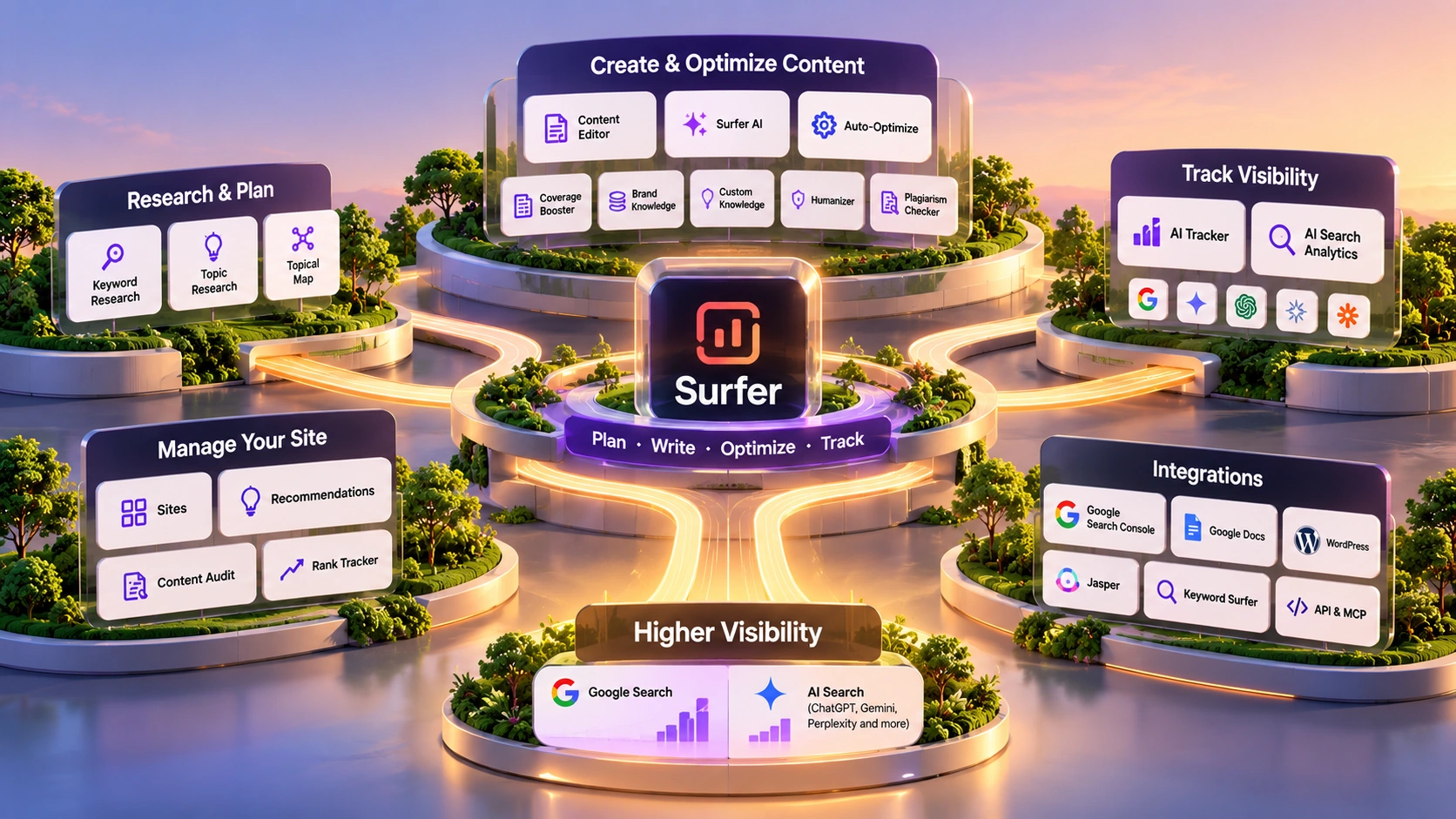
Around the Content Editor, Surfer's current product set includes Keyword Research, Topic Research, a Topical Map generator, a SERP Analyzer, Content Audit, Rank Tracker, an AI Tracker, and Surfer AI (a separate, full-article AI writer). A Humanizer, Plagiarism Checker, and an in-editor assistant called Surfy sit inside the Content Editor itself. A newer hub called Sites pulls Content Audit, Topical Map, and site performance together into one view, once you connect a Google Search Console account. A separate Recommendations panel surfaces specific, low-effort fixes across your domain, drawn from the same Content Audit and Topical Map data.
A typical path through Surfer looks like this:
| Keyword Research & Topic Research | Surface target terms and content gaps worth covering. |
| Topical Map / Sites | Turns that into a broader content plan across your domain. |
| SERP Analyzer | Pulls the current top-ranking pages for one keyword and extracts their term frequency, entity usage, and structure. |
| Content Editor | Turns that into a live Content Score as you write, split into an SEO half and an AI Search half, with an Outline Builder suggesting headings and questions to cover. |
| Auto-Optimize | Closes both halves in one pass: adding missing terms and entities for the SEO side, and rewriting the intro and facts for the AI Search side, aiming to close the gap without losing a human tone. |
| 1-click internal linking | Scans your own domain and inserts links with suitable anchor text. |
| Content Audit, Rank Tracker & AI Tracker | After publishing, Content Audit and Rank Tracker watch how the piece performs, while AI Tracker shows how your brand appears in AI answers from Gemini, Google AI Overviews, Google AI Mode, ChatGPT, and Perplexity (the Standard plan covers ChatGPT only; Pro and up cover all five). |
Surfer has real planning tools now (Keyword Research, Topic Research, Topical Map), not just the execution layer it started as. But the Content Editor's live scoring is still what the product is built around and most differentiated on. It doesn't do backlink analysis or technical crawling; nothing on Surfer's own site claims it does.
Surfer's AI tools are easy to mix up, so here's the actual split:
A standalone, full-article writer. Give it a keyword, country, device, format, and tone, and it drafts a complete article built from the pages already ranking for that keyword. Surfer's own product page says a full draft usually takes about 20 minutes, a vendor estimate, not independently timed for this review.
Lives inside the Content Editor as a smaller assistant: it rephrases, expands, or adds examples to text you're already writing, rather than generating a first draft.
Sits between the two. It edits an existing draft to close specific Content Score gaps rather than writing from scratch, and as of a 2026 update handles both halves of the score in one click: closing entity and term gaps on the SEO side, and rewriting the intro and facts on the AI Search side.
Auto-Optimize's counterpart for facts rather than entities: the Content Editor's Facts panel flags facts missing from your draft, and Coverage Booster inserts relevant ones with one click instead of you adding them by hand.
Custom Knowledge, part of Surfer AI, lets you feed in your own brand facts so generated drafts use them instead of generic claims. A separate feature called Brand Knowledge, available from the Standard plan up (and on AI Search Analytics), helps Surfer's AI features understand your brand identity, goals, and audience, and currently feeds into Surfy, Auto-Optimize, and Insert Outline, with more features set to use it later. It's a distinct feature from Custom Knowledge, not the same thing under two names.
The Content Editor also includes a Humanizer, aimed at making AI-assisted text read less mechanically, and a Plagiarism Checker as a pre-publish step. Free, no-signup versions of an AI Detector, Humanizer, and Paraphraser exist outside the main product too.
The overfitting risk. Surfer learns from pages that already rank. Matching those patterns can get you to the same level as those pages. It won't automatically get you past them. A perfect Content Score is a floor, not a ceiling.
The mechanical-content trap. Chasing every recommendation on the score panel can produce writing that's thorough but repetitive. The score is a proxy for ranking signals, not a measure of whether a reader finds the piece useful.
Where the planning tools stop. Keyword Research, Topic Research, and Topical Map can show you gaps and opportunities. They can't replace your own understanding of your market, audience, or business priorities, and Surfer doesn't do backlink analysis or technical SEO crawling at all.
What wasn't hands-on tested for this review. The Content Editor's live scoring UI, Surfer AI's actual draft quality, and the Humanizer's effect on AI-detection tools are all described here from Surfer's own product pages, not from running the tool directly. Confirm these for yourself before treating any of it as settled.
Prices below are per month, billed yearly (Surfer's pricing page says annual billing saves up to 17% versus monthly; the page's default view doesn't show monthly-billed prices).
Billed yearly.
Billed yearly.
Billed yearly.
Billed yearly.
Quoted by sales.
Billed yearly, entry tier.
*Subject to Surfer's fair usage policy.
There's also a separate AI Search Analytics plan for teams that only want AI-visibility tracking without the Content Editor workflow. The page defaults to showing one tier, $82/month billed yearly for 50 AI prompts tracked daily, confirmed directly and from a screenshot of the page. Surfer's help-center documentation describes that price as the entry point on a slider, with higher prompt volumes priced separately: $158/month (100 prompts), $308/month (200 prompts), and custom pricing for unlimited, all billed yearly. Both sources agree on the $82/50-prompt figure; the higher tiers aren't visible until the slider is moved, which is why a static view of the pricing page shows only the one tier.
Billing terms confirmed directly from Surfer's pricing FAQ: plans auto-renew each period, you can turn off auto-renewal anytime from the Billing page, access runs through the end of the period you already paid for, and annual plans are charged for the full year upfront. Surfer accepts cards for monthly or yearly billing and bank transfers for yearly billing only; PayPal isn't supported.
New Surfer accounts also get a 7-day free trial of the Pro plan, covering AI visibility tracking, Content Audit, Keyword Research, AI writing, and 1-click automations, confirmed on Surfer's help-center site rather than the marketing pricing page. Check the current signup flow for exact terms before committing.
| Optimization depth | High. SERP- and entity-driven analysis against live ranking data. |
| Real-time feedback | High. Content Score updates while you write, not just after. |
| Planning tools | Moderate. Keyword Research, Topic Research, Topical Map exist, but aren't the product's main focus. |
| Learning curve | Moderate. Early sessions feel mechanical; interpreting signals takes a few rounds. |
| AI visibility tracking | Plan-dependent. Included from Standard up, with limits that scale by plan. |
| Content scoring | Proprietary. Surfer's own "500+ ranking factors" model, now split into an SEO half and an AI Search half on one score bar; a vendor claim, not independently audited. |
Ahrefs is the stronger fit if backlinks and technical SEO are central to your workflow; Surfer doesn't do either. Frase builds a structured content brief before you write; Surfer's planning tools (Keyword Research, Topic Research, Topical Map) cover similar ground but are built around feeding the Content Editor, not standing alone as a briefing tool. Clearscope competes most directly with the Content Editor itself (SERP-based content scoring); the practical choice between the two usually comes down to UI preference and existing tool-stack fit rather than a clear capability gap. This review doesn't have a hands-on side-by-side to make that call for you.
| Capability | Surfer SEO | Ahrefs | Frase | Clearscope |
|---|---|---|---|---|
| Primary purpose | On-page content scoring against live SERP data, plus a dedicated AI Search Analytics tier for AI-visibility tracking | Backlink analysis, keyword research, and technical site auditing (per this site's own Ahrefs review) | Research, briefing, drafting, auditing, and AI-citation tracking in one platform (per this site's own Frase review) | SERP-based content scoring, competing most directly with Surfer's Content Editor; not independently reviewed on this site, so not detailed further here |
| Backlink & technical SEO | Not offered; nothing on Surfer's own site claims it does | A core strength: a large live backlink index plus a Site Audit crawler | A built-in Site Auditor covering technical SEO, content quality, and AI-readiness | Not independently verified here |
| On-page content optimization | A core strength: live Content Score split into SEO and AI Search halves, NLP and entity coverage, Auto-Optimize, Coverage Booster | Not independently verified here | Real-time content score while writing, secondary to its research and briefing focus | Not independently verified here |
| Content briefs & planning | Keyword Research, Topic Research, and Topical Map feed the Content Editor, not a standalone briefing tool | A Content Gap tool compares competitors, but it's not a structured brief | A core strength: briefs built from live SERP research, aimed at writer handoff | Not independently verified here |
| AI visibility / GEO tracking | AI Tracker plus a dedicated AI Search Analytics plan, across 5 engines | Not independently verified here | A dedicated AI Visibility tracker, engine coverage scaling by plan | Not independently verified here |
| Starting price | $49/mo (Discovery), billed yearly | $29/mo (Starter) | $49/mo ($39/mo billed yearly) | Not independently verified here |
Early sessions feel mechanical: you enter a keyword, get target ranges for term frequency and entity density, and react to a score.
After a few rounds, you'll likely start seeing which signals matter most for your own pages, instead of reacting to every recommendation on the panel.
With practice, writing and optimizing happen closer to the same time. Surfer doesn't publish an independent figure for how much time this saves, so none is given here.
Needs every published piece checked against the live SERP before it goes out.
Standardizes structure and quality across multiple writers.
Whose main metric is ranking outcomes, not publishing volume.
Pick something else if you mainly need backlink analysis or technical SEO crawling (Surfer doesn't do either); if you want a dedicated, standalone content-brief tool rather than planning features built around one editor; or if you don't plan to use SERP or AI-visibility data at all, in which case Surfer's main advantage won't matter to you.



Surfer holds a 4.8 out of 5 rating from 546 reviews on G2 (checked 2026-10-08, G2's "AI Verified" listing for the product).
What Users Love
Top Concerns
G2 ratings, review counts, and theme mentions change over time. Read the reviews directly on G2 before treating any specific complaint as representative.
Checking a draft against the pages already ranking for your keyword: coverage, entity use, and structure. It also has planning tools (Keyword Research, Topic Research, Topical Map), but the Content Editor is still its core.
Frase is built around producing a content brief before you write. Surfer's planning tools feed its own editor rather than working as a standalone brief. Many teams use both; Frase first, Surfer while writing.
Plans run from $49/month (Discovery) to $299/month (Peace of Mind) billed yearly, plus a custom Enterprise tier. AI Search Analytics starts at $82/month billed yearly for 50 daily prompts, with higher tiers for 100, 200, or unlimited prompts. See the pricing table above for what each tier includes.
No. It checks your execution against current SERP patterns. It doesn't control your strategy, your differentiation, or Google's ranking algorithm.
Surfer may not be the best fit if your main need is backlink analysis, technical SEO crawling, or a standalone content-brief tool. Its planning features exist, but they're built to feed its own editor, not to replace a dedicated tool for those jobs.
Surfer SEO checks your content against what's actually ranking, in real time, as you write. That's the Content Editor, and it's still the core of the product. Auto-Optimize, internal linking, the Humanizer, and Surfy all extend that same loop. Keyword Research, Topic Research, and Topical Map add real planning ability on top, and AI Tracker and Content Audit extend the same checking idea past the publish button, into AI-answer visibility and already-live pages.
It can help you decide what to cover, but it won't replace your own judgment about what's actually worth writing. What it will do is tell you, clearly, whether your execution is competitive before you find out the hard way.
Pick a page you're planning to publish, run it through Surfer's Content Editor, and see exactly where it falls short of what's already ranking.
Independent review. Prices and features may change; always check the official Surfer SEO site for the latest information.
 Surfer SEO