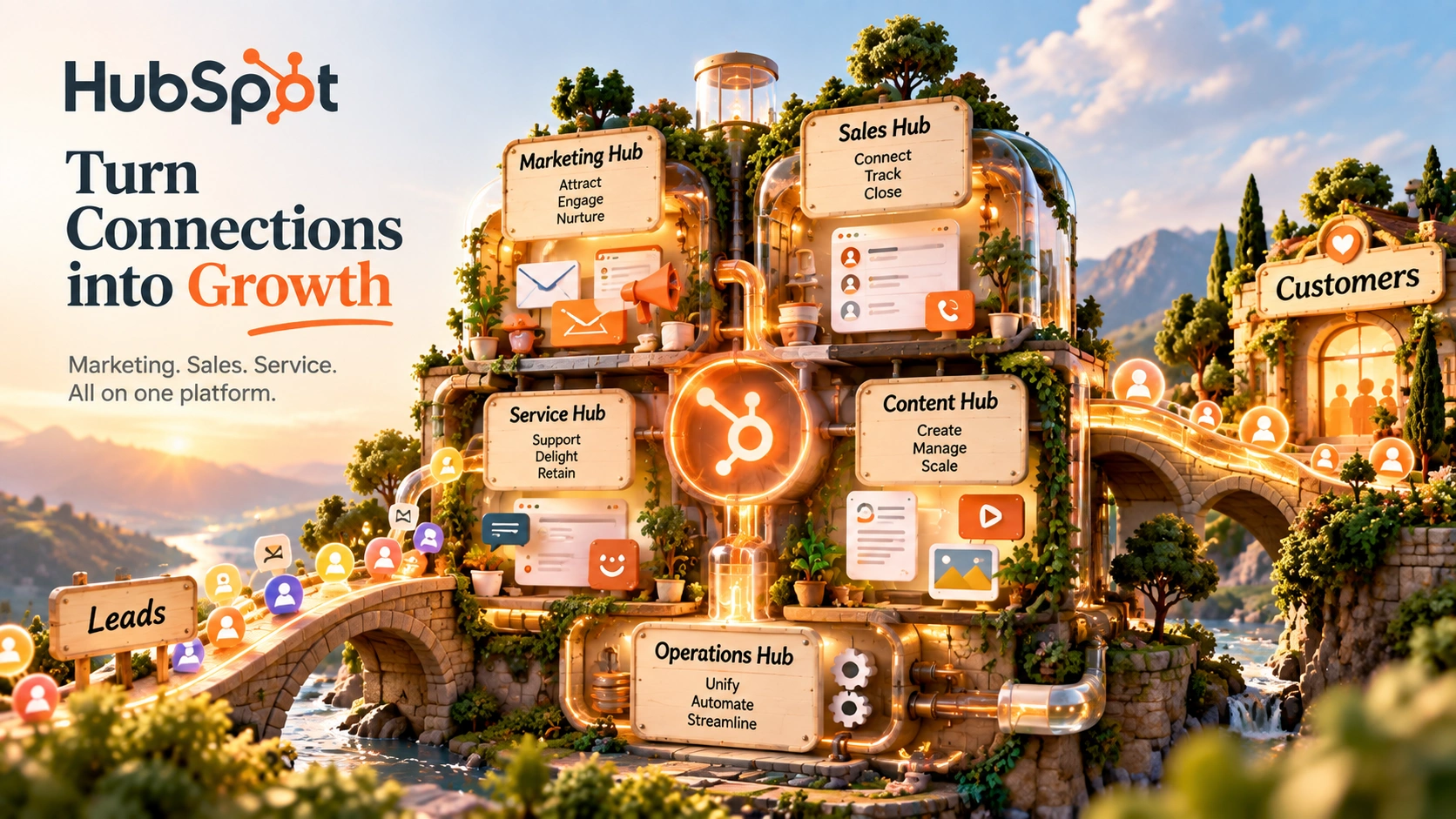
HubSpot is a customer platform built around one CRM database that marketing, sales, and service tools all read from and write to. Instead of separate systems for campaigns, deals, and support tickets, the same contact record follows someone through all three. Here's what it actually does, what it costs, and where it falls short.
HubSpot's free CRM tools don't expire and don't require a credit card. Pricing and features can change, check HubSpot's current plans before you subscribe.
HubSpot started as a marketing tool and has grown into a full customer platform: Marketing Hub, Sales Hub, Service Hub, Content Hub, and Data Hub, all built on the same underlying CRM. A contact who fills out a form, gets called by a rep, and later opens a support ticket is the same record the whole way through.
That shared database is the actual product. Automating email campaigns or managing a sales pipeline isn't unique to HubSpot. What's harder to replicate with a stack of separate tools is having marketing engagement, sales activity, and support history all attached to one contact, visible to anyone on the team who needs it.
Tools like GetResponse or ActiveCampaign center on email and automation with some CRM-adjacent features layered in. HubSpot's positioning runs the other direction: the CRM is the foundation, and marketing, sales, and service are applications built on top of it.
HubSpot's free tier isn't a time-limited trial, it stays free as long as you stay within its limits. It includes:
View-only seats are free on every tier, including Free. For a small team just getting contact records and basic pipelines into one place, the free tier may be enough before any paid plan is necessary.
Four videos from HubSpot's own channel covering marketing performance, AI-driven market research, AI search visibility, and audience targeting, each links down to the section covering that topic in depth.
HubSpot blog interview on marketing performance optimization, featuring Johann Wrede, CMO of UserTesting.
Part of HubSpot's Loop Marketing framework, covering the Express stage.
GROW Europe 2025, HubSpot Live: Aja Frost breaks down HubSpot's AEO checklist for showing up in AI search engines.
Part of HubSpot's Loop Marketing framework, covering the Amplify stage: AI-powered distribution strategy.
HubSpot runs each of its Hubs as a separate listing on G2, so there's no single blended "HubSpot" rating to cite. Marketing Hub specifically holds a 4.4/5 rating on G2, based on 15,958 reviews as of this review.
G2 ratings and review counts change over time. Check G2's current HubSpot Marketing Hub page for the latest figures before relying on this summary.
Marketing engagement, sales activity, and support tickets all attach to the same CRM record, visible across the team instead of siloed per department.
Email campaigns, workflows, and lead scoring built around the same contact and lifecycle-stage data the rest of the platform uses.
Deal pipelines, sequences, and forecasting tied directly to the contacts marketing already engaged.
A help desk workspace and live chat that can see a contact's full marketing and sales history, not just their support thread.
A website and landing page builder, plus basic SEO tools, connected to the same contact and analytics data as the rest of the platform.
Dashboards pull from marketing, sales, and service activity together, making it easier to see how a contact moves through the customer lifecycle instead of checking each system separately.
AI features across Hubs (content generation, agents) run on a shared pay-as-you-go credit system rather than being sold as separate add-ons per Hub.
HubSpot is often compared with ActiveCampaign, Pipedrive, and Zoho CRM because they overlap in CRM and marketing-automation territory, even though each one centers on a different starting point.
| Capability | HubSpot | ActiveCampaign | Pipedrive | Zoho CRM |
|---|---|---|---|---|
| Core focus | A shared CRM with marketing, sales, service, and content apps built on top | Email and marketing automation with CRM-adjacent features | Visual sales pipeline and deal management, sales-first | CRM core with a wide catalog of adjacent Zoho apps |
| Free plan | Yes, free CRM tools with no time limit | No permanent free plan | No permanent free plan | Yes, limited free tier |
| Marketing automation | Deep, native, tied to the shared CRM record | Deep, email and automation is the core product | Limited, mainly sales-focused automation | Available, varies by add-on module |
| Sales pipeline | Native, shares data with marketing and service | Basic pipeline features, not the core focus | Native and highly visual, the core product | Native, configurable pipelines |
| Service/support tools | Native help desk and live chat, tied to the same CRM record | Not a core feature | Not a core feature | Available via a separate Zoho Desk product |
| Learning curve | Real, especially for advanced workflows and multi-Hub setups | Moderate | Generally considered simpler, sales-focused scope | Varies, can grow complex across the wider Zoho suite |
| Best for | Businesses that want marketing, sales, and service sharing one CRM record | Teams whose main need is email and marketing automation | Sales teams that want a focused, visual pipeline tool | Businesses already in or wanting the broader Zoho ecosystem |
Pricing varies by tier and contact volume for all four, so it isn't included here. Check each vendor's own pricing page for current figures.
A simple way to understand HubSpot is to look at three common tasks: launching a marketing campaign, setting up a sales pipeline, and handling a support ticket.
Building Your First Marketing Campaign
Setting Up a Sales Pipeline
Handling a Support Ticket
HubSpot isn't one simple product. It has five main Hubs sitting on top of the same CRM: Marketing, Sales, Service, Content, and Data Hub.
You can buy Hubs separately, with their own Starter, Professional, and Enterprise pricing, or bundle them together through the Customer Platform. Understanding this structure matters before you look at pricing, since "HubSpot's price" depends entirely on which Hubs you need and whether you buy them bundled or separately.
The Customer Platform bundle (covered in the pricing section below) includes Marketing, Sales, Service, Content, and Data Hub tiers together at one combined price, generally cheaper than buying the same tier of each Hub individually. Buying a single Hub on its own, say just Marketing Hub, is also possible and makes sense if you genuinely only need that one function, but you lose the bundle discount.
HubSpot's AI tools are branded Breeze and run on the shared HubSpot Credits system rather than being priced as separate add-ons per Hub. They include content generation (blog posts, emails, meta descriptions), AI agents aimed at automating parts of marketing, sales, and service work, and AI-assisted reporting and data enrichment.
Credits are consumed as these features are used, with additional credits available on a pay-as-you-go basis beyond what's included in your plan (per HubSpot's pricing page, $0.010 per credit at time of writing).
Treat Breeze as a layer on top of the same CRM and workflow system covered elsewhere in this review: the AI tools read from and act on the same contact records as the rest of the platform. Check HubSpot's current pricing page for which specific AI features are included at each tier, since usage limits and feature placement can change.
HubSpot's App Marketplace lists more than 300 integrations, per HubSpot's own announcement of its redesigned marketplace, spanning e-commerce, finance, productivity, and other business software, plus a general-purpose option like Zapier for anything not natively supported.
| Category | Detail |
|---|---|
| Platform | Cloud-based, browser-accessible, no installation |
| CRM | Free core CRM: contact and deal management |
| Marketing Automation | Email, workflows, forms, lead scoring |
| Sales Pipeline | Deal pipelines, sequences, forecasting |
| Service/Support | Help desk workspace, live chat, ticketing |
| Content Tools | Website and landing page builder, basic SEO |
| AI Tools | Breeze: content generation and AI agents, metered via HubSpot Credits |
| Integrations | 300+ App Marketplace listings |
| API Access | Public REST API |
| Pricing Structure | Customer Platform bundle or individual Hubs, Starter/Professional/Enterprise tiers |
| Free Tier | Free CRM tools, no time limit, no credit card required |
The free CRM and Starter tier are straightforward to pick up. The real learning curve appears when you start running workflows across multiple Hubs. Marketing automation, sales sequences, and service ticketing all interact with the same underlying data, and understanding how a change in one Hub affects the others takes real time. Teams coming from a single-purpose tool (just email, or just a sales pipeline) should expect a longer ramp-up than teams already used to managing cross-functional systems.
If the main friction today is reconciling data between separate tools, HubSpot's shared CRM removes that reconciliation work by design.
Starting on the free CRM or a single Hub and adding Sales or Service Hub later keeps everything on the same contact record instead of migrating data between systems down the line.
The Professional and Enterprise tiers' onboarding fees and per-seat pricing make more sense when there's a team dedicated to setting the system up properly, not just one person configuring it part-time.
A different tool may be a better fit in these cases:



HubSpot sells a bundled Customer Platform (Marketing, Sales, Service, Content, and Data Hub together) and individual Hubs separately. Figures below are for the Customer Platform bundle, per HubSpot's official pricing page, checked October 2026.
$7/mo per seat billed annually. Marketing, Sales, Service, Content, and Data Hub Starter tiers bundled.
$1,300/mo billed annually. 6 seats included.
Starting price. 8 seats included.
A free CRM tier exists below Starter, with free tools that don't expire. Individual Hubs (just Marketing Hub, just Sales Hub, etc.) can also be purchased on their own Starter/Professional/Enterprise tiers at different prices than the bundle above, and Professional/Enterprise individual-Hub purchases carry their own separate one-time onboarding fees. Check HubSpot's current pricing page for individual-Hub figures and to confirm bundle vs. standalone pricing for your situation.
HubSpot is worth it for businesses that want marketing, sales, and service sharing one CRM record instead of reconciling data between separate tools. It's less of a fit for a small team that just needs email automation or just a sales pipeline, where a focused tool is likely cheaper and simpler.
The Customer Platform bundle runs Starter at $20/month per seat ($7/month per seat billed annually), Professional at $1,450/month ($1,300/month annually, 6 seats included), and Enterprise starting at $4,700/month (8 seats included). Individual Hubs can also be purchased separately at different prices. Per HubSpot's official pricing page, checked October 2026.
Yes, a free CRM tier with tools across marketing, sales, service, content, and payments, no time limit and no credit card required.
ActiveCampaign centers on email and marketing automation with some CRM-adjacent features. HubSpot centers on a shared CRM with marketing, sales, and service apps built on top of it.
Yes, on Professional and Enterprise tiers, both for the bundled Customer Platform and for individual Hubs purchased separately. Fees vary by tier and by bundle vs. standalone Hub; confirm current figures directly with HubSpot.
More than 300, per HubSpot's own App Marketplace announcement, spanning e-commerce, finance, productivity, and other business software.
A shared, metered pool that powers HubSpot's AI tools and agents across Hubs. Each plan includes a credit allotment, with pay-as-you-go pricing for usage beyond that.
The free CRM and Starter tier are built for small teams getting started. Costs and complexity scale up quickly at Professional and Enterprise, so a small business should map out which Hubs it actually needs before committing past Starter.
HubSpot makes the most sense for businesses that want marketing, sales, and service sharing the same CRM record instead of stitching separate tools together after the fact. It isn't the cheapest or simplest option for a team that only needs one function, like just email automation or just a sales pipeline, and the real costs (per-seat pricing, onboarding fees, metered AI credits) go well beyond the advertised starting price once you're past Starter.
For a business still operating out of a single tool or no CRM at all, starting on the free tier costs nothing and shows whether that's a model worth paying for. For a business that already has marketing, sales, and service data scattered across separate systems, HubSpot's case is consolidating that onto one platform, with the real trade-off being cost and setup complexity as you move up the tiers.
Start on the free CRM, connect a form or pipeline, and see how the same contact record carries through marketing, sales, and service.
Independent review. Prices and features may change; always check the official HubSpot site for the latest information.
 HubSpot
 Kit
Kit Notion AI