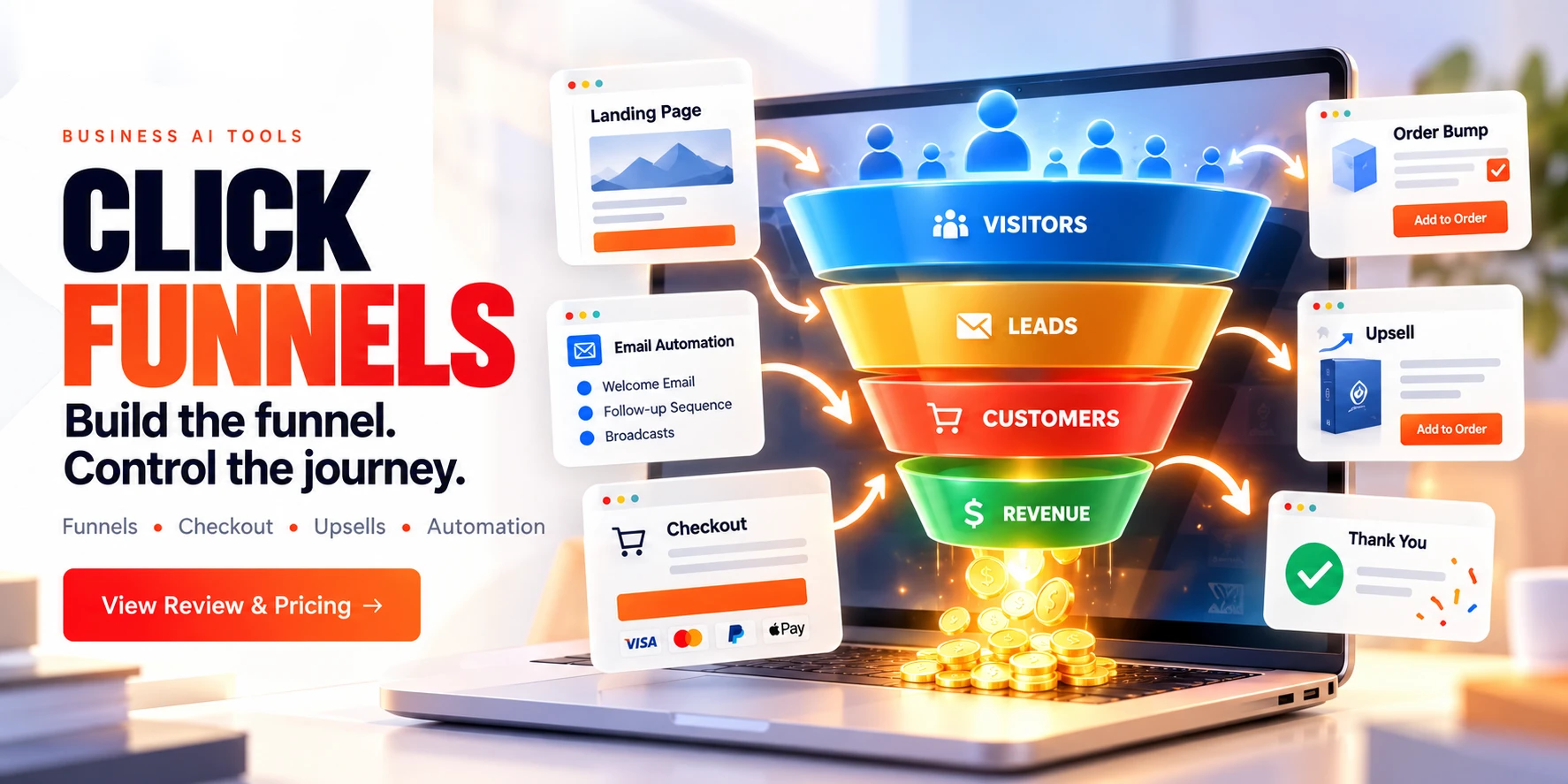
ClickFunnels is a sales-funnel platform built for businesses that already have something to sell. Here's what it actually does, what it costs, and where it falls short.
ClickFunnels' official pricing page lists a 14-day free trial. Pricing and features can change, check ClickFunnels' current plans before you subscribe.
Most tools help you build a funnel. ClickFunnels is built to sell through one.
Systeme.io helps you start, GetResponse helps you automate, Kit helps you build an audience. ClickFunnels assumes you already have something to sell and focuses on getting more revenue out of each visitor.
You open ClickFunnels and see funnel templates, upsell and downsell flows, order pages, and conversion-focused layouts.
The templates can make the first build easier because you aren't starting from a blank page.
Four videos from the ClickFunnels channel covering Frameworks, integrations, workflow automation, and the affiliate side of the platform, each links down to the section covering that topic in depth.
Package and share complete business systems as a Framework, funnels, automations, and assets bundled together.
How ClickFunnels connects with the tools you already use, email marketing, CRMs, webinar platforms, and more.
Building an automated sequence in ClickFunnels using the drag-and-drop Workflows builder.
Junior Anthony on affiliate-driven growth strategy, featured on the ClickFunnels channel.
If you're ready to get started with ClickFunnels, here's the actual sequence, start to finish, not just a pitch for why funnels matter. For a lead magnet funnel, for example, you'd choose the "Lead Funnel" template, then customize the opt-in page from there.
ClickFunnels is more than a page builder. It lets you control what happens after someone opts in, buys a product, accepts an upsell, or leaves a cart. The checkout experience can change based on what a visitor selects, so the platform is managing a sequence of decisions, not just displaying pages.
Its upsells, downsells, and order bumps are designed to structure the buying journey and increase the value of each transaction, not just the number of sales.
Templates are designed around funnel structures built to guide a visitor toward a purchase, not just laid out for looks.
Upsells and downsells let you offer additional products or upgrades during the buying process, built directly into the funnel flow rather than bolted on.
The checkout flow is designed to reduce friction and make it easier for visitors to complete a purchase.
The upsell and order-bump tools are designed to increase the value of each sale, not just the number of sales.
ClickFunnels has a 4.6/5 rating on G2 based on 417 reviews.
4.6 out of 5: ★★★★½, based on 417 reviews.
These themes come from the review-summary data available on G2, so they should be treated as recurring mentions rather than a statistical summary of all 417 reviews.
This summary reflects 417 G2 reviews as of this writing. Visit G2 for the most current feedback.
View all reviews on G2 →These two get compared constantly, and for good reason, they sit at opposite ends of the same category. ClickFunnels optimizes for conversion depth and revenue per visitor. Systeme.io optimizes for consolidation and getting started with minimal friction. Neither is "better" in the abstract; they're built for different stages of the same business.
| Capability | ClickFunnels | Systeme.io |
|---|---|---|
| Core focus | Upsells, downsells, and order-flow optimization once you already have an offer | All-in-one consolidation, funnels, email, courses, and affiliates in one dashboard |
| Funnel builder | Deeper upsell/downsell logic, built for complex multi-step revenue sequences | Faster for simple funnels, more limited once flows get complex |
| Email marketing | Native Email app + Automation Workflows, lighter, often paired with a dedicated ESP | Full email tool built in, positioned as unlimited sends within the platform |
| Automation | Drag-and-drop Workflows builder with multi-trigger support | Trigger-condition-action automation builder, comparable core capability |
| Developer access | Public REST API, OAuth 2.0, and webhooks for custom integrations | Public API and webhook support |
| Learning curve | Steeper, assumes marketing intent and a validated offer from day one | Positioned around fast onboarding and minimal setup friction |
| Best for | Scalers with an established product who need revenue-optimization depth | Solopreneurs and course creators who want one consolidated, simple stack |
⚖️ Bottom line: if you're still validating an offer or want everything, funnels, email, courses, under one simple roof, Systeme.io is built for that entry point. If you have something you've already tested and need serious upsell logic, order-flow optimization, and a real API to build around, ClickFunnels is the tool for that stage.
ClickFunnels apps add specific functions to the workspace without requiring a separate dashboard. Once activated, an app appears in the left-hand navigation and its features become available without leaving the platform.
A categorized library reached via "+ Add Apps": Email for broadcast campaigns, Frameworks for packaging business systems, Landing Pages, Store for e-commerce, and Appointments for booking and calendar management.
A dedicated Zapier app connects ClickFunnels to over 7,000 third-party tools without needing a custom integration for each one.
A drag-and-drop automation builder that turns events like cart abandonment into automatic actions, an email, a tag, an enrollment, without anyone manually watching for it.
A single workflow can respond to multiple triggers, a form opt-in, a purchase, a cart abandonment, all feeding the same automated sequence.
For CRMs or platforms without a native integration, Workflows connect outward via Webhooks, see the API & Webhooks section for the technical detail.
Each automation tracks its own metrics, average cart value, opt-in rate, page views, tied to the sequence itself, not just the funnel it's attached to.
A custom domain lets you use your own branded URL instead of a generic page-builder address.
Authorizes your domain's DNS provider directly and configures the required records for you, fastest option when your registrar is supported.
Copy TXT and CNAME records from your dashboard into your registrar's DNS editor yourself, the fallback when your provider isn't on the automated list.
SSL is provisioned automatically once records verify, typically within minutes, though DNS propagation can occasionally take up to 48 hours.
A full website beyond funnels, the domain connected here is shared across Courses, Store, Blog, Customer Center, and Community for consistent branding.
If your root domain already points to another website, you can use a subdomain such as funnels.yoursite.com for ClickFunnels without replacing the existing site.
Connect Stripe via the Stripe app in your workspace to accept credit cards and other supported payment methods directly.
An alternative payment setup option for accepting supported payment methods through ClickFunnels.
ClickFunnels supports payment methods including credit cards, Apple Pay and PayPal through its available payment integrations.
Once connected, any product you create can be attached to a Checkout element on a funnel page or store, the payment flow is then handled automatically.
Native broadcast emails sent directly from your workspace, no separate tool needed for a one-off campaign or announcement.
Triggered emails for event-driven messages, welcome sequences, abandoned cart reminders, and similar automated sends.
For advanced segmentation, deliverability tooling, or sophisticated multi-step nurture sequences, consider pairing it with a dedicated tool like GetResponse or Kit.
Workspace Settings → Email Settings → General Settings holds this required field, your business email address and mailing address, shown at the bottom of every marketing email under regulations like CAN-SPAM.
"Affiliate" means two different things here, and it's worth keeping them separate.
Promote ClickFunnels itself and earn a commission when someone you refer subscribes. Commissions scale up through performance tiers as referral volume grows.
Once someone clicks your link, the cookie stays active for 45 days. The last affiliate link clicked before purchase gets credit, even across devices.
Paid out twice monthly once a minimum payout threshold is met, through a third-party payment processor. A bonus program exists for affiliates reaching a sustained number of active referrals. Affiliate terms, payout schedules, and commission structures can change, so check the current affiliate agreement before relying on these figures.
The opposite direction: build and run your own affiliate program for your own products, without third-party affiliate-tracking software.
Add the Affiliate Center to your workspace, set your own commission structure, build a registration funnel, and generate campaign-specific tracking links for your affiliates.
Compliance note: ClickFunnels' own affiliate program prohibits bidding on ClickFunnels-trademarked terms in paid ads and requires an income disclaimer on any results or case studies you share. Worth reading the affiliate agreement fully before promoting.
ClickFunnels has a public REST API, OAuth 2.0 support, and webhooks for connecting it to other software. Webhooks can send events such as new orders or identified contacts to your own system. Full API/webhook access is included on Scale and higher plans.
Configured under Workspace Settings → Webhooks, firing on event types like order.created and contact.identified, pushed to your endpoint the moment they happen, no polling required. Failed deliveries retry automatically, with every attempt logged alongside its response code for debugging.
V2 is the current, actively developed version. V1 webhooks still work but receive maintenance only and are discouraged for new integrations.
ClickFunnels support does not provide implementation assistance for custom webhook setups, so teams without development experience may need a developer.
There is more to manage than with a simple landing-page builder, because funnels can include products, payments, upsells, automation, and integrations.
Compared with Systeme.io, there is a steeper learning curve, more decisions, and more setup. It expects you to already understand funnels and marketing, more than a typical website builder would.
The editor is structured and conversion-focused rather than built for visual flair, but it does the job of guiding a visitor to checkout.
If the underlying offer isn't working, adding more funnel features won't necessarily solve the problem. Validate the offer first.
Email is not the primary focus, see the dedicated Email Marketing section above for what's actually included and where it falls short.
ClickFunnels has an affiliate program that allows you to earn commissions by promoting the platform. See the dedicated Affiliate Program section above for how it works.
| Feature | ClickFunnels |
|---|---|
| Platform | Cloud-based. Funnel-first architecture designed for conversion and revenue optimization. |
| Funnel Builder | Core feature for creating multi-step sales funnels. |
| Email Marketing | Native Email app plus Automation Workflows for triggered sends. Not a full ESP, pair with GetResponse or Kit for advanced segmentation. |
| Automation | Drag-and-drop Workflows builder with multi-trigger support, plus Webhooks for anything outside native integrations. |
| Upsell System | Native upsells, downsells, and order bumps, built into the architecture rather than a third-party add-on. |
| Payments | Stripe, Payments AI and other supported payment integrations; available methods depend on the integration. |
| Domain Setup | Automated (DNS provider authorization) or manual (TXT/CNAME records) connection, with automatic SSL provisioning. |
| Integrations | Apps library, native integrations, Zapier (7,000+ apps), and Webhooks for custom connections. |
| API Access | Public REST API, OAuth 2.0 and token authentication; full API/webhook access included on Scale and higher plans. |
| Affiliate Tools | Both a program to promote ClickFunnels and a built-in Affiliate Center app to run your own affiliate program. |
| Customization | Moderate. Conversion-focused, trade-off between flexibility and optimization. |
| Target Audience | Businesses with established offers, marketers running paid traffic, course creators and teams scaling sales funnels. |
The basic editor isn't difficult: building a simple funnel from a template is straightforward. What takes longer is understanding automation, payments, upsells, and integrations well enough to use them confidently. Budget more time than you would for a simple landing-page builder, and less than you would for learning a full CRM from scratch.
ClickFunnels gives you more tools for selling it through funnels, upsells, order bumps, and checkout flows.
If you care about conversion rate and average order value, ClickFunnels gives you tools for testing and optimizing both.
If you want landing pages, checkout, payments, and follow-up automation in one system instead of several separate tools, this is where ClickFunnels fits.
A different tool may be a better fit in these cases:


ClickFunnels runs four paid tiers. Launch, Scale, and Optimize are available monthly or annually, while Dominate is annual only.
$81/mo billed annually.
$164/mo billed annually.
$248/mo billed annually.
Annual only, no monthly option.
Every tier includes unlimited funnels and visitors, plus access to the Email, Automations, Courses, Community, and Analytics apps. All plans carry a 30-day money-back guarantee, and ClickFunnels' own pricing page lists a 14-day free trial.
Figures per ClickFunnels' official pricing page, checked October 2026. Pricing and plan names change over time, confirm current numbers on the live pricing page before budgeting.
ClickFunnels 2.0 is the current product: it's what the pricing tiers above are built around, and what every new signup gets by default. Classic is the earlier architecture, a simpler, more standardized funnel-building framework that some existing customers still run on.
Third-party comparisons describe the practical differences this way: 2.0 adds a more customizable drag-and-drop editor with real-time collaborative editing, deeper automation and segmentation, expanded e-commerce options like bundling and quantity discounts, and broader payment-processor support. Classic favors a more standardized, simpler setup.
If you're signing up today, you're on 2.0. Existing Classic users can migrate their funnels across, ClickFunnels describes the process as built to carry funnels over rather than requiring a rebuild from scratch.
These two solve different problems. Leadpages is a focused landing-page builder built for marketing teams running paid campaigns. ClickFunnels is a full multi-step sales funnel system built for selling a product end to end.
| Category | ClickFunnels | Leadpages |
|---|---|---|
| Core focus | Full sales funnels: opt-in through checkout, upsells, and post-purchase | Standalone landing pages optimized for conversion |
| Starting price | $97/month ($81/month billed annually) | $49/month ($37/month billed annually), per Leadpages' own pricing |
| Checkout | Built-in: order bumps, upsells, downsells, subscriptions | Not built in, connects to an external payment processor |
| Conversion tools | Funnel-level split testing | Page-level A/B testing, heatmaps, and dynamic text replacement, per Leadpages' own comparison page |
| Templates | 250+ funnel-focused templates | 200+ landing-page templates |
| Best for | Selling digital products, courses, or coaching through a structured buying sequence | PPC campaigns, lead magnets, and webinar registrations |
⚖️ Bottom line: if you're running paid traffic to a single conversion-focused page and don't need a built-in checkout or email system, Leadpages is the cheaper, more specialized tool. If you're selling a product through a multi-step funnel with upsells and want that logic native to the platform, ClickFunnels is built for that job. The conversion-tooling comparisons above come from Leadpages' own comparison page, so treat them as Leadpages' framing of the matchup rather than an independently verified benchmark.
ClickFunnels is worth it for businesses that already have a validated offer and are ready to scale revenue, with upsells, order bumps, and checkout flows built in. It's less of a fit for beginners still figuring out what to sell, or anyone who mainly wants a simple website, since the platform assumes you already know your product and your audience.
Systeme.io is an all-in-one starter platform for beginners, courses, and basic funnels. ClickFunnels is built for scaling: upsells, downsells, and order-flow optimization once you already have an offer. Systeme.io suits launching and testing; ClickFunnels suits scaling what's already working.
ClickFunnels runs four tiers: Launch at $97/month ($81/month billed annually), Scale at $197/month ($164/month annually), Optimize at $297/month ($248/month annually), and Dominate at $5,997/year, annual only. Every tier includes unlimited funnels and visitors; what scales up per tier is contacts, email sends, team seats, and workspaces. Per ClickFunnels' official pricing page, checked October 2026.
2.0 is the current product and what every new signup gets, with a more customizable editor, deeper automation, and broader payment support. Classic is the earlier, simpler architecture that some existing customers still run on, and ClickFunnels supports migrating Classic funnels over to 2.0.
Leadpages is a focused, cheaper landing-page builder built for paid-traffic campaigns. ClickFunnels is a full sales-funnel system with built-in checkout, upsells, and email. Leadpages suits a single conversion-focused page; ClickFunnels suits a full buying sequence native to the platform.
Select a template, customize the pages with the drag-and-drop editor, add your products, set up any upsells or downsells, and publish. For a lead magnet funnel, choose the Lead Funnel template and customize the opt-in page.
ClickFunnels includes an Email app for broadcasts and Automation Workflows for triggered emails. For advanced segmentation, consider pairing ClickFunnels with a dedicated tool like GetResponse or Kit.
Yes. ClickFunnels has an affiliate program that lets you earn commissions by promoting the platform, using a 45-day sticky cookie for attribution. Separately, the built-in Affiliate Center app lets ClickFunnels users run their own affiliate program for their own products.
Yes, a public REST API with OAuth 2.0 and token-based authentication, plus webhooks for real-time events. ClickFunnels' own support team does not assist with webhook implementation.
ClickFunnels makes the most sense once you already know what you're selling and have some traffic coming in. Its strongest features, the funnel builder, checkout flows, upsells, automation, and integrations, are all built around getting more value out of visitors you already have.
It isn't the cheapest or simplest option, and it won't fix a weak offer or compensate for poor marketing. If you're still testing an idea, building your first website, or mainly need email marketing, a simpler tool is likely a better starting point. Validate your offer somewhere low-friction first, then move to ClickFunnels once scaling is the actual problem.
For an established business that wants more control over how a visitor moves from landing page to purchase and beyond, backed by native payments, a public API, webhooks, and an affiliate program on both sides of the transaction, ClickFunnels is worth considering.
Build a funnel, add upsells and order bumps, and see how it handles the whole buying sequence, not just a single page.
Independent review. Prices and features may change; always check the official ClickFunnels site for the latest information.
 ClickFunnels
 Kit
Kit Notion AI