THE BENCHMARKFinding a tool to remove background from image files is easy. Finding one that doesn't eat your photo is not.
Type "remove background from image" into any search engine and you'll get dozens of tools claiming instant, perfect cutouts. Most are fine for a simple headshot on a plain backdrop, but fall apart on anything with real detail — multiple small objects, fine textures, overlapping elements near the edge of frame. So we used exactly that kind of photo: a dense nature scene containing 13 distinct objects, and ran it through 13 AI background removal tools to remove background from photo content the same way you would for a real project.
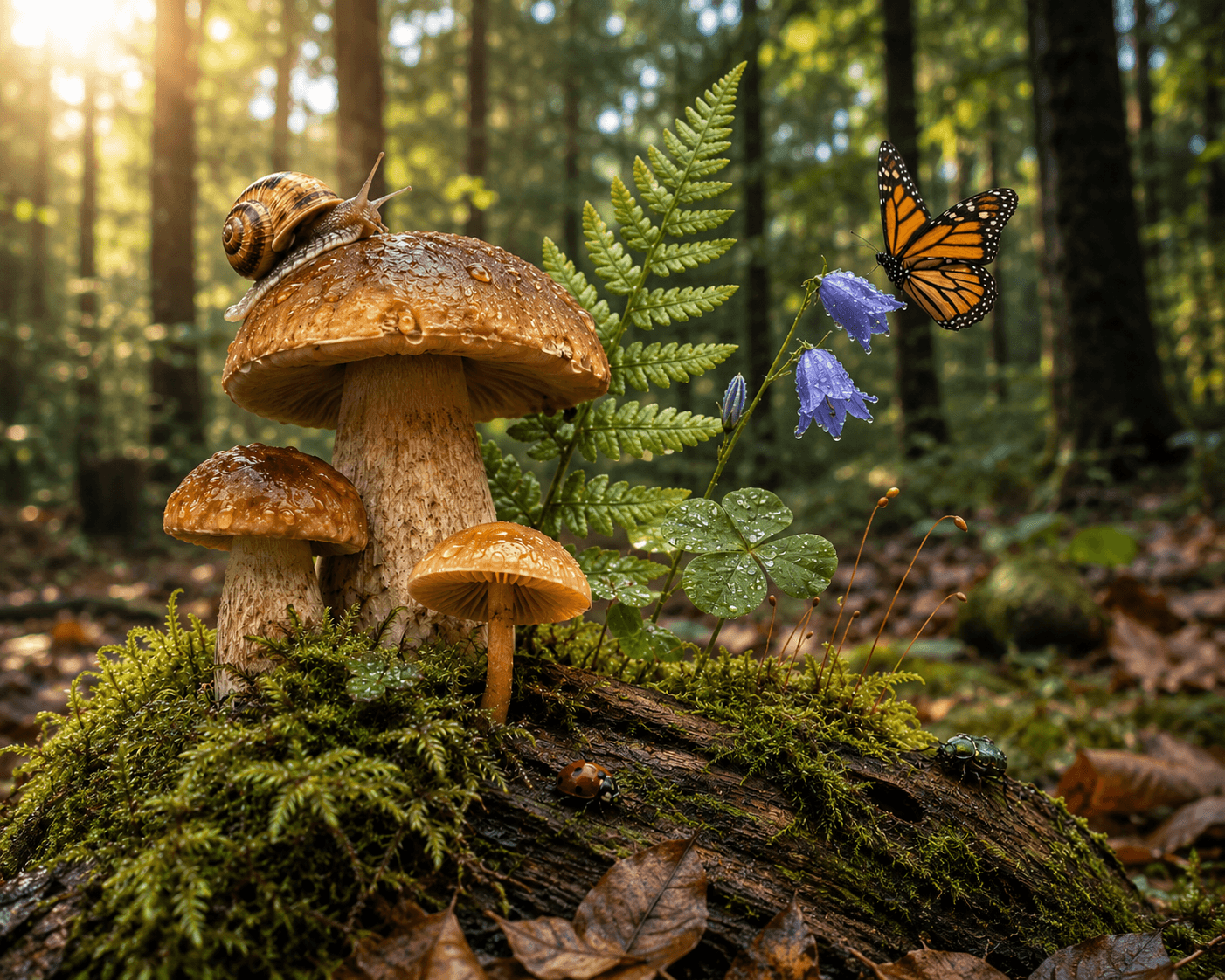
The source image. A densely-detailed nature scene with 13 distinct foreground objects — the hardest realistic test for any tool that needs to remove background from an image without losing the subject.
9/13
tools kept every object
6/13
produced a binary mask
4/13
scored 0 on colour fringing
10
objects Photoshop removed
The headline finding wasn't about edges or artifacts. It was that four of the thirteen tools deleted large parts of the actual subject along with the background — something a quick glance at a thumbnail would never reveal. If you're choosing how to remove background from image content with any real complexity, this matters more than edge polish.
🏆 TOP RESULTSTwo tools tied for best overall — for different reasons.
No single tool swept every category. The two highest overall scorers got there in different ways. Both are worth trying first if you need to remove background from photo online without losing detail.
🎯 JOINT BEST OVERALL
Krea Flux2 Klein — 80/100
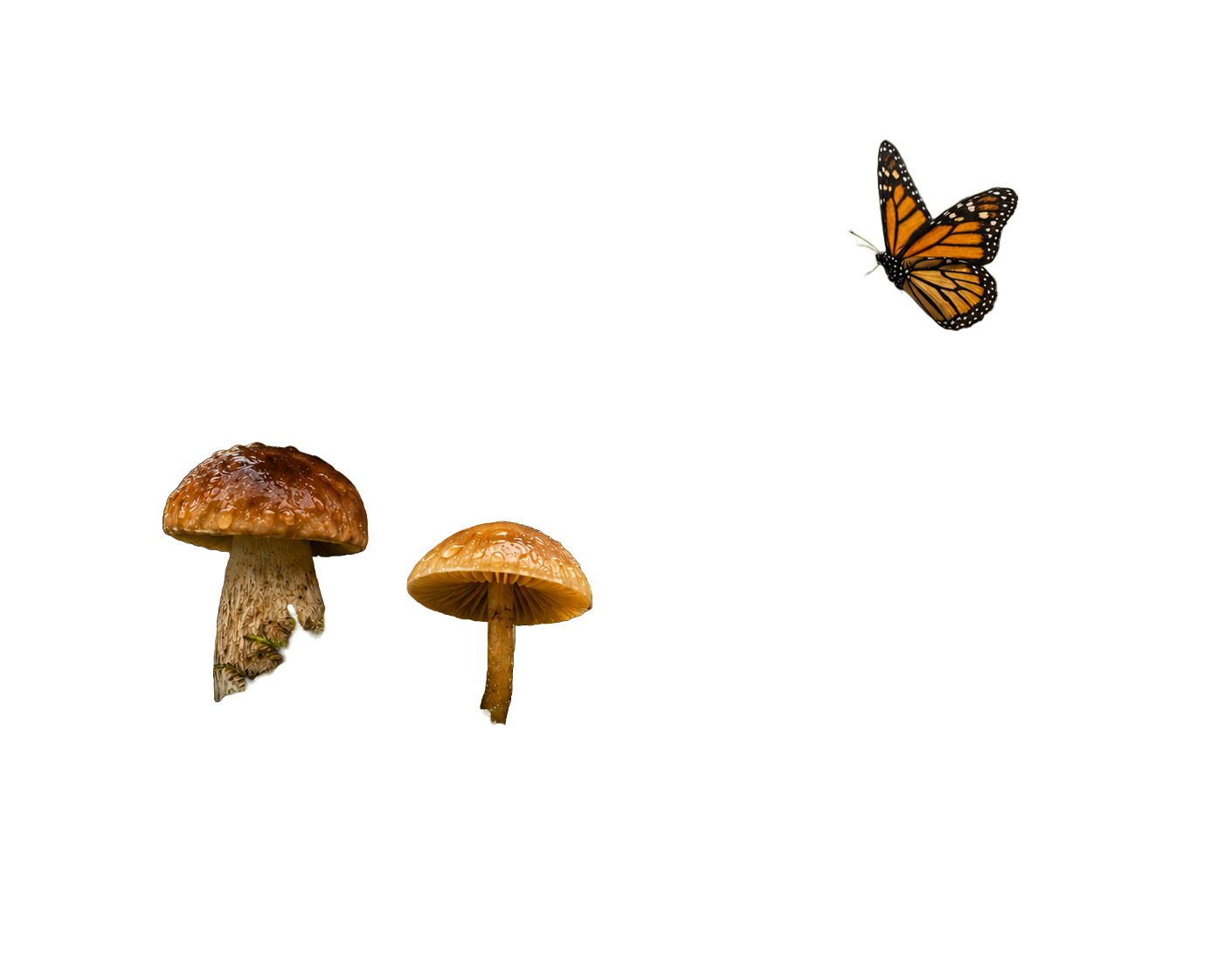
Kept all 13 objects with zero artifacts and strong texture retention (80%) — the rare tool that preserves fine detail instead of smoothing it away. Edges show some roughness and a mild colour-fringe halo, but nothing was lost from the scene.
🎨 JOINT BEST OVERALL
OpenArt Wan2.7 — 80/100
Full 13/13 object retention and an artifact-free cutout, with the best texture retention of the three OpenArt-hosted models at 77%. Same edge-roughness and mild-fringing trade-off as Krea — nothing was lost from the scene.
Four tools didn't just remove the background.
They removed parts of your photo.
This is the result that matters most if you're choosing a tool to remove background from an image with any real complexity — product flat-lays with multiple items, group shots, or busy scenes. A clean edge means nothing if the tool decided half your subject was the background. Four tools — Fotor, Photoshop, Phot.AI, and Ideogram — scored well on artifact-freeness but failed badly on foreground coverage, silently dropping 6 to 10 of the 13 distinct objects in the scene.
⚠ Objects deleted along with the backgroundPhotoshop10 of 13 missing
Removed: small yellow mushroom, snail, ladybug, green beetle, fern frond, bluebell flowers, clover leaves, moss-covered log, fallen brown leaves, moss sporophytes. Only 3 of 13 objects survived — despite scoring 91/100 on edge quality for what remained.
Phot.AI8 of 13 missing
Removed: monarch butterfly, fern frond, bluebell flowers, clover leaves, ladybug, green beetle, moss-covered log, dried leaves. Edge quality for the remaining objects scored 86/100.
Fotor7 of 13 missing
Removed: fern frond, bluebell flowers, clover leaves, ladybug, green beetle, moss-covered log, fallen brown leaves.
Ideogram6 of 13 missing
Removed: yellow mushroom, clover leaves, ladybug, green beetle, moss-covered log, dried leaves.
Notice the pattern: small insects, ground-level plant matter, and low-contrast fungi are the first things these tools discard. If your photo has small or low-contrast elements near the edges of the frame, double-check the output before you assume the cutout is complete.
Left: Photoshop — smooth edges on what remains, but 10 of 13 objects are gone. Right: Krea Flux2 Klein — every object from the original scene is still present.
🏆 FULL RANKINGSAll 13 tools, every score.
Sorted by overall score by default — click any column header to re-sort. "Coverage" reflects how many of the 13 original objects survived, the metric that matters most if your photo has more than one subject. Higher is better on every column.
| Tool | Overall | Edge Quality | Artifacts | Coverage | Colour Fringing | Transparency | Texture | Key Issue |
|---|
| Krea Flux2 Klein | 80 | 50 | 94 | 100 | 80 | 60 | 80 | Jagged edges, mild colour fringing |
| OpenArt Wan2.7 | 80 | 50 | 94 | 100 | 80 | 60 | 77 | Jagged edges, mild colour fringing |
| Letsenhance | 74 | 50 | 94 | 100 | 80 | 60 | 51 | Binary mask, texture smoothing |
| Canva AI | 73 | 85 | 53 | 100 | 0 | 100 | 43 | Visible halos, strong colour fringing |
| Nanobanana (OpenArt) | 73 | 50 | 94 | 100 | 80 | 60 | 48 | Jagged edges, texture smoothing |
| ChatGPT | 72 | 41 | 52 | 100 | 0 | 100 | 100 | Blocky edges, strong colour fringing |
| OpenArt Qwen2.7 | 70 | 50 | 94 | 100 | 80 | 60 | 32 | Jagged edges, heavy texture smoothing |
| Photoshop | 66 | 91 | 69 | 23 | 16 | 100 | 100 | Drops 10 of 13 objects |
| Phot.AI | 66 | 86 | 65 | 33 | 6 | 100 | 100 | Drops 8 of 13 objects |
| Remove.bg | 64 | 69 | 53 | 100 | 0 | 100 | 21 | Visible halos, strong colour fringing |
| Kittl | 63 | 50 | 94 | 100 | 80 | 60 | 7 | Jagged edges, severe texture loss |
| Ideogram | 55 | 71 | 21 | 50 | 0 | 80 | 76 | Drops 6 of 13 objects, heavy halos |
| Fotor | 48 | 50 | 94 | 42 | 80 | 60 | 8 | Drops 7 of 13 objects, severe texture loss |
🔍 Reading the table: "Coverage" below 100 means objects were removed from the photo, not just the background — treat any score under 100 here as a real warning, not a minor deduction. "Transparency" at 60 means the tool produced a fully binary (hard-edged) mask with no soft alpha gradient at all. The two highest overall scorers, Krea Flux2 Klein and OpenArt Wan2.7, are the only tools to combine full coverage, zero artifacts, and above-average texture retention.
TOOL-BY-TOOLWhat each tool actually did — how to remove background from image the right way.
If you're still deciding how to remove background from image files for your own project, the breakdowns below show exactly what to expect from each tool — not just the score, but what the cutout actually looks like and where it falls short.
❓ FREQUENTLY ASKED QUESTIONSCommon questions about removing backgrounds from images
⚡ READY TO TRY IT YOURSELF?
Start with the joint winners: Krea AI & OpenArt AI
 Try OpenArt AI Free →