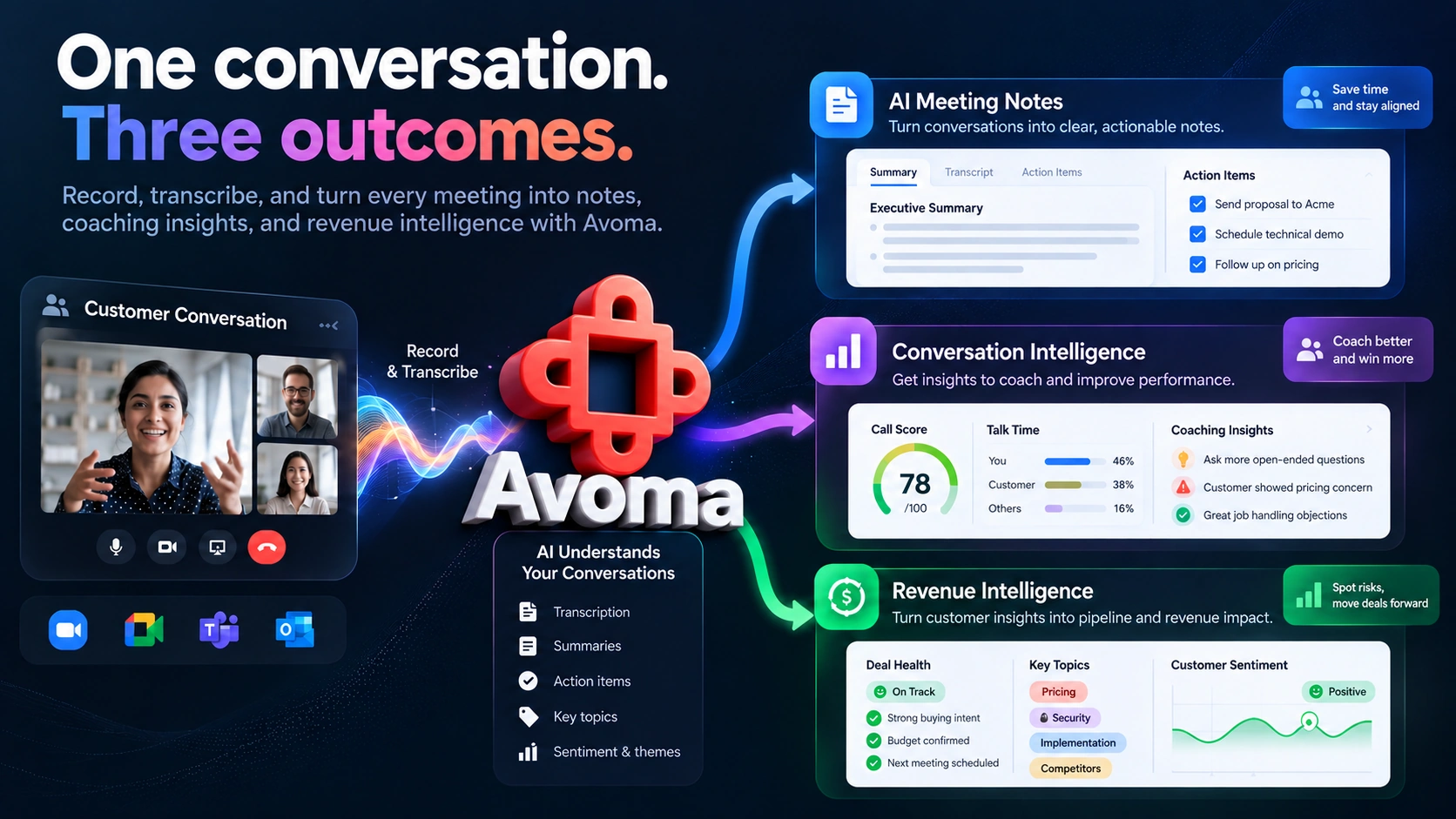
Avoma AI records and transcribes your calls, then adds sales coaching and deal-tracking tools through two paid add-ons. This review covers how it captures meetings across Zoom, Teams, and Google Meet, current pricing across three plans and three add-ons, a few places where Avoma's own pricing page and help documentation disagree, security details, real G2 review themes, and how it compares to Otter AI, Fathom AI, and Grain AI.
Pricing and features can change. Check Avoma AI's current pricing page before you subscribe.
Avoma is a meeting, conversation, and revenue intelligence platform. It joins your calls, records and transcribes them, and turns the conversation into notes, summaries, and action items. Beyond basic note-taking, Avoma offers call coaching and deal-tracking tools for sales and customer-facing teams through its Conversation Intelligence and Revenue Intelligence add-ons.
Automatic recording, transcription, and AI summary notes with action items, on every plan.
AI call scoring, scorecards, and real-time coaching, through the separate Conversation Intelligence add-on.
Deal-risk flags, forecasting, and win/loss analysis, through the separate Revenue Intelligence add-on.
Avoma connects to your Google Calendar or Microsoft Outlook calendar to find your upcoming meetings. From there, it can join supported meetings using a recording bot. It also offers a Chrome extension for Google Meet and cloud-recording options for supported platforms, letting some meetings be captured without an Avoma bot joining as a participant. For Zoom specifically, Avoma's own help center says it can only record a Zoom meeting when Zoom is connected, either by an admin for the whole company or by an individual for their own account, and someone from your organization with Zoom connected needs to be in the meeting. Avoma's documentation says this requirement takes effect October 12, 2026. Zoom can still record meetings independently of Avoma, but Avoma needs that Zoom connection to capture or process the meeting through its own supported recording options.
Whether every meeting gets recorded automatically or only some do is controlled by a rules system called Automations. An admin sets rules that check a meeting's title, team, participant email, or whether it is internal or external, and the rule turns recording on or off based on those conditions. These rules apply across the whole organization rather than per user, and Avoma's current documentation says conditional "if not X, then Y" logic isn't available yet.
This org-wide Automations system is separate from the simpler per-meeting recording toggle. That toggle does let you apply a change to an entire series of recurring meetings at once, not just a single instance, so recurring-meeting handling differs depending on which of the two systems you're using.
When the Avoma bot records a meeting, Avoma can play an audio announcement and post a chat message telling participants the call is being recorded, for supported bot-recorded meetings. Admins can turn these on or off and customize the wording. Zoom is an exception: Avoma's audio announcement setting doesn't apply there, since Zoom manages its own recording notice independently of Avoma. These settings also don't cover cloud recordings generally, where the conferencing platform handles its own notice. Check your platform's own settings and consent requirements if that distinction matters for your team. Avoma's bot can also be blocked entirely by a meeting platform's own settings, so it's worth checking your conferencing tool if the bot isn't showing up.
Ask Avoma is a chat-style AI assistant that answers questions using your own meeting and deal data rather than general knowledge. On any plan, you can ask about a single meeting. Asking across your entire call history and deal data, called Global Ask Avoma, is listed on Avoma's pricing page as included on the Enterprise plan, or available on Startup and Organization by adding Conversation Intelligence; Avoma's own help documentation isn't fully consistent on this point, so confirm the current entitlement with Avoma directly if it affects your purchase decision. Depending on what's connected, you can ask about themes and objections raised across past calls, customer feedback, open follow-ups in your inbox, or (with a connected CRM) deal health and pipeline risk; what the assistant can actually answer depends on which data sources and integrations you have connected, not just which plan or add-on you're on. It can also pull in outside context, like competitor or industry information, when that's relevant to the question.
Avoma's help documentation describes answers being deliverable as one-off replies or as scheduled reports sent to Slack, Microsoft Teams, or email on a recurring basis, along with a saved Prompt Library for questions you ask often. These features require the applicable plan and add-on access. Because Avoma's pricing page and help documentation differ on whether Enterprise needs Conversation Intelligence for Global Ask, confirm the current entitlement with Avoma.
Four videos from Avoma's own channel and podcast, covering the methodology tracker feature and the sales perspective behind the product.
Introduces the AI Sales Methodology Tracker, which identifies methodology-related keywords and patterns in meeting transcripts. (Avoma channel)
Sujan Patel, Founder and CEO of Mailshake, on standing out in a competitive market and what sales leaders need to know to win. (The Modern SaaS Podcast by Avoma)
A Modern SaaS Podcast episode focused on improving the sales discovery and demo experience for SaaS sales professionals. (Avoma channel)
Seven creative prospecting tips to help sales professionals stand out during tough financial conditions. (Avoma channel)
Avoma prices its three core plans per paid "recorder" seat, a license for someone who can start and own recordings. Viewing shared recordings and notes is free for everyone else in the workspace; there's no cost for view-only seats. Avoma also offers a 14-day free trial with unrestricted access to the Organization plan and all three add-ons, so you can try the coaching and deal-tracking features before paying for them.
$19/seat/month billed annually. For small teams.
Avoma's own highlighted plan. $29/seat/month billed annually, as the standard list price; Avoma's pricing page may also display a separate promotional price, so confirm the current checkout price before subscribing.
Billed annually only. Minimum 10 paid seats. For organizations that need additional compliance and access controls.
Three add-ons extend any of the three plans, and each is priced and billed separately from the base plan:
It's worth doing the math before you commit to a plan. The fuller coaching and deal-intelligence capabilities require these add-ons rather than coming bundled into one base plan; Organization includes a limited version of Conversation Intelligence, and Enterprise includes Global Ask Avoma, but the full add-on feature sets still cost extra on either plan. A Startup seat with both Conversation Intelligence and Revenue Intelligence added comes to $77 per seat/month on annual billing ($19 + $29 + $29), before any bundle discount Avoma may offer at checkout.
Avoma connects to a wide range of CRMs, conferencing platforms, and sales tools, though setup method and feature availability vary by platform.
Salesforce, HubSpot, Pipedrive, and Zoho connect directly through OAuth.
Zendesk and Copper connect through an assisted, API-key setup; Copper's own side additionally requires a Premium or Business Copper license, separate from your Avoma plan.
Zoom, Microsoft Teams, Google Meet, and Webex.
Aircall, Dialpad, RingCentral, Salesloft, Kixie, Zoom Phone, Vonage, Outreach, and GoTo Connect.
Slack and ClickUp for collaboration, Gmail and Outlook for email, and Zapier for connecting to other tools generally.
Avoma's help documentation doesn't state an Avoma-side plan restriction for most of these integrations, but that isn't the same as a guarantee that every integration works identically on every plan, so it's worth confirming the specific capability you need against Avoma's current integration page. Deal-related Ask Avoma questions require an active CRM connection and the relevant feature entitlement, not just the connection on its own. CRM connection, note-sync, and revenue-intelligence requirements can differ by plan and integration, and Avoma's own documentation isn't fully consistent either: its general CRM setup guide says a Premium plan or higher is needed, while its HubSpot integration page says that specific integration is available on all license types. Confirm the specific combination you need before subscribing.
According to Avoma, it supports HIPAA compliance and GDPR compliance; HIPAA compliance is specifically listed as an Enterprise-plan feature, not something stated for Startup or Organization. Its security page lists SOC 2 Type II assurance and ISO/IEC 42001:2023 certification. These are different kinds of claim: HIPAA and GDPR concern legal and regulatory obligations, SOC 2 Type II is an independent assessment of Avoma's controls rather than a certification in the same sense, and ISO/IEC 42001 is an AI management-system standard. Avoma's security page states that customer data, including call recordings and transcripts, is encrypted at rest and in transit, and points to its trust center for fuller technical detail. Configurable data retention policies are also listed as an Enterprise-plan feature; the help documentation doesn't describe a specific retention period or deletion process for the Startup or Organization plans, which isn't the same as those plans having no retention or deletion controls at all.
| Feature | Avoma AI Current Specs |
|---|---|
| Conferencing Platforms | Zoom, Microsoft Teams, Google Meet, Webex |
| Capture Methods | Recording bot, or Chrome extension/cloud recording on supported platforms without a bot joining |
| Recording Rules | Org-wide Automations (title, team, participant, internal/external), plus a per-meeting recurring-series toggle |
| Global Ask Avoma | Included on Enterprise, or via the Conversation Intelligence add-on on Startup/Organization (documentation not fully consistent) |
| CRM Sync | Salesforce, HubSpot, Pipedrive, Zoho (direct); Zendesk, Copper (assisted) |
| Coaching Add-On | Conversation Intelligence: call scoring, scorecards, real-time assistant, $29/seat/month annual |
| Deal-Intelligence Add-On | Revenue Intelligence: deal-risk flags, forecasting, win/loss analysis, $29/seat/month annual |
| Security | HIPAA (Enterprise), GDPR, SOC 2 Type II assurance, ISO/IEC 42001:2023, encryption at rest and in transit |
| Free Plan | None for recording; free view-only seats for shared recordings |
Get the most direct use from Avoma's coaching tools, which live in the Conversation Intelligence add-on: call scoring, custom scorecards, and coaching recommendations.
Get the most from the separate Revenue Intelligence add-on, built around deal risk, forecasting, and win/loss analysis rather than coaching individual reps.
Can use Avoma to revisit client calls for context they missed in the moment, a workflow that came up in reviewer feedback as one reason smaller teams rely on it.
May get the most out of Avoma's CRM-connected workflows, since its AI features that touch deal data depend on a connected CRM; Avoma also supports Pipedrive, Zoho, Zendesk, and Copper for teams on a different CRM.
Solo users and very small teams should weigh the cost carefully. Reviewers have flagged pricing as steep for smaller teams, and Avoma's three core plans all require at least one paid "recorder" seat, with no free-forever tier, only the per-seat pricing above. The coaching and deal-tracking features add further cost on top.




Pricing and plan features checked October 16, 2026.
| Category | Avoma | Otter AI | Fathom AI | Grain AI |
|---|---|---|---|---|
| Free plan | None; view-only seats are free, recording seats start at $19/mo | 300 min/user/month, 30-min cap, 25-conversation history limit | Unlimited recordings and transcriptions | One recording seat per workspace, unlimited Bot Capture meetings (45-min cap), 20-meeting cap for personal-email signups |
| Entry paid tier | Startup, $19/mo (annual) | $16.99/mo, or $8.33/mo annual | Premium $20/mo, or $16/mo annual | Starter $19/mo, or $15/mo annual |
| Standout feature | Deal-risk tracking and call coaching, sold as separate add-ons | Live transcription during the call, with real-time captions | Unlimited free recording | AI coaching and Scorecards on Business and above, with no separate add-on required |
| Best for | Revenue teams that want deal and coaching data, and will pay extra for it | Teams that mainly need accurate live transcripts | Individuals who want unlimited free recordings and transcriptions | Teams that want coaching and CRM sync without a separate add-on |
Avoma's clearest edge over the other three is its focus on deal risk, win/loss analysis, and sales coaching. Much of that depth sits in separate add-ons rather than a single entry-level plan, which can make Avoma more expensive than a basic meeting notetaker, especially for a small team that needs both coaching and deal intelligence.
Avoma holds a 4.6 out of 5 rating from 1,365 reviews on G2, with an "AI Verified" badge, as of this review (checked October 16, 2026). Ratings, review counts, and the badge can all change over time, so treat this as a dated snapshot rather than a permanent figure. The themes below are examples of praise and concerns drawn from reviews visible on Avoma's G2 profile, not a verified frequency analysis across all 1,365 reviews.
What Users Love
Top Concerns
This review was researched by the TechScribe editorial team, based on Avoma's own pricing page, help center, and security page, and G2 review data (4.6 out of 5 across 1,365 reviews, as of October 16, 2026).
This page may contain affiliate links: if you sign up through them, we may earn a commission at no extra cost to you, which never affects our rating or what we recommend.
No. There's no permanent free plan for recording. Viewing meetings someone else recorded is free for any number of seats, but recording your own meetings requires a paid seat starting at $19 per seat/month on annual billing.
Startup is $19/seat/month annual or $29/month billed monthly. Organization's standard list price is $29/seat/month annual or $39/month billed monthly, though Avoma's pricing page may also show a separate promotional price. Enterprise is $39/seat/month, billed annually, with a 10-seat minimum. Three add-ons, Conversation Intelligence, Revenue Intelligence, and Lead Router, are each priced separately on top of a base plan.
Conversation Intelligence covers call coaching: scorecards, call scoring, and performance dashboards. Revenue Intelligence covers deal tracking: deal-risk flags, forecasting, and win/loss analysis. They're sold separately, and each can be purchased alongside any base plan.
A chat-style AI assistant that answers questions using your own meeting, deal, and email data. Asking about a single meeting is included on every plan. Avoma's pricing page lists Global Ask Avoma, which searches across meetings organization-wide, as included on Enterprise or available on Startup and Organization by adding Conversation Intelligence; its help documentation isn't fully consistent with the pricing page on this entitlement, so confirm the current details with Avoma if it affects your purchase.
Not always. Zoom and Microsoft Teams typically use Avoma's recording bot. For Google Meet, Avoma's Chrome extension and Google's own cloud recording let Avoma capture the meeting without a bot joining as a visible participant; similar cloud-recording options exist for some other platforms too. Which method applies depends on the conferencing platform, your account permissions, and your setup.
Yes, both are supported CRM integrations. Avoma's help documentation doesn't state a specific Avoma-side plan requirement for either, though AI features tied to deal data need an active CRM connection to work.
Avoma states that it supports HIPAA compliance (listed as an Enterprise-plan feature) and GDPR compliance, and its security page lists SOC 2 Type II assurance and ISO/IEC 42001:2023 certification; these are different kinds of claim, not one interchangeable certification. It also states that customer data is encrypted at rest and in transit; its trust center covers further technical detail. Configurable data retention is also listed as an Enterprise-plan feature.
Avoma's strongest case is a sales or customer-facing team that wants more than meeting notes: deal-risk tracking, win/loss analysis, and call coaching, on top of standard transcription and summaries. That depth is the main thing separating it from a simpler notetaker, and it's split across two separate add-ons, Conversation Intelligence for coaching and Revenue Intelligence for deal data, rather than bundled into one price.
It isn't the cheapest way to get started. There's no free recording tier, pricing is per seat starting at $19/month on annual billing, and many of Avoma's more advanced coaching and deal-intelligence features require separate add-ons rather than being bundled into a single base plan, potentially $77 per seat/month or more with both add-ons included. For a solo user or a very small team watching costs closely, reviewers have specifically flagged the pricing as steep.
One more thing worth weighing before you commit: a G2 reviewer reported the AI notetaker missing a number of their calls entirely, and named that as the reason they left. That's a single documented account rather than a pattern confirmed across many reviews, but it's a concrete reliability concern worth checking against your own team's calls before rolling Avoma out broadly.
Connect your calendar and let Avoma record, transcribe, and summarize your meetings, with sales coaching and deal intelligence available as add-ons.
Independent review. Prices and features may change; always check the official Avoma AI site for the latest information.
 Read AI
 Avoma AI