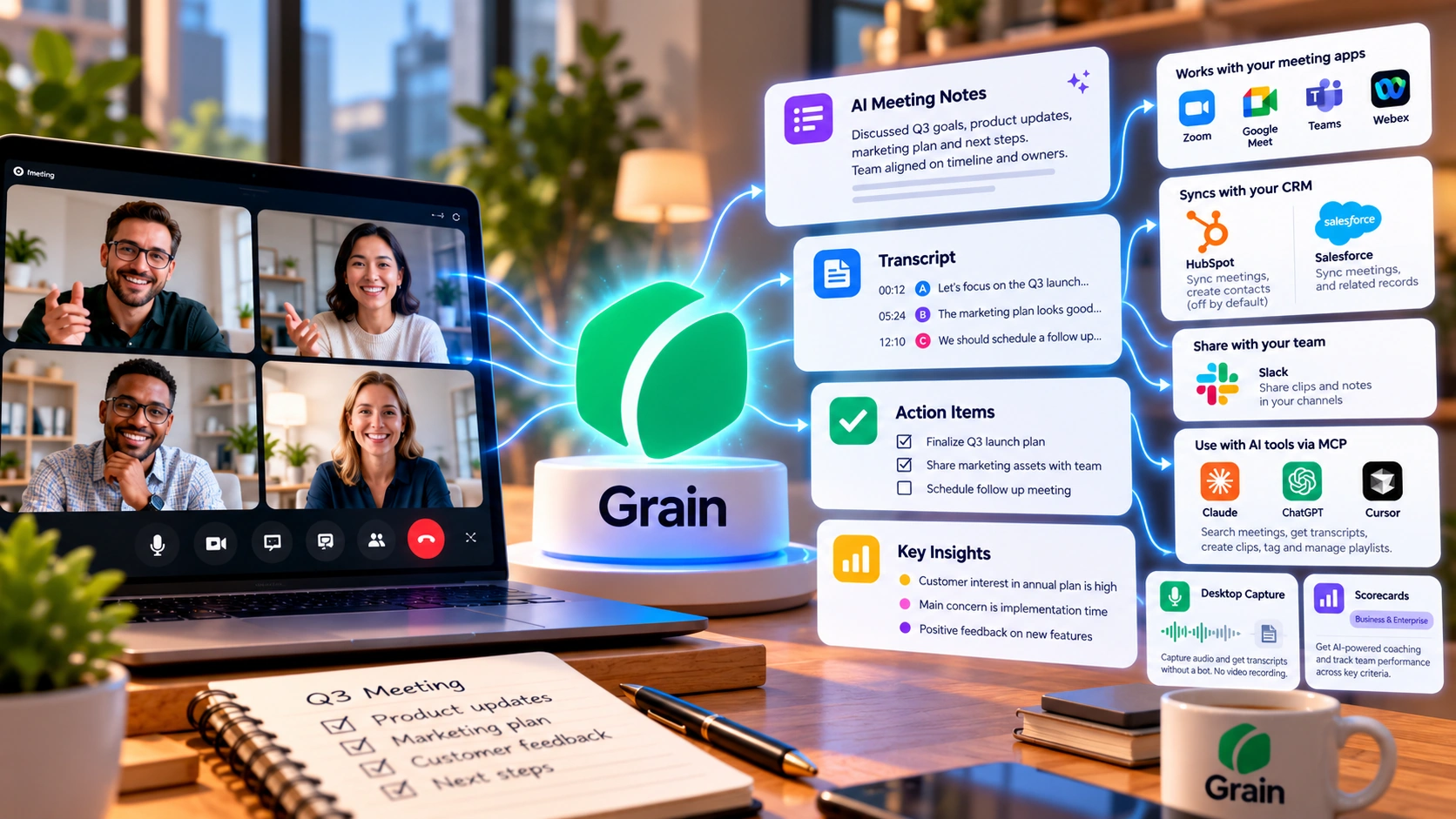
Grain AI records your meetings, turns them into searchable transcripts and shareable clips, and adds sales-coaching Scorecards on its paid tiers. This review covers how its two capture methods actually work, current pricing across four plans, a genuine discrepancy in Grain's own pricing-vs-help-center seat limits, CRM sync rules for HubSpot and Salesforce, security details, real G2 review themes, and how it compares to Otter AI and Fathom AI.
Pricing and features can change. Check Grain AI's current pricing page before you subscribe.
Grain AI is an AI meeting assistant built by Grain Intelligence Inc. It records your calls, writes up notes, and turns conversations into searchable, shareable clips. A visible meeting bot covers Zoom, Google Meet, Microsoft Teams, and Webex, while a bot-less desktop option captures audio from meetings without a bot, including Slack huddles and in-person conversations.
Once a meeting ends, Grain hands you a transcript, an AI summary, and action items. You can also pull out a specific moment as a clip to share with your team.
Pull a specific moment out of a call and share just that part, without sending a full recording.
Scorecards grade a call against six criteria, giving managers and reps a consistent standard to review against.
Logs meetings automatically to matching HubSpot and Salesforce records on the Business plan and up.
Sales, customer success, and product teams get the most use out of it. They often need to pull up exactly what was said on a call from weeks back.
Grain records two ways. Bot Capture sends a visible Grain bot into the meeting, the same way most meeting assistants do. It works with Zoom, Google Meet, Microsoft Teams, and Webex, and it saves a full video recording along with the transcript and AI notes.
Desktop Capture is the bot-less option. A desktop app captures audio locally, with no bot joining the call. It works with any meeting type, not just the four listed above, but it does not save a video, only the transcript and AI notes. Desktop Capture meetings are private by default, unless your team has turned on auto-share for them, while Bot Capture meetings follow your workspace's sharing rules. Desktop Capture currently runs on Apple Silicon Macs (M1 or later) and Windows. Grain has said it has no plans to support Intel-based Macs or Linux.
Admins can set capture rules so Grain records matching meetings on its own, instead of someone turning it on by hand each time.
Grain's help center lists support for over 100 languages, in two accuracy tiers. Grain names 17 languages in its "Common" tier, including English, Spanish, Japanese, and Chinese, and says these get its most accurate transcription. The rest of the list is accurate for the words themselves, but punctuation and proper names may come through less cleanly. Workspace admins set a default transcription language for Bot Capture recordings, and you can change a Bot Capture meeting's transcript language afterward if it was set wrong. Desktop Capture works differently here: it detects the spoken language automatically, and that transcript's language can't be changed manually afterward.
Consent works differently depending on how Grain joins the call. With Bot Capture, participants see a recording disclaimer. If the meeting host starts the recording, participants can choose to consent or leave. If someone else starts it, the bot first asks the host for permission before joining. Desktop Capture has no in-meeting consent prompt. Grain says users are responsible for informing participants and following the consent rules that apply to them.
Grain's "Ask anything" feature lets you search your whole meeting library in plain language. You get an answer with a citation back to the exact moment it came from. During a live call, you can add notes, tags, and clips. These sync straight into the transcript afterward, so flagging something important doesn't mean stopping to write it down separately.
Grain also runs its own MCP connection, which lets AI tools like Claude, ChatGPT, and Cursor work with your meeting data directly. You connect and authorize it through whichever app you use, following that app's own setup steps, and Grain can only reach meetings you were already part of. From there, an AI assistant can find meetings by person, topic, or date, and read transcripts and notes.
MCP access also includes write actions on every plan: an assistant can create clips, add tags, or manage playlists on your behalf, once you've connected and authorized it. On Business and Enterprise, it can also pull sales-coaching insights, Scorecards, and HubSpot deal context. A one-click export opens any transcript directly in Claude or ChatGPT, too.
Grain has four tiers, priced per seat per month in US dollars, based on Grain's own pricing page.
Free for everyone.
$15/seat/month billed annually.
Grain's own "most popular" plan. $29/seat/month billed annually.
Custom pricing, through Grain's sales team.
*Grain's pricing page lists "Unlimited notetaker seats," but its help center says a Free workspace has one recording seat. Grain's documentation doesn't explain this discrepancy, so confirm the number of recording seats with Grain directly before choosing a plan on the strength of this bullet alone.
The Free plan's "unlimited meetings" is about recording volume, not about how many people in a workspace can record. Each Free workspace gets exactly one free Notetaker seat: one user who can record, with no stated cap on how many meetings that seat can record. Everyone else in that workspace can be added as a seat, and can view and comment on shared recordings, but can't record their own, unless they're given a paid seat. So a solo user can get unlimited free recording through Bot Capture, with one exception: anyone who signs up with a personal (non-company) email address is capped at 20 bot-captured meetings before they need to upgrade. That cap applies to Bot Capture specifically; Grain's plan guide doesn't state it applying to Desktop Capture. A small team sharing one Free workspace doesn't get unlimited recording for everyone by default, no matter how many free seats they add, since only the one recording seat can record regardless of email type. The "30-day meeting history" item in the Free feature list above isn't explained further in Grain's help center; if the exact scope matters for your use, confirm it with Grain directly before relying on it.
Grain's integrations center on CRM sync at the Business tier and up, plus a few lighter connections available starting on Starter.
Business plan and up. Grain logs each meeting as a note on the matching Contact, Company, and Deal record, with a link to the recording, participant details, an AI summary, and key points linked to timestamps. Creating a new HubSpot contact for a participant who doesn't already have one is off by default; a workspace admin can turn that setting on in Grain's HubSpot integration settings.
Business plan and up. When a meeting participant's email matches an existing Salesforce contact, Grain logs the meeting as an activity on that record, including the meeting summary and links to the recording and any clips.
Available from Starter and up, for sharing meeting notes and clips into Slack channels.
A personal connection is available from Starter. A workspace-wide one is available from Business. Either way, it connects Grain to other tools without custom code.
A personal API key is available from Starter, and a workspace-wide one from Business. The MCP server itself, which lets Claude, ChatGPT, or Cursor query your meetings directly, is available on every plan. Deeper sales-coaching data through MCP is added on Business and Enterprise.
According to Grain's own help center, meeting recordings and metadata are encrypted in transit over HTTPS and TLS, and also at rest. Recordings are stored in AWS S3, and backups are encrypted too. Grain says it complies with GDPR and, where applicable, HIPAA. It also says it has completed a SOC 2 Type II audit.
Access to recordings is role-based. Admins control sharing through link-access settings and team rules. Grain says only engineers who need access for their work can reach production systems. Single sign-on (SAML-based) is available on the Enterprise plan. Any user can delete a single recording at any time, and workspace admins can set an auto-deletion policy that removes recordings automatically after a chosen period. Beyond describing those two controls, Grain's help center doesn't specify a single default retention period that applies to every workspace.
On AI processing: Grain's security page states that no customer data is retained by its LLM providers during summarization. That's a general statement about how Grain's AI processing works. For its OpenAI connection specifically, a separate help article adds a more precise detail. Transcripts go to OpenAI's API over an encrypted connection to generate summaries, key points, and next steps. OpenAI keeps that data for up to 30 days, only for abuse monitoring, before deleting it, and it is never used to train OpenAI's models. Grain doesn't spell out exactly how the general "not retained" statement and this 30-day abuse-monitoring window relate, so both are stated here as Grain's own current wording rather than resolved into one.
| Feature | Grain AI Current Specs |
|---|---|
| Meeting Platforms (Bot Capture) | Zoom, Google Meet, Microsoft Teams, Webex |
| Capture Methods | Visible bot (saves video) or Desktop Capture (audio and transcript only, Apple Silicon Mac or Windows) |
| Transcription Languages | 100+ languages; 17 in a "Common" tier with the most accurate transcription |
| Cross-Meeting Search | "Ask anything" search across your whole meeting library, with citations |
| AI Assistant Integrations | Claude, ChatGPT, and Cursor via MCP, including write actions, on every plan |
| CRM Sync | HubSpot and Salesforce, Business plan and up |
| Coaching Tools | Scorecards across 6 criteria, 1-to-5 scale (Business plan and up) |
| Free Plan | One recording seat per workspace, unlimited Bot Capture meetings with a 45-minute cap, 20-meeting cap for personal-email signups |
| Enterprise Controls | SAML-based SSO, priority API support, custom invoices, dedicated CS manager |
Scorecards score a call against six criteria, rapport, qualification, understanding needs, demonstrating value, objection handling, and closing. Managers and reps can review calls against the same standard and spot coaching opportunities.
Meeting history, CRM sync, and searchable transcripts make it easy to find exactly what a customer asked for on a past call.
Clips and tags make it simple to pull one moment out of a long call, like a feature request or a piece of user feedback, and share just that part with the rest of the team.
A single user with a company email gets unlimited Bot Capture meetings on Free at no cost. A personal email drops that to 20 bot-captured meetings before upgrading. A small team's fit is narrower either way: only one person per Free workspace can record.
Grain's strongest case is a customer-facing team that wants more than a transcript, a searchable call library, CRM records that update on their own, and Scorecards that give sales coaching a consistent standard. Consider an alternative when your workspace needs more than one free recorder, a visible bot on a platform Grain doesn't support, or desktop recording on hardware Grain doesn't cover.




These are three AI meeting assistants with the same basic job: join a call, transcribe it, summarize it. Prices below are each vendor's own current pricing page, per user. Grain's standout feature against both is sales-coaching Scorecards bundled with CRM sync at its Business tier; Otter leads on real-time transcription accuracy, and Fathom leads on free-plan generosity.
| Category | Grain AI | Otter AI | Fathom AI |
|---|---|---|---|
| Free plan | One recording seat per workspace, unlimited Bot Capture meetings (45-min cap), 20-meeting cap for personal-email signups | 300 min/user/month, 30-min cap, 25-conversation history limit | Unlimited recordings and transcriptions |
| Entry paid tier | Starter $19/mo, or $15/mo annually | $16.99/mo, or $8.33/mo billed annually | Premium $20/mo, or $16/mo annually |
| Most popular / featured tier | Business $39/mo, or $29/mo annually | Business $30/mo, or $19.99/mo billed annually | Team $19/mo, or $15/mo annually (2-user minimum) |
| Enterprise | Custom, contact sales | Contact sales | Custom, contact sales |
| Language support | 100+ languages; 17 in a "Common" tier with the most accurate transcription | Transcribes 6 languages (English, French, Spanish, German, Japanese, Chinese) | 38 languages transcribed; 7 also get translated summaries on Premium/Team |
Grain's CRM sync and coaching Scorecards both sit on its Business tier, the same tier Otter and Fathom gate their own deeper CRM features behind. Where Grain differs is the clip-and-highlight workflow built around sales coaching specifically, rather than Otter's real-time transcription focus or Fathom's unlimited free recording.
Grain holds a 4.7 out of 5 rating from 314 reviews on G2, as of October 16, 2026, with an "AI Verified" badge on a claimed listing. Different G2 pages for the same product can show slightly different counts, and review platforms update constantly, so treat this as a dated snapshot, not a permanent verdict. The points below are themes drawn from a set of individual G2 reviews. They reflect reported experiences, not a statistical sample of all Grain users.
What Users Liked
What Users Disliked
This review was researched by the TechScribe editorial team, based on Grain AI's own pricing and help-center documentation and G2 review data (4.7 out of 5 across 314 reviews, as of October 16, 2026).
This page may contain affiliate links: if you sign up through them, we may earn a commission at no extra cost to you, which never affects our rating or what we recommend.
Yes, for one recording user per workspace. The Free plan costs $0 and includes unlimited meetings with a 45-minute limit per meeting, AI notes and action items, and basic MCP access, but only one seat per Free workspace can record; other members can view and comment. Anyone who signs up with a personal (non-company) email address is also capped at 20 bot-captured meetings before needing to upgrade.
Starter is $15 per seat per month billed annually, or $19 billed monthly. Business is $29 per seat per month billed annually, or $39 billed monthly. Enterprise is custom-priced through Grain's sales team.
Not necessarily. Grain also offers a bot-less desktop capture option. It records audio locally, with no bot joining the call.
Yes, both from the Business plan and up. Salesforce logs an activity on a matching contact. HubSpot logs a note on matching Contacts, Companies, and Deals; creating a new HubSpot contact for an unmatched participant is off by default and must be turned on by a workspace admin.
Yes. Grain's own MCP server lets Claude, ChatGPT, and Cursor query your meeting transcripts and notes directly, and transcripts can be exported into Claude or ChatGPT in one click.
Grain says transcripts sent to OpenAI's API for summarization aren't used to train OpenAI's models. This statement applies to the documented OpenAI connection; check Grain's current privacy documentation for the scope of any broader data-use commitments covering other providers.
Grain's strongest case is a customer-facing team that wants more than a transcript: a searchable call library, CRM records that update on their own, and Scorecards that give sales coaching a consistent standard. Those are Business-tier features, so the real decision point is whether your team needs that structure badly enough to pay $29 to $39 a seat for it.
For a solo user, the Free plan can work well, particularly with a company email and meetings that fit within the 45-minute limit. Personal-email signups are limited to 20 Bot Capture meetings before needing to upgrade. For a small team, know this going in: only one person gets a seat that can record for free. Everyone else on a Free workspace can view and comment, but not record their own meetings.
A few trade-offs are worth weighing first. Transcription accuracy is strongest in Grain's 17-language "Common" tier and softer outside it. Desktop Capture trades a bot-free, private-by-default recording for no saved video. A few reviewers also flagged rough edges: recordings get hard to organize at scale, and Slack sharing doesn't handle selective audiences well. None of these rule Grain out, but they're worth testing on your own calls before paying.
Connect your calendar and let Grain AI record, transcribe, and clip your meetings. The Free plan costs nothing; one recording seat is included per workspace.
Independent review. Prices and features may change; always check the official Grain AI site for the latest information.
 Read AI
 Fellow
 Grain AI